
Remote IT Managed Services: Models, Costs and How to Choose
Remote IT managed services are an ongoing contract in which a provider runs monitoring, patching, security and the service desk from its own operations centre, so you pay a predictable monthly fee instead of raising a ticket every time something breaks. The advice that usually follows that definition is where I'd part company with most of the market: shop on the lowest per-seat rate, then negotiate the fastest response time you can extract.
Both instincts cost money. The response clock is the easiest clause to win and the least useful once an incident is live, because it measures the provider's speed, not your exposure. What decides whether the contract works is the responsibility map behind it, and what decides whether it's worth the fee is a cost model that reaches well past the monthly invoice.
A managed contract transfers day-to-day operations. It does not transfer accountability, and it does not transfer the consequences of an outage.
What Remote IT Managed Services Cover
A remote IT managed services agreement buys ongoing operational work, not ownership of your technology estate. The provider may monitor, patch, secure, back up systems and handle tickets, while your organization retains responsibility for architecture, software entitlements and decisions about risk. The contract shifts day-to-day tasks, but accountability for business outcomes remains with you.
The market analysis estimates managed remote IT support services at USD 33.47 billion in 2026, with projections reaching USD 61.27 billion by 2032 and a compound annual growth rate of 10.72% from 2027 through 2032. It also estimates that fully remote delivery accounted for 61.87% of 2026 revenue, according to Mordor Intelligence's managed remote IT support market analysis. Remote delivery is now the default operating model.
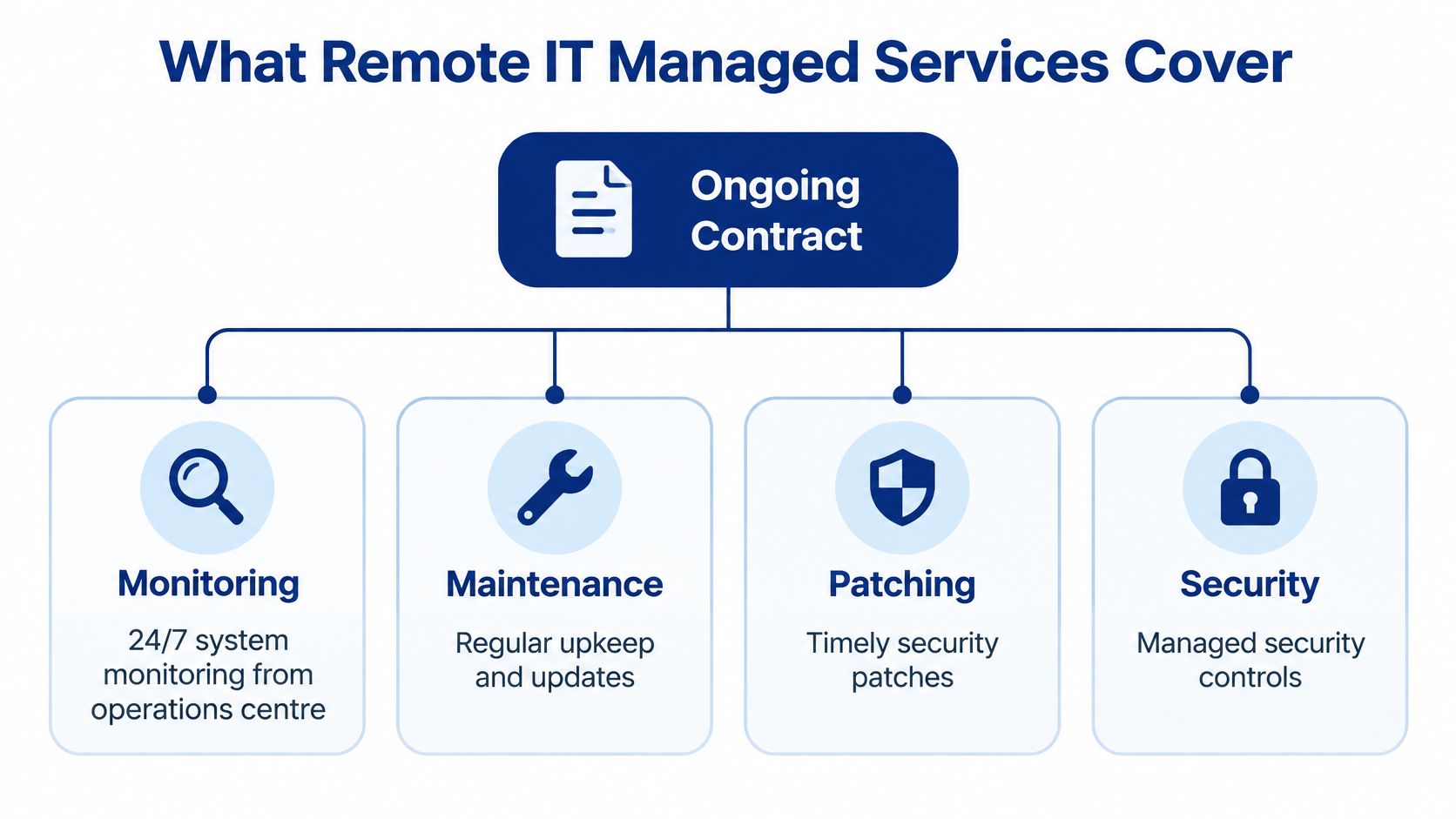
Remote monitoring and management (RMM) is a core part of the service. In the Kaseya 2022 MSP Benchmark Survey, which surveyed more than 1,200 MSPs and technician firms across 40 countries, roughly 65% named RMM their most important application. The survey also found that nearly 30% of MSPs in the Americas charged between USD 51 and USD 100 per device per month for ongoing support and maintenance. This model combines centralized oversight of distributed devices with recurring per-device charges.
The five capabilities a contract should name
Monitoring and alerting. RMM tools monitor servers, endpoints, network equipment and cloud services, then generate alerts for provider review. If users usually report problems first, clarify whether the contract includes proactive monitoring or only helpdesk support.
Patching. Specify which operating systems and third-party applications are covered, how often updates are applied, and the maximum permitted patch age. Require patch compliance reporting, rather than accepting “regularly” as a measurable commitment.
Security. Define whether the base fee includes endpoint protection, MFA administration, vulnerability scanning and alert triage. Identify separate charges and assign responsibility for responding to security alerts.
Backup and recovery. Set out backup schedules and restore testing, then agree on recovery outcomes and time targets. A backup without a tested restore process does not establish that data can be recovered.
ITSM. Specify the service desk, ticket routing, change control and asset records. These processes turn operational alerts into tracked work that can support finance and audit requirements.
The tools and licensing behind those capabilities can change the quote. Remote access may be priced per technician seat; SuperOps remote access pricing gives a price point to compare against other licensing costs. ConnectWise RMM provides RMM capabilities for monitoring and patch management. Ask providers to state which tools are included and whether their licensing is covered by the retainer.
Require a written scope for all five capabilities, including exclusions and separate fees. The monthly charge alone does not show the full cost of service.
Fully Remote, Hybrid or Co-Managed Models Compared
Pick the delivery model before you argue about rates or response targets. Every price in this market assumes a particular split of work between the provider's operations centre and your own people, so the model decides what the SLA can even promise.
Model | Who runs day-to-day work | Best fit | Main trade-off |
|---|---|---|---|
Fully remote | Provider's operations centre and service desk handle monitoring, patching and tickets from outside your site | Distributed teams and small offices with no on-site IT staff | Hardware swaps and on-site work depend on dispatch times |
Hybrid | Provider handles remote monitoring and security; your staff or a local contractor handles on-site hardware and walk-ups | Multi-site firms with some local staff | Two handoffs to coordinate on every incident |
Co-managed | Your internal IT keeps ownership of core systems; the provider adds 24x7 monitoring, security and overflow capacity | Enterprises with an existing IT team and a skills gap | Needs a clear responsibility split to avoid gaps |
Fully remote puts the whole operation off site
Take a 40-person professional services firm with no IT staff. A fully remote provider runs monitoring, patching and the service desk from its own centre and dispatches a technician only when a laptop dies or a switch needs replacing. The trade-off is dispatch latency, and the contract should state that window in hours rather than "as soon as practicable".
Delivery location is part of this decision now. A 2025 IDC study sponsored by Comarch found that 70% of companies already rely on managed IT services, another 20% planned to adopt them, and 42% of large enterprises planned to move managed IT services to nearshore locations (Comarch's 2025 managed services research). Treat that as vendor-sponsored research, not an independent census, and use it to ask a question rather than settle one: which country do the people who hold admin rights on your network work from?
Hybrid splits the work between two teams
Multi-site companies with a few capable local people land here. Remote staff handle monitoring, patching and security; local staff or a contractor handle walk-ups, cabling and device swaps. It works, but every incident now has two handoffs, and the gap between "provider says it's on-site work" and "your office manager says it's a provider job" is where tickets stall for a day.
Co-managed adds capacity to a team that already exists
An enterprise with a solid IT team but no cloud security specialist or no overnight coverage buys the missing function, not the whole stack. The risk is duplication: two teams both watching the same dashboard, neither owning the alert. Before signing, write down exactly which systems your team keeps and which the provider owns.
The fit test before you read a single quote
Count on-site tasks. If someone touches hardware more than twice a month, fully remote will frustrate you.
Name the regulated data. Hold healthcare or card data and you need a named on-call owner for incidents, not a shared inbox.
Check the delivery footprint. Ask which country and which time zones cover your business hours, and get it in the schedule.
Decide who approves change. A co-managed deal with two change authorities is worse than either model alone.
Choose the model first. Then test whether the rate and the response targets match the split you've chosen.
Service Levels That Set Response and Resolution Times
Most managed-service disputes trace back to a missing priority definition rather than a missed target. One response promise for every ticket can't hold, because an office-wide outage and a request for a spare keyboard can't share a clock.
A representative managed-service SLA framework sorts incidents by business impact and keeps response and resolution as separate contractual metrics (ThrottleNet's SLA framework).
Priority | Typical incident | Response target | Resolution target |
|---|---|---|---|
P1 | Office-wide outage, server failure or active security incident | 15–30 minutes | 4–8 hours |
P2 | Issue affecting a team or a critical application | 30–60 minutes | 8–12 business hours |
P3 | Single user with a workaround available | 2–4 business hours | 1–3 business days |
P4 | Routine request | 4–8 business hours or next business day | 3–5 business days |
What each priority level should promise
A VPN concentrator fails at 8:00 on a Monday and locks out a 60-person office. That's a P1, and the 15 to 30 minute response target starts the moment the ticket is accepted, not when someone reads the alert queue. A single remote worker whose VPN client misbehaves while the web portal still works is P3 at best, and treating it as P1 teaches the provider to inflate every ticket.
The reason to insist on written definitions is simple. Priority drives the clock, the clock drives the credit, and an undefined priority makes both unenforceable.
What to write into the SLA: response and resolution are two clocks, each needs a start trigger, a stop trigger, and a rule for whether it pauses while the provider waits on you.
Five things to check in the draft SLA
Two metrics, two targets. If the draft only promises "response", you've bought a triage service.
Clock rules. Confirm when the clock starts and stops, and whether waiting on your approval pauses it.
After-hours coverage. Check whether it applies to P1 only or to P2 as well, and what the on-call number is.
Remedies. Ask for service credits or termination rights after repeated misses, in writing.
Reporting. Request attainment by priority each month, never a single blended average that hides the P1s.
That reporting depends on the ticketing layer recording priority on every ticket, and if you're pricing that layer, this ConnectWise PSA pricing breakdown gives you a benchmark. Take the priority table into your next contract review and fill in your own business hours against each row. A table with real hours beats a promise with none.
Security Controls and Who Owns Each Risk
Fully managed does not mean fully accountable, and a contract that blurs the two is a liability dressed as a service. Industry analysis now describes MSPs as de facto CISOs for organisations that can't hire senior security staff, while making the point that accountability can't be outsourced (ITPro on MSPs as de facto CISOs).
The right frame for the technical side is zero trust. NIST defines it as a resource-centric architecture where user and device authentication and authorisation happen before each session to an enterprise resource and are re-evaluated continuously while the connection is live (NIST SP 800-207 on zero trust architecture). Translated into contract language: a VPN link or an office IP address is never evidence of trust.

Controls to put in the security schedule
NIST's guidance on remote administration treats the management plane itself as a high-value target and expects remote-access servers to be patched, securely configured, manageable only from trusted hosts, and protected with encrypted management traffic and mutual endpoint authentication (NIST guidance on remote administration security). The workable version of that for a buyer looks like this.
MFA on every privileged session, with no shared admin accounts and separation between day-to-day and privileged identities.
Device health checks before access, so a non-compliant laptop can't reach production just because the password was right.
Resource-level authorisation and micro-segmentation, not network-level access that lets one compromised admin endpoint reach everything.
Centralised, tamper-evident session logs with a stated retention period you can independently review.
Patch-age thresholds and restricted management paths for the RMM and remote-access tools themselves.
Encrypted management traffic with mutual endpoint authentication.
The responsibility split stated plainly
Identity configuration. The provider administers roles and groups; you approve the role design and the joiner, mover, leaver rules.
Patch exceptions. The provider documents every exception and its age; you formally accept the risk, in writing, per exception.
Incident disclosure. The provider notifies inside an agreed window; you decide whether the incident is reportable to a regulator.
Recovery testing. The provider runs the restores and produces evidence; you set the recovery point and recovery time targets.
Software licences. The provider tracks entitlements and usage; you own the renewals and the true-up exposure.
Residual business risk. You sign. Every time.
Tie each duty to a measurable outcome (patch-compliance results, privileged-access review records, recovery-time test results) rather than generic uptime. Where healthcare or card-payment data is in scope, HIPAA or PCI-DSS configurations can raise the monthly fee, so price the sector requirement rather than discovering it at renewal (Ashton Solutions guidance on IT support providers).
Endpoint detection and response usually sits outside the base fee and gets quoted per endpoint, so ask for it as its own line rather than assuming the retainer covers it; this breakdown of ConnectWise Managed EDR pricing shows how that layer is priced separately. If you run regulated data, also ask where the provider's own tooling stores it. Freshservice, for example, is GDPR, HIPAA and SOC 2 compliant with data residency in the EU, US, AUS or on request, which is the kind of statement you want to see in writing rather than infer. Ask for evidence of each control, not assurance about it.
Pricing Models and the Costs Behind the Invoice
There's no market rate for remote IT managed services, and anyone quoting you one is guessing. What the market does have is a small number of billing units, and each one hides a different scope risk.
Pricing model | Billing unit | Reference point | Watch for |
|---|---|---|---|
Per device | Each managed endpoint or server per month | Priced per unit, so the count depends entirely on how a device is defined | Device definitions that exclude servers or network gear |
Per user | Each named user per month | Billed on people rather than hardware, so the count tracks headcount | Shared or service accounts that go uncounted |
Per technician | Each technician seat per month | SuperOps Remote Access at $59.25 per technician per month, 25% below its $79 list price, and SuperOps Endpoint Management at $74.25 per technician, 25% below a $99 list, both with a 10% minimum guaranteed | Seat counts that rise faster than your own team |
Bundled tier | Fixed monthly fee for a defined service tier | A single predictable number for a stated scope | Tasks outside the tier billed as extras |
Where the invoice stops being the whole cost
A cheaper contract can be economically worse, and the reason is rarely the rate. Uptime Institute's 2025 survey found that 57% of respondents said their most recent major outage cost more than USD 100,000, while one in five reported costs above USD 1 million (Uptime Institute's 2025 outage analysis). A contract that prevents one of those events pays for a lot of monthly fees.
The quieter costs sit in the same estate:
Duplicated applications, where the provider's monitoring tool overlaps the one your team already owns and both renew.
Underused licences, paid for annually and touched by nobody after onboarding.
Billing leakage, the slow drift between what's in scope and what's on the invoice.
Repeat site visits for a task that a remote tool could have closed.
Out-of-scope support, billed hourly and invisible in the headline number.
Integration work, always quoted separately and always underestimated.
Two quotes make it concrete. Provider A charges USD 50 per device but leaves your existing monitoring tool in place and defines scope in one paragraph. Provider B charges USD 60, consolidates monitoring into one platform, lists every included task and names the tools it will retire. If A leaves two overlapping licences running to renewal, B is the cheaper contract, and the comparison only works if you count the licences.
The cheapest invoice is rarely the cheapest service. The gap just doesn't show up in year one.
Normalising four quotes onto one page
List every device, user and licence in scope, with counts, so each quote prices the same estate.
Convert each quote to one unit, usually cost per device or per user per month, before you compare totals.
Add the tools you'll keep, at their real renewal value, not the bundled discount.
Add an allowance for out-of-scope work, based on last year's actual tickets.
Model renewals and price caps, because year three is where the increase lands.
If part of that normalisation is collapsing the RMM and service desk onto one console, this ManageEngine MSP Central pricing breakdown shows how a per-endpoint rate turns into a monthly figure. Compare total cost of service, never invoice totals.
Evaluating Providers and Negotiating the Contract
Every provider looks competent in a scripted demo. Score them on six criteria weighted to your own risk, and ask for the artefact behind each score before you shortlist anyone.
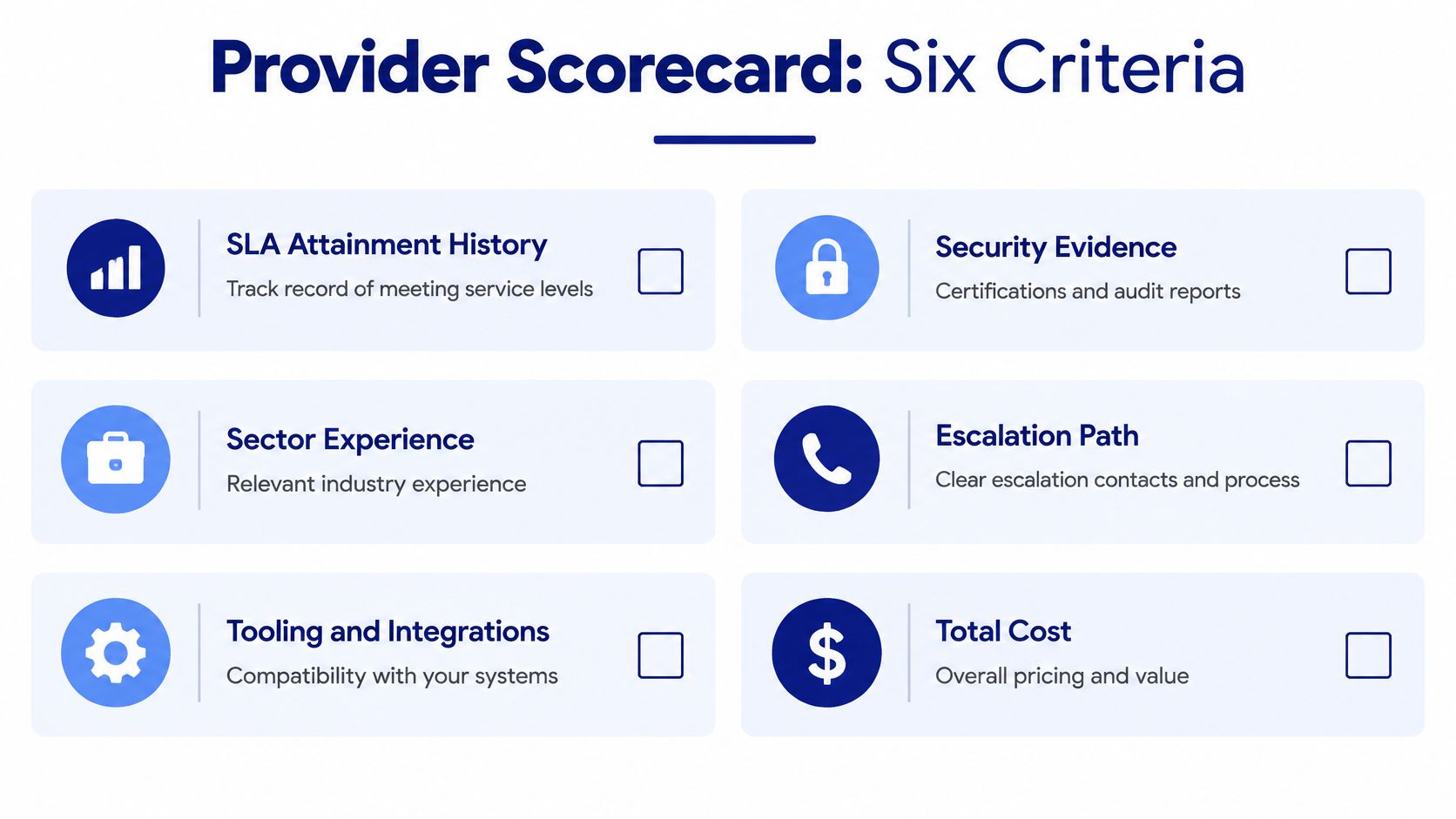
Six criteria to score against
SLA attainment history, evidenced by twelve months of real reports by priority, not a marketing slide.
Security evidence, in the form of audit reports and certifications covering the systems that touch your data.
Sector experience, measured by referenceable customers in your industry and the compliance settings they run.
Escalation path, with named roles and phone numbers for after-hours P1 incidents, tested once before signing.
Tooling and integrations, specifically whether their stack talks to your identity provider and ticketing system.
Total cost of service, normalised as above, including the tools you'll keep and the licences you'll still renew.
What to ask for before a shortlist
Two reference customers in your sector, with permission to call them.
A sample monthly report, so you can see whether it reports by priority or hides behind an average.
The exact list of included tools and their versions, not the category name.
The named escalation chain for an after-hours P1, including who answers at 2am.
Levers worth trading
Term length for rate. A longer commitment buys a lower unit price, but only with the exit terms below.
Volume tiers that step down as endpoints grow, so consolidation doesn't penalise you.
Renewal price caps, written as a percentage ceiling per year.
Termination for convenience with a defined notice period.
Exit assistance and data return in a specified format, because leaving badly is the lock-in.
Evidence delivery on a schedule, the monthly pack plus the annual attestation.
Vendor sprawl is often what stops a provider fixing a problem in the first place. RMM, service desk and security licences sit with different suppliers on different renewal dates, so nobody can make a change without a purchase order. Stackingo.com's multi-vendor RFQ puts those licences side by side against one scope document, and adding other vendors to the same request is free. One commercial front, comparable quotes, fewer renewal dates to track.
Then shortlist three providers and send all three the same scope document. Different questions produce different answers that can't be compared, which is how most procurement cycles end up choosing on price alone.
Run the Migration Checklist Before You Sign
The cutover is where good contracts fail. Run this routine in order, and treat each step as a gate rather than a task.
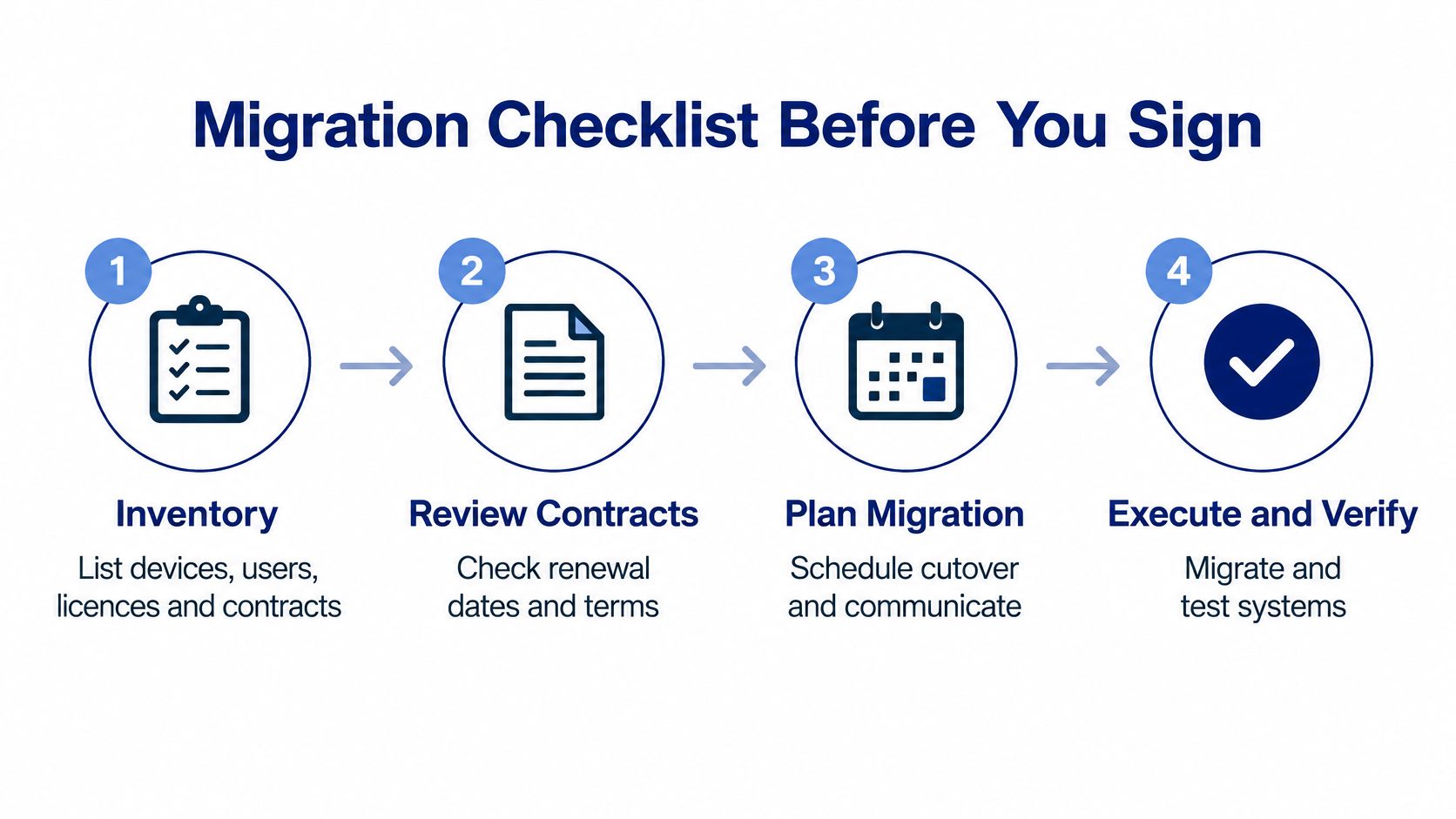
The migration routine
Inventory devices, users, licences and contracts. Use IT asset management with contract tracking so renewal dates are visible before handover. The usual slip is hardware only, with software entitlements ignored. A discovery and contract-tracking layer such as Lansweeper gives you the device and software view this step needs, and Freshservice IT asset management covers hardware and software discovery, contract tracking and a full CMDB with dependency mapping if you prefer one platform.
Map critical systems and their dependencies. The provider can't restore what it doesn't know exists. The common mistake is documenting servers but not the authentication chain that makes them reachable.
Deploy monitoring and endpoint agents everywhere, then track coverage weekly. Asset visibility only starts once agents are installed, and a 95% coverage figure means 5% of your estate is invisible.
Connect identity and collaboration tooling, such as Entra ID, Okta, Slack or Teams, and confirm privileged access works through the agreed path rather than a leftover local admin account.
Record baseline metrics: ticket volume, patch compliance, backup restore time and current response times. Without baselines you can never prove the service improved.
Run a two to four week parallel period in which both old and new support see alerts, and test an after-hours P1 escalation end to end. A parallel run that never triggers a P1 hasn't tested escalation.
Check the schedules before signing. The responsibility matrix, the priority table and the exit terms should appear in the contract schedule, not the covering email.
Delay the signature rather than accept a general promise. A missing responsibility matrix doesn't become clearer once the first incident lands.
The decision point is simple. If any item above is missing, you're not buying a managed service yet, you're buying an intention with a monthly fee attached. Wait a fortnight, fix the gap, and sign a contract you can enforce.
Stackingo exists to make that final negotiation simpler. We aggregate licences across leading technology OEMs into one RFQ-led purchasing process, so the RMM, service desk and security tools behind your managed service can be quoted side by side against a single scope document instead of five separate vendor conversations. Send us the scope you've just written, and you'll get comparable multi-vendor quotes in one commercial front at Stackingo.


