
RPC Unavailable Lansweeper: How to Fix It Step by Step
Your Lansweeper dashboard is suddenly filling with Windows assets that won't scan. The error reads “RPC server is unavailable”, with code 0x800706BA. Start by treating it as a layered connectivity and identity failure, not as one broken Lansweeper setting. Verify the target is online, confirm RPC and WMI reachability, inspect firewall and DCOM permissions, then use the scan agent when inbound RPC can't be opened.
Why the RPC Unavailable Error Appears in Lansweeper
The RPC Unavailable Lansweeper error appears when the scanning server can't complete the remote communication path required to query a Windows computer. Lansweeper identifies 0x800706BA with several causes, including incorrect firewall setup, offline machines, DCOM problems, and incorrect settings, as documented in its RPC troubleshooting guidance.
That list matters because it changes the order of investigation. Don't start by rebuilding credentials or reinstalling Lansweeper. First establish whether the computer is powered on, whether the scanner is trying the right address, and whether the required ports and services answer. Lansweeper's own troubleshooting flow recommends checking the asset's last scan attempt, confirming that the machine is powered on, testing TCP and WMI reachability, and verifying that the RPC service is running.
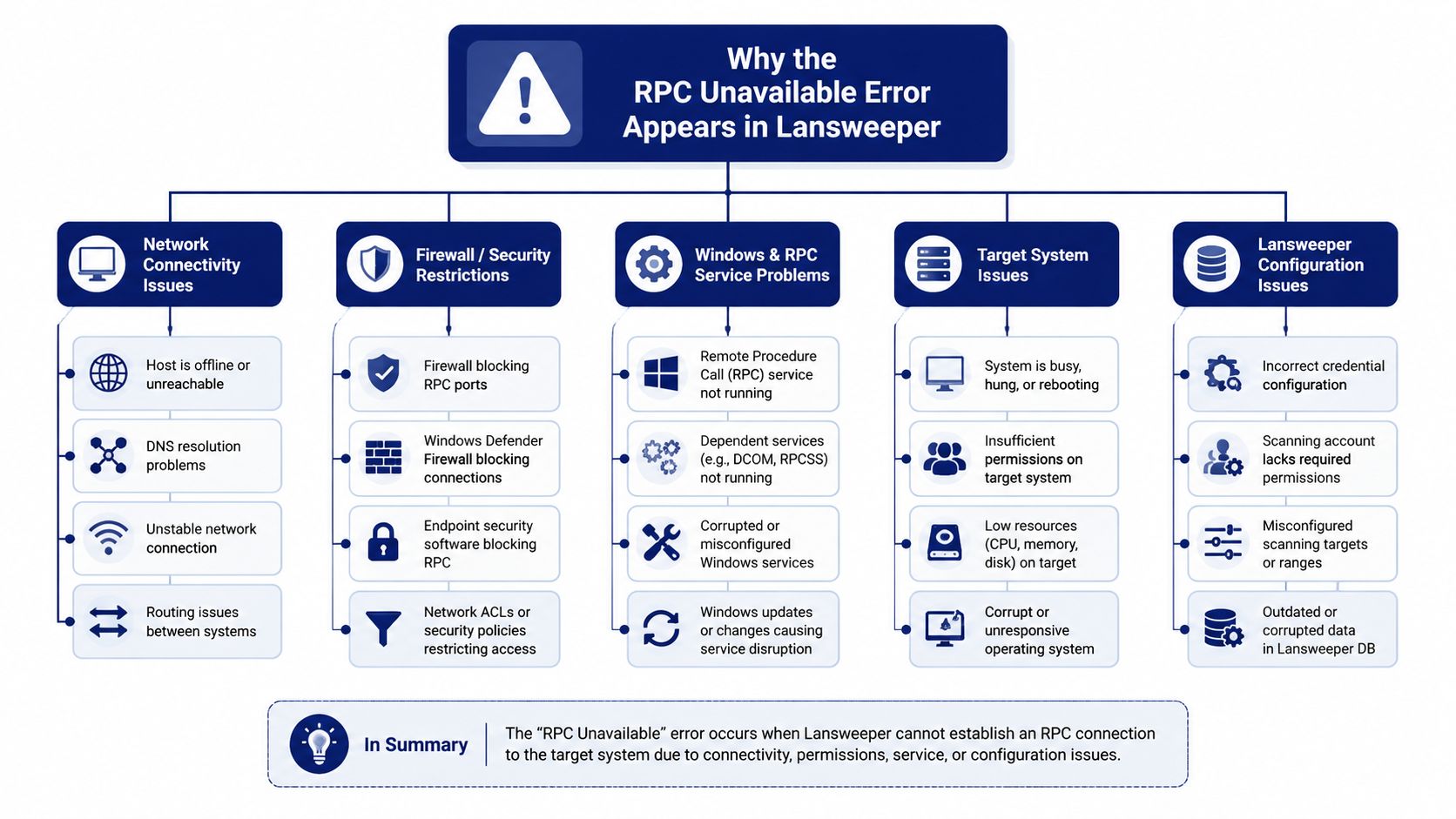
The four layers worth isolating
Target availability: The machine may be offline, asleep, disconnected, or represented by stale inventory data.
Network path: DNS, routing, VPN ranges, segmentation, or an address mismatch can prevent the scanner from reaching the intended host.
Firewall and ports: TCP 135 may answer while the dynamic RPC endpoint remains blocked, producing a misleading partial success.
Identity and permissions: WMI and DCOM can reject a connection even when the network path is healthy.
An IP mismatch deserves special attention in mobile and remote environments. Lansweeper community guidance describes cases where a stored address no longer matches the machine's current address, causing ping failure alongside RPC-unavailable errors. VPN scan ranges, corrected firewall rules, and agent-based scanning are practical responses discussed in the Lansweeper community troubleshooting thread.
For additional Lansweeper administration resources, use the Lansweeper articles on Stackingo.
Verifying RPC Services and Core Network Reachability
Start with the target computer, not the Lansweeper console. If the machine is offline or the RPC service stack is unhealthy, changing a scan credential won't help. Lansweeper specifically recommends verifying the last scan attempt, confirming power status, checking port reachability, and ensuring that RPC is running, so these checks give you the fastest useful signal.
Check the target before changing configuration
On the Windows target, open the Services console and inspect:
Remote Procedure Call
DCOM Server Process Launcher
RPC Endpoint Mapper
They should be running with an appropriate automatic startup configuration. Don't assume a recent restart or policy change left them healthy. If a service is stopped, record the state, start it if your change policy permits, and repeat the scan only after the service stack is stable.
From the Lansweeper scanning server, verify that the hostname resolves to the address you expect. Compare the result with the target's local network configuration, especially for laptops that move between office networks, home networks, and VPN connections. A successful ping proves only that an ICMP response returned. It doesn't prove that RPC can negotiate an endpoint.
Use port tests to separate network failure from service failure
Run PowerShell tests from the same server that runs the Lansweeper service. Testing from your workstation can produce a false conclusion because routing and firewall treatment may differ.
Check | Command | Expected result |
|---|---|---|
Name resolution | The expected host address is returned | |
Basic reachability | The target responds, if ICMP is permitted | |
RPC endpoint mapper | TCP connection succeeds | |
WMI transport path | SMB-related connectivity is available where required |
Lansweeper explains that much Windows asset data is collected through WMI, which uses dynamic ports. A ping that succeeds while the TCP test fails points toward a host firewall, network ACL, or segmentation rule rather than a simple Lansweeper defect. Preserve the command output before you alter rules, because the original failure pattern helps the network team identify the blocked layer.
Checking Firewall Ports and WMI or DCOM Permissions
Once the host answers and TCP 135 is reachable, focus on the difference between endpoint discovery and actual WMI communication. RPC begins with the endpoint mapper, but WMI may then require a dynamic port. Lansweeper's Windows scanning guidance states that firewalls must allow WMI traffic and recommends validating TCP ports and WMI checks as part of Windows scan troubleshooting.
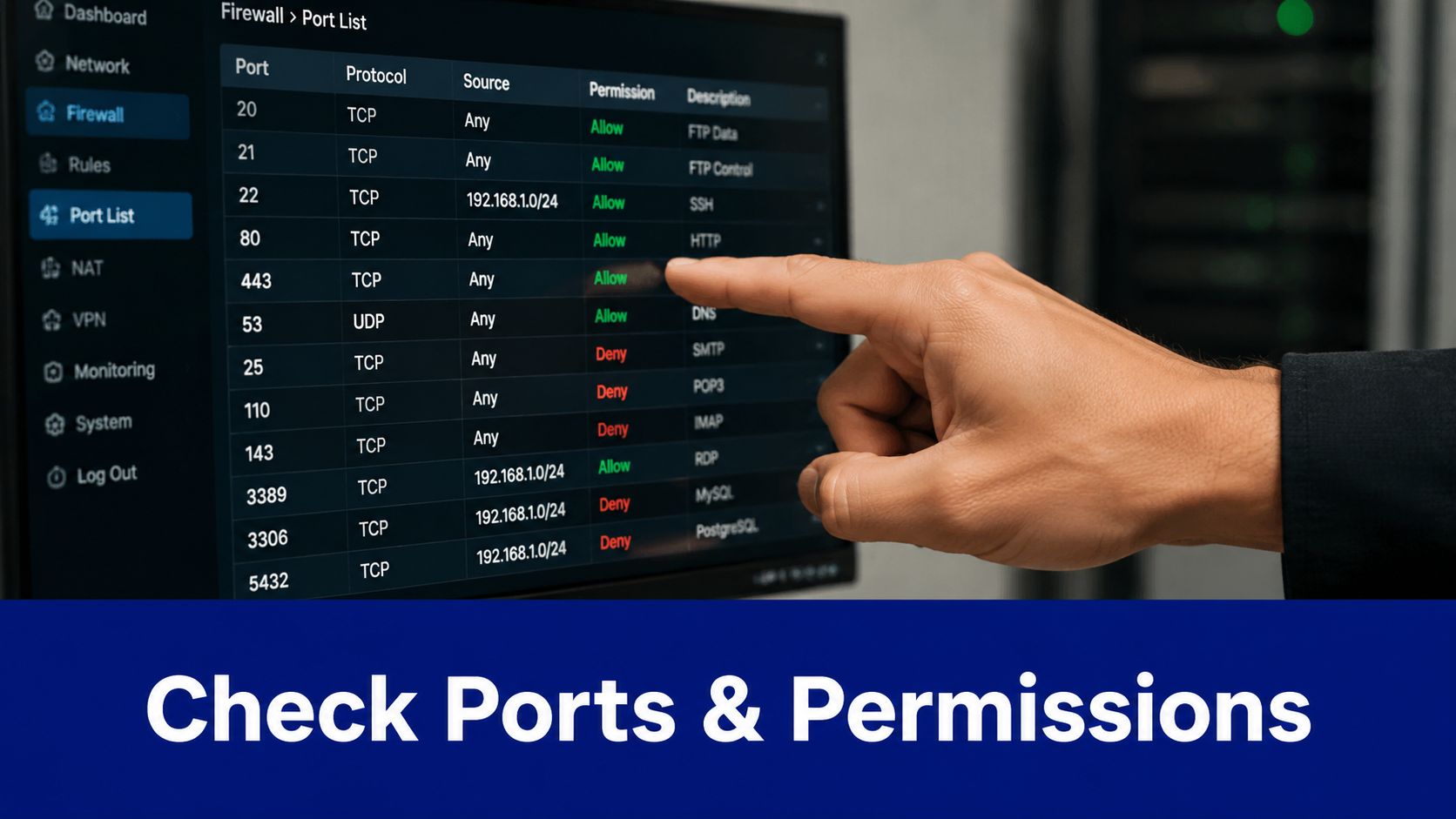
Firewall checks that actually distinguish the failure
Review Windows Firewall with Advanced Security on the target. Check the inbound rules for Windows Management Instrumentation and COM+ Network Access, then inspect any custom policy or third-party endpoint security rule that could restrict remote administration. The endpoint mapper may be open while the subsequent dynamic connection is denied, so checking only TCP 135 isn't enough.
Don't broadly disable the firewall during a production incident unless your change process explicitly allows it. A scoped test rule from the scanning server's network is safer and gives you an auditable answer. The exact dynamic-port policy depends on your Windows and network design, so confirm the permitted range with your security team rather than copying an unrestricted rule into every segment.
For teams investigating rule behavior across distributed networks, ManageEngine Firewall Analyzer can be considered alongside native Windows firewall logs and network ACL review.
WMI and DCOM require separate proof
If the ports are open but WMI fails, test permissions rather than continuing to widen the firewall. In , open Component Services, select My Computer, and review DCOM access and launch settings for the scanning identity. Then run a direct query:
A successful result confirms more than a ping. It shows that the remote path can authenticate and return a WMI response. An access-denied response points toward identity or authorization, while a timeout or unavailable-server response keeps the network and service layers in scope.
Configuring Lansweeper Scanning Credentials and Service Accounts
Once reachability is confirmed, validate the identity used for discovery. Add the account to Lansweeper's credential store, assign it to the relevant targets or scanning configuration, then run the product's credential test. A stored password does not prove that Windows will accept the remote session. Rescan the asset and review its last scan attempt, as recommended in Lansweeper's community guidance for RPC scanning issues for 0x800706BA.
Separate the scanning identity from the service identity
Use a dedicated domain identity for Windows discovery, with permissions defined by your security policy and Lansweeper's documented requirements. Some environments place the scanning account in the local Administrators group on target computers, while others grant narrower rights. Whichever model you choose, align DCOM launch, activation, remote access, and WMI permissions with the identity making the call.
Password changes create a common false network signal. After an Active Directory rotation, update the Lansweeper vault before changing firewall rules. Check lockouts, expiration, recent rotations, and credential precedence. If every target using one entry fails at once, inspect that entry first.
Check identity edge cases
Local account filtering under UAC can restrict remote administrative access even when the credentials are correct. SMB signing requirements, NTLM fallback restrictions, time skew, and Kerberos delegation can also alter a remote session's result. Record the account owner, rotation process, scope, and purpose so the next incident does not begin with guesswork.
A dedicated group managed service account can reduce password handling for larger estates when the Lansweeper and Active Directory design supports it. Test the account against representative targets, review its permissions, and document the setup in the runbook. Review Lansweeper licensing and product options through Stackingo separately from the technical fix.
Reading Event Logs and Running Remote RPC Tests
Event logs tell you which layer rejected the request, but only if you inspect both sides of the connection. Open Event Viewer on the scanning server and target, then review System, DistributedCOM, WMI, and relevant authentication logs around the failed scan. Useful source names include , , , , and .
Don't treat an event ID as a diagnosis by itself. A DCOM event can reflect a permission problem, a blocked endpoint, or a service that never answered. Correlate the timestamp with the Lansweeper scan attempt and with your port-test output.
Reproduce the call outside Lansweeper
Run from the Lansweeper server and connect to:
Use the same scanning credentials. Then reproduce a basic operating-system query with PowerShell:
A failure in both tools points away from Lansweeper's scan schedule and toward Windows, network, or identity controls. If the direct query succeeds but Lansweeper still fails, review credential assignment, asset identity, scanning-server selection, and the target's last scan attempt.
Capture evidence for escalation
Save successful and failed outputs, including results for the ports your architecture requires. Review event sources and IDs such as , , , and , but use the surrounding event text to establish what happened.
For centralized log correlation during a wider incident, ManageEngine EventLog Analyzer is one option to evaluate with your existing monitoring stack. The important practice is consistency. Run tests from the Lansweeper service host, not from a different administrative workstation.
Using the Lansweeper Scan Agent as a Guaranteed Fallback
When VPN routing, segmentation, or host firewall policy makes inbound RPC unacceptable, stop trying to force an agentless design through a blocked path. Lansweeper says its scan agent is a guaranteed workaround for RPC-server-unavailable and firewall-related scan failures because it returns the same data without depending on the same remote RPC route, as explained in its scan agent documentation.
The agent changes the direction of the conversation. Instead of the scanning server opening WMI and DCOM sessions into the endpoint, a local service collects information on the endpoint and communicates with the Lansweeper environment through its configured outbound path. That makes it especially useful for roaming laptops and networks where inbound administration is intentionally blocked.
Choose the agent when the boundary is intentional
Deploy it through a managed software distribution method, a Group Policy deployment, the Lansweeper console, or a manual installation for isolated remote sites. Test the deployment in each network zone and confirm that the endpoint reports back before closing the incident.
The agent can collect local inventory such as installed software, services, and registry-based information. Some hardware, Active Directory, and domain-level details still depend on credentialed agentless access to the target or another suitable source, so don't describe the agent as a universal replacement for every discovery method.
Use a hybrid operating model
A practical design uses agentless scanning where the data centre network permits controlled WMI and RPC access, while agents cover blocked or mobile segments. Monitor agent check-ins, investigate missing reports promptly, and keep the agent version aligned with your Lansweeper operational standards.
If remote desktop administration and licensing overlap with your broader endpoint strategy, RDS and SysAid resources can help you assess related tooling without confusing an asset-inventory fallback with a general remote-support platform.
Troubleshooting Checklist and Operational Takeaways
The fastest triage sequence moves from availability to transport, then authorization and product configuration. A tier-one administrator can work through the initial path within a focused incident window, but only if each test answers one question and the result is recorded.
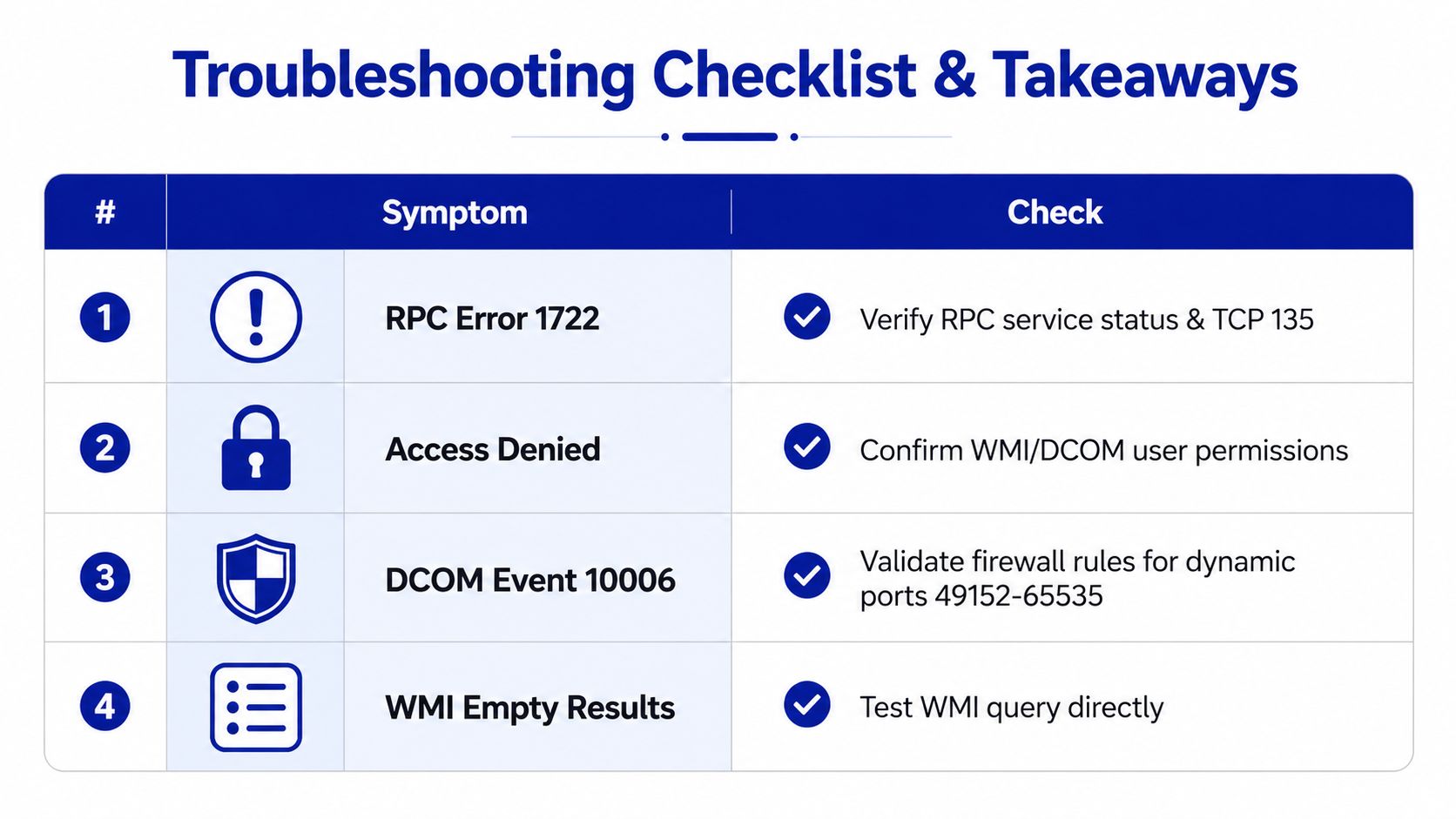
Triage by symptom
Symptom | First check | Likely layer |
|---|---|---|
RPC error 1722 or 0x800706BA | Confirm RPC service and TCP 135 | Service or transport |
Access denied | Test the scanning identity against WMI and DCOM | Authorization |
DCOM event 10006 | Review firewall policy and dynamic RPC reachability | Firewall or DCOM |
WMI returns empty results | Run a direct WMI query against | WMI namespace or query |
Use the following sequence, stopping when the evidence identifies the failing layer:
Confirm availability. Check power state, last Lansweeper scan attempt, hostname resolution, and ping behavior.
Validate transport. Run and test the additional ports required by your Windows scanning design.
Check services. Verify RPC, DCOM, and WMI-related services on the target.
Test identity. Use the Lansweeper credential test and a direct WMI query with the same account.
Review evidence. Correlate System, DCOM, and WMI events with the scan timestamp.
Change the collection method. If policy will not permit RPC, deploy the scan agent rather than weakening segmentation.
Recurring traps during incident response
UAC local-account filtering can make a local administrator appear underprivileged. Network-level authentication protection can block administrative shares even though basic connectivity works. A Kerberos double-hop can complicate calls that pass through the Lansweeper server, while antivirus can quarantine a client component or scheduled task context can run with a different identity than your interactive test.
Don't rely on a successful test from your own desktop. The proof must come from the Lansweeper scanning server and should include the exact target name, credential context, port result, WMI result, and relevant event text.
Operational rule: If direct tests pass but the asset still fails, compare the asset identity and assigned scan credentials before repeating network changes.
The recurring lesson is simple. RPC unavailable Lansweeper incidents usually involve more than one boundary, and the visible error is only the first failed handshake. A disciplined path through address identity, services, ports, WMI, DCOM, and credentials prevents random configuration changes. If the network boundary is deliberate, the scan agent is the cleaner operational answer.
Stackingo can help you evaluate and procure Lansweeper licensing alongside related enterprise software through a consolidated, RFQ-led marketplace process. Visit Stackingo to compare available licensing options and bring procurement into the same controlled workflow as your inventory and compliance planning.
Frequently asked questions
What does RPC unavailable mean in Lansweeper?
It means Lansweeper couldn't complete the remote communication required to scan the Windows target. The documented error code is 0x800706BA, with common causes including firewall configuration, an offline machine, DCOM issues, and incorrect settings.
Should I check credentials or firewall rules first?
Check availability and basic reachability first, then test TCP and WMI access before changing credentials. If the port path works but the direct WMI query returns access denied, focus on the scanning identity and DCOM or WMI permissions.
Can an IP mismatch cause RPC unavailable errors?
Yes. Lansweeper community guidance describes scan failures where stale inventory addresses produce both ping failure and RPC-unavailable errors. Compare the stored asset address with the machine's current network identity, especially for VPN and roaming devices.
Does the Lansweeper scan agent avoid RPC failures?
The scan agent is documented by Lansweeper as a guaranteed workaround for RPC-server-unavailable and firewall-related scanning failures. It collects data through a local agent path rather than relying on the same remote RPC connection.
What should I capture before escalating the issue?
Capture the asset's last scan attempt, target availability, name-resolution result, port tests, direct WMI output, credential-test result, and related System or DCOM events. Evidence from the Lansweeper scanning server is more useful than a successful test from an unrelated workstation.
