
SysAid Help a Practical Guide for IT Teams
You're usually looking for SysAid help because something small has already started to hurt daily work, a login won't stick, a ticket landed in the wrong queue, or notifications went quiet and no one can say why. The fastest way out isn't clicking around randomly. It's knowing whether you're dealing with the End User Portal, the admin console, email intake, automation, or infrastructure, then checking the right layer first.
SysAid is a mature IT service management platform, not just a ticket form. It was founded in 2002 by Israel Lifshitz in Tel Aviv, and by 2011 its products were already in use at more than 100,000 organizations worldwide (SysAid Technologies history). That matters because a tool that survives that kind of adoption usually has enough depth to support real service desk operations, but it also means misconfiguration can hide in several places at once.
Understanding SysAid and Where to Find Help
SysAid works best when you treat it like a service desk operating system, not a single screen. A ticket may begin in the user portal, but the cause can sit in access control, workflow logic, email intake, or a quiet admin setting that blocks action behind the scenes. If you start in the wrong place, you end up fixing symptoms instead of the layer that failed.
Know which help surface matches the problem
If an employee cannot submit a request, begin with the End User Portal and the ticket intake fields. If a technician cannot see a queue, look at the admin console, roles, or assignment rules. If the issue involves a workflow, integration, or installation, the documentation portal should come first, then vendor support once you have logs and a repeatable path to the failure.
The practical split is straightforward.
End users need portal access, a searchable knowledge base, and clear form fields.
Admins need configuration controls for categories, rules, SLAs, permissions, and integrations.
Support teams need reproducible evidence, not just a short complaint.
Practical rule: Route the question before you troubleshoot the feature. Most SysAid help requests are really about choosing the wrong help surface first.
SysAid also grew beyond its original market early. The company opened an office in Sydney in June 2010 and another in Brazil in May 2012 (SysAid Technologies history), and reporting on that Brazil expansion highlighted the company's continued push into new regions. For enterprise buyers, that kind of footprint usually points to better localization and wider support coverage, which is one reason long-running platforms often feel steadier in multinational environments.
For a faster vendor-side response path, I'd also keep this practical support guide bookmarked next to your internal runbooks.
Core SysAid Features That Drive Service Desk Operations
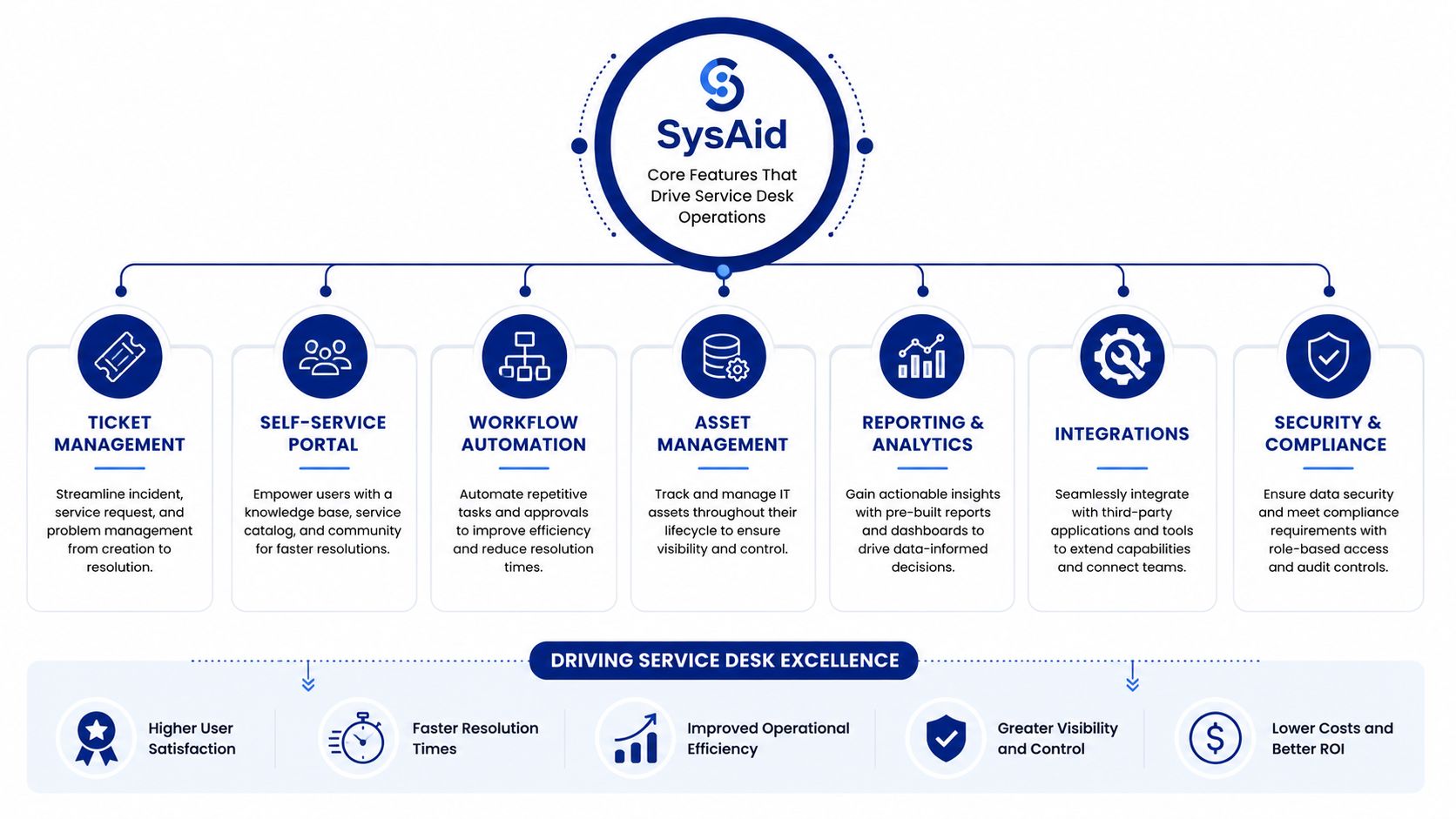
A service desk often feels broken for a simple reason. The module doing the work is not the module the team expected. SysAid help makes more sense when you read it as an operating system for service operations, with each part handling a specific job. Service records capture demand, categories decide the route, knowledge base articles absorb repeat questions, and workflows move tasks through the approvals and handoffs that keep work from stalling.
The same confusion shows up in real implementations. A ticket can sit untouched because the category tree is too shallow, an SLA can miss because the wrong record type was used, or a request can loop forever because a business rule never fires. Those are configuration problems, not signs that the platform has failed.
Match the module to the operational task
A service record is the container for the work, but it is not the whole story. The surrounding pieces give that record context and direction. Categories decide where it should land, assets explain what the request touches, and the knowledge base gives users a path to solve routine issues before they create another ticket. SLAs and business rules define what happens next, while the CMDB and asset records let admins trace the service impact across connected systems.
The first place teams usually get tangled is record type. Incidents describe something that is broken. Service requests describe something a user needs. Problems track recurring root causes, and changes cover controlled modifications. If everything gets filed as an incident, escalation paths become noisy, priority reporting turns fuzzy, and technicians spend time sorting work that should have been classified at intake.
A cleaner way to read the platform is through the flow of work.
Intake layers collect the request.
Routing layers send it to the right queue.
Knowledge layers reduce repeat work.
Automation layers keep actions consistent.
That structure is what makes a service desk easier to run. When the category tree is disciplined and the intake form matches the actual support model, technicians spend less time rescuing misfiled tickets and more time clearing the queue.
For a plain-language map of how these parts fit together, this SysAid service desk overview is a useful reference.
The operational gain is not the number of features. It is the ability to see where work slows down, whether the bottleneck sits at intake, assignment, knowledge, or fulfillment.
Fixing Login and Access Issues in SysAid

A login problem in SysAid rarely starts as a SysAid problem. It usually starts with a locked account, an expired password, a browser that is holding on to old session data, or an SSO path that is failing before the request ever reaches the portal. Start with the simplest layer first. That is the fastest way to separate a local access issue from a platform-wide one.
Start with the simplest access path
If a local admin cannot sign in, check whether the account is locked and whether the password has expired. If an end user cannot open the portal, try a different browser or a private session, because cookies and cached authentication data can keep a valid login from completing. If the failure happens only through SSO, the identity path deserves attention before any SysAid-side change.
Access problems usually fall into a small set of patterns:
Locked account: Review recent failed sign-in attempts, then restore access only after confirming the cause.
Expired password: Reset the password and verify the user can return to the portal.
SSO failure: Test the identity provider flow first, then adjust SysAid settings if the handoff is the problem.
Session timeout: Check browser policy, MFA prompts, and IP restrictions that may be ending the session early.
Browser conflict: Clear cookies and test again in a clean session.
A good diagnostic habit is simple. If one user can sign in and another cannot, compare the account state, browser state, and identity policy before touching the server.
For larger environments, the baseline deployment details matter as well. SysAid's installation guide specifies a 64-bit operating system for environments above 2,000 assets, Latin1_General_CI_AS collation for self-hosted SQL Server, and an agent footprint of 1500 MHz CPU, 512 MB RAM, and 50 MB disk (installation guide). If access problems show up only after rollout or at scale, check those prerequisites before you chase a login symptom that is really an environment mismatch.
Federated environments add another layer. An identity provider may be healthy on its own and still fail to pass users into SysAid cleanly. If you are working through that path, this SysAid ADFS integration reference is a useful companion while you decide whether the fault sits in browser behavior, portal access, or the federation handoff.
Creating, Assigning, and Routing Service Records
A service record should never feel mysterious. In SysAid, the record enters through portal submission or email intake, then it's shaped by required fields, categories, and assignment logic. If those pieces are incomplete, the ticket may exist but still sit in limbo.
Keep intake strict and routing simple
Portal submissions require Category, Title, and Description, and Urgency applies only to incidents (SysAid create a service record). After submission, the user sees a confirmation pop-up saying the request has been assigned to a Help Desk Admin. That confirmation matters because it tells the user the record is now in the system, even if fulfillment still depends on routing.
Record Type | Portal Required Fields | Email Intake Notes |
|---|---|---|
Service request | Category, Title, Description | Email intake should still map to a usable category |
Incident | Category, Title, Description, Urgency if needed | Urgency only belongs here |
Other record types | Use the closest supported intake path | Validate routing rules before rollout |
Empty or vague categories are a common reason tickets stall. If a category doesn't map cleanly to a queue, assignment rules can't do their job. That's why seasoned admins keep the category tree tight and avoid building a giant catch-all branch that swallows every request.
For deeper ticket-routing patterns, this SysAid ticket resource is worth keeping open while you tune intake.
The best configuration is usually the least clever one. One clean intake path, one clear routing rule set, and a few well-maintained categories beat a complicated tree that nobody trusts.
Diagnosing Email Notifications and Inbound Mail
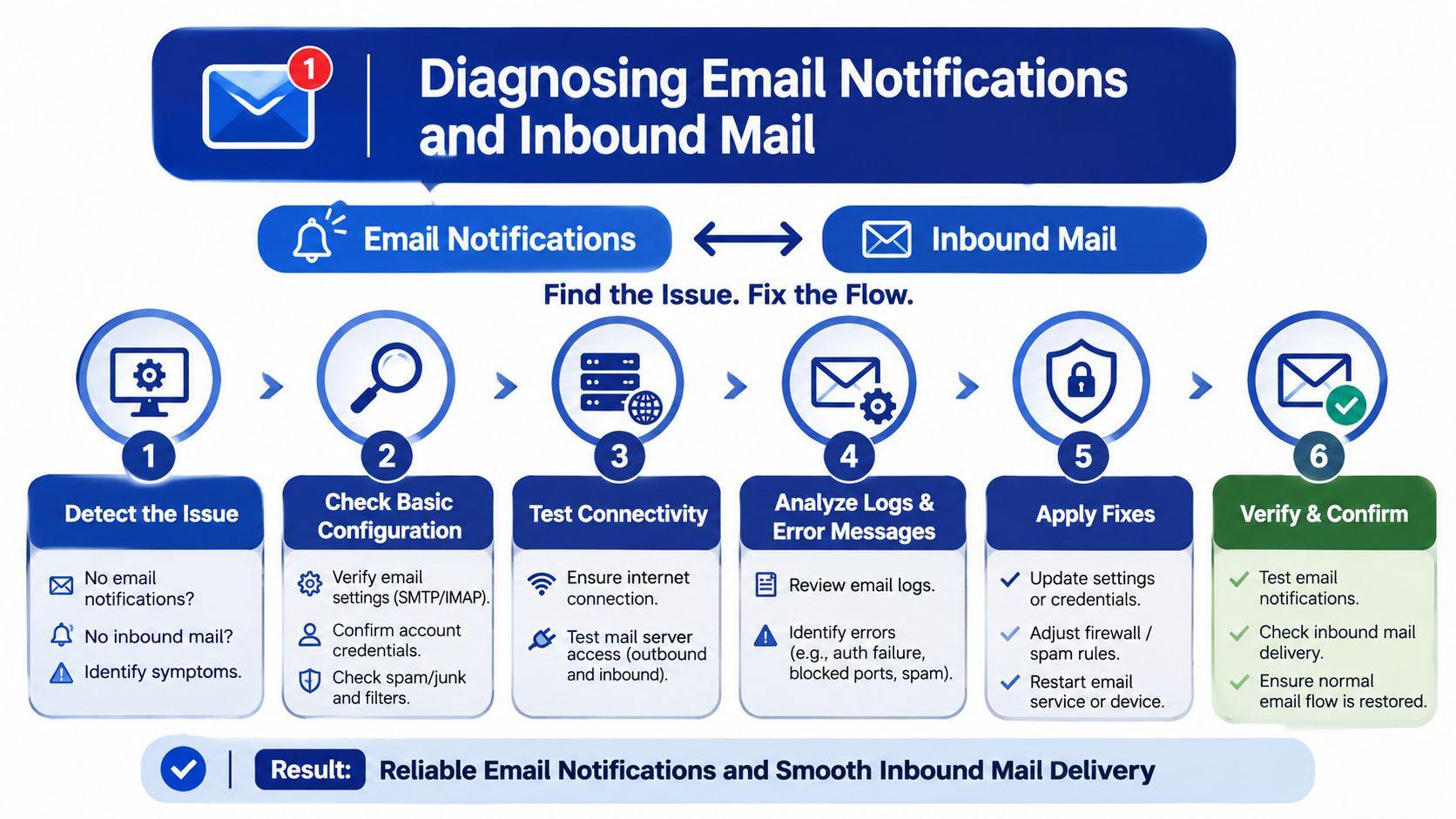
A SysAid email issue usually starts in one of two places. Outbound notifications fail on the way out to users and technicians. Inbound mail fails on the way in, where messages are supposed to become records or update existing ones. Treat those as separate paths, because the fix for one often does nothing for the other.
A practical way to troubleshoot is to follow the message, not the complaint. If no one receives notifications, first confirm that SysAid tried to send them, then compare that event with what the mail server did next. If inbound mail is not creating or updating tickets, check the mailbox polling setup, folder rules, and any filters that move messages away from the watched inbox. A message sitting in the wrong folder can look like a platform problem even when the mail system caused it.
Start with the simplest question: did the message leave SysAid, or did it never leave the mailbox boundary at all?
Separate sending failures from receiving failures
If alerts are missing, begin on the outbound side. Look for evidence that the notification was generated, then trace delivery through the relay or mail server. If mail is arriving but not turning into tickets, inspect the mailbox SysAid is reading, the folders being watched, and any server-side rules that reroute mail before SysAid can see it.
A short checklist keeps the investigation grounded:
Confirm the outbound event happened.
Check the mail server or relay for delivery issues.
Inspect inbox rules and folder placement.
Verify the monitored mailbox is still reachable.
Retest with a known-good message.
This kind of step-by-step check matters because email problems often sit at the boundary between systems. SysAid may be doing its part correctly while the relay, mailbox, or folder logic changes underneath it. That is why a clean diagnostic path works better than guessing.
If your team depends on alerts, recheck a known route after every mail change. That simple habit catches silent breakage before users report it.
Making Workflows, Business Rules, and SLAs Actually Trigger
Automation in SysAid is only useful when the triggering conditions are exact. A workflow, business rule, or SLA can look configured correctly and still do nothing if the ticket doesn't meet the expected conditions. Most “automation is broken” complaints are really condition mismatches.
Test the rule, not the whole stack
The most reliable method is to isolate one rule at a time. Create or use a test record, give it the exact category, priority, and assignment state the rule expects, then watch what changes. If the workflow fires in test but not in production, the difference is usually the ticket attributes, not the rule engine.
SysAid's knowledge base model reinforces this idea of controlled structure. The article title, question, answer, and optional tags are all searchable, and second- and third-level categories are recommended for easier retrieval (knowledge base articles). That same design principle applies to automation. If the categories are loose, retrieval and triggers both suffer.
A rule that depends on a vague category name is a rule that will eventually disappoint someone in production.
SLA failures are often schedule problems, not timer problems. Business hours, holiday calendars, and pause conditions need to reflect the support calendar, or the SLA clock will behave exactly as configured and still frustrate the team. Before blaming automation, compare the rule conditions with the record's actual metadata.
Integrations, LDAP, and Remote Support Connectivity
Connections outside SysAid usually fail for ordinary reasons. Credentials expire, directory sync pauses, or security teams block the ports that discovery and remote agents need. The platform can be healthy while the integration layer is the part that stops working.
A good first check is the network path. SysAid's remote agent and discovery stack relies on TCP 139, TCP 445, UDP 137, UDP 138, and UDP 8193, with port 8193 still required after deployment, and .NET Framework 3.5 or above for Windows functionality (system requirements cloud). If those ports are blocked, agent rollout and discovery can fail even when the application itself looks fine.
That is the point where many teams waste time looking in the wrong place. The service desk ticket says “remote support broken,” but the underlying issue is often a firewall rule, a disabled prerequisite, or a machine that never met the baseline for agent communication.
For a clean verification sequence, start with the parts that are easiest to prove:
Confirm the approved ports are open.
Verify Windows prerequisites on the target machines.
Test directory sync before expanding rollout.
Validate one remote support session before broad deployment.
LDAP deserves the same treatment. Treat it as a live dependency, not a setup task you finish once and forget. If the directory mapping is wrong, users can lose access, group membership can drift, and authentication starts failing in ways that look like a SysAid problem until you trace the request back to the identity source.
Remote support needs equal care. For teams that want a practical look at how remote access planning affects rollout, this SysAid RDS reference is a useful adjacent reference. It helps show why a session can fail even when the service desk configuration appears correct.
Monitoring feeds and other integrations follow the same pattern. They can drift independently, and each one has its own dependency chain. If you only test them during go-live, the gaps tend to show up when users are already waiting for help.
Admin Configuration Reference for High-Impact Settings
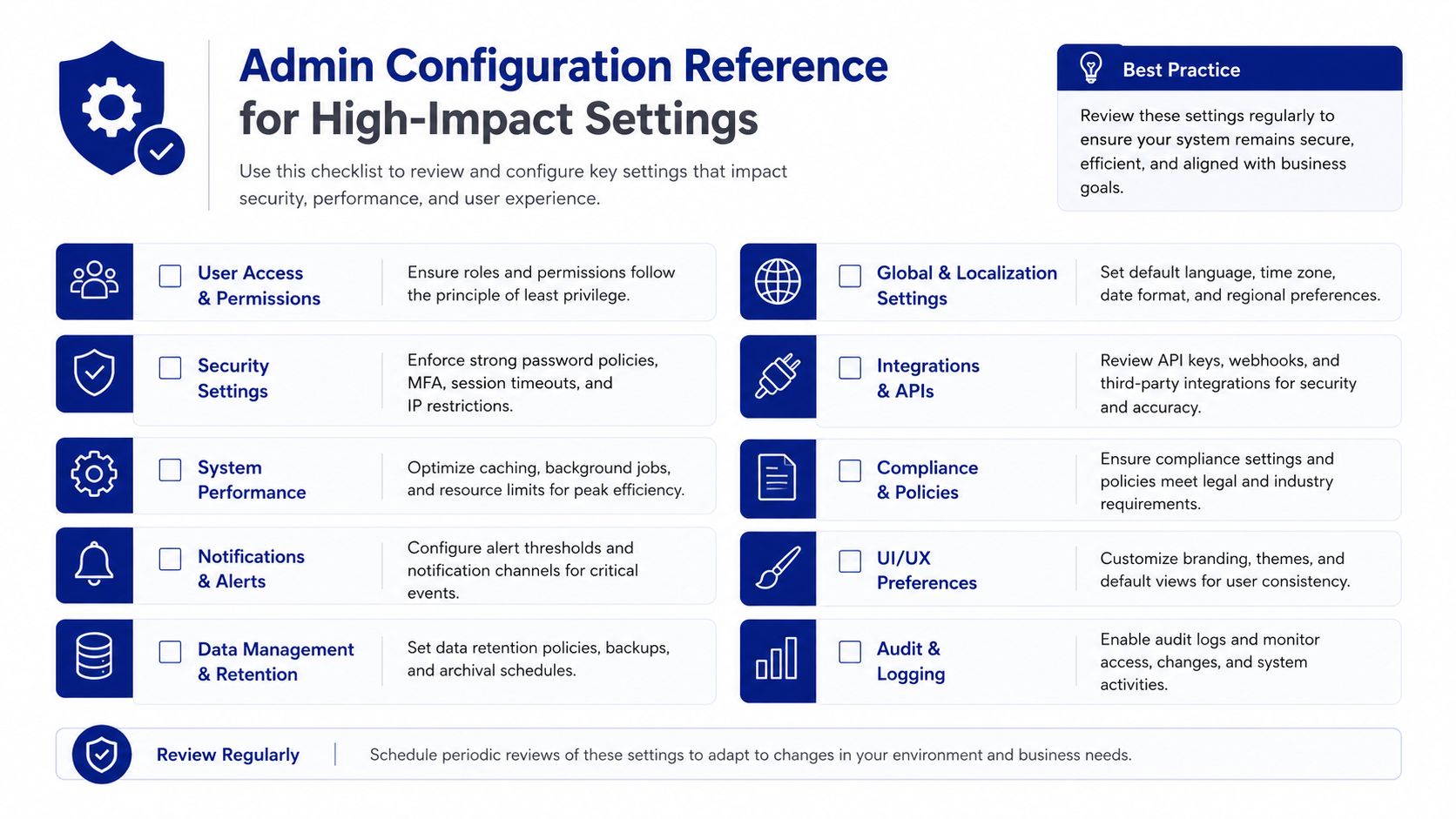
The settings that cause the most trouble are usually not the ones people notice first. They are the quiet choices that shape routing, visibility, and trust. If they drift, the platform still opens, but users start filing tickets about the tickets.
Verify the settings that shape behavior
Start with categories and subcategories. They need to be specific enough to route work correctly, but not so fragmented that technicians and end users have to guess which option fits. If the structure feels like a maze, intake slows down before a ticket even reaches a queue.
Roles and permissions need the same discipline. Set them around how the support team works, not around an old org chart that no longer matches daily operations. A permission model that is too broad exposes data people do not need. One that is too tight forces technicians to ask for access every time they touch a record.
Custom fields deserve a hard look as well. Keep them only when someone relies on them for intake, reporting, or routing. Dead fields make forms longer and make users second-guess whether a field matters.
Branding is not cosmetic in the service desk. If the End User Portal looks unfinished or inconsistent, people treat it like a side tool and avoid it. Authentication settings deserve the same review, because a polished portal still fails if access rules block the right people at the wrong step.
A practical review sequence helps more than a broad audit. Start with the items that directly change how users enter work and how technicians receive it.
Categories: Check whether each branch leads to a clear resolution path.
Permissions: Confirm technicians can see what they need and nothing more.
Custom fields: Remove fields that add friction without improving routing or reporting.
SLAs: Match them to business hours and real escalation paths.
Portal settings: Make sure users recognize the entry point and trust it.
The same review usually exposes where a service desk stack has become harder to support than it should be. If your broader ITSM program needs commercial simplification alongside technical cleanup, a vendor like Stackingo may be part of that conversation. Keep the focus on fit and operational clarity, not on a feature checklist alone.
Contacting SysAid Support and Escalating Effectively
A support ticket moves faster when it reads like a clean incident file. SysAid's own guidance asks for the service request number, personal contact details, specific problem details such as system messages, error codes, and logs, plus system information including the operating system, hardware configuration, network details, and other running applications (SysAid User Manual). That tells admins something practical. Support works best when the case already contains the evidence needed to separate a product issue from an environment issue.
Start with the facts that narrow the problem. Record the timeline, the affected users, what changed just before the break, and what you already tested. If the trouble sits in identity, email, or remote connectivity, call out the exact subsystem symptoms so the support engineer does not have to extract them one by one. A case with context usually gets to the fault faster than a note that only says the system is broken.
One clean way to prepare an escalation is to write it as a short incident summary:
What broke
Who is affected
When it started
What changed
What logs or messages you captured
That structure gives support a quick path through the noise. It also helps your internal team later, because the same notes can show whether the issue came from a setting change, an access problem, or a deeper platform fault.
If the issue keeps returning, add the details that show the pattern. Repeated failures after the same admin change point to configuration, while errors that move with one user or one device usually point somewhere else. The goal is to hand support a case that answers the first round of questions before they ask them.
Enterprise Best Practices for a Stable SysAid Environment
SysAid stays healthy when admins treat it like a living service desk platform, not a one-time deployment. The teams that avoid chaos usually review categories, rules, roles, and knowledge content on a schedule instead of waiting for a crisis. That habit matters more as the environment grows.
Build a quarterly review rhythm
Start with phased rollout. Put new workflows in front of a small user group, watch how tickets behave, then expand once the routing and access model proves stable. That approach reduces the chance that one bad category tree or permission set spreads across the whole organization.
Then keep the knowledge base clean. Searchable titles, questions, answers, and tags only help if articles are current and easy to retrieve. Old content with misleading categories creates more work than no article at all.
The same goes for discovery and operations. If asset records drift, your support team loses context. If SLA settings aren't reviewed, response expectations stop matching reality. If roles change but permissions don't, access issues follow.
A steady operating cadence usually includes:
Reviewing categories and ownership
Testing a few automation rules
Checking portal visibility
Auditing roles and permissions
Validating key integrations
SysAid has been around long enough to support mature service desks, but maturity only helps when the instance stays governed. Good admins don't wait for the system to drift, they keep it aligned before users notice.
If you want clearer SysAid help content, better rollout planning, or a cleaner way to frame the platform for your team, visit Stackingo and use it as a starting point for practical ITSM decisions. You'll find guidance that helps you connect SysAid operations to licensing, rollout, and support planning without losing time in trial-and-error.