
SysAid Log4j Vulnerability: Detection, Patching
A SysAid Log4j alert usually lands when the team is already busy. Someone has patched, screenshots are circulating, and the question is still open, whether the instance was already used as an entry point before the fix went in. That is the gap most guides skip, and it decides whether you have a vulnerability or an active incident.
Why SysAid Log4j Exposure Demands Immediate Attention
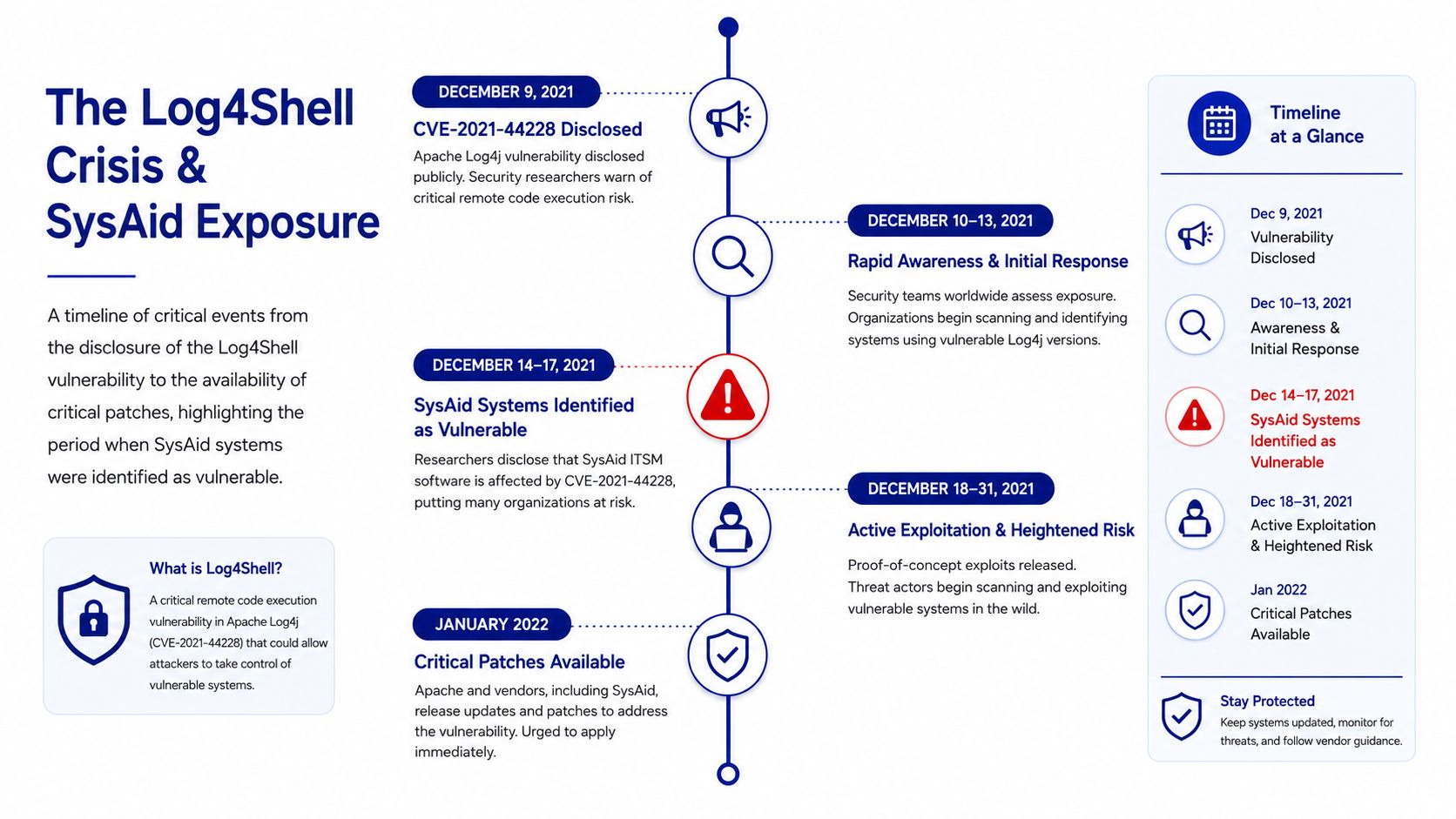
The first reason this matters is straightforward, SysAid Server was tied to real intrusion activity during the Log4Shell crisis. Microsoft reported that the threat actor MERCURY exploited Log4j 2 vulnerabilities in vulnerable SysAid Server instances, which means this was not just a generic Java library issue. It was a working path into enterprise service desk software that supports daily IT operations.
Log4Shell itself was publicly disclosed on 9 December 2021 and rated CVSS 10.0, the highest severity score, because it enabled remote code execution through the JNDI lookup mechanism in Log4j 2 versions 2.0-beta9 through 2.14.1. CISA said it was being actively and widely exploited, and the UK NCSC warned it affected millions of computers worldwide running online services. That combination of public disclosure, active exploitation, and broad enterprise reach is why sysaid log4j got attention so quickly. CISA's Log4j guidance captures the original severity clearly.
Why ITSM platforms become high-value targets
ITSM systems sit close to privileged workflows, identity data, and support channels. If an attacker gets code execution in that stack, they are not just probing a public-facing app, they are entering a platform that often has broad visibility into internal operations. That is why service-desk software deserves the same urgency teams usually reserve for identity or remote access tools.
Practical rule: if a platform can open tickets, handle admin workflows, or touch internal integrations, assume it is a high-value target until you prove otherwise.
SysAid's own response showed the problem evolved beyond a single emergency patch. The vendor later published a security notice, and cloud release notes show a patch progression that moved from a Log4j fix in build 21.4.70 (65345) to Apache Log4j 2.17.1 in cloud build 22.1.10 (65530). That sequence matters because it shows the vendor kept tightening the fix rather than treating the first patch as the final word.
How to Detect Vulnerable Log4j Versions in Your SysAid Environment
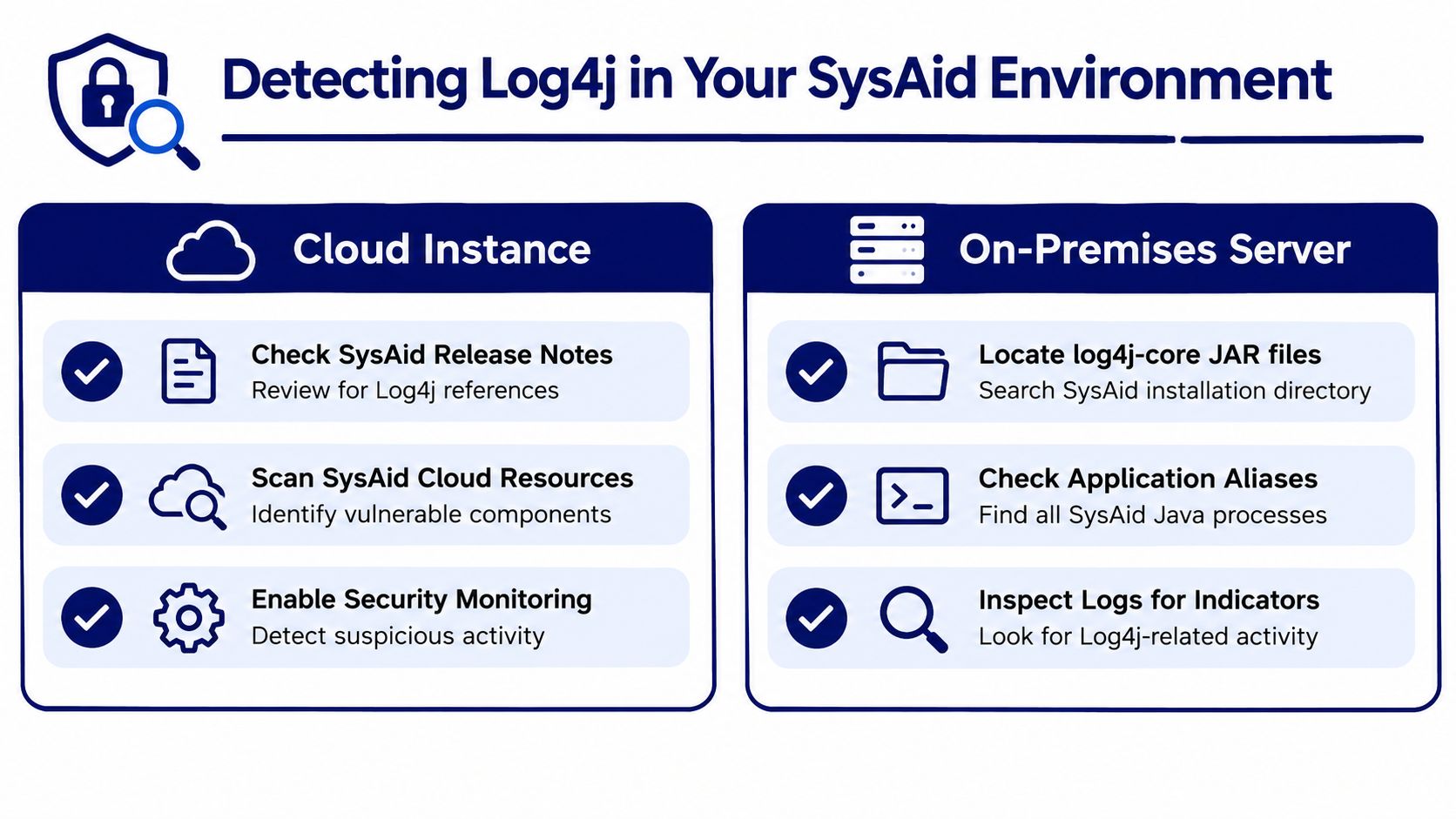
Detection starts with one question, which build and component set is running in your SysAid instance. For cloud customers, the vendor manages the application stack, but you still need to confirm your tenant is on a build that includes the fix. For on-prem teams, the burden is heavier because the files, Java runtime, and Tomcat artifacts all live under your control. SysAid on-prem context is useful here because on-prem ownership changes the detection model completely.
What to check first in cloud and on-prem
The quickest path is to compare the instance against known fixed releases. SysAid stated that build 21.4.70 (65345) included a Log4j fix, and later 22.1.10 (65530) upgraded to Apache 2.17.1. Australia's Cyber.gov.au advisory adds a clean boundary, CVE-2021-44228 affects Log4j versions prior to 2.15, while CVE-2021-44832 affects all versions from 2.0-alpha7 through 2.17.0 except 2.3.2 and 2.12.4. Cyber.gov.au Log4j advisory is the right reference when you need version boundaries for validation.
For on-prem deployments, inspect the SysAid installation tree and application server artifacts for Log4j jars and related classes. The file names matter, but so does the context around them, because a patched jar on disk does not help if the service is still loading an older copy from another location. Review the application startup paths, bundled libraries, and any Tomcat-deployed components that might carry their own logging stack.
Detection signals that matter more than file names
File presence alone is not enough. You also want to look at logs for JNDI-related lookup behavior, unusual request patterns, and application errors that line up with exploit attempts. That kind of evidence helps you separate a clean patch from a compromised host that merely got updated after the fact.
Useful checks include:
Build confirmation: verify the SysAid cloud build or on-prem release against the vendor's fixed versions rather than assuming a hotfix was applied everywhere.
Library inventory: locate all Log4j-related jars and confirm the loaded version, not just the package that was copied during deployment.
Runtime review: check whether the JVM and Tomcat process are using the expected application paths and libraries.
Log review: search for suspicious lookup strings, error bursts, or requests that do not match normal service-desk traffic.
Vendor visibility: cloud customers should validate the vendor's current release state and any security notices tied to their tenant.
The mistake teams make is treating “we found a patched jar” as proof. It is not proof until you know the old one is not still reachable.
Patching and Mitigating Log4j in SysAid Deployments
SysAid's patch history shows the right instinct, fix fast, then keep moving to stronger upstream versions. The cloud release notes show one emergency fix in 21.4.70 (65345) and a later upgrade to Apache Log4j 2.17.1 in 22.1.10 (65530). That progression is exactly what you want to see in a mature response, because it means the vendor did not stop at a narrow workaround.
The patch progression you should anchor to
Build Version | Log4j Version | Release Type | Status |
|---|---|---|---|
21.4.70 (65345) | Log4j fix applied | Cloud release | Fixed |
22.1.10 (65530) | Apache 2.17.1 | Cloud release | Fixed |
On-prem fixed release | Vendor-fixed Log4j package | On-prem release | Vendor-dependent |
For on-prem teams, the immediate target is the vendor-fixed release that matches your deployed branch. If you cannot move immediately, Australia's Cyber.gov.au guidance gives a temporary mitigation path, shut down the JVM, back up the original JAR, remove , then restart the JVM. That is a containment step, not a substitute for a clean upgrade. Cyber.gov.au mitigation steps are explicit for a reason.
What works and what does not
Performance tuning does not change exploitability. Apache's Log4j 2 documentation explains that asynchronous logging can deliver about 10x higher throughput with lower latency than Log4j 1.x and Logback in multi-threaded scenarios, but that is a performance topic, not a security fix. The vulnerability was tied to JNDI lookup behavior in specific versions, so changing appenders or logger mode will not close the hole.
Security takeaway: fix the version first, then validate the runtime, then review network reachability and logging behavior separately.
That distinction saves time during incident response. Teams often spend hours tweaking logger settings because the stack is noisy, then discover the vulnerable code path was never removed. SysAid patch management context is helpful for keeping the operational view tied to version control rather than configuration folklore.
Verifying Your SysAid Environment Was Not Already Compromised
Patching is necessary, but it does not answer the question leadership cares about. If the instance was exploited before the patch, you may still have a persistence problem, a web shell, or stolen access paths sitting inside the environment. SysAid incident reviews should therefore start with evidence of pre-patch compromise, not just version status. Microsoft's guidance on SysAid exploitation shows why that verification step matters, and it belongs in the response process, not after the fact.
What to inspect after the fix
Focus on evidence of unauthorized code execution, not just exploit attempts. In SysAid environments, that means checking the SysAidServer webroot, Tomcat artifacts, and any files that should not be there. Microsoft's threat hunting guidance specifically references suspicious web shells created through SysAidServer, which gives you a concrete artifact class to hunt for.
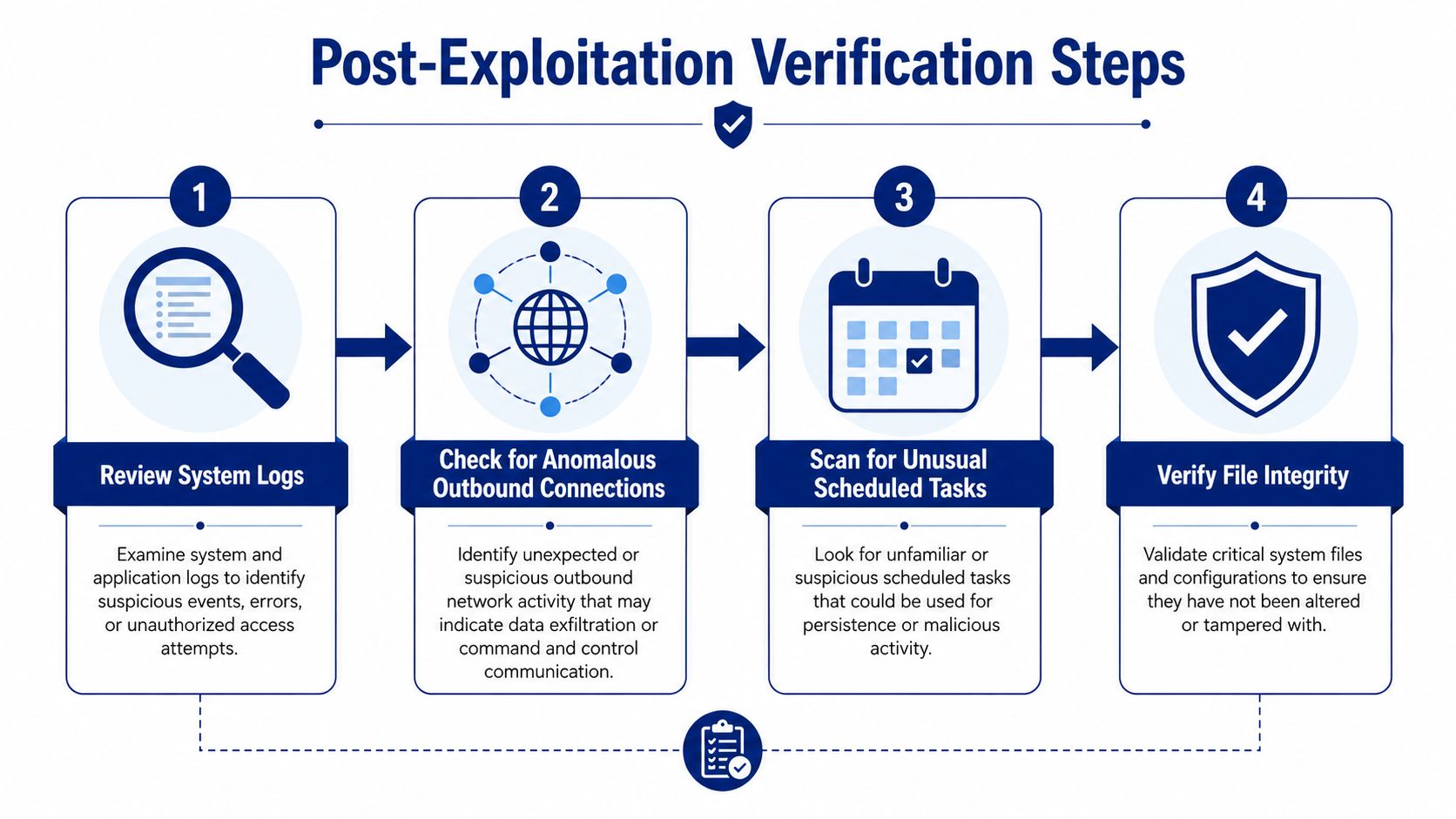
A practical verification pass should include:
System logs: review request histories, application errors, and authentication anomalies around the exposure window.
Webroot artifacts: inspect the SysAidServer webroot for unexpected JSP files, modified timestamps, or unfamiliar filenames.
Tomcat traces: check deploy directories, temp paths, and server logs for signs of abnormal file creation or execution.
Outbound activity: look for unusual connections that do not match normal help-desk behavior.
File integrity: compare critical application files against known-good baselines if you have them.
Why this step gets missed
The scanner showing a fixed version is a common stopping point, but the response remains incomplete. Log4Shell was an unauthenticated remote-code-execution issue, which means a successful exploit can give an attacker broad control before anyone notices.
The better question is what evidence proves the system was not used as an entry point. If you cannot answer that with logs, artifacts, and integrity checks, treat the event like an incident review, not a routine patch ticket. SysAid monitoring guidance is relevant here because monitoring has to continue after the patch is applied.
Managing Ongoing Exposure Risk in Legacy SysAid Deployments
The risk did not end when the first Log4j fix shipped. SysAid later disclosed a separate on-prem path-traversal issue that could lead to code execution, which tells you the platform's exposure story is ongoing for self-managed deployments. At the same time, Microsoft reported Iranian-linked activity exploiting Log4j 2 vulnerabilities in unpatched SysAid systems, so old paths remained operationally relevant well after the initial crisis. SysAid security update page is a good reminder that the platform kept evolving under security pressure.
Three ways to reduce residual risk
Stay on patched on-prem with continuous monitoring. This keeps control in-house and works best when you have disciplined patching, host monitoring, and file-integrity checks. The downside is clear, every new disclosure becomes your problem to validate and contain.
Isolate the SysAid service. Segmentation does not remove the vulnerability, but it can shrink blast radius. This is the right move when procurement cycles or legacy dependencies keep the platform on-prem longer than you would like.
Move toward vendor-managed cloud. Cloud reduces the burden of direct patch handling, and SysAid's cloud release history shows the vendor has continued to move the platform onto newer fixed Log4j versions. The trade-off is reduced control over the stack and a greater need to trust the vendor's release discipline.
Option | Residual Risk | Operational Overhead | Best Fit |
|---|---|---|---|
Patched on-prem | Lower, but still monitored | Highest | Mature ops teams |
Isolated on-prem | Lower blast radius | Medium | Transitional environments |
Vendor-managed cloud | Vendor-managed patching | Lower internal burden | Teams prioritizing simplification |
The decision is not just technical. It is about how much exposure you are willing to own every time an upstream library gets weaponized again. SysAid software overview helps frame that platform choice in the broader product lifecycle.
Procurement and Renewal Considerations for Secure ITSM Platforms
Security incidents should affect renewal conversations. If a vendor responds quickly, ships fixed builds, and documents versions clearly, that is a meaningful trust signal. If they are slow, vague, or force you to infer patch status from support threads, that is a commercial risk as much as a technical one.
Ask direct questions during procurement and renewal:
Patch discipline: how quickly does the vendor publish fixed builds after disclosure?
Disclosure clarity: do release notes identify security fixes in a way your team can audit?
Deployment model: does cloud reduce your residual risk enough to justify migration effort?
Verification support: will the vendor help you confirm whether an instance was potentially compromised before patching?
Exit options: if the platform no longer meets your security bar, how quickly can you compare alternatives?
That is where a marketplace-led buying motion helps. Stackingo can simplify multi-vendor comparison by turning quote collection into one RFQ process, which is useful when you are weighing ITSM, renewal timing, and residual risk together. For teams that need a cleaner way to compare options without re-entering the same requirements across multiple vendors, that structure saves time and reduces friction.
If you are handling SysAid Log4j risk now, use the patch as the start of the work, not the end. Visit Stackingo to compare enterprise software options through a single RFQ-led process, especially when renewal decisions need to factor in patch discipline, deployment model, and long-term exposure management.