
SysAid Manpower Planning Guide for Enterprise IT Teams
You're about to sign the SysAid license, the platform looks solid, and the vendor deck makes it sound simple. Then the question hits, who runs the discovery tier, who patches the on-prem build, and who owns the workflow mess once HR, facilities, and finance want in?
That's where sysaid manpower planning starts. If you treat it as a post-purchase issue, you'll underbudget the rollout, overload your service desk, and push hidden labor into security and operations teams that were never sized for it.
Why SysAid Manpower Planning Matters Before You Sign the License
SysAid is not a “buy software, flip the switch” purchase. It's a platform decision that changes who owns endpoints, discovery, access control, reporting, and cross-department workflow design. That means the labor question belongs in procurement, not in the cleanup phase after go-live.
SysAid's scale makes that even more important. By 2011, it was already in use in more than 100,000 organizations worldwide and had offices in Sydney and Brazil by the early 2010s, which tells you the product was already operating at international scale before many buyers even started evaluating it (SysAid's early global footprint). The company was founded in 2002 and stayed bootstrapped until its first funding round in November 2018, when it closed $30 million led by Israel Growth Partners, a useful marker that the product had matured before institutional expansion (IGP portfolio note).
The wrong way to buy SysAid
Most buyers model license cost and maybe implementation hours. That's too narrow. SysAid manpower really breaks into three labor buckets.
Practical rule: if you can't name the people who will own administration, discovery, and security on day one, you're not ready to buy.
The three buckets are:
Platform administration, the people who configure forms, workflows, permissions, and reporting.
Discovery and asset operations, the team that sizes and maintains agents, RDS, inventory quality, and rollout coverage.
Security and governance oversight, the people who patch, harden, review access, and handle incident response on on-prem systems.
A license approval without those roles is just deferred cost. If you want the commercial side of that cost model, tie it back to the total package in SysAid cost planning.
Roles and FTE Estimates for a SysAid Deployment
A SysAid rollout can look small on paper and still eat real headcount once you factor in asset discovery, permissions, reporting, and governance. The cleanest way to think about it is role by role, with clear ownership for each function.
Core roles you actually need
At a minimum, a solid deployment usually needs an ITSM platform admin, a discovery and RDS operator, a CMDB steward, and a service-desk lead. Add an integration developer if SysAid has to exchange data with other systems, a reporting analyst if leadership wants reliable dashboards, and a security and patching owner if the environment stays on-prem.
Cross-functional use cases add more load. HR, facilities, and finance all create extra category design, permissions mapping, and workflow review work. A broader rollout also needs a change-management lead, because the platform changes how different departments submit, route, and approve work.
SysAid Role and FTE Estimate by Environment Size
Role | Up to 1,000 assets | 1,000–5,000 assets | Above 5,000 assets |
|---|---|---|---|
ITSM platform admin | 0.5 FTE | 1 FTE | 1.5 to 2 FTE |
Discovery and RDS operator | 0.25 FTE | 1 FTE | 1.5 FTE or more |
CMDB steward | 0.25 FTE | 0.5 FTE | 1 FTE |
Integration developer | Shared or part-time | 0.5 FTE | 1 FTE |
Service-desk lead | 0.5 FTE | 1 FTE | 1 FTE |
Reporting analyst | Shared | 0.25 to 0.5 FTE | 0.5 to 1 FTE |
Security and patching owner | Shared if cloud, dedicated if on-prem | Dedicated if on-prem | Dedicated if on-prem |
Change-management lead | Shared | 0.5 FTE | 1 FTE |
A trial is the fastest way to test whether your staffing assumptions are realistic. A practical SysAid trial planning exercise forces you to spell out who will configure, monitor, and maintain the platform before procurement gets comfortable.
What that table means in practice
Under 1,000 assets, SysAid can usually run as a part-time platform with one strong owner and a few shared specialists. Once you move into the 1,000–5,000 asset range, discovery stops being side work and becomes a real operational lane. Above 5,000 assets, one-person ownership breaks down, and you need to separate platform work, data stewardship, and governance cleanly.
Deployment design also changes the labor mix. SysAid's endpoint agent has modest baseline requirements, but patch management adds endpoint disk overhead, and the server-side discovery tier needs more serious sizing as asset counts rise, as shown in the SysAid system requirements. That is why procurement teams should price staffing alongside the technical fit, not after it.
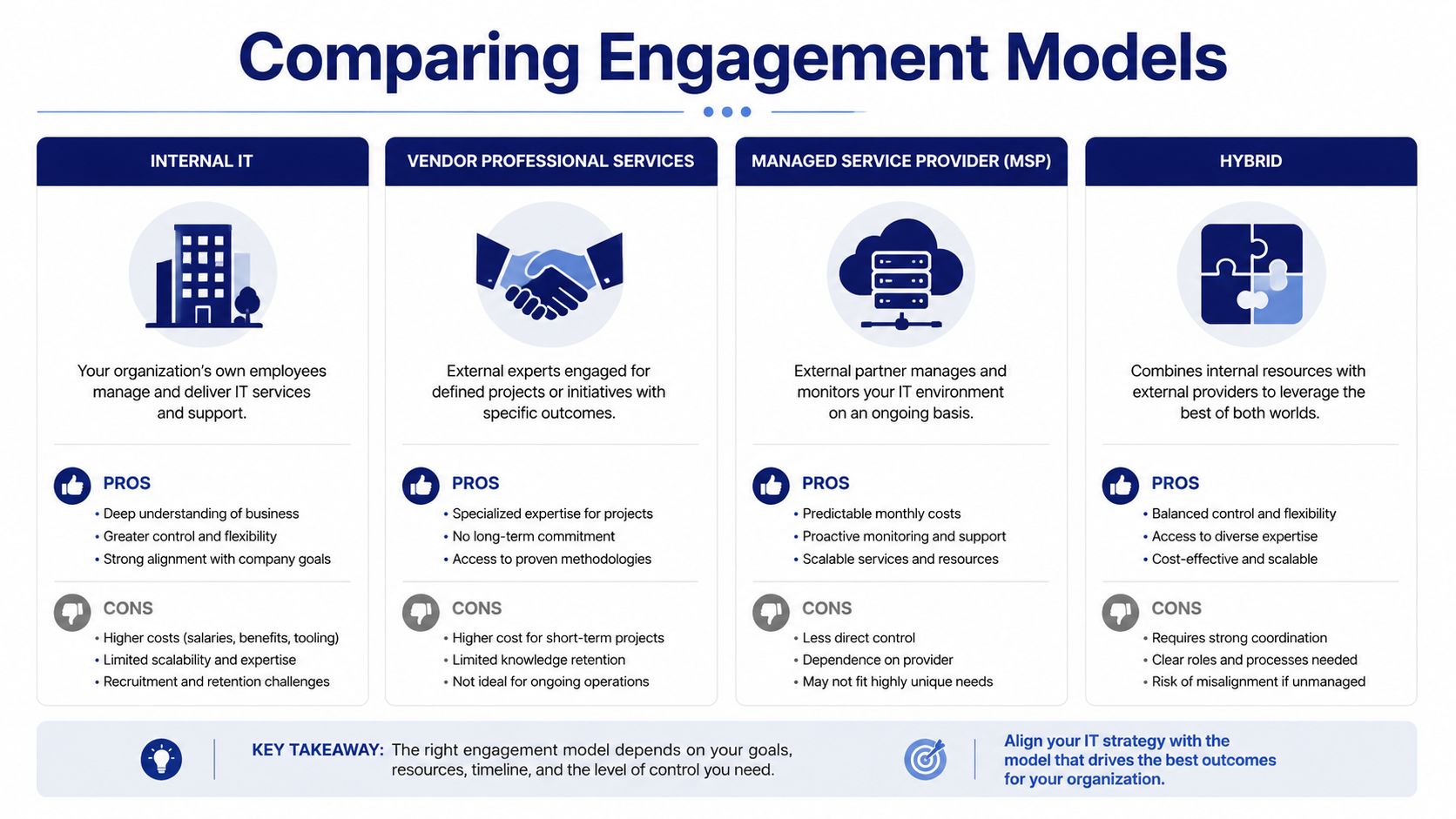
Comparing Internal, Vendor, MSP, and Hybrid Engagement Models
The staffing model is the decision, not just the software. Who owns the work determines speed, risk, and whether you build institutional knowledge or rent it.
How the four models differ
Internal IT works when you want tight control and long-term knowledge retention. It usually takes longer to stabilize, but it keeps the operating model inside your walls.
Vendor professional services are useful when you need a fast launch, a clean initial build, and structured knowledge transfer. The downside is dependence, if the transfer is weak, your team inherits a system it doesn't really own.
MSP coverage is strongest for routine operations, after-hours handling, and ticket volume smoothing. The tradeoff is obvious, you gain coverage but lose direct control over the people doing the work.
Hybrid is the model I recommend most often. Keep CMDB stewardship and security governance internal, outsource tier-1 handling or after-hours coverage, and use partners for specialist build work. That split keeps the sensitive work close to the business while lowering daily workload.
Best fit rule: internal for control, vendor for launch, MSP for scale, hybrid for most enterprises.
Decision criteria that actually matter
Time to value goes fastest with vendor services or MSP support.
Knowledge retention is strongest with internal or hybrid ownership.
Cost predictability is usually best with MSP contracts that define scope tightly.
Compliance control is strongest when security and data ownership stay internal.
Exit risk rises when too much admin knowledge sits outside the organization.
If you want a parallel view of support operating models, use the SysAid support model guide to map ticket handling responsibilities before you lock the contract.
Statement of Work Clauses That Protect Your SysAid Manpower Budget
Most SOWs describe deliverables and leave labor fuzzy. That is where budgets get blown up later. A vendor can hit the implementation target and still leave your team carrying extra admin, security, and governance work the moment the project goes live. You need clauses that bind the provider to named people, measurable output, and proper handoff.
Clauses you should insist on
Start with named resource commitments. If a partner promises a senior SysAid consultant, the SOW should say who that is, what happens if they are replaced, and what approval you get before substitution. That keeps you from paying for a strong sales pitch and getting a junior team after signature.
Add productivity baselines. Do not accept vague effort statements. Ask the vendor to state the number of tickets, assets, workflow objects, integrations, and admin artifacts each FTE is expected to handle in your environment. If you are buying an on-prem deployment, also require the staffing assumption to reflect patching, access review, and deployment hardening. For buyers evaluating SysAid on-premise deployment considerations, this clause matters because the operating load is larger than a simple cloud rollout.
Include knowledge-transfer milestones. Your team should receive admin training, workflow documentation, integration notes, discovery runbooks, and escalation paths before final acceptance, not after the invoice is paid. Make the handoff concrete. If the provider cannot show that your internal staff can run the platform without help, the work is not finished.
Procurement standard: acceptance should be based on operational outcomes, not just configuration completion.
Where SLA language belongs
Put operational response expectations in the SOW if they are part of the build or transition. Put broader service commitments in the master services agreement when they cover ongoing support terms. That separation matters because it stops the vendor from hiding labor assumptions inside loose service language.
Use milestone-based payments whenever possible. It forces the provider to show progress, and it gives you an advantage if the handoff is incomplete. Tie at least part of the payment to documented admin enablement, validated discovery, and a clean transition of support responsibilities.
If you are drafting the commercial package around software and services together, keep the license motion organized through SysAid software procurement so the services clauses do not get buried in a separate buying track.
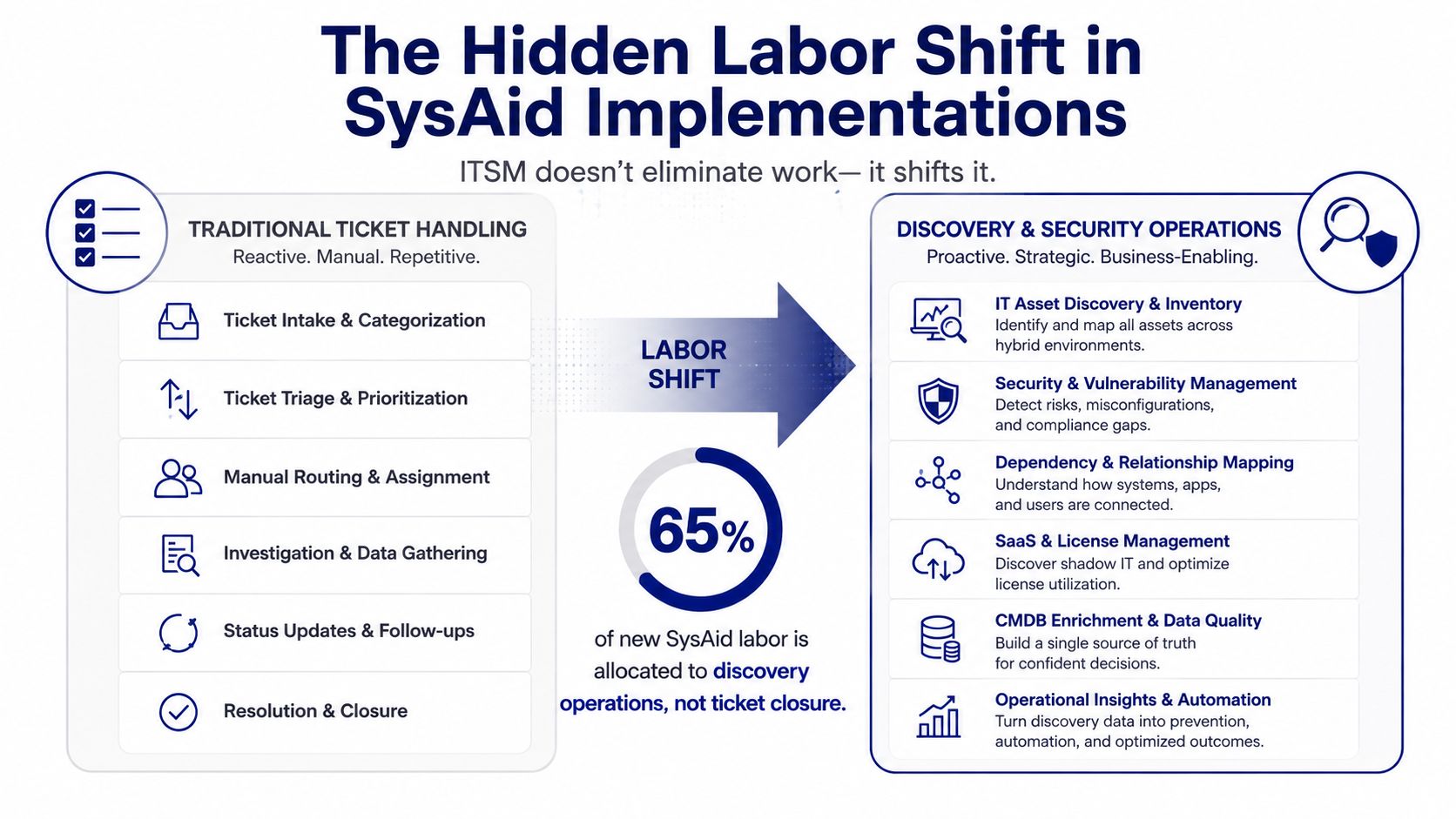
The Hidden Labor Most SysAid Staffing Plans Miss
SysAid does reduce ticket-handling friction, but it shifts labor into other workstreams. Buyers get drawn in by the automation pitch and then underbudget the people needed to keep the platform healthy, especially in on-prem deployments. If you scope the license without naming those roles up front, you will pay for them later in admin time, downtime, or stalled adoption.
The biggest hidden load is discovery operations. SysAid's own technical guidance shows that the agent, discovery service, firewall behavior, patch-management storage, and network openings all have to be sized and validated during rollout and steady state. Discovery is the inventory engine that makes the rest of the platform credible.
Security and governance are not optional
On-prem SysAid adds a real security burden. NVD documented CVE-2023-47246 in SysAid On-Premise versions before 23.3.36, a path traversal issue that could lead to code execution and was exploited in the wild in November 2023 (NVD CVE-2023-47246). That means patch discipline, access review, and incident readiness are operating requirements, not optional cleanup tasks.
Broader adoption multiplies the workload again. SysAid markets HR service desk use cases, which means category design, permissions, and reporting all have to be reworked for non-IT teams (SysAid HR service desk use case). The more departments you add, the more governance labor you inherit, because each group brings its own workflows, approval chains, and reporting needs.
If you are buying the on-prem model, treat the platform as an operating environment and scope the staffing that comes with it. The rollout path in SysAid on-premise implementation planning should be read with that reality in mind.
RFQ and Procurement Language for SysAid Manpower
If you're sending an RFQ, don't ask vendors to quote “implementation support” in the abstract. Force them to price labor by role and by operating assumption.
Copy-ready RFQ language
Use language like this:
Named roles required: ITSM platform admin, discovery and RDS operator, CMDB steward, integration developer, reporting analyst, and security owner if on-prem deployment is proposed.
FTE disclosure required: state planned staffing by role, by phase, and by asset range.
Discovery assumptions required: disclose how the provider sizes RDS, agent deployment, and scan concurrency.
Security expectations required: identify patching cadence, access-control responsibilities, and incident escalation ownership.
Knowledge-transfer deliverables required: include admin docs, workflow maps, training sessions, and exit assistance.
How to score responses
Weight answers on labor depth, not just price. Give points for clear SysAid references, realistic staffing depth, and a credible handoff plan. Penalize proposals that rely on one person doing everything or that hide support work behind vague shared-resource language.
If you want a structured way to compare multiple quotes, use Stackingo as the RFQ front end and keep the comparison standardized. That's useful when you're lining up software, services, and renewal scenarios in one procurement motion.
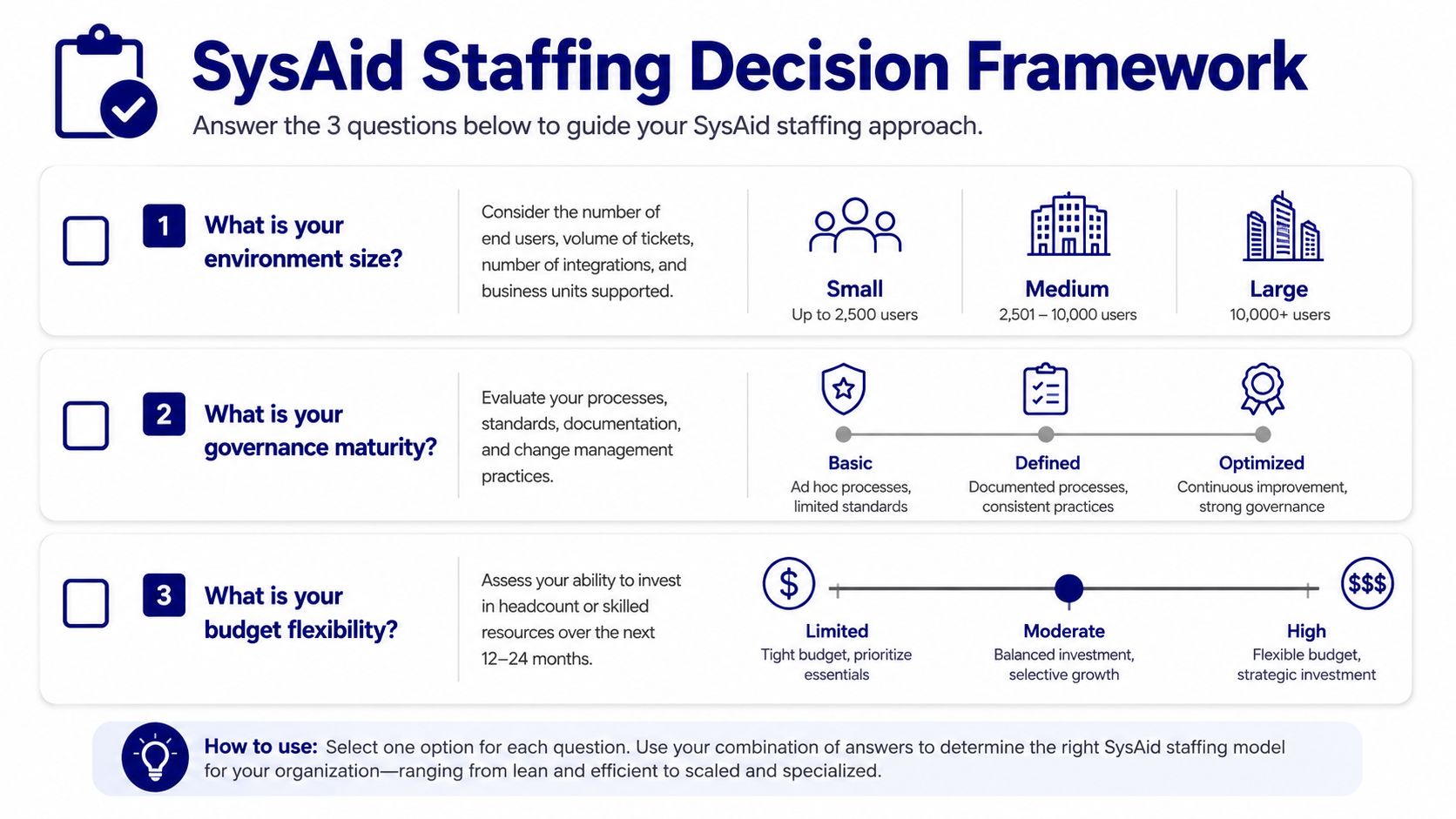
A Practical Staffing Decision Framework and Next Steps
Use three questions to choose the right model. How big is your environment? How mature is your governance? How much operational risk can you tolerate? Those answers point you toward the right mix of internal staff, vendor help, or MSP coverage.
For a small environment with simple governance, lean part-time and keep the build tight. For a larger enterprise with compliance exposure or on-prem requirements, plan dedicated ownership for discovery and security. If your departments outside IT want the platform, budget for change management too.
Plan SysAid manpower before the license is signed, not after.
If you're a CIO, write the board paper around labor risk, not just license cost. If you're in procurement, force the RFQ to expose role coverage and handoff terms. If you run the service desk, map the people who will own discovery, governance, and cross-functional workflow before you approve rollout.
Stackingo helps enterprise buyers turn SysAid licensing and service requirements into one structured RFQ, so labor assumptions don't get buried in vendor prose. If you're scoping SysAid manpower for a rollout, visit Stackingo and use the procurement flow to compare license, implementation, and support options in one place.