
SysAid RDS Deployment: Your 2026 Comprehensive Guide
SysAid RDS is the secure bridge that links on-premise resources like LDAP to SysAid Cloud, and SysAid recommends it for networks with 20 assets or more. For larger estates, one node can support up to 2,000 assets when it's sized and deployed correctly.
If you're evaluating sysaid rds, the key question isn't whether it works, it's whether your network, security posture, and procurement model are ready for it. The tool sits between discovery convenience and enterprise control, which is exactly why the deployment details matter.
What Is SysAid RDS and Why Do You Need It
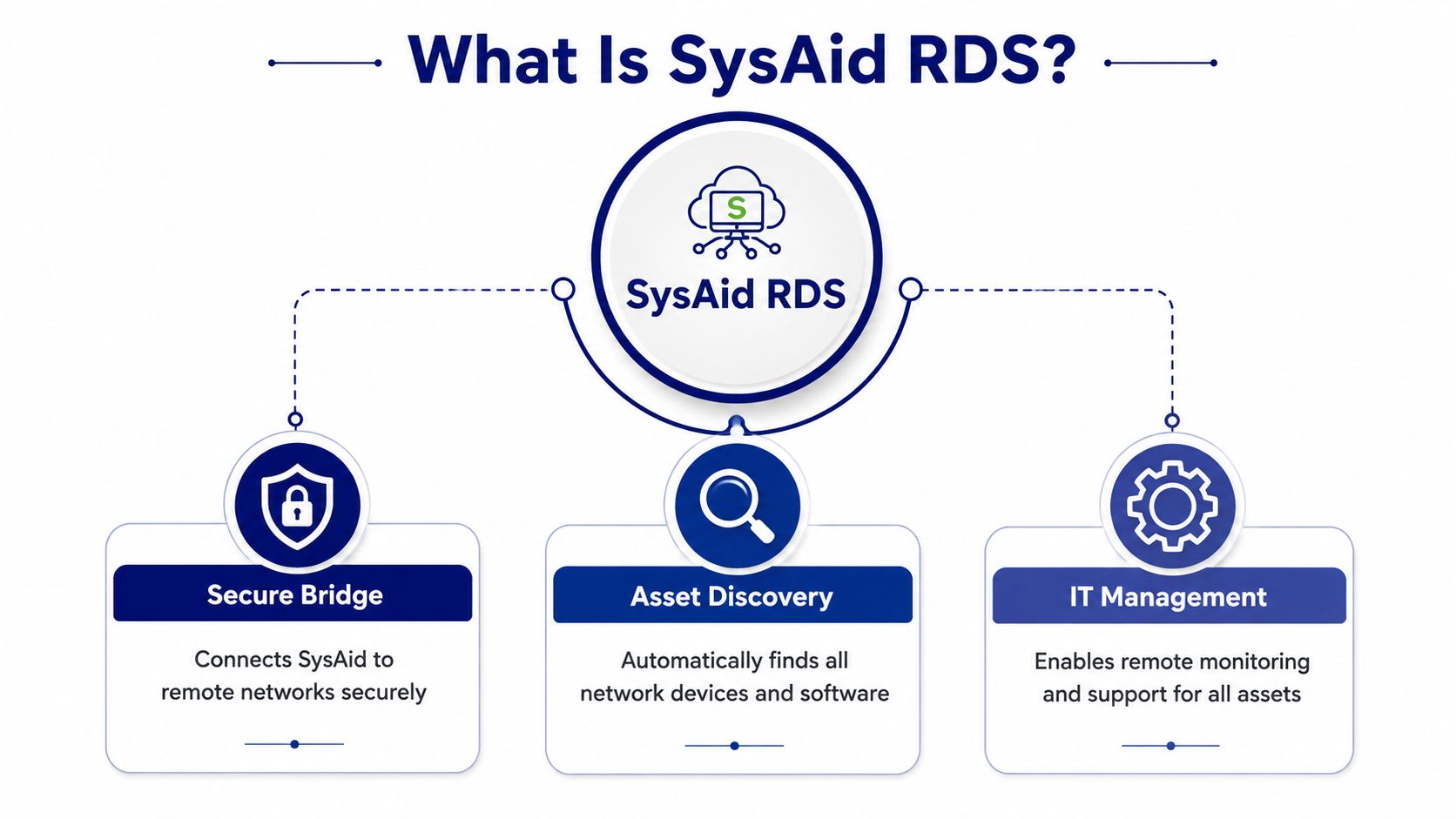
SysAid RDS is a secure bridge component. It carries discovery and directory traffic between your local network and SysAid Cloud without forcing you to expose LDAP or open unnecessary inbound paths to the internet. SysAid's documentation says RDS can be installed inside a local network to connect an LDAP server to SysAid Cloud Edition servers, which is why teams use it when direct external exposure is not acceptable. SysAid Cloud Edition advanced setup guide
Where RDS fits in real operations
RDS matters most when the network you need to manage is not directly reachable from the cloud service. SysAid documents it for network discovery and agent deployment without requiring inbound firewall port openings on the local network, while data routes back to the server or cloud over the internet. That matters in segmented environments, branch offices, and any environment where the security team will not accept direct exposure of internal services. SysAid RDS guide
Use cases that tend to justify RDS quickly are straightforward:
Remote subnets and branches: Discovery happens inside the local network where the assets live.
LDAP-connected deployments: Directory communication stays inside the network boundary.
Agent rollout at scale: SysAid ties RDS to deployment workflows, not just passive discovery.
Firewall-sensitive environments: You avoid opening inbound paths just to let the cloud inspect the LAN.
Practical rule: If the network team is uncomfortable exposing internal directory services externally, RDS is usually the cleaner architecture.
The enterprise angle matters here. RDS is not just a technical connector, it affects how you buy, size, and standardize SysAid across sites. A procurement team should treat it as part of the ITSM operating model, because the wrong deployment pattern creates avoidable support overhead and forces later rework. If you are mapping a deployment path, the SysAid download page on Stackingo is a practical starting point for comparing what you need against what you plan to roll out.
SysAid's product model also places RDS inside a broader ITSM stack. The platform's reporting includes opened and closed service records by period, category, company, administrator, and priority or urgency, plus service quality reporting with MTTR as a default measure. That means RDS is feeding a service-management system that depends on reliable asset data for reporting and operational control. SysAid reports documentation
Planning Your Deployment Prerequisites and Licensing
Sizing RDS starts with procurement and capacity planning, not the install itself. The hardware guidance is tied to asset volume, so the deployment decision should match the size of the environment you plan to manage, the growth you expect, and the amount of operational change your team can absorb without redesigning the service later. For up to 500 assets, the minimum listed CPU is 2.0 GHz with 2 GB RAM and 400 MB of disk space. For 500 to 2,000 assets, the requirement rises to a Dual-Core Xeon or equivalent with 2 GB RAM, and for more than 2,000 assets, it rises again to a Quad-Core Xeon or equivalent with 4 GB RAM.
What to check before you install
Treat the RDS node like a production service, because that is how it behaves once discovery and agent deployment depend on it. A dedicated machine is the safer choice, especially if you expect regular scanning or multiple scan ranges. SysAid recommends RDS nodes for networks with 20 assets or more, and one node supports up to 2,000 assets.
Asset range | Minimum listed CPU | Minimum RAM | Disk space |
|---|---|---|---|
Up to 500 assets | 2.0 GHz | 2 GB | 400 MB |
500 to 2,000 assets | Dual-Core Xeon or equivalent | 2 GB | Not specified in the cited table |
More than 2,000 assets | Quad-Core Xeon or equivalent | 4 GB | Not specified in the cited table |
A procurement team should read that table as an architectural signal, not just a spec sheet. Under-sizing RDS invites slower scans, tighter rollout windows, and avoidable instability when discovery jobs grow. Over-sizing a little is usually cheaper than revisiting the deployment after asset growth forces a redesign.
Planning insight: The hardware question is not “what is the minimum?” It is “what can stay stable when discovery and agent deployment become routine?”
Licensing and buying decisions need the same discipline. RDS is part of the wider ITSM operating model, so the organization should decide early how discovery scope, infrastructure placement, and support ownership line up with the rest of the platform. If procurement needs a practical starting point for the acquisition path, the SysAid download guide on Stackingo is useful for matching the purchase plan to the deployment plan.
That same view matters for enterprise standardization. A well-scoped RDS rollout reduces later support friction, because asset data, scan coverage, and service workflows stay aligned with the way the environment is managed. When discovery becomes a shared dependency for reporting, onboarding, and endpoint control, the licensing conversation is no longer separate from operations, it is part of the design choice.
How Do You Install and Configure SysAid RDS
Where should SysAid RDS live if you want it to support discovery without creating avoidable friction later? Start with a dedicated server or VM inside the network segment you intend to discover. Placement matters because RDS is meant to sit close to the assets it scans and the systems it reaches, not as an arbitrary utility on whatever machine happened to be available. SysAid RDS guide
Preparation before the install
The cleanest deployments start with scope control. Define which network segments will be scanned, which directory services RDS must reach, and which service account will own the connection. SysAid's troubleshooting guidance says the RDS service account should have administrator privileges on the target domain or IP range, so the credential choice is part of whether discovery succeeds, not a housekeeping detail. SysAid troubleshooting
For an on-premise rollout, the deployment model should match the network boundary you manage. Stackingo's SysAid on-premise guide is useful because the same placement logic applies whether the estate is concentrated in one site or split across several, the bridge has to sit where the traffic and permissions can support it.
Installation and service setup
SysAid's troubleshooting documentation names two Windows services depending on where the RDS instance runs. If the deployment is from the SysAid Server, the service name is SysAid Server. If the deployment is from a remote machine, the service name is SysAid Discovery Service. That distinction matters during validation because admins often check the wrong service first.
A practical install flow usually looks like this:
Place the node correctly: Install RDS inside the network segment you want to reach.
Use the right service account: Give it the domain or IP privileges SysAid expects.
Restart after credential edits: After any credential change, restart the RDS service before testing connectivity again.
Verify outbound connectivity: SysAid sends data back to the server or cloud over the internet, so outbound access is the channel that needs attention.
Configuration choices that prevent rework
The common mistake is treating RDS as a one-time install instead of part of a long-lived scanning design. If the node is handling discovery for a large estate, place it on dedicated hardware and avoid sharing it with unrelated workloads. SysAid also recommends a 64-bit environment for environments above 2,000 assets to reduce capacity pressure and the instability that can show up during larger discovery runs. SysAid RDS guide
Agent deployment and directory integration should be validated together. If one succeeds and the other fails, the local bridge is only half configured, and that creates gaps in discovery coverage, onboarding, and the reporting that ITSM teams depend on.
What Are Common Troubleshooting Steps and Log Locations
RDS troubleshooting starts with the service identity, then moves to permissions, then reaches network reachability. Those three layers account for most failures in real deployments. If the service account no longer has the right administrator privileges on the target domain or IP range, or if the RDS service was not restarted after a credential change, scan results will usually fail before you get useful discovery data. For the operational details behind those checks, see SysAid troubleshooting.
What to check when discovery fails
If discovery does not return the assets you expect, begin with the service that is running and the scope it is allowed to scan.
Confirm the correct Windows service: Use SysAid Server or SysAid Discovery Service, depending on where the node is deployed.
Check the service account: Verify that it still has administrator privileges on the target range.
Restart after credential edits: After any account change, restart the service before testing again.
Review the network segment scope: A scan aimed at the wrong subnet will not find the devices you were expecting.
A wrong service identity creates a false trail fast. In mixed environments, admins often blame connectivity or firewall rules first, then discover the node was running under the wrong service or pointing at the wrong range.
How to think about logs and diagnostics
Logs matter most after the basic service checks pass. At that point, the useful work is to line up the discovery window with the RDS service state, then compare it with what the host could reach on the network. That sequence usually separates a service problem from a routing, permissions, or target-selection problem faster than changing scan settings at random.
If the issue still does not fit the usual pattern, use a structured escalation path. A practical Stackingo's SysAid support resource helps teams decide whether the blocker is operational, licensing-related, or tied to the deployment design itself, which matters when RDS is part of a broader ITSM procurement decision rather than a standalone scan node.
How Do You Scale and Secure RDS for the Enterprise
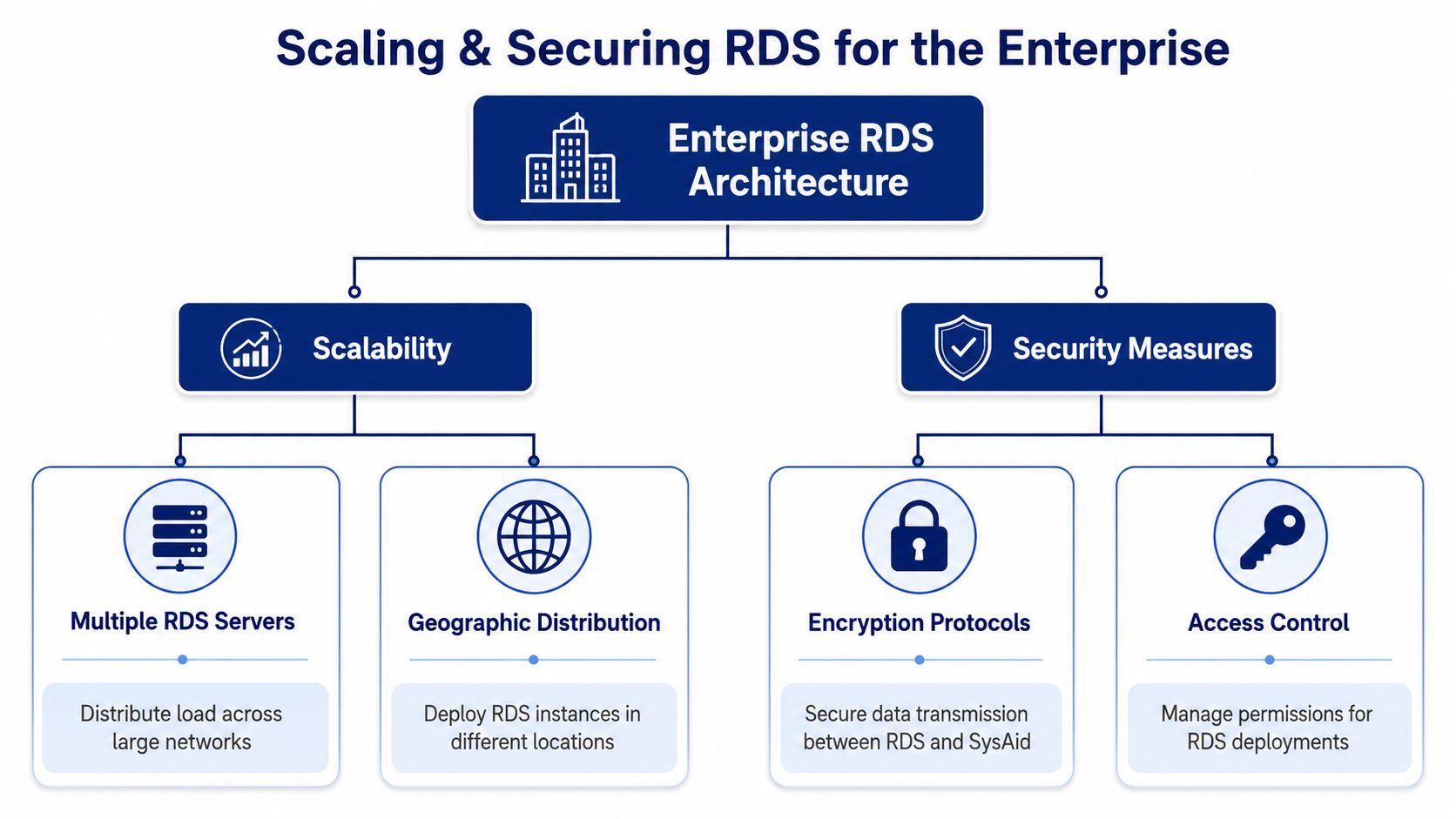
RDS is a scaling layer, not a convenience feature. For enterprise planning, the practical question is whether your discovery model can keep pace with procurement, licensing, and the way your environment grows. That is where SysAid integrations strategy for enterprise ITSM starts to matter, because RDS rarely stands alone once teams connect discovery to service workflows, reporting, and broader platform decisions.
Why enterprise teams should distribute RDS
A single RDS node can work in a contained environment, but distributed networks create their own pressure points. Branch offices, segmented business units, and geographically separated assets all benefit from locality. If discovery traffic has to cross too many hops or compete with user traffic, scan windows become harder to predict and easier to disturb.
That also affects procurement. If a team buys for the current footprint only, the first expansion cycle can force a redesign, or a licensing conversation that should have happened earlier. An enterprise deployment needs room for that growth, because discovery capacity, support expectations, and ITSM integration choices tend to move together.
Security controls that matter
The safest RDS deployment keeps permissions narrow and communication paths intentional. Start with the service account, then define how scan ranges are segmented. If a team gives RDS broad privileges across everything, discovery may get easier, but governance gets harder at the same time.
Use this rule set:
Least privilege first: Give the service account only the access required for the target domains or IP ranges.
Dedicated placement: Keep RDS on a machine whose role is discovery, not general-purpose workloads.
Segmented scan ranges: Smaller operational scopes make change control and troubleshooting simpler.
Use enterprise sizing early: Do not wait for instability before you upgrade the node class.
Security note: The cleaner the boundary around the RDS node, the easier it is for operations and security teams to agree on it.
Under-provisioning creates technical debt. In practice, that shows up as delayed scans, slower rollouts, and time spent proving the environment is the problem rather than the tool. If reporting and governance matter to your buying process, the operational picture should be reviewed alongside SysAid reports documentation, because discovery quality affects what leadership sees downstream.
Considering Alternatives and Procurement with Stackingo
RDS is strong when you want SysAid-native discovery and deployment tied into ITSM workflows, but it's not the only architectural path. Some teams compare agentless discovery tools, broader ITAM suites, or platforms that lean harder into network monitoring. A significant commercial challenge is that every alternative comes with different licensing, packaging, and support models, which means procurement can become more complex than the technical evaluation. Stackingo's SysAid competitors overview
Stackingo fits here as a procurement layer, not a technical substitute. It gives buyers a way to compare enterprise software options, structure requirements, and move through quote cycles without dealing with siloed vendor negotiations one by one.
Frequently Asked Questions About SysAid RDS
Can one RDS handle multiple network segments?Yes, as long as the node can reach the relevant ranges and the service account has the right privileges. The practical limit is less about the concept and more about how much load and operational complexity you're asking one node to carry.
What happens if RDS goes down?Discovery and deployment tasks that depend on that node stall until service is restored. Existing asset data in SysAid doesn't vanish, but new scans and remote discovery jobs won't complete through that bridge.
Do I need administrative permissions for scanning? Yes. SysAid says the RDS service account should have administrator privileges on the target domain or IP range. Without that, you'll run into partial discovery or failed connectivity.
Does more than one RDS instance make sense?It does in enterprise environments with distributed sites or growth pressure. Multiple nodes help separate network zones and reduce the risk of one node becoming a bottleneck.
Is RDS a licensing concern?It can be, because procurement teams need to account for how the SysAid deployment fits into the broader subscription and operating model. That's exactly where commercial planning should happen before rollout, not after.
If you're planning a SysAid deployment and want the licensing, procurement, and architecture pieces aligned from day one, visit Stackingo to compare options and shape a cleaner buying path for your IT stack.