
Lansweeper Ubuntu Setup for Asset Discovery
The usual Lansweeper Ubuntu advice starts too early, with a package installation command. Classic Lansweeper runs on Windows, not Ubuntu. Before downloading anything, decide whether your Ubuntu machine is a discovery target, an agent host, or a Network Discovery hub, because those roles have different compatibility and access requirements.
What Lansweeper Ubuntu Really Means
Ubuntu can participate in Lansweeper discovery without hosting the classic application. The classic installation requires a Windows computer, but it can scan Linux, Unix, macOS, Windows computers, VMware servers, and other network devices. An Ubuntu server is therefore a supported discovery target, not a replacement host for the Windows-based classic application, as the classic installation requirements explain.
That distinction changes your architecture diagram. Label the application host, collection components, inventory targets, and credential paths separately rather than drawing a single box called Lansweeper.
Which role should each machine have?
An Ubuntu host can serve different purposes depending on the component you select:
Agentless target: The discovery system connects to Ubuntu through SSH and collects inventory remotely.
LsAgent endpoint: A locally installed collector inventories the Ubuntu machine for the classic deployment.
IT Agent endpoint: The current Linux endpoint agent collects inventory for the associated platform site.
Network Discovery host: Ubuntu runs a discovery component rather than the classic application.
These aren't interchangeable deployment labels. Installing an endpoint agent doesn't turn that endpoint into the central application, and installing a discovery hub doesn't establish support for every Ubuntu endpoint-agent package.
For broader product context, the Lansweeper platform overview is useful alongside the component-specific documentation. Keep commercial platform capabilities separate from the technical requirements of the collector you're deploying.
Design rule: Choose the application location, Ubuntu component, and credential path before choosing the installer.
How does segmentation change the design?
In a small lab, a Windows installation with direct SSH access to Ubuntu virtual machines can be a reasonable starting point. You can validate credentials interactively and inspect incomplete records without involving several network owners.
A segmented enterprise presents a different problem. If production Ubuntu servers accept administrative access only through a bastion, direct scanning from another network zone may contradict the security baseline. Don't assume that because an administrator can reach a server, the scanning service can follow the same route.
Record the Ubuntu release and its support window in the design as well. A generic Linux label doesn't tell the operations team which component is compatible or tell procurement when operating-system maintenance will require a decision.
The architecture deliverable should name who owns each dependency: the Windows application, endpoint packages, discovery hosts, network permissions, credentials, and support-status reporting. Without that ownership, an installation can succeed while collection remains somebody else's unresolved task.
Choosing SSH Agent or Network Discovery
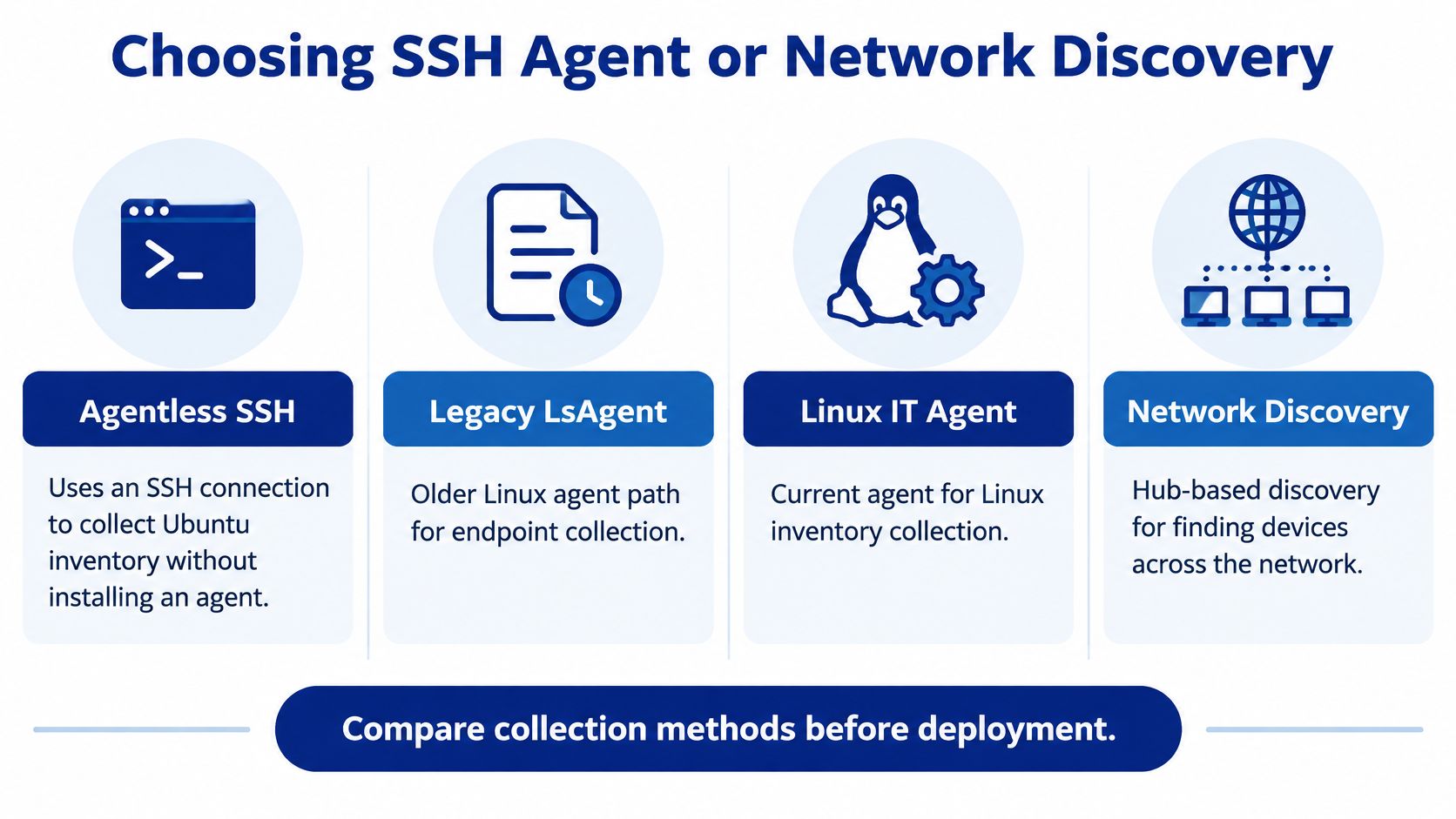
Choose the collection method by reachability, supported Ubuntu release, privilege requirements, and the evidence you need. SSH can collect detailed inventory from reachable servers. A local agent suits hosts where inbound SSH access is restricted, though it still needs a reporting path. Network Discovery is a separate component decision, and it does not replace the endpoint agent on the same host.
Which component fits your Ubuntu release?
Use this Ubuntu discovery component decision matrix to match the component to its host and collection path before setting a fleet standard.
Component | Documented Ubuntu scope | Network need | Privilege | Best when |
|---|---|---|---|---|
Agentless SSH | Validate the target distribution and command availability | Discovery system must reach endpoint SSH | Account can execute ; root isn't mandatory; sudo is recommended | Direct administrative reachability is permitted |
Legacy LsAgent | Pin the build version and confirm the Ubuntu release against its installer notes before approval | Local collection with a configured reporting path | Confirm the installation account can install the package and the agent can read the inventory fields required | Maintaining an existing deployment while planning migration |
Linux IT Agent | Ubuntu 22.04 LTS x64 | Repository access and outbound platform connectivity | Root or sudo for package installation | You need supported local endpoint collection |
Network Discovery | Ubuntu 22.04, 24.04, 25.10, and 26.04, x64 packages | Repository, tenant-linking, and relevant discovery connectivity | Sudo or root for installation | Ubuntu will host the discovery component |
The release entries are documented in the Linux IT Agent installation documentation and Linux Network Discovery support documentation. Don't transfer compatibility from one row to another. A release listed for Network Discovery does not confirm IT Agent support for the same release.
For network-oriented evaluation, separate the wider collection design from an IP scanning workflow. Detecting a device does not establish which software is installed on it.
What are the security and maintenance trade-offs?
SSH provides detailed Linux inventory, including operating system, processor, memory, and installed software. SNMP generally returns less information. The agentless Linux scanning requirements specify that the account must be able to run ; root login is not mandatory, and sudo is recommended for commands requiring additional privileges.
That baseline does not guarantee complete inventory. Check that the least-privilege account can run every command needed to collect the fields you plan to use, then confirm those fields appear in the returned asset record.
Local collection removes the inbound SSH scanning path, while retaining requirements for connectivity, package maintenance, and security review. It shifts the operational work toward endpoint deployment and outbound reporting.
Legacy Linux agents require a separate maintenance decision. The older build depends on .NET Core 3.1 and lacks newer fixes and improvements, while current LsAgent releases use .NET 6, as described in the Linux software scanning guidance. Record continued use of a legacy build as an exception with an owner and review point, rather than treating it as the fleet standard.
For a separate endpoint-management comparison, Asset Management by SuperOps combines automated discovery, lifecycle tracking, policy enforcement, and software licensing visibility. It represents a different operating model and does not establish equivalent Ubuntu collection coverage.
Installing Scans and the Linux Agent
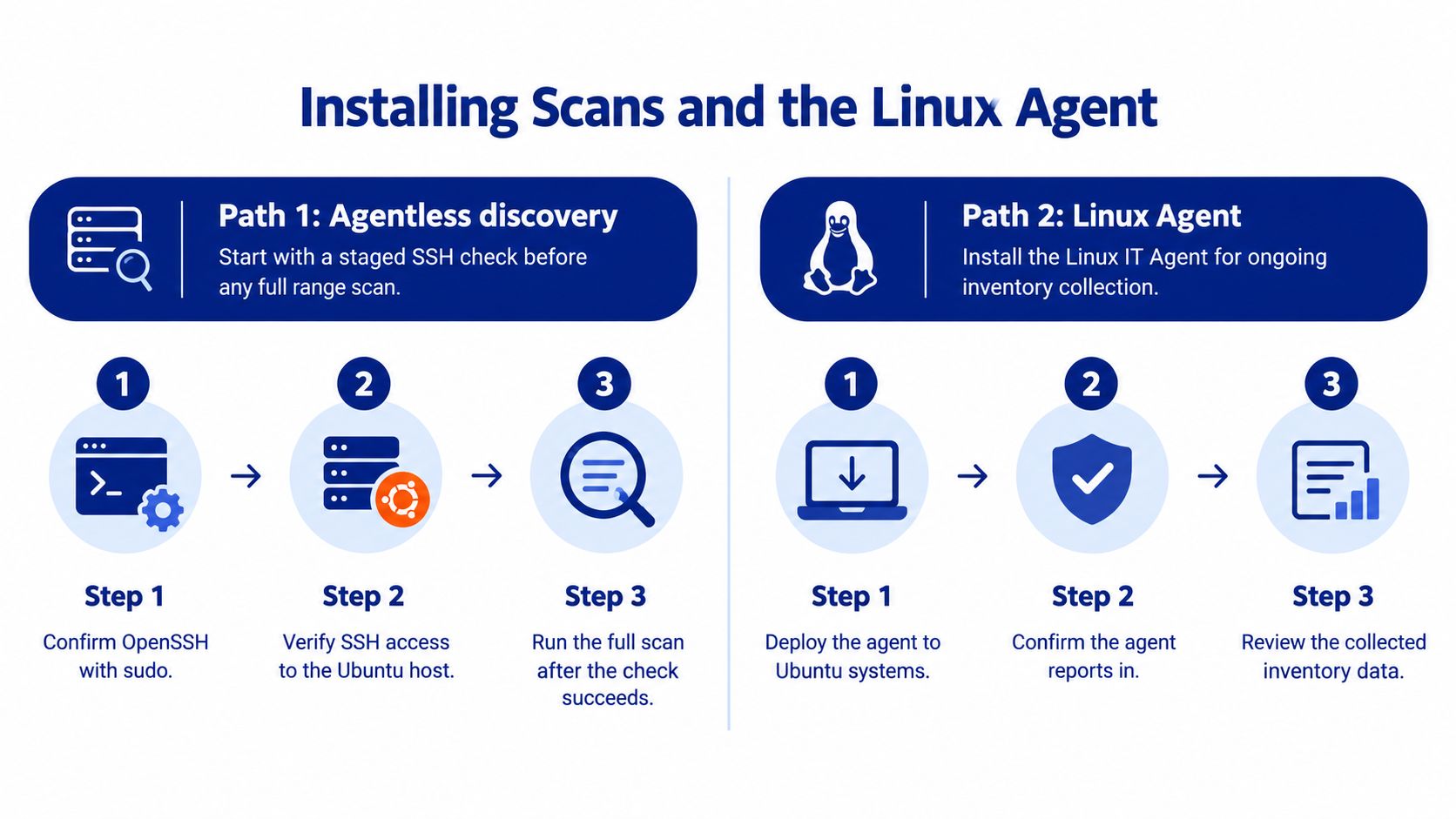
Start with a gated pilot, not a fleet-wide deployment. For SSH, prove the account and network path before adding a scanning range. For local collection, establish release compatibility, repository access, tenant linking, and successful inventory before distributing the package through configuration management.
How do you validate agentless discovery?
Use the SSH requirements established above as acceptance gates. Begin by ensuring OpenSSH is installed with , then enable and start the SSH service through the host's service-management process.
Check the daemon with . Confirm that TCP port 22 is reachable from the discovery system, not merely from an administrator's laptop.
Then validate the collection identity:
Credential: Create the password-based or certificate/key-based SSH discovery credential.
Command access: Use that exact account to execute and test the privileged read-only commands required by your inventory policy.
Network path: Test from the location that will initiate discovery.
Scan execution: Add the relevant range as a scanning target, trigger an immediate scan, and monitor the scanning queue.
Don't schedule recurring scans until the manual test and collected record agree. A successful interactive login through a different account or bastion doesn't prove that the configured discovery credential will work.
Test the path the scanner uses, not the path the administrator wishes it used.
How do you install local collection?
For an IT Agent pilot on a release and architecture listed in its documentation, download the Debian repository package from Lansweeper. Install that package with , then refresh package metadata using .
Generate a site linking code with an expiration date. Install the endpoint package with , replacing the placeholder with the generated value.
In a proxied environment, supply and during installation. Don't run an unmodified installation and assume the agent will inherit every connectivity setting from an interactive shell.
For the Network Discovery hub, use the repository-package pattern and install with . The sensor installation requirements establish the administrative prerequisites: SSH or console access, sudo or root, and permission to install packages through apt.
Keep the pilot record specific:
Deployment metadata: Ubuntu release, architecture, chosen component, and package source.
Connectivity metadata: Proxy configuration, approved outbound path, and responsible network owner.
Linking evidence: Intended site, linking-code expiry, and confirmation that the host appeared there.
Collection evidence: A reviewed inventory record, not just a successful package-manager exit.
Expand through configuration management only after those checks pass. For mixed operating-system fleets, maintain separate deployment runbooks, including a distinct macOS discovery approach, rather than applying Linux assumptions everywhere.
Permissions Firewalls and Inventory Gaps
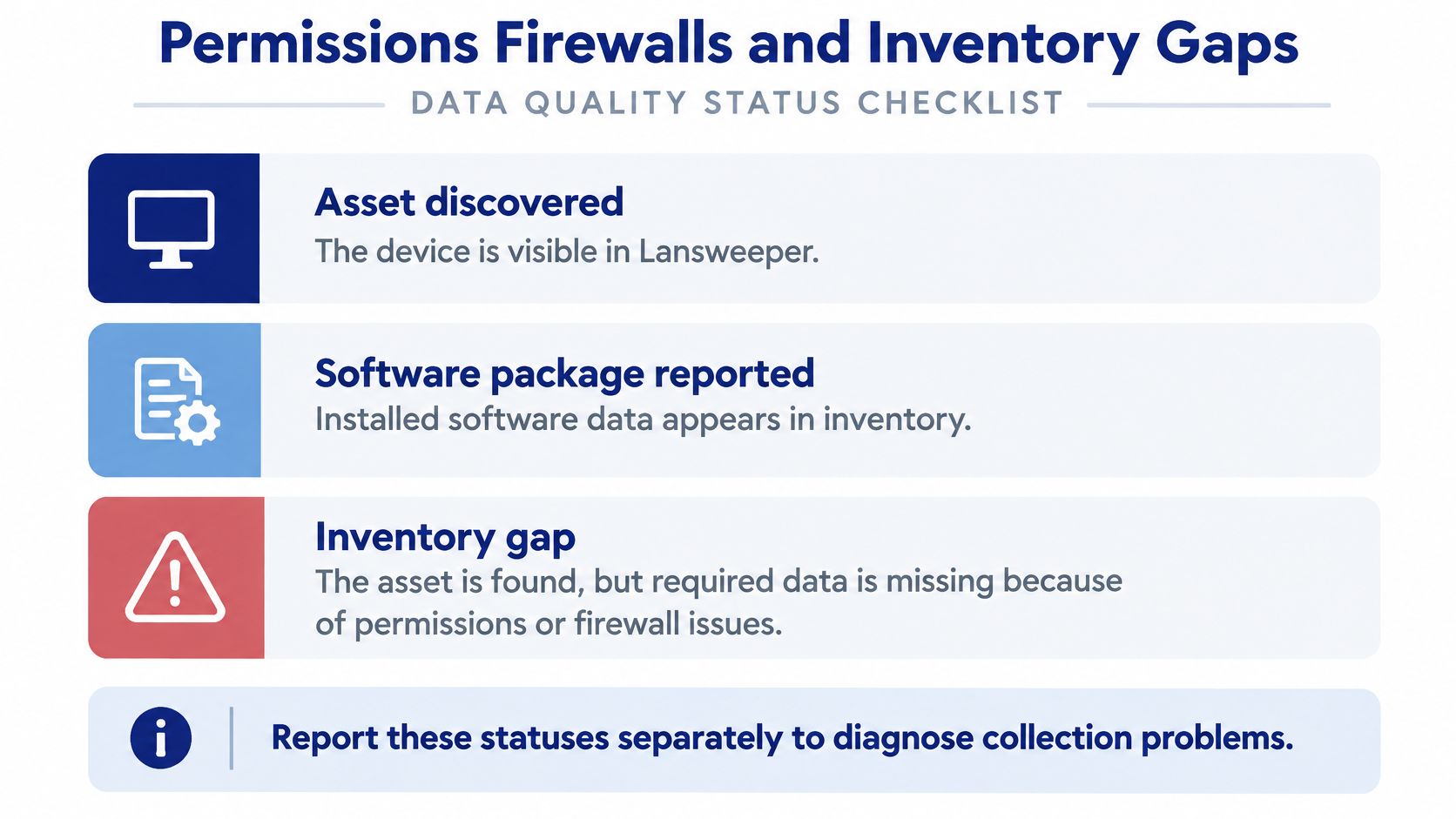
A successful scan isn't proof of complete software inventory or license compliance. Report asset discovery, package observation, and verified license evidence separately. Otherwise, a reachable Ubuntu host with incomplete collection can look indistinguishable from a fully reviewed asset in a procurement export.
What does complete Ubuntu inventory mean?
Lansweeper can inventory installed Linux software with or without an agent. Its Linux inventory documentation explains that collection depends on distribution-specific commands and the target's ability to execute them, making command availability and privileges material to inventory quality.
Define your reporting statuses explicitly:
Status | What you can conclude | What remains unproven |
|---|---|---|
Asset discovered | A device record exists | Required software and version fields are complete |
Software package observed | Inventory contains package evidence | The package represents every installation or a licensable entitlement |
License evidence verified | Required deployment evidence has been reconciled with applicable entitlement terms | Nothing beyond the documented verification scope |
Treat users, services, processes, kernel details, cloud metadata, package versions, and license-relevant fields as validation targets, not universally guaranteed outputs. If your buying decision depends on a field, compare it against the endpoint during the pilot.
Minimal images, containers, restricted shells, and removed utilities may yield partial records even when collection technically succeeds. Repeating the same scan won't restore an absent utility or broaden an account's permissions.
How should security and operations handle exceptions?
Separate connection failures from field-level gaps. Disabled SSH, routing or firewall blocks, incorrect credentials, and restrictive sudo policies require different owners and different remedies.
Current platform deployments also require outbound TLS connectivity to regional gateways, update services, and download endpoints. Review egress allowlisting and data residency before rollout rather than treating cloud connectivity as a post-install detail.
Evidence boundary: A green collection status confirms an execution outcome. Procurement still needs to know which fields were observed and which assumptions remain unresolved.
For immutable images and short-lived cloud workloads, set freshness according to how quickly the underlying asset can change. A record shouldn't remain eligible for purchasing quantities after the instance has been replaced or its identity can no longer be confirmed.
Maintain an exception queue with the asset owner, missing fields, last successful observation, failure category, and next action. Unreachable systems should remain visible as exceptions rather than disappearing from the inventory denominator.
Review inactive asset handling alongside duplicate detection. Don't delete records just to make dashboards cleaner, but don't let stale and replacement instances inflate purchasing quantities either.
Using Ubuntu Data for License Procurement
Use Ubuntu inventory to create a defensible renewal and migration list, not just a device total. Procurement needs to know what's deployed, whether the operating system remains supported, which software evidence is reliable, and which records must be excluded or investigated before quantities are priced.
What does Ubuntu lifecycle reporting tell a buyer?
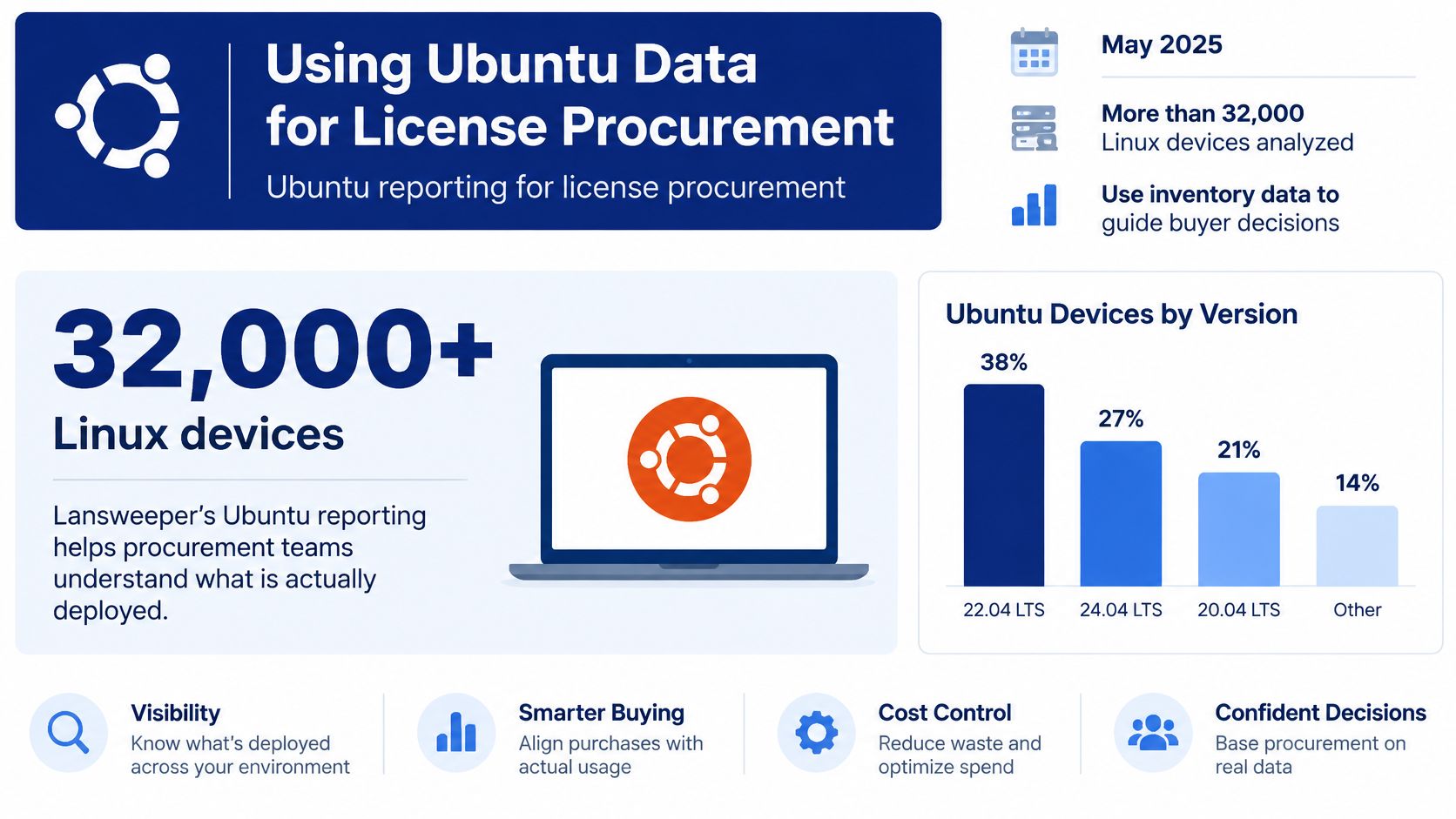
In May 2025, Lansweeper analyzed more than 32,000 Linux devices and found 98.55% running supported Ubuntu versions under standard or extended support, according to its Ubuntu end-of-life reporting. The same reporting describes interim support of 9 months and LTS support of up to 10 years, and identifies per-device operating-system version, end-of-life date, and remaining support.
Those results describe the observed dataset, not your fleet. Your purchasing decision still requires your own asset-level report.
The useful procurement output isn't a binary supported-or-unsupported decision. Assign an owner and action to each relevant device: retain the current release, migrate, verify extended-support coverage, retire the workload, or investigate missing evidence.
LTS selection can reduce the frequency of major operating-system transitions. Interim releases create tighter maintenance windows, so the renewal discussion needs to include engineering capacity and migration timing rather than treating support as an isolated purchase.
How should you prepare an RFQ?
Ubuntu warrants an explicit discovery path in mixed Linux estates. Lansweeper's broader research covered more than 300,000 Linux devices across over 26,000 organizations, with CentOS at 25%, Ubuntu at 20%, and Red Hat at 15%, as reported in its Linux installation analysis.
That distribution mix is useful context, not a basis for estimating your quantities. Don't apply an external Ubuntu share to a partially discovered estate and call the result a measured count.
Prepare an export that buyers can reconcile:
Identity and ownership: Stable asset identifier, responsible team, and operational purpose.
Lifecycle evidence: Distribution version, support status, end-of-life information, and planned action.
Software evidence: Observed packages and versions, with any verification limitations attached.
Quantity controls: Duplicate decisions, stale-instance exclusions, and unreachable exceptions.
Commercial scope: The measured asset band and the capabilities being evaluated.
Keep the CIO summary and buyer worksheet aligned. The CIO needs unsupported-system exposure and migration dependencies; procurement needs an explainable quantity and clear quote assumptions.
A multi-vendor RFQ should preserve those assumptions across proposals. Ask suppliers to state the included scope, quantity basis, renewal terms, and exclusions so you aren't comparing a measured asset-based requirement with an unrelated guessed seat count.
Troubleshooting Scans and Your Next Step
A successful installation does not prove that an Ubuntu fleet is ready for rollout. Start with the first visible symptom, identify the component involved, and rerun the acceptance test tied to that failure. Change one variable at a time so the result shows which dependency was responsible.
What should you check when deployment fails?
Use the symptom to choose the next check, rather than repeating the installation:
Package can't be located: Check repository registration, refresh package metadata, and confirm outbound access to the required discovery-gateway and download destinations. Then retry the package lookup.
SSH inventory is empty: Check that the SSH daemon is running and reachable, then verify the configured identity and permitted commands. Compare the scanner credentials with the account from a successful manual test.
Linking fails: Confirm that the code is valid, intended for the correct site, and entered correctly. Review the proxy settings used during installation.
Software inventory is thin: Check the image, shell restrictions, command availability, and collection privileges. Compare a manual package query with the asset record to locate missing fields.
Legacy agent remains the standard: Check the component matrix and Ubuntu release before choosing a supported replacement. The classic application remains Windows-hosted; Ubuntu support differs among SSH, LsAgent, the IT Agent, and Network Discovery.
Record the correction and run the same acceptance test again. Confirm both a healthy reporting path and the expected inventory fields before widening the pilot.
Can the Ubuntu agent replace the Windows application host?
No. Classic Lansweeper requires Windows. Ubuntu can host or run specific discovery components, including supported agents, but those components do not replace the classic application host. Check the support status for the exact Ubuntu release and component you plan to deploy, then verify its reporting path with one pilot device before rollout.
Does agentless SSH discovery require root?
Agentless SSH needs an account that can execute the commands required for collection. Root is not mandatory, but the approved sudo policy must cover each field your procurement export depends on, such as package lists. Test one host using the proposed account and sudo policy, inspect the resulting asset record, and confirm the required fields before approving that access across the fleet.
Why does a device appear without its software list?
Device matching and package collection are separate outcomes. Restricted privileges, missing commands, shell limits, or a customized image can allow an asset identity to appear while leaving software evidence incomplete. Compare the device record with the package list from one manual command on the endpoint. If that command returns packages missing from the record, investigate collection privileges before changing device-matching settings.
When is Ubuntu discovery evidence ready for procurement?
Proceed when the selected component is supported, reporting is repeatable, required fields match the endpoint, and exceptions are documented. Export the measured asset count, Ubuntu releases, and support status, then use the Lansweeper purchasing page to request a quote against that asset band.
Operations should be able to reproduce the result, and procurement should be able to explain the quantity. Installation success alone does not meet either test.
Stackingo offers an RFQ-led purchasing route for multi-vendor enterprise licenses, including Lansweeper. Bring your validated Ubuntu inventory, measured asset band, and collection requirements to Stackingo to request a quote against the same documented scope.


