
Lansweeper Com: Complete IT Asset Guide
Updated: Oct 10
Is Lansweeper Com only an inventory tool, or can it support the decisions that follow discovery? The concrete answer is that Lansweeper is an agentless IT asset discovery platform that catalogs hardware and software to improve cybersecurity and compliance posture.
That distinction matters to a CIO. Finding devices is only the first step. You also need to understand how complete the inventory is, how vulnerability data maps to real products, where deployment and remediation stop, and how to buy licenses without creating another fragmented vendor process. Lansweeper was founded in Belgium in 2004 and had reported headcount figures ranging from about 400 to 418 employees in 2025–2026 (business profile data).
What Is Lansweeper and Why It Matters
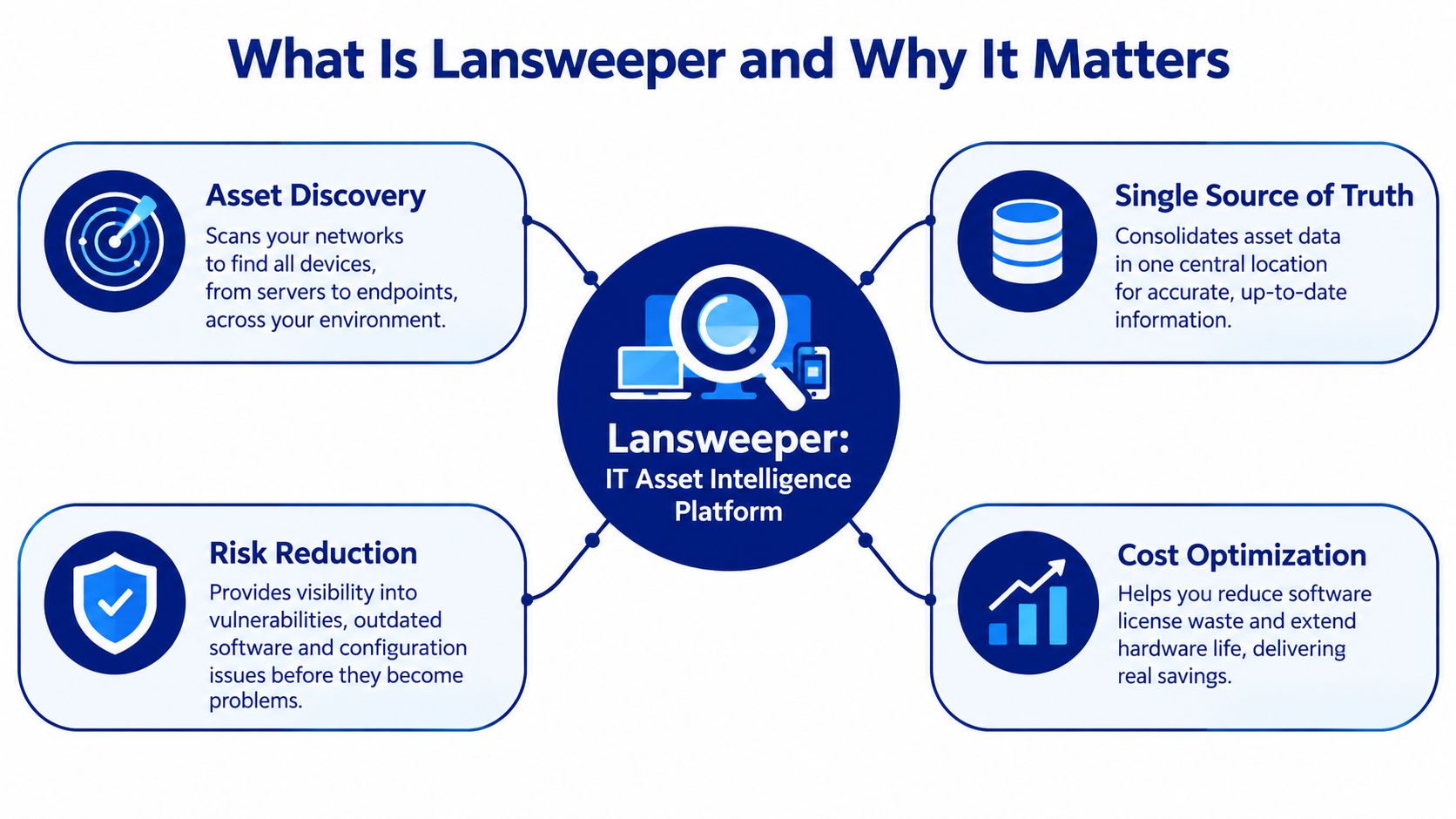
Lansweeper provides technology asset intelligence for organizations that need a dependable view of connected infrastructure. Its documented scope includes IT, OT, and cloud assets, consolidated into a single inventory managed through Lansweeper Sites (Lansweeper Discovery documentation). That makes it relevant to infrastructure teams, security operations, compliance owners, and procurement leaders, not only to desktop administrators.
The operational value comes from connecting inventory to decisions. A security team can investigate whether a vulnerable product exists in the estate. An infrastructure team can identify devices that need lifecycle attention. Procurement can compare the discovered footprint with purchased entitlements, renewal records, and planned technology standards.
Why continuous visibility beats a periodic inventory
A spreadsheet or periodic export becomes unreliable as soon as devices move between offices, cloud accounts, networks, and remote connections. Lansweeper's model is designed to create and update inventory from multiple discovery sources, although the quality of the result still depends on scan targets, credentials, network reachability, and reconciliation rules.
The platform's scale is material. Market data associated with Lansweeper states that it serves over 25,000 customers and monitors around 100 million connected devices (Lansweeper acquisition announcement). Those figures indicate broad enterprise adoption, but they don't remove the need to validate coverage in your own environment.
Procurement rule: Treat an asset discovery platform as a source of operational evidence, not as an automatic guarantee of inventory completeness.
Where Lansweeper fits, and where it doesn't
Lansweeper is strongest when you need discovery, normalization, reporting, and vulnerability context. It can ingest data from platforms such as SCCM and Intune, connect with ServiceNow, Jira, and HaloITSM, and expose inventory through a GraphQL API (asset discovery capabilities).
It isn't automatically a replacement for every IT operations system. Independent reviews describe challenges with large-network setup, weaker deployment tooling, incomplete software inventory in some scenarios, and limited native SOC workflow integrations (Gartner Peer Insights review). Your business case should therefore separate knowing what exists from deploying patches, managing tickets, operating a SIEM, and executing remediation.
For a more detailed commercial and technical overview, see this Lansweeper asset intelligence guide.
How Lansweeper Discovery Works Internally
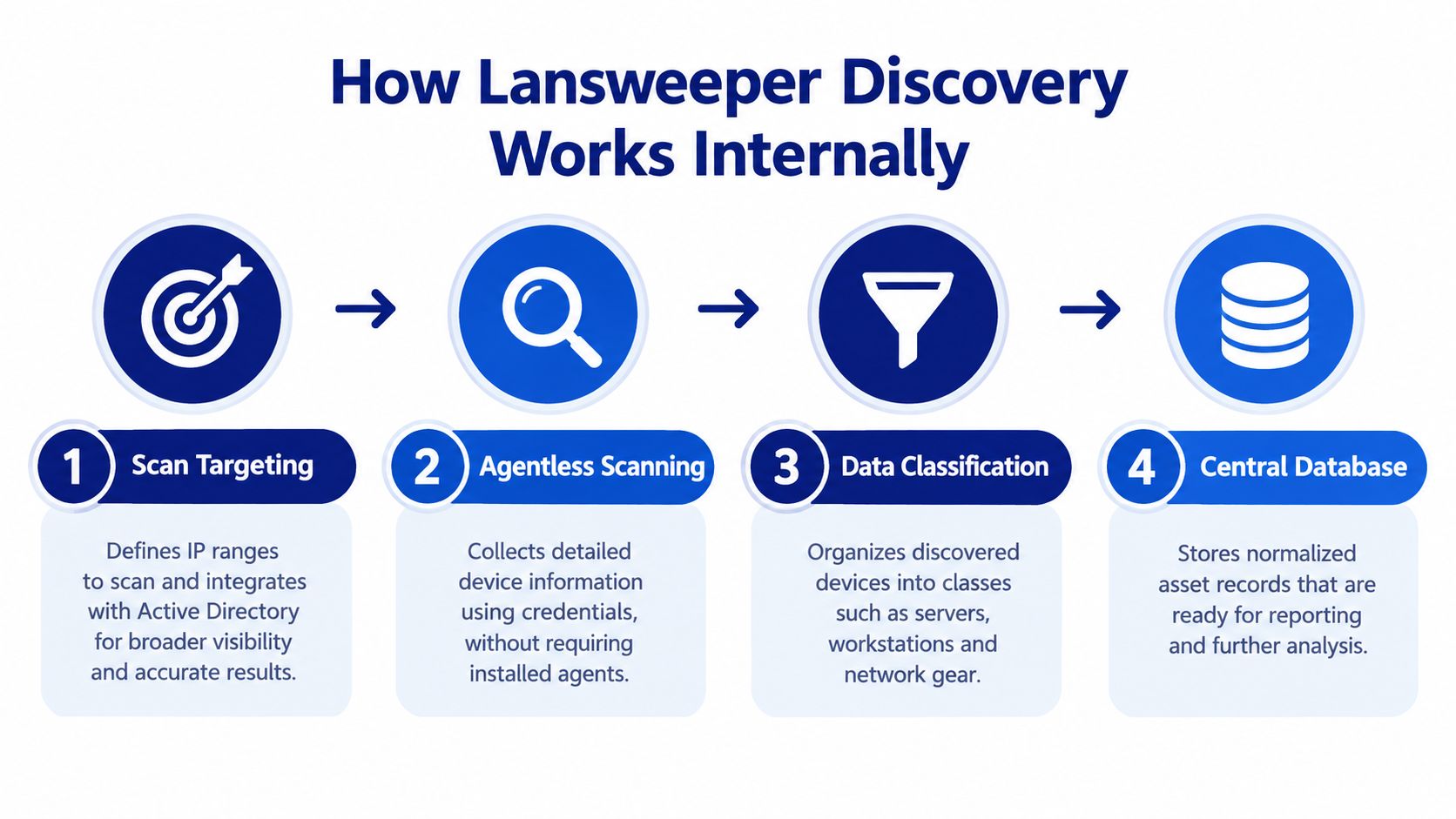
Lansweeper uses an agentless discovery approach that can combine directory-based scanning, network scanning, and device-specific methods. The architecture reduces the requirement to install endpoint software everywhere, but it doesn't eliminate implementation work. You still need to choose targets, establish appropriate access, and interpret the differences between reachable devices and directory objects.
Four practical layers of discovery
First, define scan targets. Lansweeper supports Active Directory domains, IP ranges, and device classes including printers, switches, and ESXi environments (scanning targets and methods). Directory imports can include offline or stale computer objects. IP scans add devices that respond on the network. Those sources answer different questions, so combining them is more reliable than treating one as a complete estate view.
Second, collect data without a universal endpoint agent. Credentialed scanning can gather deeper system information, while credential-free recognition can still help identify reachable devices. The practical trade-off is clear. Agentless scanning lowers rollout overhead, but firewalls, segmentation, missing credentials, VPN usage, and powered-off assets can reduce visibility.
Third, classify and reconcile records. The platform needs to distinguish servers, workstations, network gear, printers, virtual infrastructure, and other asset categories. Data from multiple sources can then be evaluated for duplicates, stale records, and conflicting attributes.
Finally, use the resulting records in Lansweeper Site. Network Discovery requires a sensor and hub, linking them to a site with a linking code, defining subnets or IP ranges, and running discovery (Network Discovery documentation).
What administrators should test before rollout
Use a representative pilot rather than a clean lab network. Include a branch office, a segmented VLAN, remote endpoints, network devices, and systems with incomplete directory data. Compare the discovered records with an independently verified sample, then document which assets were missed and why.
The Lansweeper IP scanner workflow is useful background, but procurement should go further than confirming that a scan runs. Ask whether the resulting data supports your audit reports, vulnerability prioritization, CMDB reconciliation, and renewal decisions.
Cloud Integration and Vulnerability Management
Cloud discovery changes the inventory question from “what responds on our network?” to “what infrastructure exists across every account and provider?” Lansweeper documents connections to Microsoft Azure, Amazon Web Services, and Google Cloud Platform, using machine-to-machine authentication rather than traditional credential-based access (Cloud Discovery documentation).
The workflow involves creating a provider connection, authenticating with M2M credentials, applying filters and schedules, and reviewing the discovered assets in Lansweeper Site. This approach helps teams bring cloud resources into the same operational view as on-premises systems, although account structure, permissions, tagging quality, and ownership data still affect the usefulness of the inventory.

Why CPE correlation improves vulnerability triage
Lansweeper's vulnerability engine uses Common Platform Enumeration, or CPE, correlation to map vulnerabilities to specific software, hardware, operating system, or firmware products in inventory (vulnerability detection documentation).
That is more actionable than a generic host-based alert. Instead of asking which endpoints sit in a broad network segment, security teams can ask which exact product footprint is affected by a CVE. The remediation queue can then be organized around product ownership, exposure, business criticality, and available maintenance windows.
This does not make vulnerability management automatic. CPE matching depends on accurate product identification, and remediation still requires a patching system, deployment process, change control, or a responsible application owner. Lansweeper gives you better evidence for prioritization, but another tool or team may still execute the fix.
Connect inventory to the operating model
A CMDB or service desk integration can turn discovery data into workflow context. The Lansweeper CMDB integration perspective is especially relevant when asset records need to support incident handling, change assessment, ownership, or service mapping.
For a CIO, the business value is the connection between facts and action:
Security: Identify affected product classes instead of reviewing undifferentiated host lists.
Compliance: Produce evidence of what exists, where it runs, and which systems require review.
Finance: Compare observed technology with purchasing records and renewal assumptions.
Operations: Improve the context available to service desks and infrastructure teams.
Licensing Models and Deployment Considerations
Lansweeper's commercial evaluation should begin with the assets you need to count, not a headline price. Define whether the scope includes IP-connected devices, cloud resources, non-IP equipment, remote systems, integrations, reporting, and support. Require the vendor or reseller to state which units are billable and how those units are measured.
Deployment choice affects both operating effort and procurement risk. Lansweeper Classic remains associated with on-premises deployment, while the newer platform experience focuses on cloud administration, integrations, network discovery, and AI-oriented capabilities. Lansweeper announced a redesigned platform interface in 2026, Flow Builder, and the Lens MCP Server for AI grounding. Documentation and product updates continued through September 2026 (platform experience documentation).
Compare the deployment choices honestly
Cloud-oriented deployment reduces the infrastructure your team manages and supports capabilities delivered through Lansweeper Sites. It fits organizations seeking centralized administration across distributed environments, provided connectivity and data-handling requirements are acceptable.
Classic deployment can suit environments shaped by data residency, local control, or network isolation. The trade-off is operational ownership. Your team remains responsible for servers, databases, scanning services, upgrades, connectivity, and internal support.
Hybrid discovery can address remote or off-network devices that fixed scanners cannot consistently reach. LsAgent can extend coverage to those devices, while directory, network, or cloud sources cover other parts of the estate. Review the documentation on LsAgent coverage for off-network devices before assuming one discovery method will cover every asset type.
Recognize the operational limitations
Software detection method matters. Registry-based scanning can miss applications that file-based discovery would identify, and deployment tooling does not always report success reliably. Treat those as validation requirements rather than assuming inventory and deployment results are equally dependable across every endpoint.
Test the operating model before signing:
Coverage: Can scanners or agents reach segmented, remote, and VPN-heavy environments?
Data quality: How are stale Active Directory objects and duplicate records handled?
Software detail: Does detection support your audit and licensing requirements?
Workflow fit: Which system owns patching, deployment, ticketing, and SIEM response?
Commercial scope: How will growth, new cloud accounts, and non-IP assets affect licensing?
Use this Lansweeper pricing and licensing overview as a procurement starting point, then confirm current terms directly because pricing and packaging can change. The technical inventory model should establish what you need to buy. A marketplace can then help turn that defined requirement into comparable license options, rather than forcing procurement to interpret inconsistent quotes.
Procuring Lansweeper Licenses Through Stackingo
The technical decision and the commercial decision often fail for different reasons. An IT team may select the right discovery model, then lose time comparing inconsistent quotes, unclear quantities, separate support terms, and different assumptions about billable assets. A marketplace-led RFQ process can standardize those inputs before the negotiation begins.
Stackingo aggregates software licensing options from multiple technology OEMs into one purchasing experience. For a Lansweeper buyer, the useful function is not just locating a product page. It is capturing the environment, usage scenario, quantities, deployment preference, renewal timing, and integration requirements in a form that can produce comparable commercial responses.
A procurement example without the sales theatre
Suppose your team has already validated Lansweeper against a mixed environment and now needs a production quote. The infrastructure lead knows the scan scope. Security knows the vulnerability use case. Finance wants predictable renewal treatment. Procurement needs an auditable comparison rather than a chain of disconnected emails.
A structured RFQ can bring those requirements together:
Environment: Cloud, Classic, or a combination of discovery methods.
Scope: The asset categories and sources that need coverage.
Operations: Reporting, API access, integrations, and support expectations.
Commercials: Initial term, renewal assumptions, quantities, and partner options.
Implementation: Onboarding responsibilities and any managed assistance required.
This approach doesn't replace technical validation. It prevents the commercial discussion from obscuring technical assumptions.
What a marketplace layer changes
Vendor-direct buying can be appropriate when you need a complex enterprise agreement or direct product engineering access. The weakness appears when every vendor uses a different quote format and every internal stakeholder supplies requirements in a different language.
A marketplace process can help you:
Normalize requirements: Put asset counts, deployment models, and integration needs into a consistent request.
Compare alternatives: Evaluate Lansweeper alongside adjacent ITAM, ITSM, or endpoint platforms when the process scope is broader than discovery.
Clarify discounts: Request partner-supported commercial options without assuming a discount exists.
Reduce handoffs: Keep procurement, IT, security, and finance aligned around one requirement set.
Improve renewals: Preserve the original assumptions so expansion and renewal discussions start from documented facts.
The Stackingo Lansweeper licensing page provides the relevant route for requesting licensing information and procurement support. Use it after your technical team has defined the estate, not as a substitute for a coverage pilot.
Commercial discipline: A comparable quote is only useful when every supplier prices the same scope, term, deployment model, and support expectation.
For enterprise buyers, that distinction is important. The lowest initial quote may not be the lowest total cost if it excludes required integrations, onboarding, support, or the asset categories that matter most to compliance. Ask for line-item clarity and record what the supplier has assumed.
Enterprise Procurement Checklist and Conclusion
Before approving Lansweeper Com, complete these checks:
Validate discovery: Test Active Directory, IP ranges, cloud accounts, network gear, remote systems, and segmented environments.
Confirm vulnerability mapping: Review how CPE correlation identifies the products your security team manages.
Define workflow boundaries: Document which tools handle patching, deployment, service management, SIEM response, and remediation.
Assess data quality: Include stale directory objects, duplicate records, off-network endpoints, and incomplete software detection in the pilot.
Verify integrations: Confirm API, SCCM, Intune, ServiceNow, Jira, and other required connections before contracting.
Model licensing: Ask how billable assets, expansion, renewals, support, and deployment choices affect the commercial proposal.
Standardize the RFQ: Give every supplier the same scope and assumptions so finance can compare like with like.
Lansweeper is a strong fit when your priority is broad asset visibility connected to security and operational reporting. It is a weaker fit if you expect one product to provide deep endpoint deployment, patch execution, native service management, and complete remediation workflows. Pair the platform with a disciplined procurement process, and your decision will reflect both the quality of the inventory and the cost of owning it.
Stackingo helps enterprise buyers source Lansweeper licenses through a structured RFQ process, with comparable requirements, partner-supported quote options, and procurement assistance. Visit Stackingo to define your Lansweeper scope and request a customized commercial path.