
Lansweeper Office 365 Setup and License Optimization
You're usually looking at Lansweeper Office 365 for one reason, your Microsoft 365 tenant feels harder to trust than the renewal spreadsheet sitting in procurement's inbox. The scan is useful, but the value really starts when directory identity, mailbox data, and assigned licenses are all visible in one record, because that's where hidden waste and entitlement gaps stop being guesswork.
Why Unified Identity and Cloud Entitlement Data Matters
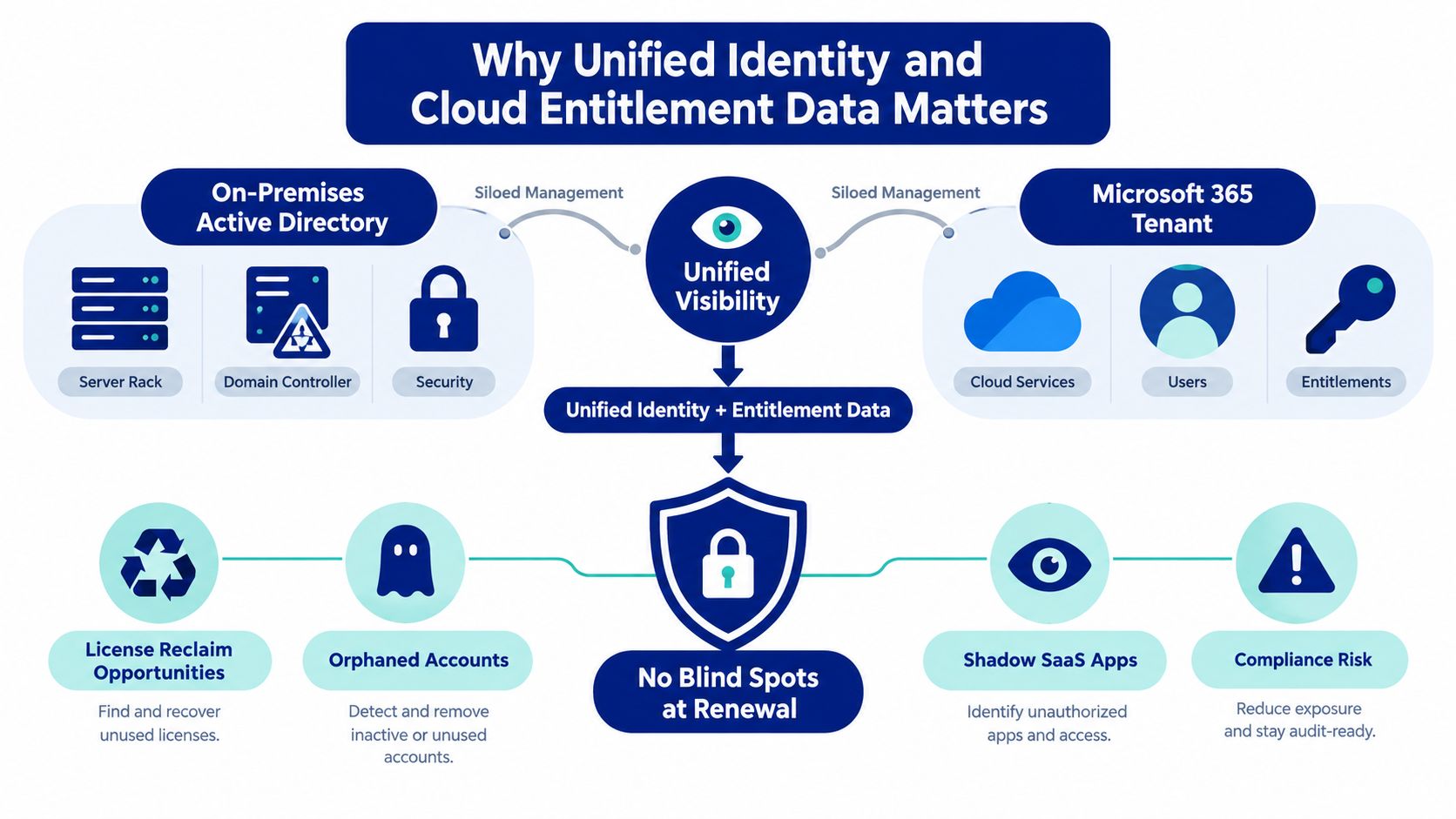
Lansweeper's Office 365 integration is built for inventory, license governance, and identity reconciliation, not for administering Microsoft 365 itself. Its scan pulls organization details, domains, users, groups, assigned licenses, assigned plans, mailboxes, contacts, and ActiveSync devices, then ties that data back to Active Directory or Azure Active Directory so one user record can show both directory identity and cloud entitlement context. That's the difference between a list and a control surface.
Unified records change the renewal conversation
When identity and entitlement data live together, an admin can see whether a user exists in the directory, whether they have a mailbox, and which license or plan is attached. That makes it easier to spot accounts that still look active in one system but are effectively deadweight in another. It also gives procurement a cleaner basis for reviewing coverage before renewal or audit cycles.
Practical rule: if the user record doesn't line up across AD and Microsoft 365, don't treat the license as justified yet.
That matters because Lansweeper's own model is asset discovery, not a procurement marketplace. The tool is strongest when it shows where identity and entitlement disagree, then lets IT and finance decide what to do with that mismatch. For a deeper look at how the scan data connects to Microsoft Graph workflows, see Lansweeper Microsoft Graph setup guidance.
Preparing Azure Application Registration and API Permissions
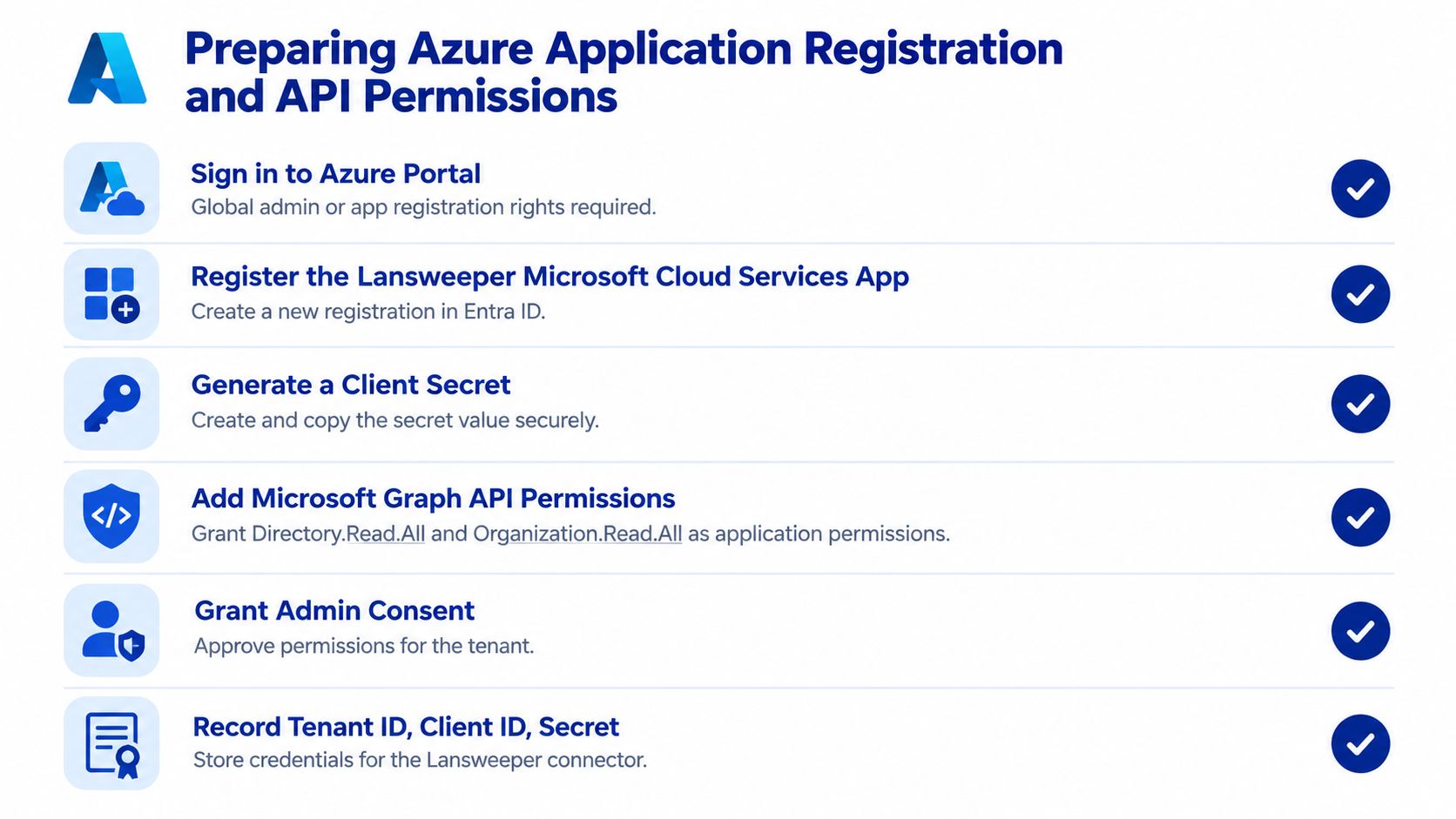
A clean Lansweeper scan starts in Azure, where the Microsoft Cloud Services application is registered and locked down to the permissions the inventory needs. The essentials are the application ID, tenant ID, and either a client secret or a certificate thumbprint, plus the right Microsoft Graph permissions for the scope you want to read. Lansweeper documents Group.Read.All, GroupMember.Read.All, and User.Read.All for Entra ID user and group discovery. The broader platform guidance also points to Microsoft Graph permissions such as Organization.Read.All and Directory.Read.All for Microsoft 365 discovery.
Keep the credential narrow
The safest approach is least privilege. Grant only the permissions needed for the inventory scope, then keep the secret or certificate protected like any other production credential. If the same cloud credential will support multiple Microsoft targets, verify that its permissions cover each target before you reuse it.
The connector also needs to reach Microsoft identity and Graph endpoints, and the scanning host must support TLS 1.2 or later. If the host can authenticate but the app cannot read the object classes you expect, the scan may look healthy while still returning partial data.
Build the Azure app like a production dependency
A working setup usually follows this order:
Register the app in Azure AD, then capture the application and tenant identifiers.
Choose the authentication method carefully, because certificate-based auth is often the better fit for operational scanning.
Assign only the required Graph permissions, then approve admin consent.
Store the secret or thumbprint securely, so the scanning server can authenticate without manual handling.
For a related build-out pattern, the Lansweeper Azure AD setup guide is a useful companion when you're aligning directory discovery with cloud scanning.
Configuring the Scanner and Validating Inventory Completeness
A scan can connect cleanly and still miss the inventory you need for renewal work. The first check is whether the results match what Microsoft 365 already shows in the admin center, because that is what procurement and finance will challenge if the numbers do not align.
What the scanner needs
The scanning server must reach login.microsoftonline.com and graph.microsoft.com, with TLS 1.2 or later enabled. If outbound access is filtered, authentication may succeed while coverage stays incomplete. That is the common failure mode: the connector looks healthy, but the inventory still does not reconcile.
Use a repeatable control. Export the Lansweeper results, export the Microsoft 365 admin center data, normalize UPNs and immutable identifiers, then compare the two sets. A coverage check is only meaningful when both sides use the same naming and identity rules. Lansweeper does not publish a universal success benchmark, so each team needs its own baseline and should rerun it after permission changes.
A green connection light is not proof of complete data.
For operational teams, that difference matters. It separates a dashboard from an inventory you can defend in a license review. If you are connecting this work to endpoint and device visibility as well, see the Lansweeper Intune V2 setup guidance for how the discovery model extends across Microsoft environments.
Validate the objects that matter
Focus on the records that affect renewal decisions, not just the total count of objects returned.
Tenant domains and UPNs show whether the identity space aligns.
Group membership shows whether the user still fits the current access model.
Assigned licenses and plans expose entitlements that need review.
Mailboxes, contacts, and ActiveSync devices help confirm whether the account is still in use.
When those fields line up, the baseline is credible enough for procurement to use. When they do not, the gap is the finding. That gap often becomes the starting point for license cleanup, especially when IT can tie unified AD and Microsoft 365 data back to active use rather than simple assignment.
Translating Inventory Data into License Optimization Strategies
Inventory alone doesn't save money. The savings case starts when assigned-license data is combined with usage signals, HR joiner-mover-leaver records, mailbox activity, and renewal dates so the team can separate needed access from habitual over-assignment. That's the point where Lansweeper becomes useful to procurement instead of just useful to IT.
Turn discovery into decisions
The cleanest framework is a simple four-way decision model: retain, downgrade, reassign, or eliminate. A user with active business needs and the right plan stays put. A user with lighter activity may justify a lower tier. A departed employee's license can often be reassigned, while a service account or compliance-driven seat may need to remain in place.
The reason this matters is the broader SaaS pattern. Independent 2025 SaaS-management evidence indicates that organizations use only about 49% of purchased SaaS licenses, and unused or underused licenses can represent approximately 30% of spend. That doesn't prove every Microsoft 365 seat is waste, but it does prove why procurement shouldn't treat “assigned” as “fully justified.” The full context is summarized in this audit-tool analysis.
Use a decision matrix, not a hunch
User Category | Inventory Signal | Procurement Action |
|---|---|---|
Active knowledge worker | Current plan, mailbox activity, matching directory identity | Retain |
Light user | Assigned higher plan than usage suggests | Downgrade |
Departed or changed role | License present, identity no longer aligned | Reassign |
Shared or compliance account | License intentionally reserved | Eliminate only if policy allows |
Commercial reality: the cleanest savings cases come from seats that are clearly out of sync with user role, mailbox activity, or renewal timing.
A marketplace-led procurement motion helps here, because the inventory data gives you the advantage and the RFQ gives you the comparison. Stackingo can sit in that commercial layer when teams are ready to turn an optimized entitlement picture into a sourcing exercise, and Lansweeper Cleverbridge licensing context is a useful adjacent read when you're mapping software spend to procurement workflows.
Troubleshooting Common Scan Failures and Data Discrepancies
The most frustrating scans are the ones that look fine on the surface and still return incomplete data. In practice, the problems usually come from permissions, connectivity, or credential lifecycle, not from the inventory model itself.
Start with the obvious failure points
Blocked outbound URLs are common. If the scanning host can't reach Microsoft identity or Graph endpoints, the app may still appear configured while the dataset remains partial. Expired secrets are another frequent cause, especially when a team set up the connector once and never revisited the credential calendar.
Insufficient permissions are more subtle. A credential can authenticate successfully and still fail to read all requested object classes, which is why reconciling the scan with expected directory data matters more than a successful login message. If one object class is missing, check whether the app was granted the correct read scope for that class rather than assuming the connector itself is broken.
Reconcile before you escalate
Use the expected-versus-discovered comparison to isolate where the gap begins. If group objects are present but license data is thin, the issue is different from a total tenant shortfall. If the counts diverge only after a permission change, the fix is usually in the Azure app registration, not in Lansweeper's scanner.
The non-active asset troubleshooting guide is a useful companion when you're sorting out whether a record is missing because the object really isn't there or because the scan couldn't reach it.
Scaling ITAM and Procurement with Stackingo
Once the Microsoft 365 inventory is clean, procurement becomes the next practical step. The goal is to turn a right-sized seat count into comparable quotes, shorter decision cycles, and clearer renewal choices across vendors.
Stackingo is a marketplace-first enterprise licensing platform, so a cleaned entitlement picture can feed an RFQ-led buying motion across software and hardware licensing. That matters because Lansweeper pricing is asset-based, with the Pro package including 2,000 assets and scaling up to 9,000 assets, so Office 365 inventory sits inside a broader discovery allowance rather than a separate Microsoft 365-only meter. That pricing structure is described on Lansweeper's pricing page.
Use the inventory as a negotiation asset
The sequence is straightforward. First, establish the baseline inventory. Second, classify what is retainable, reclaimable, or misaligned. Third, bring the cleaned numbers into an RFQ so vendors quote against reality instead of stale entitlement assumptions.
That approach helps IT and finance work from the same evidence. IT can point to the discovered record, finance can evaluate the commercial exposure, and procurement can compare offers without rebuilding the case from scratch.
If you are using Lansweeper Office 365 data to support a renewal or audit cycle, Stackingo can help structure the sourcing exercise. Visit Stackingo to request comparable quotes and move from raw inventory to a cleaner procurement decision.