
Lansweeper Sccm
Your Configuration Manager renewal lands in six weeks, and procurement wants to know why the estate also pays for Lansweeper.
Lansweeper and SCCM usually work best together: Lansweeper discovers and organizes assets across mixed technology estates, while SCCM, now Microsoft Configuration Manager, manages Microsoft-oriented endpoints, software deployment, and compliance. Lansweeper reported monitoring approximately 100 million connected devices for more than 25,000 customers by 2021 (Gartner Peer Insights' Lansweeper profile).
Treat this as a data-pipeline decision. Decide which system discovers assets, which one changes them, and how you keep records consistent through upgrades, permission shifts, and renewals. Feature lists skip lifecycle, validation, and procurement costs, and that is where the core choice sits.
What Each Tool Actually Does in 2026
One platform controls endpoints. The other finds and describes what sits on the network. Treating those as interchangeable jobs is how organizations end up paying for both tools and trusting neither.
Microsoft Configuration Manager, historically called SCCM, is a control platform for managing endpoints, especially in Microsoft-oriented environments. Teams use it for client policy, software deployment, operating-system provisioning, configuration, compliance, and update orchestration. It operates alongside Microsoft Intune and Defender in the broader endpoint stack, but its exact role depends on your management model and existing operations.
Lansweeper is an asset-discovery and intelligence platform. Founded in Belgium in 2004, it developed from a network-inventory product into a platform covering IT, operational technology, IoT, cloud environments, installed software, and users. Its scanning now reaches Windows, Linux, macOS, VMware, and cloud subscriptions, which is why it often finds assets that Configuration Manager never enrolled. It discovers and organizes asset information rather than deploying software or enforcing endpoint policy.
A deployment tool answers "did the change happen?" A discovery tool answers "what exists at all?" Neither answers the other's question, which is why mature estates often run one of each.
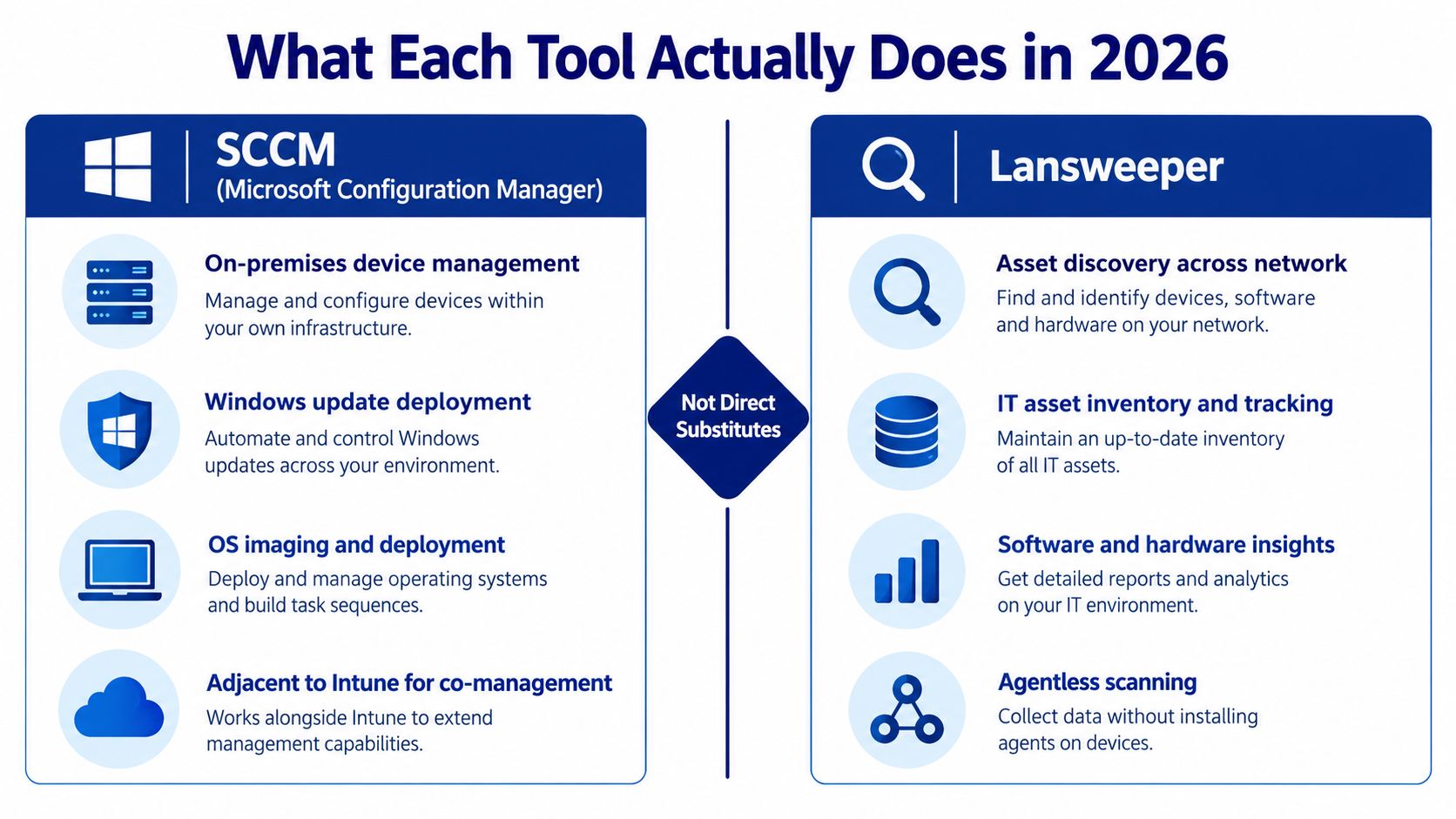
Need | Microsoft Configuration Manager | Lansweeper |
|---|---|---|
Deploy software and updates | Core function | Provides visibility, not equivalent deployment control |
Enforce endpoint policy | Core function for managed clients | Not a replacement for endpoint policy |
Discover and inventory assets | Strong for managed clients | Broad discovery across mixed estates |
Reconcile inventory sources | Centered on its management environment | Can import and organize SCCM inventory |
Operational model: SCCM owns endpoint changes. Lansweeper helps you understand what assets exist and what information is known about them.
If you need a fuller overview of Lansweeper's inventory role, see Lansweeper asset discovery and inventory. For procurement, the distinction matters: broad asset visibility supports renewal planning and audit preparation, while deployment and compliance still need an operational control system. Buying one product to cover the other's job leaves a gap that surfaces at audit time.
Inventory and Asset Discovery Compared
For a mixed estate, Lansweeper is generally the stronger choice for building a broader inventory. Configuration Manager's hardware and software records are valuable, but they primarily reflect devices enrolled and reporting into its management environment. That's a useful operational view, not automatically a complete record of every connected technology asset.
The Lansweeper integration can query the devices listed in Configuration Manager's Assets and Compliance > Devices area and create corresponding Lansweeper assets for Windows, Linux, and macOS systems it hasn't previously discovered. Imported details can include device name, domain, IP address, manufacturer, model, operating system, processor, memory, serial number, resource ID, site, client details, network adapters, and installed software (Lansweeper's SCCM integration guide).
The difference is practical. Configuration Manager is strongest when devices have its client and participate in its inventory process. Lansweeper's broader asset-intelligence role helps surface information beyond that managed endpoint view, including technology outside a primarily Windows fleet. Don't assume every product version, deployment model, or scan method has identical coverage. Validate the exact discovery capabilities you'll use for your own network, cloud services, and device categories.
Inventory question | Configuration Manager | Lansweeper |
|---|---|---|
What's enrolled and reporting? | Strong view of managed clients | Can import SCCM records and scan assets |
What exists outside endpoint management? | May not represent the wider estate | Designed to broaden asset visibility |
What supports license reconciliation? | Useful source for managed-device records | Can organize inventory across sources |
What should procurement verify? | Client coverage and hardware-inventory freshness | Scan coverage, duplicates, and missing asset types |
A licensing baseline should never be treated as complete because an export exists. Reconcile imported records with scan results, investigate duplicates, and identify categories that aren't represented. For more on the inventory-to-record relationship, see Lansweeper and CMDB data.
Patching Deployment and Endpoint Management Scope
If your main requirement is deploying software, managing configurations, or orchestrating updates, keep Configuration Manager in the comparison. Lansweeper can help teams see what assets and installed software are present, but it isn't a like-for-like replacement for endpoint-management functions.
That distinction prevents an expensive mistake. Replacing SCCM's deployment processes with an inventory platform leaves a control gap: you may know which devices need attention without having the same system distribute software, apply policy, or manage deployment workflows. Keep the tool responsible for the change separate from the tool that helps you verify asset coverage.
Use inventory to check management coverage
Lansweeper's value alongside SCCM is the additional read-oriented view. Security, procurement, and IT operations can compare broader asset information with the endpoints SCCM manages. That helps teams spot questions worth investigating: Are there assets absent from the managed-device list? Do installed-software records align with what the endpoint team expects? Are devices represented differently across systems?
Those comparisons don't prove that a deployment succeeded or that a device is compliant. They help you identify discrepancies and route them to the team that owns endpoint policy.
For software distribution: Keep Configuration Manager or another suitable endpoint-management tool responsible for deployment.
For asset visibility: Use Lansweeper to broaden discovery and organize records across a heterogeneous estate.
For remediation: Assign an owner and verify the change in the control system, then update or reconcile the relevant inventory data.
The decision often becomes both-and. A Microsoft-centric organization may need Configuration Manager to run endpoint operations and Lansweeper to give procurement and security a wider asset view. An organization with modest endpoint-management requirements should still assess its actual deployment needs before retaining SCCM, rather than assuming it's necessary because it already exists.
The Integration Is a Pipeline Not a One-Time Setup
A failure mode I see often: the endpoint team upgrades the site server over a weekend, a policy change strips the service account's access, and the next Lansweeper scan returns stale records. Nobody notices until procurement builds a renewal baseline on outdated data. The connector depends on three things staying true over time: access to the Configuration Manager environment, a working permission set, and scheduled scanning, all laid out in Lansweeper's integration documentation. Budget for it the way you budget for the site system it reads from.
Permissions drift causes most of the breakage. Community guidance specifies local administrative rights on the SCCM server and at least the read-only analyst role in SCCM, and scans fail or return incomplete data when the account loses access or the database and WMI paths stop being reachable (Lansweeper community guidance on SCCM integration). Password rotations, server migrations, and routine security hardening all change those conditions without telling you.
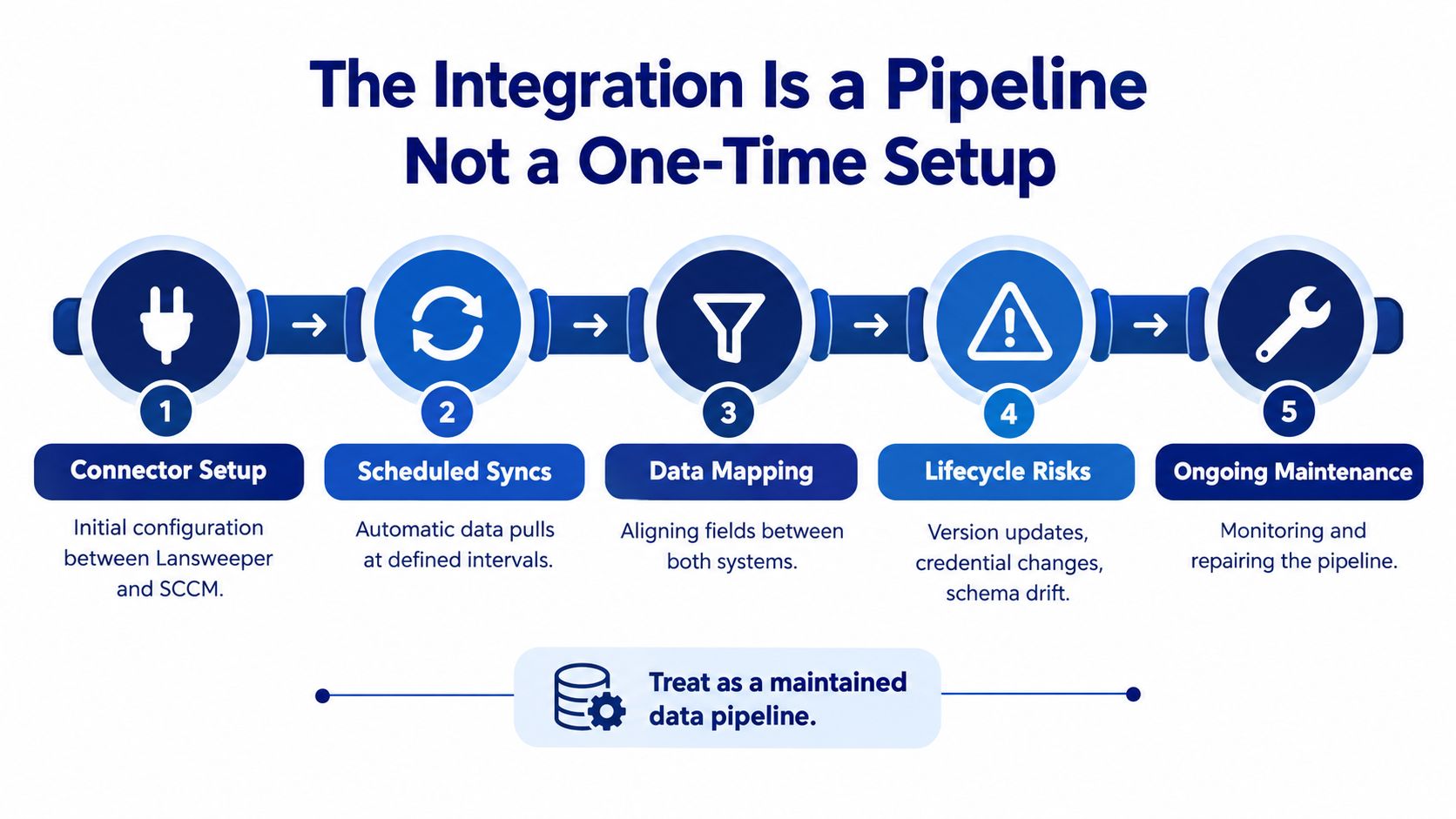
The lifecycle issue is time-sensitive. Configuration Manager version 2409 is scheduled to reach end of life on June 4, 2026, and version 2503 or later is required for continued support and updates, according to the Lansweeper community guidance linked above. Treat that date as a planning trigger. An upgrade can change access, permissions, collections, scan schedules, and the reports behind your asset baseline, and each of those is a place where the pipeline can break without warning.
CIO rule: Put the connector in the change plan whenever Configuration Manager changes. Test the data flow before the upgrade reaches production.
The work splits across two teams, so assign it that way. Before a platform change, have the asset-data owner record the fields and reports procurement relies on. Afterward, have them confirm that Lansweeper still reads the intended devices, that matching has not created duplicates, and that historical records remain usable. If Intune is part of your endpoint strategy, review the separate Lansweeper and Intune integration in the same design review, since the two connectors answer different questions about the same estate.
How to Validate a Lansweeper SCCM Integration
A renewal manager pulls a software report, finance asks where the numbers came from, and nobody can say when the last clean import ran. Treat validation as pipeline acceptance testing: prove the feed is current, complete, and reconciled before procurement spends against it.
Confirm the Lansweeper version. The connector arrived with Lansweeper 7.2; on older releases, upgrade first, using the documentation referenced in the pipeline section. Version debt here turns into permission and mapping defects later.
Review the service account. It needs local administrative rights on the SCCM server and at least read-only analyst rights in Configuration Manager. Use an approved account, name its owner, and have security sign off on the scope.
Check the source inventory first. Hardware inventory must be enabled in client settings. Clients send a full inventory first, then deltas through the management point to the site database, so test after a real cycle rather than after a forced resync; add classes or MIF files only when procurement needs those attributes (Microsoft's hardware-inventory documentation).
Run a limited pilot. Match a small Lansweeper import set against Assets and Compliance. Compare serial number, OS, installed software, last-seen dates, and site assignment. Log every unmatched device and duplicate; both are licensing risk.
Set a recurring scan schedule. Align imports with inventory cadence, assign exception handling, and sample freshness monthly. A green scan job can still hide stale records.
Keep a validation record: compared systems, fields checked, scan date, owners, and open exceptions. If old records inflate the count, use Lansweeper guidance on non-active assets before setting the baseline.
When to Run Them Together and When to Replace SCCM
For many large Microsoft-centric estates, run both. Configuration Manager remains the endpoint control plane; Lansweeper gives procurement and security a wider inventory feed that can expose unmanaged, stale, or duplicate records outside managed clients.
SCCM owns change. Lansweeper knows what changed.
Treat the choice as a data-pipeline decision. Feature checklists stop too early. If Lansweeper only mirrors what SCCM already collects, it adds cost without adding evidence. If it reaches assets SCCM cannot see, or reconciles records across sites, domains, and acquired estates, it earns its place.
Large Microsoft-centric estate: Keep Configuration Manager for endpoint policy, software deployment, and update management. Add Lansweeper when asset visibility needs to extend beyond that management scope.
Heterogeneous or post-merger estate: Use Lansweeper to pull a wider set of asset records into a cleaner inventory. Keep existing endpoint tools until replacements are proven under real permission and lifecycle conditions.
Exiting SCCM for an Intune-first model: Move deployment and policy responsibilities deliberately. Retain or adopt an inventory layer if Intune alone does not give procurement and security the asset coverage they need.
Scale claims matter less than fit. The reported footprint cited earlier supports Lansweeper's relevance, but your own matched records, exception rates, and refresh cadence are the evidence to trust.
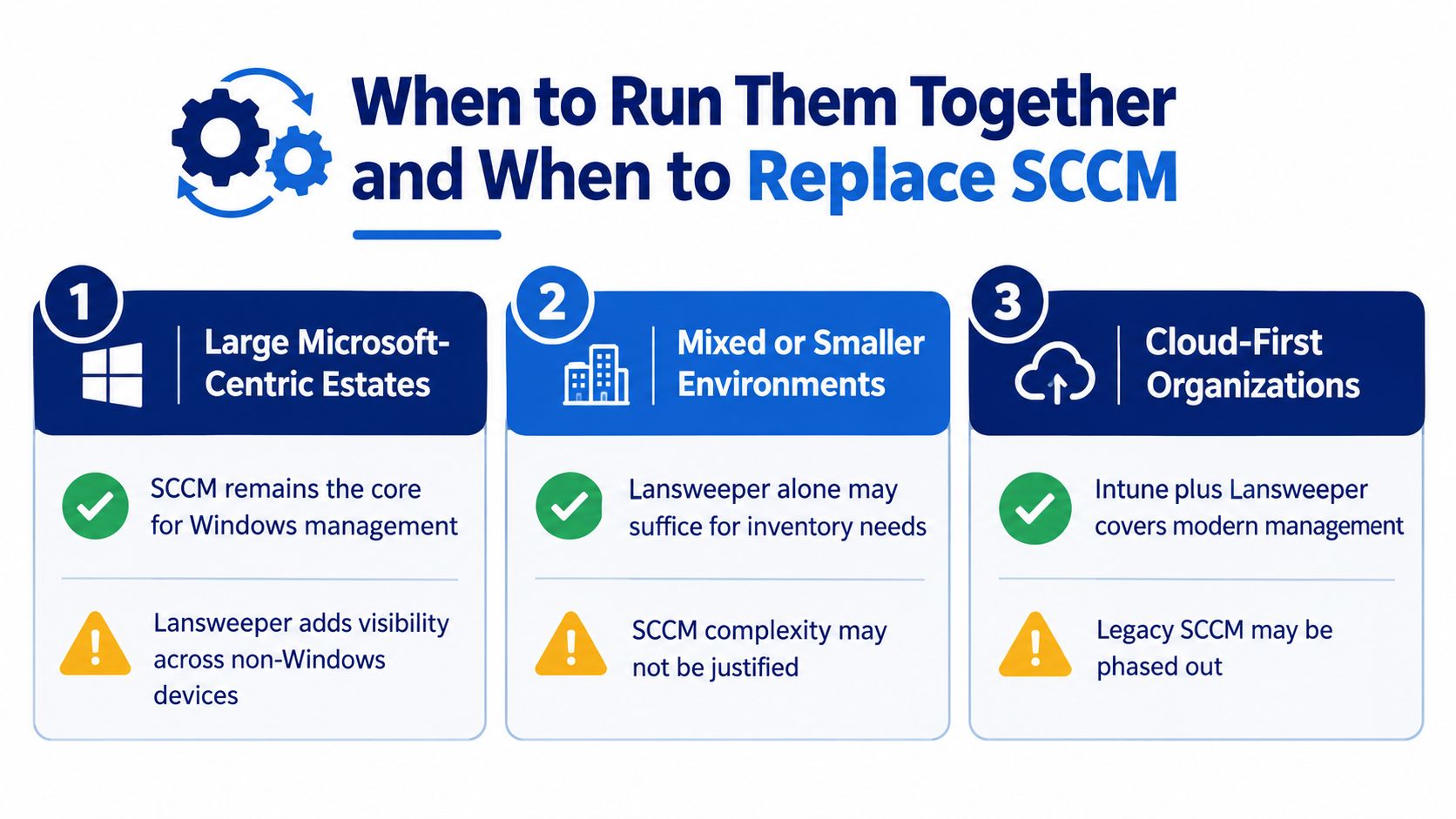
Replace SCCM only after every used function has a capable successor and migration testing shows policy, deployment, reporting, and permission outcomes survive the move. If you are considering Lansweeper as an asset layer alongside Microsoft endpoint management, revisit the Intune relationship covered earlier before you decide.
Licensing Costs and Procurement Implications
Compare the full operating cost, not just the license line. Your assessment should include the tools, upgrade work, account governance, integration testing, exceptions, and the staff time needed to keep inventory records reliable. Those costs vary by environment, so don't accept a generic estimate as a substitute for a scoped quote.
Lansweeper's commercial fit depends on the value of broader asset visibility and the number and types of assets you need to cover. Configuration Manager's cost belongs in the context of your Microsoft licensing agreements and endpoint-management strategy. The right comparison is not just "which subscription is cheaper?" It's whether each product's capabilities justify its license and operational overhead in your environment.
For a procurement review, ask vendors and internal teams to price the same scenario:
Scope: Which asset types and systems must be covered?
Operations: Who maintains permissions, scan schedules, and exception handling?
Migration: What must be retested when Configuration Manager changes?
Commercial path: Can you compare licensing options across vendors using the same requirements and quantities?
Stackingo is one procurement option for gathering multi-vendor software and hardware license quotes through an RFQ-led marketplace. Its model gives enterprise buyers a single commercial front for comparing requirements and quotes from multiple OEMs. You can review the Lansweeper pricing and licensing context, then assess any quote against your asset scope and support requirements.

If you're reviewing Lansweeper alongside Configuration Manager, bring your asset scope, license requirements, and renewal timeline to Stackingo. Stackingo can help you structure a multi-vendor RFQ and compare enterprise software and hardware licensing options through one purchasing experience.


