
Lansweeper ServiceNow Integration: A Step-by-Step Guide
Your connector authenticates, the synchronization job finishes, and your ServiceNow team still can't trust the records. A Lansweeper ServiceNow integration needs more than connectivity: it needs a controlled discovery-to-CMDB pipeline, with tested mappings, explicit ownership, and recovery procedures before you expand across the enterprise.
The practical objective is straightforward: make discovered assets useful to the people handling incidents, changes, compliance, and procurement without introducing conflicting configuration items. Treat a completed job as evidence that the process ran, not proof that the data is correct.
What the Lansweeper ServiceNow Integration Actually Does
Lansweeper supplies discovery data; ServiceNow governs configuration records and their operational use. This is a complementary architecture, not a decision to replace your ITSM platform with an inventory tool.
Start by separating the responsibilities. Lansweeper discovers hardware, software, network, cloud, and IoT assets. ServiceNow provides the configuration-management environment where those records and relationships support asset lifecycle, cybersecurity, compliance, and change-management processes.
Why keep both platforms?
Itron provides a concrete example. The organization operates approximately 20 offices worldwide and used Lansweeper to scan roughly 32,000 hardware and software assets; its CI Synchronizer implementation supplied mappings for more than 30 asset types, over 15 related-list sets, and more than 80 possible CI-to-CI relationships, according to the documented Itron deployment.
That example demonstrates discovery breadth and relationship coverage. It doesn't establish a universal implementation duration, data-quality guarantee, or return on investment.
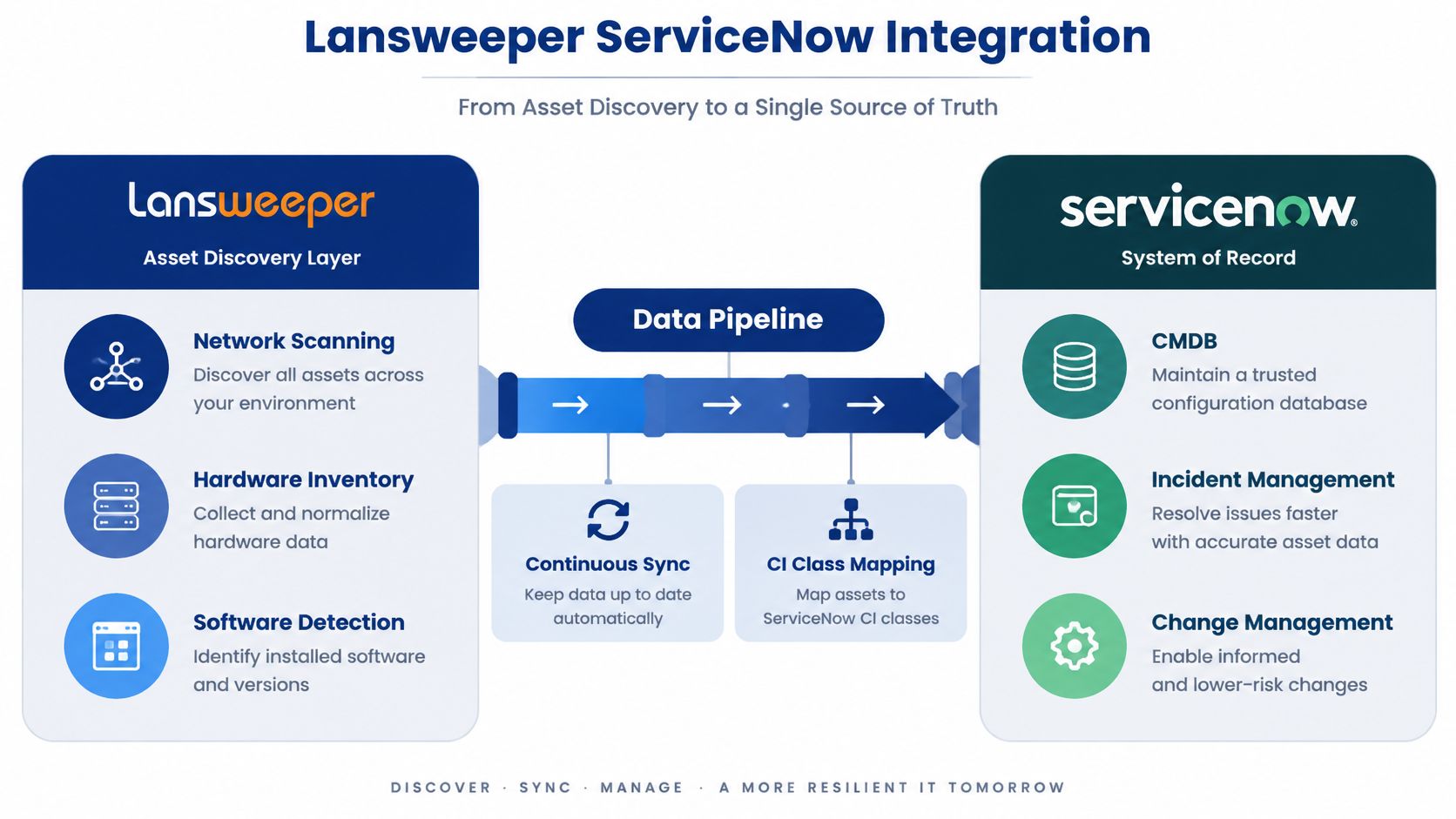
Define the intended outcome in operational terms:
Discovery coverage: Specify which environments and asset categories belong in scope.
Configuration context: Decide which attributes and relationships your ServiceNow consumers need.
Governance: Preserve responsibility for lifecycle decisions, source precedence, and business ownership.
The Lansweeper discovery overview provides related context for evaluating the inventory layer separately from the downstream CMDB.
Scope boundary: Populating a CMDB isn't the same project as synchronizing incidents, requests, and changes bidirectionally.
Keep that distinction in the architecture document and procurement scope. Otherwise, stakeholders may assume that asset synchronization includes workflow automation that nobody has designed, licensed, or tested.
Prerequisites You Need Before You Touch the Connector
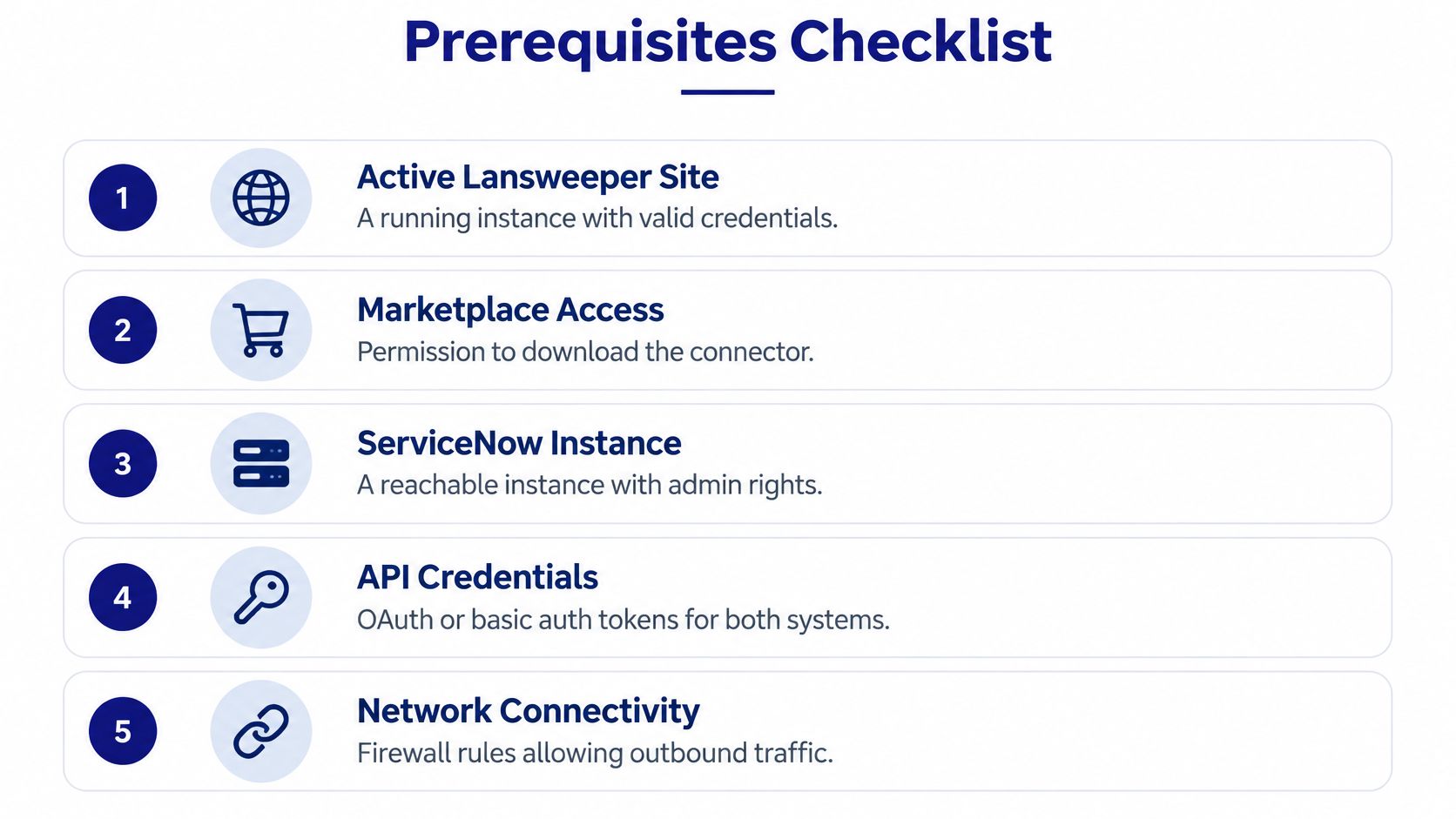
Confirm the prerequisites for your chosen integration route before creating synchronization jobs. CI Synchronizer requirements and general ServiceNow Connector authentication settings aren't interchangeable installation instructions.
Use the checklist below to structure the access review, then validate the exact requirements against the selected connector's documentation.
What should the environment review establish?
For the CI Synchronizer route, prepare an active Lansweeper site, Marketplace access, a configured ServiceNow CMDB, Azure Active Directory authentication, and an on-premises Windows VM for the CI Sync Agent. Assign an owner to each prerequisite rather than recording everything as an undifferentiated integration task.
Site and Marketplace access: Confirm that the integration identity can reach the intended inventory and obtain the required integration components.
CMDB readiness: Have the ServiceNow team approve the destination classes, permissions, and nonproduction test environment.
Agent hosting: Identify who patches, monitors, and recovers the Windows host.
Identity configuration: Separate API authorization from interactive administrator access.
Connectivity: Validate the required application paths with the network team before troubleshooting data mappings.
The hosting and authentication prerequisites are covered in the implementation reference cited with the rollout sequence below.
Why can valid credentials still return no assets?
The API client must be explicitly assigned to at least one Lansweeper site. Without that assignment, the Data API can return an empty authorized-sites response and deliver no assets even though authentication and transport succeed, as documented in the Lansweeper authorized-sites troubleshooting guidance.
Test authorization scope directly. Don't rotate credentials repeatedly when the problem is that the identity has access to no inventory.
For OAuth Authorization Code authentication, include application registration, token configuration, and API permissions in the access review. The detailed ServiceNow Connector requirements are discussed under operational ownership.
If endpoint-management inventory is also involved, use the Lansweeper and AirWatch integration discussion to frame a separate source-overlap review rather than assuming every integration should own the same fields.
Choosing Between the Service Graph Connector and CI Synchronizer
Choose the route that fits your required data model and support arrangement. Connector selection should follow the CMDB acceptance criteria, with tooling decided only after those criteria exist on paper.
The Lansweeper Service Graph Connector description documents asset import into ServiceNow CMDB, automatic translation and mapping, support for additional asset types and software-asset-management use cases, and scheduled synchronization of changes.
CI Synchronizer represents a partner-developed route with relationship automation, illustrated by the Itron implementation discussed earlier. Its documented mapping breadth is useful evidence, but your estate still needs a class-by-class fit assessment.
Decision area | Service Graph Connector evaluation | CI Synchronizer evaluation |
|---|---|---|
CMDB population | Validate imported classes and scheduled updates | Validate job scope and destination mappings |
Relationships | Request the relationship coverage your processes require | Test the supplied relationship mappings against real assets |
Software data | Check the intended software-asset-management use case | Verify software records and related-list behavior |
Support | Establish who handles connector and platform issues | Clarify partner, product, and internal support boundaries |
Commercial scope | Confirm applicable entitlements and ongoing costs | Confirm connector, hosting, support, and maintenance terms |
What should a connector demonstration prove?
Ask each provider to demonstrate your difficult records, not just a clean endpoint. Include assets already represented by another source, records with incomplete identification data, and relationships that your change-management team needs to interpret.
A demo that only shows a pristine VMware import tells you almost nothing about production behavior.
Evaluate the operational work left behind after the demonstration:
Mapping maintenance: Who updates mappings when your CMDB model changes?
Exception handling: Can operators distinguish rejected records from excluded records?
Relationship semantics: Do the resulting links mean what your ServiceNow consumers expect?
Support escalation: Who investigates a payload accepted by one system but rejected by the other?
A packaged mapping set reduces initial configuration but still requires governance work. A narrower integration is cheaper to operate when it covers only the records your organization uses.
Score each route against the five decision areas in the table, and reject any option that cannot demonstrate relationship coverage for the CI classes your change-management process reads. Weight the support and commercial rows heavily: the cheapest contract becomes expensive the moment your team starts hand-building the relationships the connector left out.
Staging the Rollout From Pilot to Production
Promote the integration through explicit acceptance gates. A limited pilot should establish data quality and recovery behavior before production volume increases.
The CI Synchronizer implementation documentation describes the required site access, CMDB preparation, Azure Active Directory authentication, and Windows agent host. It also allows the agent to run on the Lansweeper Scanning Service server, which can reduce infrastructure overhead but deserves a shared-host capacity review.
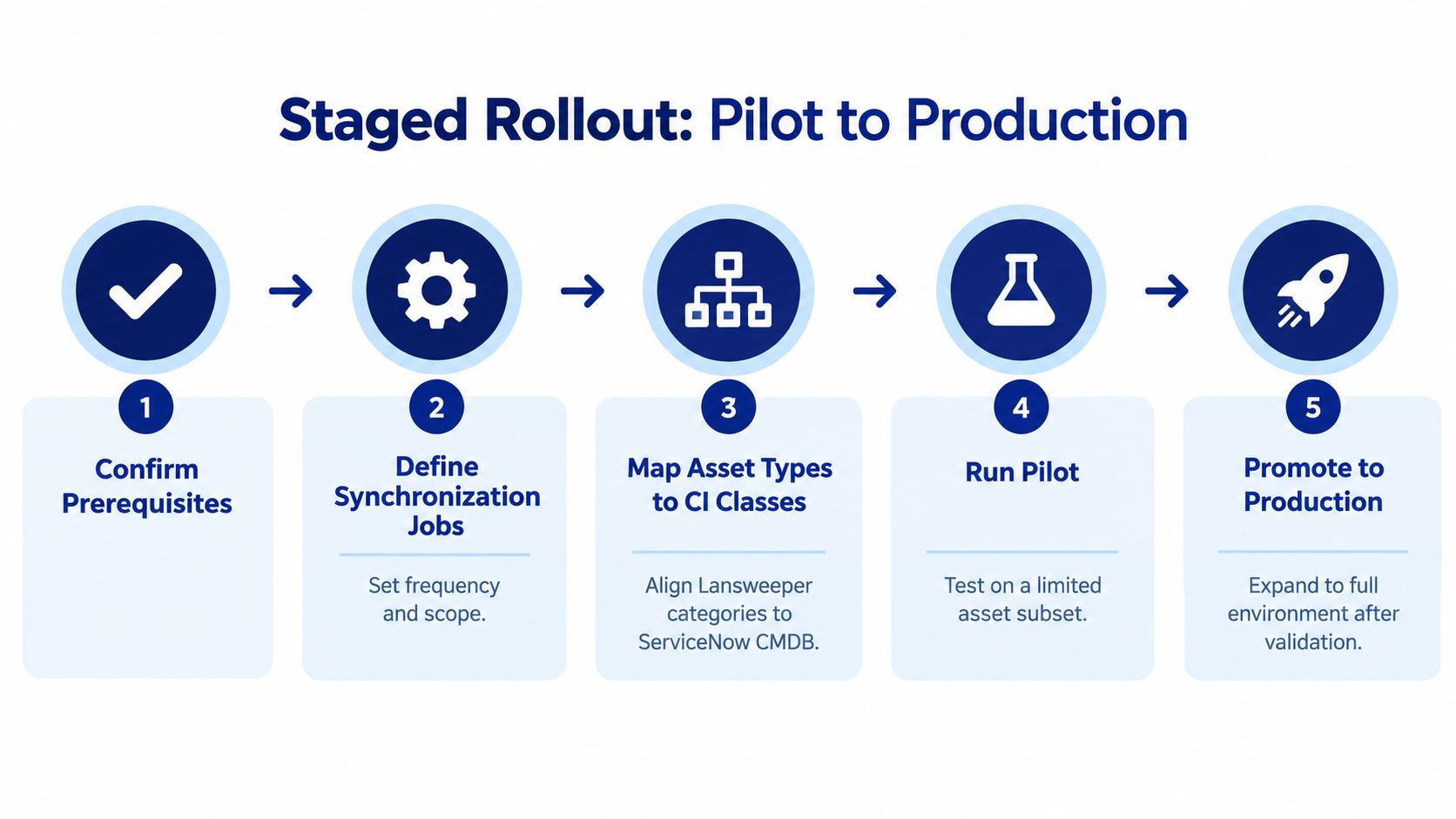
Confirm prerequisites. Record evidence of site authorization, destination access, host readiness, and named support contacts.
Define synchronization jobs. Specify included sites, asset categories, exclusions, and intended scheduling. Avoid beginning with the entire discovered estate.
Approve mappings. Review destination classes, required attributes, identifiers, and relationship direction with CMDB governance.
Run a representative pilot. Include clean records and deliberately awkward cases, such as incomplete identifiers or assets already supplied by another integration.
Promote after validation. Expand by an approved scope boundary, then compare results before proceeding further.
Which measurements should control promotion?
Set local thresholds before running the pilot. The published implementation materials don't establish an independently verified success-rate benchmark, so don't substitute a generic vendor percentage for your own acceptance criteria.
Pilot measure | Recommended definition |
|---|---|
Acceptance rate | Accepted in-scope records divided by records submitted |
Duplicate rate | Newly identified duplicates normalized to the synchronized population |
Field completeness | Required destination attributes populated for accepted records |
Mean exception-resolution time | Average elapsed time from exception detection to verified correction |
For duplicate reporting, use per 1,000 synchronized assets as a consistent normalization unit, not as a performance claim or acceptable defect allowance.
A green job status answers whether the job completed. Your pilot must answer whether the CMDB became more usable.
Validate relationships and updates, not just newly created records. Keep an exception register that connects each problem to its source payload, destination record, responsible team, and correction.
Mapping Lansweeper Asset Types to ServiceNow CI Classes
Approve the class model and matching strategy before the first production payload arrives. A field-copying shortcut here becomes an identity defect later, and remediating a misclassified CI population costs far more than a workshop that runs a few days longer.
Treat the table below as a proposed workshop reference. The destination labels are conceptual class choices, and the identifiers are candidates that must be checked against your actual ServiceNow identification rules rather than assumed to match connector defaults.
Which mapping decisions need explicit approval?
Common Lansweeper Asset Types Mapped to ServiceNow CI Classes
Lansweeper Asset Type | ServiceNow CI Class | Primary Identifier | Notes |
|---|---|---|---|
Computer | Computer | Validated hardware identity | Don't depend on device name alone |
Server | Server or approved server subclass | Stable hardware or platform identity | Confirm subclass requirements |
Network Gear | Approved network-device class | Validated serial or device identity | Test missing and reused values |
Printer | Printer | Validated hardware identifier | Define handling for incomplete records |
Mobile Device | Approved mobile-device class | Validated device identity | Review overlap with endpoint management |
Virtual Machine | Approved virtual-machine class | Platform-scoped instance identity | Preserve the relevant platform context |
Software Installation | Approved software-installation class | Host identity plus approved installation identity | Distinguish installations from software products |
A candidate identifier earns its place in a matching rule only after testing. Verify uniqueness, persistence, and coverage across subsidiaries and discovery sources before approving it. Serial numbers get reused on refurbished hardware, device names drift after renames, and virtual assets inherit identifiers from their platform layer. Each of those failure modes has surfaced in real rollouts I have reviewed.
Identification keys: Prefer stable identifiers appropriate to the class, with documented fallback behavior.
Discovery source: Designate Lansweeper explicitly so operators can trace source-specific changes.
Reconciliation authority: Approve which source may update each governed attribute.
Relationships: Validate both endpoints and direction before treating a relationship as operationally meaningful.
The CMDB and Lansweeper mapping discussion works well as a companion for separating inventory attributes from configuration-management decisions.
Custom fields need their own acceptance tests. Check supported values, empty-field behavior, and whether an incoming blank should preserve or clear existing data.
Add an acceptance test that fails any mapping which lets a discovered field overwrite a governed business-ownership attribute.
Stopping Duplicate CIs Before They Multiply
Duplicate CIs are a pipeline defect. Investigate the cause before cleanup becomes the routine that hides it.
ServiceNow's Identification and Reconciliation Engine evaluates each payload, applies identification rules, then checks reconciliation permissions before it updates or creates a CI. The risk rises when Discovery, Import Sets, Service Mapping, or another integration can present a competing identity for the same asset.
ServiceNow documents automatic reconciliation as enabled by default with a five-duplicate threshold; below that threshold, the oldest CI can be retained as the main record while the others are marked as duplicates, according to its duplicate-CI identification documentation.
That default contains noise. It does not prove the surviving record has correct ownership, lifecycle state, or relationships.
Run a collision-test matrix before approving wider scope. Give every case a pass and fail condition:
Renamed device: pass when the existing CI is updated in place; fail when the rename creates a second record.
Reimaged endpoint: pass when identity rules intentionally preserve or replace the record as designed; fail when the same chassis returns under two CIs.
Conflicting sources: pass when only the authorized source changes each governed field; fail when an overlapping observation rewrites ownership or location.
Incomplete identity: pass when the payload is rejected or quarantined under an approved fallback; fail when a blank key still lands as a new CI.
Repeated payload: pass when replayed data produces the same update result; fail when a resend forks the CI.
After each pilot run, review de-duplication tasks and the normalized duplicate rate. If the rate rises, stop expansion and inspect identification rules, inclusion conditions, source permissions, and payload mappings.
Lifecycle decisions need the same discipline. Use the handling inactive Lansweeper assets guidance as related context, while keeping inactivity, retirement, and duplication as separate states. A temporarily unreachable asset, a retired asset, and a duplicate record require different handling; write those outcomes down before automated cleanup touches the CMDB.
Scheduling, Tuning, and Operational Ownership
Production readiness means somebody can explain each run, investigate incomplete results, and recover without indiscriminate deletion. Schedule design, access control, and commercial ownership belong in the operating model.
For the initial baseline, choose a staffed, lower-demand window. Afterward, evaluate incremental synchronization where your selected route supports it, and tune batch sizes using measured destination load rather than assumptions.
Separate discovery scheduling from import scheduling. For OT and IoT environments, review discovery constraints with the operational owners and throttle synchronization batches where necessary; slowing imports doesn't make an unsafe discovery configuration safe.
Who owns each production responsibility?
Responsibility | Accountable team | Required operational evidence |
|---|---|---|
Discovery coverage | Lansweeper platform team | Site scope, exclusions, last successful discovery |
CMDB governance | ServiceNow configuration-management team | Class standards, source authority, quality approvals |
API credentials | Identity or integration-security team | Permission review, rotation and revocation procedures |
Transform maps and mappings | Integration engineering | Versioned changes, test results, rollback instructions |
Licensing-impact review | ITAM and procurement | Contract scope, count assumptions, renewal review |
The general Lansweeper ServiceNow Connector can manage table records, incidents, attachments, CMDB entries, knowledge articles, and users. Its connector authentication documentation requires an active ServiceNow account with relevant API permissions; OAuth Authorization Code setup includes application registration under System OAuth > Application Registry, client credentials, token URL, and applicable scopes.
That broader API capability doesn't establish an out-of-the-box bidirectional ITSM synchronization process. Grant only the operations your implemented workflow requires.
What should operators monitor and recover?
Record received, accepted, rejected, updated, and created records per run. Define those counters carefully because created and updated records may be subsets of accepted records rather than separate totals.
Zero-record alerts: Compare the result with expected scope, not merely job completion.
Partial-sync alerts: Check site coverage, class distribution, and missing relationships.
Freshness checks: Compare discovery timestamps with synchronization and destination-update timestamps.
Recovery discipline: Pause affected jobs, preserve logs and payload references, correct the cause, then replay a controlled subset.
Preserve mapping versions and before-change evidence. A recovery plan should identify affected records and attributes; deleting everything created during a run is too blunt when legitimate updates and relationships are involved.
Where scripts supplement the connector, apply the same controls described in the Lansweeper PowerShell integration discussion: named ownership, reviewed changes, and auditable execution.
What should procurement validate?
Ask vendors to confirm the asset-count basis, tier boundaries, connector entitlements, support responsibilities, and renewal terms in writing. Verify whether the proposed scope changes your ServiceNow software-asset-management requirements rather than assuming discovery data includes every downstream entitlement.
The Lansweeper catalog listing identifies Stackingo as an authorized reseller and lists $239 per 2,000 assets per month, alongside a $203.15 channel price per 2,000 assets per month. Treat these as catalog reference prices and request a scope-specific quote covering contract terms and integration dependencies.
Keeping ServiceNow while adding discovery can be commercially sensible when your workflows already belong there. Compare the complete operating cost, including support, mapping maintenance, hosting, and exception handling, rather than comparing subscription lines alone.
Does the Lansweeper ServiceNow integration replace ServiceNow?
No. The architecture described here retains ServiceNow for configuration governance and operational processes while adding discovered inventory.
Why does a Lansweeper ServiceNow job finish with incomplete data?
Check authorization scope, exclusions, rejected records, and required-field mappings. Successful execution doesn't establish complete delivery.
When should a Lansweeper ServiceNow pilot expand?
Expand after the CMDB owner approves the agreed quality checks and operators demonstrate recovery. Don't promote solely because the connector reports success.
Bring your asset scope, preferred integration route, existing ServiceNow entitlements, and renewal dates to Stackingo for an RFQ-led comparison of licensing options. Ask for a structured quote that separates discovery licensing, connector dependencies, and partner-delivered implementation so procurement and engineering can approve the same scope.


