
Lansweeper WMI Setup: How Do You Get Scans Working?
An open RPC endpoint doesn't prove Lansweeper WMI inventory will work. Lansweeper retrieves most Windows asset data through WMI, so connectivity, authorization and the target's WMI health all matter, as its Windows collection documentation explains. Validate a complete pilot record before expanding discovery.
Meta Title: Lansweeper WMI Setup and Windows Scan TroubleshootingMeta Description: Get Lansweeper WMI scans working with practical port, credential and permission checks. Validate a pilot, diagnose errors, and choose agents for restricted networks.Blog Title: Lansweeper WMI Setup: How Do You Get Scans Working?
What Lansweeper WMI Needs Before the First Scan
A working agentless scan requires a running WMI service, network reachability, appropriate account rights and outbound scanner access. Allow outbound connections from Lansweeperservice.exe on the scanning server, and check both endpoint firewalls and intervening security controls.
Lansweeper's Classic domain-scanning requirements specify administrative privileges on the client and support for 32-bit and 64-bit computers running Windows XP or newer. That's inventory compatibility, not a recommendation to retain unsupported operating systems. No Lansweeper software needs to be installed on the target.
Lansweeper WMI requirements by scan scenario
Scenario | Account rights | Ports | Extra conditions |
|---|---|---|---|
Domain-joined Windows, administrator account | Local admin on the client | TCP endpoint mapper plus dynamic RPC ports | WMI service running on the target |
Domain-joined Windows, least-privilege account | Distributed COM Users, Performance Monitor Users, WMI read on | TCP endpoint mapper plus dynamic RPC ports | DCOM launch and activation rights granted |
Workgroup Windows Vista or later | Admin rights on the client | TCP endpoint mapper plus dynamic RPC ports | UAC disabled for the scan account; security model set to Classic |
Distinguish modern delegated permissions from legacy workgroup requirements. The Classic workgroup-scanning requirements specify the UAC, Classic security-model and administrator conditions for Windows Vista and later workgroup targets.
Security boundary: Don't weaken UAC across a workgroup just to make discovery convenient. Evaluate an agent when the documented requirements conflict with your security baseline.
Keep Active Directory discovery separate from endpoint inventory validation. Finding a computer object doesn't establish that its Windows inventory is accessible.
Open the Ports, Add Credentials and Validate a Pilot Scan
Start with a single reachable target, establish remote WMI access, then validate a representative pilot. A ping tests reachability, not authenticated inventory collection. Don't distribute a broken firewall or credential configuration across an entire subnet.
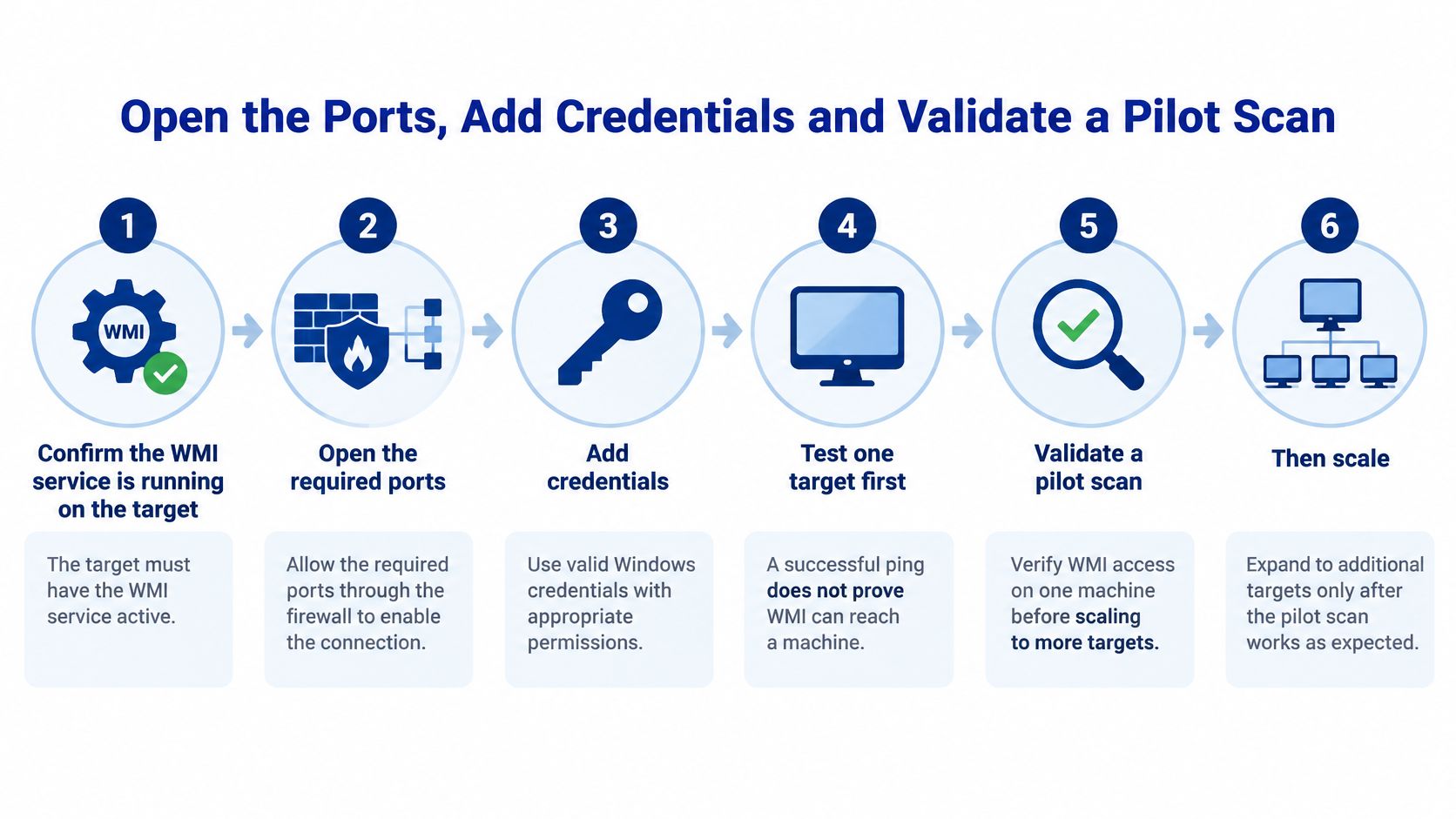
How should you establish transport and permissions?
Confirm the WMI service is running. Check Windows Management Instrumentation on the target. Investigate a stopped service before changing remote permissions.
Validate name resolution. Confirm that the scanning server resolves the target hostname to the intended machine. A stale record can send a valid credential to the wrong endpoint.
Test the endpoint mapper from the scanner. Use PowerShell's . A successful result proves this connection only, not the subsequent WMI session.
Permit negotiated DCOM traffic. The Windows scanning requirements identify TCP 135, followed by dynamic ports, typically TCP 49152–65535 on modern Windows or 1025–5000 on some legacy configurations. Scope exceptions to the scanning server and approved targets rather than opening the range network-wide.
Add the prepared Windows credential. Use the appropriate domain-qualified username and map it to the intended targets. For least privilege, grant the group memberships in the requirements table, Enable Account and Remote Enable on , DCOM local and remote launch/activation rights, and read access to registry locations needed for inventory.
Don't assume group membership grants every required namespace permission. Check the effective permissions on the actual pilot endpoint, particularly where administrators apply different policies by organizational unit.
What must pass before you expand the scan?
Create a representative pilot. For example, choose five to ten machines mixing Windows clients and a Windows Server. Treat that as a proposed test batch, not a vendor-prescribed minimum. Use a single host first, then controlled domain or IP-range targets.
Run a manual scan and inspect its log. Record the first error, affected target and credential mapping. Change the relevant layer rather than editing unrelated settings together.
Query the namespace remotely. Test from the scanning server using the scan identity. Use a DCOM-based WMI test, because a default WSMan-based CIM session doesn't validate the same transport.
Inspect the resulting inventory. Check operating system, hardware fields, installed software, uptime and last-scanned date. Require current values for every applicable pilot field, and document legitimate exceptions rather than treating blanks as success.
A completed scan job isn't proof of a complete inventory record.
Use a dedicated service identity with an owner and a controlled rotation procedure. Ensure its password won't expire unexpectedly during scheduled collection, without bypassing your credential policy. Expand your IP-range scanning targets only after the pilot passes both remote-access and data-quality checks.
Fixing Access Denied, RPC and WMI Repository Errors
Access Denied should trigger an account check, not an automatic repository repair. Record the symptom, verify transport, then inspect authorization and Windows hardening. Only investigate repository damage after simpler explanations have been tested.
WMI scan errors, causes and first checks
Symptom | Likely cause | First check | Fix |
|---|---|---|---|
Access Denied () | Wrong or expired credentials, missing WMI/DCOM rights, firewall block, or hardening incompatibility | Credential validity and password expiry | Correct the account, grant delegated rights and apply required Windows updates |
RPC server unavailable | Blocked endpoint mapper or dynamic RPC traffic, or incorrect name resolution | Endpoint-mapper test from the scanner | Correct scoped firewall rules and the DNS record |
WMI repository issues or missing data | Stopped service or corrupt/inaccurate repository | Service status and query | Start or restart the service when appropriate; repair only the affected host after backup |
Antivirus status empty | Windows Server generally lacks the AntiVirusProduct class | Target operating system and class availability | Treat absent server-class data as expected; use another server-security evidence source |
Agent scan works, WMI scan fails | Network, DCOM or authorization configuration | LsPush result for the same endpoint | Investigate firewall and DCOM rights before repository repair |
The documented hardening check is specific: when RequireIntegrityActivationAuthenticationLevel is enabled, successful agentless scanning requires KB5005033 or newer, according to the Lansweeper antivirus and WMI troubleshooting guidance. Don't disable a hardening control as your first fix.
A corrupt or inaccurate security namespace can also produce misleading antivirus status while general inventory still succeeds. Empty antivirus data alone doesn't establish repository corruption.
Escalation rule: If LsPush inventories the same endpoint successfully, investigate the remote access path before rebuilding WMI.
A successful local collection points toward network, DCOM or authorization problems, but it isn't absolute proof that every WMI class is healthy. Use the RPC unavailable diagnostic workflow to isolate connection failures, and reserve repository repair for a confirmed host-specific fault.
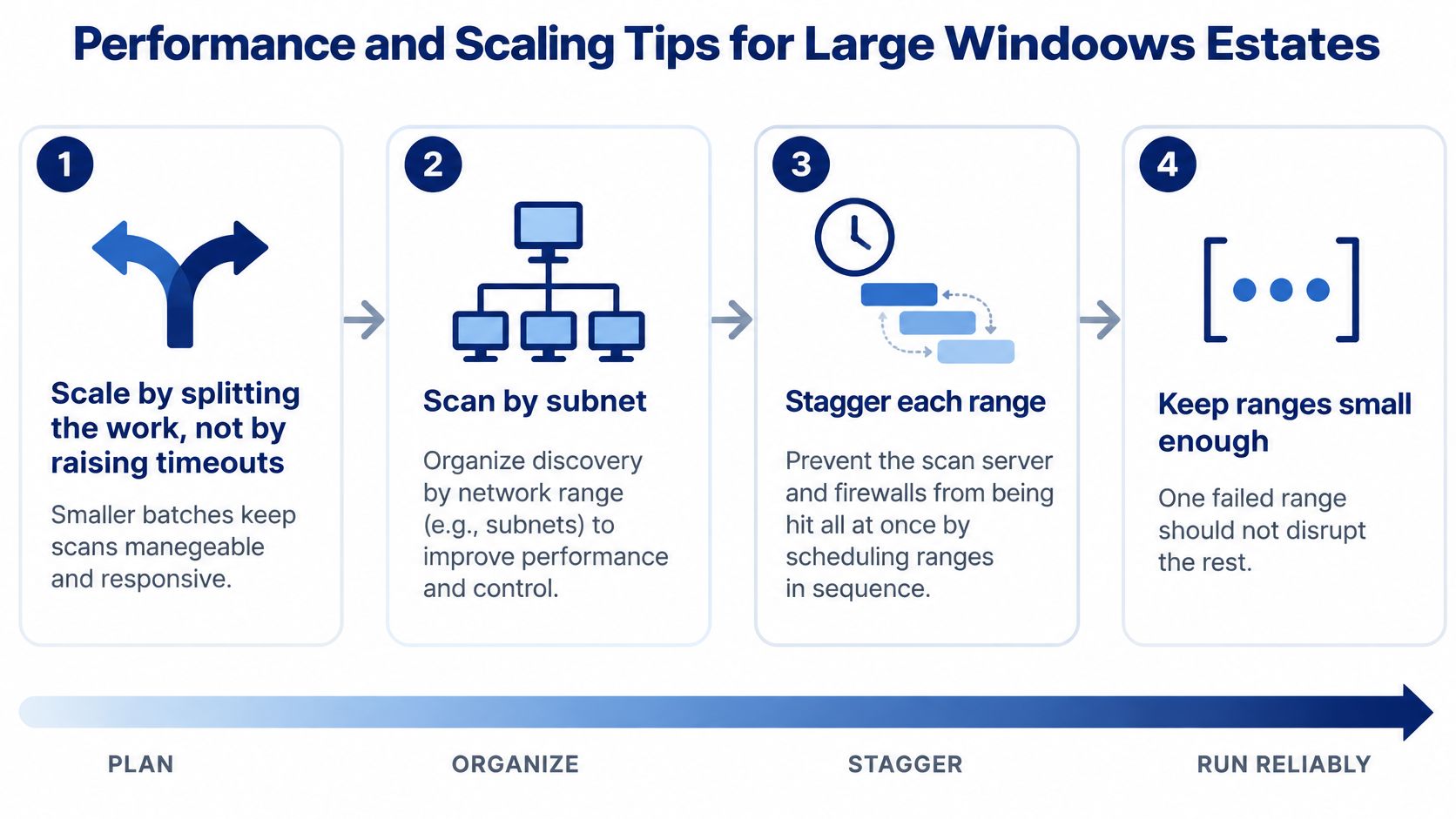
Performance and Scaling Tips for Large Windows Estates
Scale Lansweeper WMI scans only after a pilot confirms that transport and access work across the target segments. Split scans by subnet and stagger ranges to avoid sending every segment's traffic through the scanner and firewalls at once. Keep groups small enough to isolate a failing subnet without holding up unrelated sites.
Investigate a subnet when its success rate drops below the level established by the pilot, then compare failures with firewall changes and credential rotations. Schedule scans outside patching and reboot windows. Use PowerShell-assisted validation to repeat the same checks as you add ranges.
WMI can collect processor, memory, hard-drive and bandwidth usage, with configurable history cleanup. The server inventory documentation describes views for 1 hour, 1 day, 1 week, 2 weeks and 1 month, with daily averages in the longer views. Averages can mask brief spikes, so choose retention and review windows that fit the capacity question.
Choose Agents When Firewall Changes Are Off the Table
Agentless WMI, agents and SNMP compared
Method | Firewall impact | Credential model | Best fit |
|---|---|---|---|
Agentless WMI | Endpoint mapper plus negotiated dynamic RPC traffic | Administrator or delegated WMI/DCOM account | Flat, domain-joined Windows segments |
LsPush or LsAgent | Avoids inbound remote-WMI exceptions; validate delivery-path requirements | Local endpoint collection, with deployment and execution permissions | Segmented, remote or compliance-restricted endpoints |
SNMP | Permit configured SNMP query traffic between scanner and device | SNMP community or SNMPv3 credentials | Network devices and printers, with limited Windows coverage |
Choose the collection method by network policy, not preference. Lansweeper's port guidance identifies agent-based collection as an alternative when remote WMI traffic can't be permitted. Agents still require deployment, updates and a working inventory-delivery path.
Use agentless collection where approved connectivity is straightforward. Prefer agents for restricted subsidiaries, remote endpoints or third-party firewalls, and SNMP for network hardware. When lifecycle governance matters alongside discovery, AssetExplorer combines agent and agentless discovery with software compliance, a CMDB, and purchase-order and contract tracking.
Does Lansweeper WMI require an endpoint agent?
No, remote WMI scanning doesn't require Lansweeper software on the target. An agent is an alternative collection method, not a prerequisite.
Can Lansweeper WMI use a non-administrator account?
Yes, with explicitly delegated namespace, DCOM and supporting inventory permissions. Validate coverage instead of assuming delegation matches every administrator-level result.
How do you measure Lansweeper WMI rollout quality?
Track scan success by subnet, mean remediation time, dynamic-port exceptions and stale-asset rate. Use those measurements alongside your Lansweeper deployment evaluation to decide which segments should move to agents.
Visit Stackingo to compare enterprise software licensing options through a multi-vendor, RFQ-led purchasing process. Bring your validated asset counts, restricted-network requirements and lifecycle needs so your quotes reflect the collection model you can operate.


