

REMOTE SUPPORT SOFTWARE · MANAGEENGINE
REMOTE ACCESS PLUS
by ManageEngine · Authorized via Stackingo
10 YEARS IN MARKET
100k+ companies
Minimum discount
5%
FIX IT WITHOUT LEAVING YOUR DESK. EVERY SESSION ON RECORD. SAVE UP TO 15% — 5% MINIMUM GUARANTEED.
Attended and unattended remote access across Windows, Mac and Linux — with twelve diagnostic tools that resolve issues before a full session is even needed.
Stackingo gets you further.
Attended + unattended access
Wake-on-LAN + remote reboot
12 built-in diagnostic tools
Windows · Mac · Linux
Recorded, auditable sessions
Two-factor technician auth

LIST PRICE
0.25
STACKINGO
ADVANTAGE
0.21
YOU SAVE
10.58
/Month
computer
FOUR REASONS WHY BUYERS CHOOSE STACKINGO
MORE THAN A DISCOUNT — A SMARTER
WAY TO BUY SOFTWARE.
15%
Save up to
Below OEM list price, structured within authorized programmes.
+
Advisory Included
Module fit, sizing & tier optimisation reviewed before quote.
1doc
One Commercial
Multi-region, multi-vendor stack on a single agreement.
25%
Renewal defence
Every cycle re-priced — never auto-renewed at list.
BUYER INTELLIGENCE
WHAT YOU SHOULD KNOW BEFORE
BUYING.
Six things experienced IT buyers wish they'd known earlier — plus the analyst evidence behind the OEM's market position.
01
Licensing counts computers, not technicians
Remote Access Plus licenses by managed computer, so estate size drives cost. Technician seats sit inside the edition — scope both, not just headcount.
04
Diagnostic depth varies by platform
The diagnostic tool set is deepest on Windows; Mac and Linux endpoints expose a narrower range. Confirm the OS mix before assuming parity.
02
Free Edition is a look, not a pilot
The free tier covers a small fixed number of computers only — too few to evaluate a real estate. Use the paid trial for a genuine pilot.
05
Session recording storage is buyer-managed
Recordings accumulate on your own storage. Retention policy and disk headroom are yours to size — the licence does not provision them.
03
Unattended access needs an agent per machine
On-demand sessions run light, but unattended access requires a deployed agent on every target machine — budget rollout time across the estate.
06
Edition gates the enterprise controls
Two-factor authentication, session audit and technician management sit in the higher edition. Map the controls you need before choosing a tier.

GARTNER MAGIC QUADRANT
Endpoint Management Tools · 2026

Family placement — Endpoint Central evaluated
CHALLENGER

FORRESTER'S WAVE
Endpoint Management Platforms · Q2 26
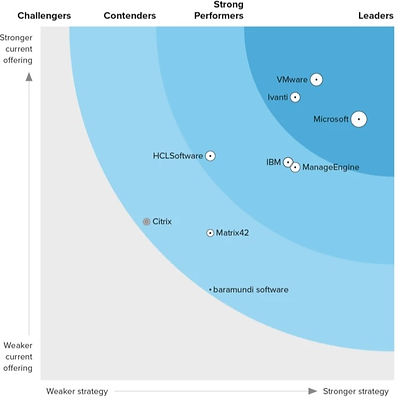
Family placement — Endpoint Central evaluated
STRONG PERFORMER
ABOUT MANAGEENGINE
REMOTE SUPPORT THAT DIAGNOSES BEFORE IT CONNECTS.
ManageEngine, a division of Zoho Corporation, delivers 60+ enterprise IT management products spanning ITSM, SIEM, IAM, endpoint management, and backup — deployed across 100,000+ organizations globally.
Remote Access Plus pairs remote control with a diagnostic layer — command prompt, registry, services, task manager and device manager — so technicians can resolve many issues without ever interrupting the user's screen.
Sessions run attended or unattended across Windows, Mac and Linux, with multi-monitor viewing, file transfer, and in-session voice, video and chat. Every connection is recorded and two-factor gated, giving regulated teams an audit trail without a separate tool.
BEST FOR
Mid-Large Ent. IT
500–10k endpoints; multi-OS estates, distributed users
STRONG FIT
Distributed IT Ops
Hybrid and remote staff; techs support users off-network
REPLACES
TeamViewer / VNC
Per-tech tool sprawl; no diagnostics, no session audit
Key Capabilities
INCLUDED IN ALL PLANS

On-Demand & Unattended Access
Attended sessions for live help plus persistent agents on unmanned machines.

Twelve-Tool Diagnostic Console
Command prompt, registry, services and task manager without a full remote session.

Recorded, Auditable Sessions
Sessions recorded with a timestamped trail; two-factor gates technician access.

Wake, Reboot & Shutdown
Wake-on-LAN, remote restart and shutdown reach machines that are powered down.

Cross-Platform Technician Console
One console spans Windows, Mac and Linux; multi-monitor view and file transfer.

Voice, Video & Chat In-Session
Talk the user through the fix in-session; no separate conferencing tool needed.
MORE FROM MANAGEENGINE
THE MANAGEENGINE ECOSYSTEM.
Remote Access Plus sits within ManageEngine's endpoint management stack — pairing naturally with Endpoint Central, Patch Manager Plus and ServiceDesk Plus to form a single support, patch and ticketing control plane.

CROSS OEM COMPARISON
FIND THE BEST FIT — NOT JUST ONE
PRODUCT
Not the right fit? We’ve got other options. One RFQ unlocks multiple solutions, compared side by side—with zero vendor bias.


FREQUENTLY ASKED QUESTIONS
GOT QUESTIONS?
WE'VE GOT ANSWERS.
The questions every buyer asks before purchasing through Stackingo—pricing, licensing, what's included, and what to expect.
01
What's the minimum discount on ManageEngine Remote Access Plus through Stackingo?
The floor discount on ManageEngine Remote Access Plus via Stackingo is 5% off ManageEngine list — locked within the authorized ManageEngine partner programme, never an ad hoc markdown.
💡
Worth sizing correctly: licensing counts managed computers, so the size of the estate sets the number — not the size of the technician team.
02
How much do ManageEngine Remote Access Plus buyers save?
Buyers save up to 15% versus ManageEngine direct list pricing, depending on volume and term, and never less than 5% — structured within the authorized reseller programme rather than ad hoc markdowns.
⚠️
The Free Edition covers only a small fixed number of computers, and the enterprise controls — two-factor authentication, session audit and technician management — sit in the higher edition. Map the controls you need before settling on a tier.
03
Why buy ManageEngine Remote Access Plus through Stackingo?
Buying ManageEngine Remote Access Plus through Stackingo means one negotiated front at 5%+ off (up to 15%) and candid guidance on where ManageEngine deals quietly leak budget:
Licensing counts computers, not technicians
Free Edition is a look, not a pilot
Unattended access needs an agent per machine
Diagnostic depth varies by platform
Session recording storage is buyer-managed
Edition gates the enterprise controls
✓
Add one consolidated RFQ, an audit-ready comparable quote, and renewal protection — and the direct route rarely wins.
04
Can Stackingo implement it, not just licence it?
More than licensing. Stackingo sells ManageEngine Remote Access Plus and can stand it up end to end — configuring On-Demand & Unattended Access, Twelve-Tool Diagnostic Console, Recorded, Auditable Sessions, Wake, Reboot & Shutdown, Cross-Platform Technician Console, and Voice, Video & Chat In-Session.
🛠️
Whether Stackingo implements it, manages a certified partner, or simply helps you compare third-party quotes, services and licence stay on a single comparable proposal.
05
What is ManageEngine Remote Access Plus and who is it for?
Enterprise remote support for IT teams that need to reach, diagnose and fix endpoints wherever the user happens to be — with every session recorded.
Best fit · Mid-to-Large Enterprise IT
Best fit · Distributed IT Operations
Typically replaces · TeamViewer / VNC
🎯
Mid-to-Large Enterprise IT — 500–10,000 endpoints across multi-OS, multi-site estates
Distributed IT Operations — Teams supporting hybrid and remote staff working off-network
Typically replaces TeamViewer / VNC for teams paying per technician with no session audit trail
GET YOUR CUSTOM QUOTE
STOP CALLING SALES.
GET A QUOTE IN 1 BUSINESS DAY.
Tell us your scope. We'll return a structured, comparable, partner-priced quote — built around your real agent count, term length and module mix.
Quote returned in 1 business day
Up to 15% below list pricing · 5% minimum
Reviewed by a licensing expert — not a chatbot
Your requirements never shared without consent
Add other vendors to the same RFQ for free