
Lansweeper Cisco Switches
Updated: Oct 10
Configure SNMPv2c or SNMPv3 on Cisco switches, map read-only credentials to IP ranges in Lansweeper, and enable CDP discovery for complete topology mapping. Lansweeper can identify Cisco equipment through SNMP and enrich the result with port mappings, neighbor data, serial numbers, uptime, manufacturer, and model details.
That combination addresses the situation most network teams eventually face: the spreadsheet says one thing, the switch says another, and nobody is completely sure which access port connects to which device. Manual audits become unreliable as Cisco-managed segments multiply. A correctly configured Lansweeper Cisco switches deployment replaces snapshots with an inventory that keeps changing as the network changes.
Why Automate Cisco Switch Discovery with Lansweeper
Manual switch audits fail in predictable ways. An engineer exports a spreadsheet, checks a few closets, records serial numbers, and tries to reconcile the result with an older port list. Moves, hardware replacements, dormant interfaces, and undocumented uplinks quickly make that record difficult to trust.
Lansweeper's network discovery stack is designed to identify IP-connected devices automatically and maintain a continuously updated inventory. For switches, its documentation says scans can return port mapping information, serial numbers, uptime, manufacturer, and model details through supported discovery methods such as SNMP. See the Lansweeper network discovery documentation for the supported discovery model.
The practical gain isn't just convenience. During an audit, incident review, or hardware refresh, you can work from discovered device data instead of asking several teams to validate separate spreadsheets.
What the inventory gives you
A Cisco switch discovered through Lansweeper can become part of a broader asset view that includes:
Identity data: Manufacturer and model details help distinguish hardware generations and replacement candidates.
Lifecycle signals: Serial numbers and uptime support inventory validation and maintenance planning.
Connection context: Port mappings associate discovered devices with switch interfaces.
Network relationships: CDP-supported discovery can place Cisco equipment into a topology view instead of treating every switch as an isolated asset.
The result is especially useful in enterprise networks where a single administrative domain contains multiple sites, subnets, and access layers. Lansweeper doesn't remove the need for network engineering judgment, but it gives engineers a repeatable source of observed state.
Practical rule: Treat automated discovery as the network's observed record, then investigate exceptions rather than rebuilding the inventory manually.
For teams evaluating the wider platform, Lansweeper asset discovery capabilities provide useful context around how network inventory fits alongside broader IT asset visibility. The configuration effort is justified when the alternative is repeated manual reconciliation with no reliable way to see what changed between audits.
Configuring SNMP on Cisco IOS for Lansweeper Discovery
Cisco discovery depends primarily on SNMP. Lansweeper supports SNMPv1, SNMPv2, and SNMPv3, but a production Cisco environment should normally prefer SNMPv3 where the IOS version and operational standards support it. SNMPv2c is simpler to deploy, but its community string must be protected like a credential.
Start by restricting access to the Lansweeper scanning host or hosts. The following IOS pattern illustrates a read-only SNMPv2c configuration with an access list. Replace the example community and scanner reference with values from your environment.
ip access-list standard LANSWEEPER-SCANNER
 permit <SCANNER_SOURCE>

snmp-server community <READ_ONLY_COMMUNITY> RO LANSWEEPER-SCANNER
For SNMPv3, create a group with read-only access and a user with authentication and privacy enabled:
snmp-server view LANSWEEPER-VIEW iso included
snmp-server group LANSWEEPER-GROUP v3 priv read LANSWEEPER-VIEW access LANSWEEPER-SCANNER
snmp-server user <SNMPV3_USER> LANSWEEPER-GROUP v3 auth sha <AUTH_SECRET> priv aes 128 <PRIVACY_SECRET>
The exact command syntax can vary with IOS and IOS XE releases, so validate it against your switch software and security standard. The important controls are read-only access, a restricted source, and a view broad enough to expose the objects required for inventory and topology data.
Verify the transport before scanning
Lansweeper's requirements specify that network-device discovery uses UDP 161, and that a read-only community string is sufficient for SNMPv1 and SNMPv2c. SNMPv3 requires the username and authentication details configured in the credential. Review the network device scanning requirements before applying a global credential.
Check the switch configuration and reachability from the scanning host. The device must answer a read request for OID 1.3.6.1.2.1.1.2.0, and it must respond on the same IP address that Lansweeper scans. If TCP 135 is open, Lansweeper notes that the device can be misidentified as Windows, so investigate unexpected responses instead of assuming the SNMP configuration is correct.
For a broader operational workflow, the Lansweeper IP scanner guide is relevant when you need to separate host reachability from credential and protocol testing.
Setting Up Lansweeper Network Scanners for Cisco Equipment
Once Cisco IOS exposes SNMP, configure Lansweeper around where the scanner can reach the management interfaces. Install the sensor and hub, link the sensor to the appropriate site, define targets such as subnets or IP ranges, and then start discovery. Lansweeper describes this sensor, site, target, and discovery sequence in its Network Discovery setup documentation.
A common enterprise mistake is to define one broad range and assume every VLAN will behave identically. Cisco management access often differs by routing policy, VRF, firewall rule, or SNMP context. Split targets where the network path or credential differs, then map the correct read-only credential to each relevant range.

A reliable scanner-side sequence
Create the credential. Use the SNMPv2c community string or the SNMPv3 username and authentication details that match the Cisco configuration.
Define the target. Add the relevant subnet or IP range under the scanning targets area.
Map the credential. Associate the non-global credential with the target range. This step is easy to miss and is a frequent cause of partial discovery.
Test locally. Run Lansweeper's local connection tester from the scanning server. It helps separate routing, ACL, UDP 161, and credential problems before a full scan.
Scan immediately or schedule it. Trigger an immediate scan while commissioning the configuration, then use scheduled discovery after the results are stable.
Scanner placement matters. A scanner that can reach only one management segment won't produce complete enterprise topology, regardless of how accurate the credentials are. Document which VLANs and management paths each scanner can see, especially when different sites use different Cisco access policies.
For related coverage of scanner placement and operating-system discovery, see Lansweeper Linux scanning considerations. The same principle applies here: validate reachability from the system performing the scan, not only from an engineer's workstation.
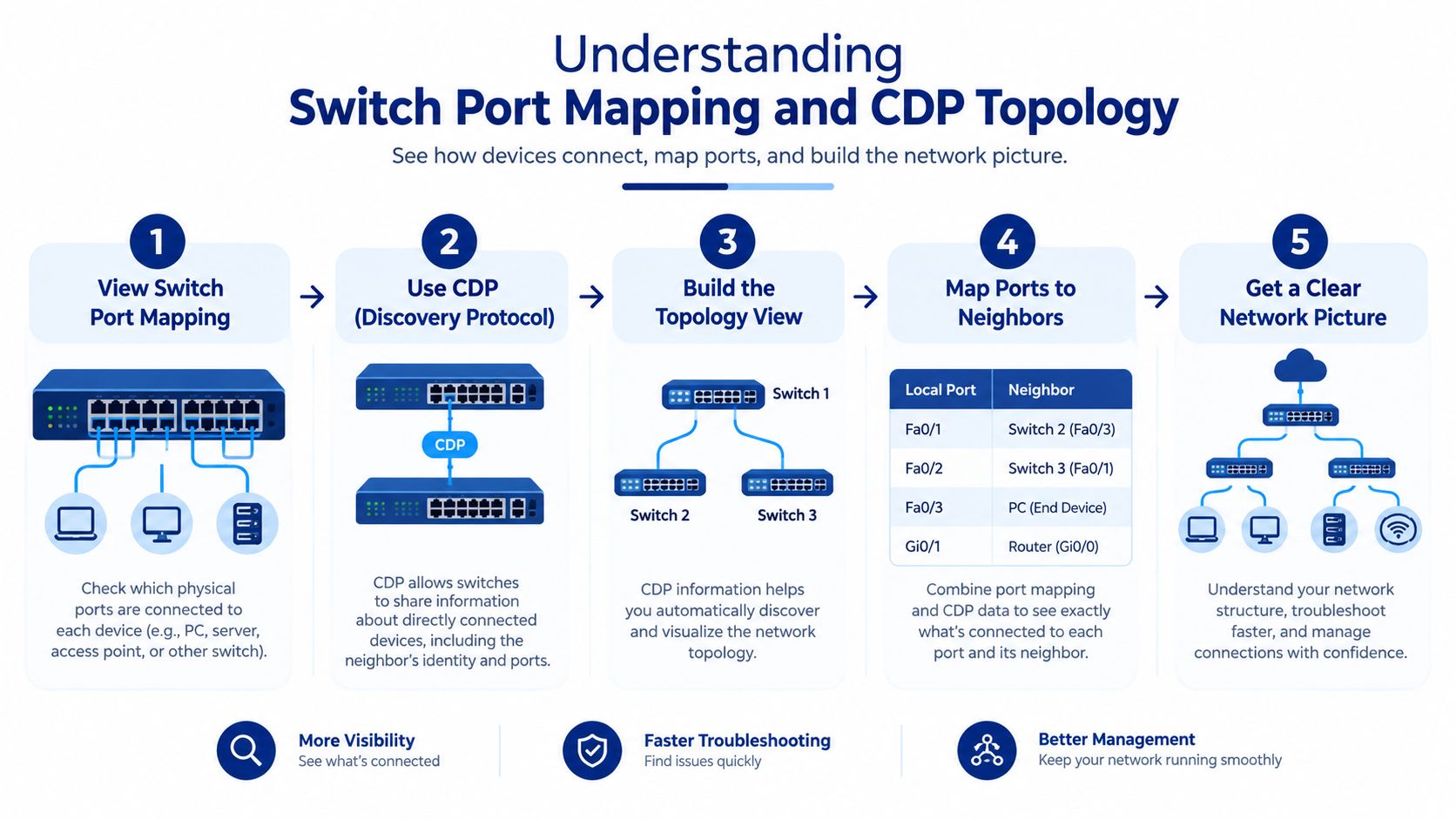
Understanding Switch Port Mapping and CDP Topology
Basic device discovery answers, “What is this switch?” Port mapping answers, “What is connected to it?” Lansweeper states that its switch-port mapping uses SNMP and supports major manufacturers, including Cisco. It can associate discovered assets with interfaces when the switch exposes the required forwarding and interface information through SNMP.
Cisco environments gain additional context through Cisco Discovery Protocol, or CDP. Cisco developed CDP so nearby Cisco equipment can exchange identity and neighbor information. When CDP data is available, a switch can be represented as part of a topology graph, showing adjacent devices and the relationships between interfaces.
Why the uplink heuristic needs review
Lansweeper classifies a switch port as an uplink by default when more than 4 devices are discovered on that port, as described in its switch-port mapping documentation. That heuristic is useful for identifying a downstream switch or aggregation connection, but it isn't infallible.
Dense edge designs can produce misleading results. A downstream segment, a VoIP daisy chain, a lab aggregation point, or a device concentration behind another switching function may look like an uplink even when the physical design requires a different interpretation. Don't treat the label as authoritative without checking the Cisco interface configuration and topology.
Validate the data the switch exposes
Scan the Cisco device, inspect the Summary tab for returned OIDs, and then review the network relation view for port mappings. If manufacturer, model, software, or relationship fields are absent, the problem may be how the switch exposes data through SNMP rather than a general Lansweeper failure.
Incomplete credential mapping is particularly damaging in multi-VLAN networks. One visible management path can make discovery appear healthy while leaving other switches or neighbor relationships absent. CDP can enrich topology, but it can't compensate for a scanner that cannot reach the relevant management interfaces.
The Lansweeper CMDB perspective is useful when you need to connect network relationships with the wider asset record rather than reviewing switch data in isolation.
Verifying Discovery and Building Inventory Reports
A successful scan isn't the same as a trustworthy inventory. Verification should compare what Lansweeper returned with what the Cisco switch reports locally. Start with the asset record, confirm the manufacturer and model, check the serial number and uptime, and then inspect whether expected interfaces and connected assets appear in the relationship view.
The most useful validation workflow is deliberately narrow. Pick representative switches from different sites, management VLANs, and hardware families. Confirm that the scanner reaches each one with the intended credential, then compare the returned OIDs and port relationships with the switch's operational data.
A repeatable review pattern
Identity review: Confirm the discovered IP, manufacturer, model, serial number, and uptime.
Protocol review: Check that SNMP responds through the expected management path and that the returned OIDs are present.
Topology review: Inspect interface mappings and neighbor relationships, then investigate unexpected uplink classifications.
Coverage review: Compare discovered assets against the defined targets and the VLANs that should be SNMP-visible.
Change review: Rescan after switch replacements, management-address changes, VLAN changes, or credential rotation.
Missing software or model fields don't automatically indicate a failed scan. Lansweeper's community guidance explains that the limitation can come from how a vendor exposes data over SNMP. In that situation, inspect the returned objects first. If the switch answers correctly but omits a field, the right response is to document the limitation rather than repeatedly changing credentials.
Build reports around decisions, not just available fields. A device inventory supports refresh planning, port-level connections support incident response, and uptime data helps identify devices that have not restarted during a maintenance window. Schedule rescans consistently, then use exceptions to focus engineering time where observed data differs from the expected design.
Troubleshooting Common Lansweeper Cisco Discovery Issues
Most discovery gaps fall into three categories: the scanner cannot reach the switch, Lansweeper has the wrong credential for the target, or the switch returns data that needs interpretation. Treat each category differently. Recreating credentials won't fix a routing block, and changing topology assumptions won't fix an unmapped VLAN.
Credential mapping mismatch
Symptom: Some Cisco switches appear, while others in the same enterprise range remain absent.
Likely cause: The credential exists but isn't mapped to the target range, or different VLANs require different credentials or access paths.
Fix: Check the target definition, credential association, scanner assignment, and management routing. Run the local connection tester from the scanning server against a representative switch in the failing range. Verify that the Cisco device answers the expected SNMP request and that the SNMPv3 username, authentication method, privacy settings, and context match the switch configuration.
A consistent naming convention for credentials helps, but naming alone doesn't solve visibility. Maintain a simple record of which scanner can reach which management VLAN and which credential applies to each range.
UDP 161 or identity mismatch
Symptom: The scan reports no usable network-device data, or Lansweeper identifies the device unexpectedly.
Likely cause: UDP 161 is blocked, the switch doesn't answer the required OID, or the switch responds on a different address than the one scanned. An open TCP 135 path can also contribute to Windows misidentification.
Fix: Test from the scanning host, not a separate administration workstation. Check firewall and ACL rules, confirm the management address, verify SNMP is enabled on the correct Cisco interface and context, and repeat the local connection test before launching another full scan. Lansweeper's network-device troubleshooting guidance can help separate broader scanner communication issues from SNMP-specific failures.
Incorrect topology or uplink interpretation
Symptom: Port mappings exist, but a dense edge connection appears as an uplink or neighbor data is incomplete.
Likely cause: Lansweeper's default rule treats a port with more than 4 discovered devices as an uplink. CDP may also be disabled, filtered, or unavailable on a relevant interface, while incomplete SNMP visibility can leave the relationship graph only partially populated.
Fix: Compare the relationship view with Cisco interface and CDP information. Check the switch's Summary tab for the returned OIDs, validate the SNMP view, and confirm that all relevant VLAN contexts are visible to the scanner. Review dense aggregation and VoIP segments manually before using the topology label for change decisions.
Good enterprise operations finish with a topology audit after material network changes. Keep the target ranges, scanner locations, SNMP-visible VLANs, and credential ownership documented so the next discovery gap has a known starting point.
Stackingo offers Lansweeper licensing and reseller procurement, including subscription options and implementation support for deployments that need structured network discovery. Visit Stackingo to discuss Lansweeper requirements, licensing, and a deployment approach for your Cisco environment.