
Lansweeper Docker: Running It on Containers in 2026
Updated: Oct 10
Official Lansweeper does not provide native Docker or Kubernetes support for the core application, so container deployments rely on unsupported community configurations that introduce licensing, persistence, and scanning complexity. The documented network-discovery setup uses ports 59526, 59525, and 9524, but getting a container running doesn't make it a supported enterprise deployment.
The popular advice says to find an image, publish a few ports, and move on. That's the wrong procurement decision. A successful container start proves only that a process launched. It doesn't prove that Lansweeper can scan your environment reliably, that your data will survive a host failure, or that vendor support will accept the architecture during a licensing, security, or operational review.
For a lab, Docker may be defensible. For production, treat it as an exception requiring written approval, documented rollback, persistent local storage, and a clear owner for unsupported behavior. The safer choices remain a traditional Windows deployment or a supported cloud model.
The Reality of Lansweeper Docker Support
Lansweeper Docker isn't a standard vendor-backed installation path. Lansweeper's current on-premises documentation positions the platform around Windows Server, Microsoft SQL Server, and IIS, not a generic Linux container stack. A community discussion also states that there is no native Docker or Kubernetes support for container inventory, which is a materially different position from saying that an enthusiast configuration can be made to run.
That distinction matters to a CTO. A third-party image or integration can remain maintained without becoming an approved way to operate the core platform. Related Docker packaging shows a long maintenance timeline, with a Lansweeper-related integration first released on 2022-12-07 and updated on 2026-04-29. That demonstrates continuing interest in container-oriented tooling around the ecosystem, not vendor endorsement of running the complete application in Docker. The public Lansweeper documentation was updated on 2026-09-24, while the on-premises changelog shows active releases through 2026, including 12.9.2.2 on 09/09/2026, 12.9.1.1 on 02/09/2026, and 12.9.0.3 on 10/08/2026. Those facts reinforce the need to separate the supported release path from adjacent community projects.
What the support distinction means
Unsupported doesn't automatically mean impossible. It means you carry the burden of proving that the deployment works after upgrades, preserves data, meets security requirements, and remains recoverable when the container or host fails.
Question | Supported deployment assumption | Docker reality |
|---|---|---|
Operating stack | Windows Server, IIS, and Microsoft SQL Server | Depends on community packaging and compatibility |
Vendor support | Clear installation baseline | Architecture may fall outside the documented path |
Inventory model | Durable endpoints and supported scanning methods | Ephemeral containers complicate identity and continuity |
Change control | Standard product upgrade process | Image, volume, network, and database changes require separate validation |
Treat licensing the same way. Docker doesn't remove subscription obligations, asset definitions, user controls, or audit evidence. It can make ownership less clear because the application, database, scanner, and integration layers may be managed by different teams.
Procurement rule: If the vendor's supported architecture assumes Windows Server, don't classify a Linux container workaround as an equivalent deployment option in a purchase comparison.
That is why the useful question isn't “Can I dockerize Lansweeper?” Ask which related components can run in containers without changing the supported boundary of the core inventory system. For a decision framework, Stackingo's Lansweeper guidance can sit alongside vendor documentation, but it shouldn't replace the vendor's support position.
Windows Containers Versus Linux Alternatives
If you still need a containerized design, Windows containers are the only direction that aligns conceptually with Lansweeper's Windows-based architecture. Linux containers are attractive because the surrounding platform is familiar, but familiarity with Docker doesn't make a Windows application native to Linux. Running a Windows image through emulation, translation, or a compatibility layer adds another failure boundary before Lansweeper even reaches the network.
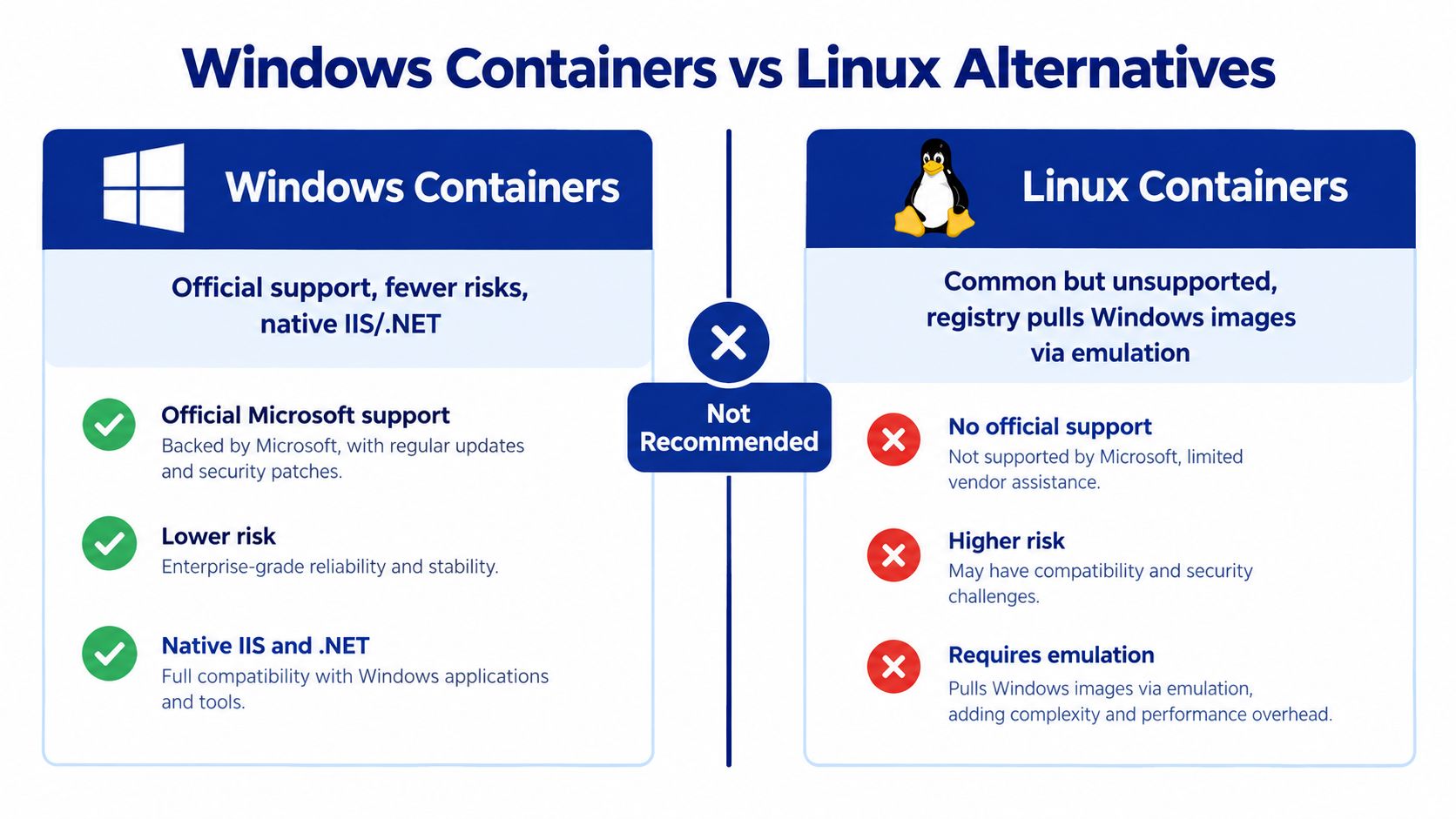
The practical comparison is less about convenience and more about auditability.
Windows containers
A Windows-based container can better reflect the application's assumed operating system, IIS behavior, and .NET dependencies. That doesn't convert it into a supported Lansweeper architecture, but it reduces the mismatch between the application and its host environment.
You still need to validate:
Image provenance: Know who built the image, how it is updated, and whether its contents can be reproduced.
Host compatibility: Confirm that the Windows host, container runtime, application version, and database path work together.
Persistent state: Keep the database and application data outside the disposable container layer.
Recovery: Prove that a replacement container can reconnect to the existing data without manual repair.
Support boundary: Document that the deployment is an exception, not a vendor-approved standard.
Linux alternatives
Linux is the more common Docker environment, but it is the weaker fit for the Lansweeper core application. A Linux container may work for a related integration, a test exercise, or a carefully isolated lab. It shouldn't be presented to auditors as a normal production deployment merely because the web interface loads.
The risks include incompatible Windows dependencies, unclear upgrade behavior, database connectivity problems, and network-discovery limitations. The same concern applies to container inventory. Community guidance indicates that only long-lived containers with persistent storage may be treated like ordinary Linux assets if an agent is installed. Short-lived workloads don't map cleanly to an asset system designed around durable machines.
For background on the platform's Linux-related considerations, see this Lansweeper for Linux deployment discussion. Use it to frame questions, then validate the final architecture against current vendor support terms.
Building Your Docker Compose Configuration
A community Dockerized network-discovery flow is operationally specific. You paste the linking code, start the container, open setup port 59526 to set the first-run administrator password, and then access the main interface on 59525. Those ports are not decorative. Restrict the setup surface after initialization, and don't expose it broadly just because the initial configuration is convenient.
Start with the network, not the image
For network discovery, host networking is required. A bridged Docker network prevents the scanner from reaching local subnets in the way the deployment expects. The container also needs the and capabilities for discovery functions.
A minimal operational checklist looks like this:
Prepare the host: Use a controlled Docker host with local cache or SSD-backed application storage.
Set host networking: Don't rely on ordinary bridge mode for LAN discovery.
Add capabilities: Grant and only to the discovery container that needs them.
Paste the linking code: Complete the documented registration flow before starting normal operations.
Open setup port 59526: Use it for the first-run administrator password, then limit access.
Reach the main UI on 59525: Put trusted TLS or a controlled reverse proxy in front of production access.
Persist the database: Keep application data outside the container's writable layer.
Test restoration: Rebuild the container and confirm that inventory, credentials, configuration, and scanner state return intact.
Storage is the design decision
The Hub uses SQLite. SQLite needs local cache or SSD storage, not a network share. The deployment notes warn that placing SQLite data on or another network-backed path can trigger database-locking problems. That makes a generic shared-volume strategy unsuitable.
The scanner's default queue and agent communication port is 9524, and Lansweeper documents that the port can be customized. LsAgent and LsPush use it to send data, while administrators can also use it to view the scanning queue. Make sure firewall rules allow the required traffic from the relevant agents and scanning components.
The surrounding infrastructure still needs its ordinary connectivity. Lansweeper documents SSH on 22/TCP for Linux, Unix, and Mac scanning by default, with support for a custom SSH port. VMware communication uses 443/TCP over HTTPS. SQL Server uses 1433/TCP by default between scan servers and the database, while the web console requires chosen HTTP and HTTPS ports. These dependencies don't disappear inside Docker.
Use this Lansweeper RPC troubleshooting guide when validating connectivity, but keep the test evidence in your change record. A green container status is not a network-discovery test.
The Hidden Costs of Containerizing Lansweeper
Docker is excellent for stateless services. Lansweeper is not stateless when the container includes a database and discovery state. Community guidance explicitly describes the Docker service as stateful, which is why the approach is less attractive than a conventional application container. You aren't just replacing an installer with an image. You're taking responsibility for data integrity, storage locality, credentials, certificates, and upgrade sequencing.
The certificate and identity burden
The certificate is self-signed by default. Production users should replace it with a trusted certificate or place the service behind a properly managed TLS layer. Leaving the default certificate in place creates browser warnings and weakens the credibility of the deployment during security review.
Administrator lockout also has a different operational shape. The documented recovery workflow uses an authentication tool inside the container. That can be effective, but it creates a dependency on container access, image contents, operator permissions, and recovery documentation. If the team that owns Docker differs from the team that owns Lansweeper, a routine password problem can become an escalation event.
Operational test: Ask an engineer who didn't build the container to restore the database, reset administrator access, replace the certificate, and reconnect scanning. If that person can't complete the exercise from written runbooks, the deployment isn't production-ready.
The support and upgrade tax
A traditional installation gives you a recognizable baseline. A Docker deployment introduces additional questions:
Who validates upgrades: The application owner, platform team, or vendor?
What changes together: Image, database schema, host kernel, runtime, network permissions, or reverse proxy?
Where is evidence stored: Image digest, configuration, volume backup, port policy, and recovery result?
What happens after failure: Can you roll back without corrupting the inventory database?
Who owns exceptions: Security and procurement must understand that the architecture is outside the normal deployment model.
Containerization can also obscure asset identity. A workload that disappears and reappears may not behave like a durable endpoint in inventory reporting. That isn't merely a technical nuisance. It affects audit confidence, ownership, lifecycle records, and any reconciliation between discovered assets and licensed assets.
Review Lansweeper pricing and licensing considerations before treating Docker as a cost-saving measure. Avoiding a Windows host doesn't eliminate subscription, database, support, storage, network, or recovery costs. It may just move them into engineering time that procurement doesn't see on the initial quote.
Alternative Strategies for Enterprise Deployment
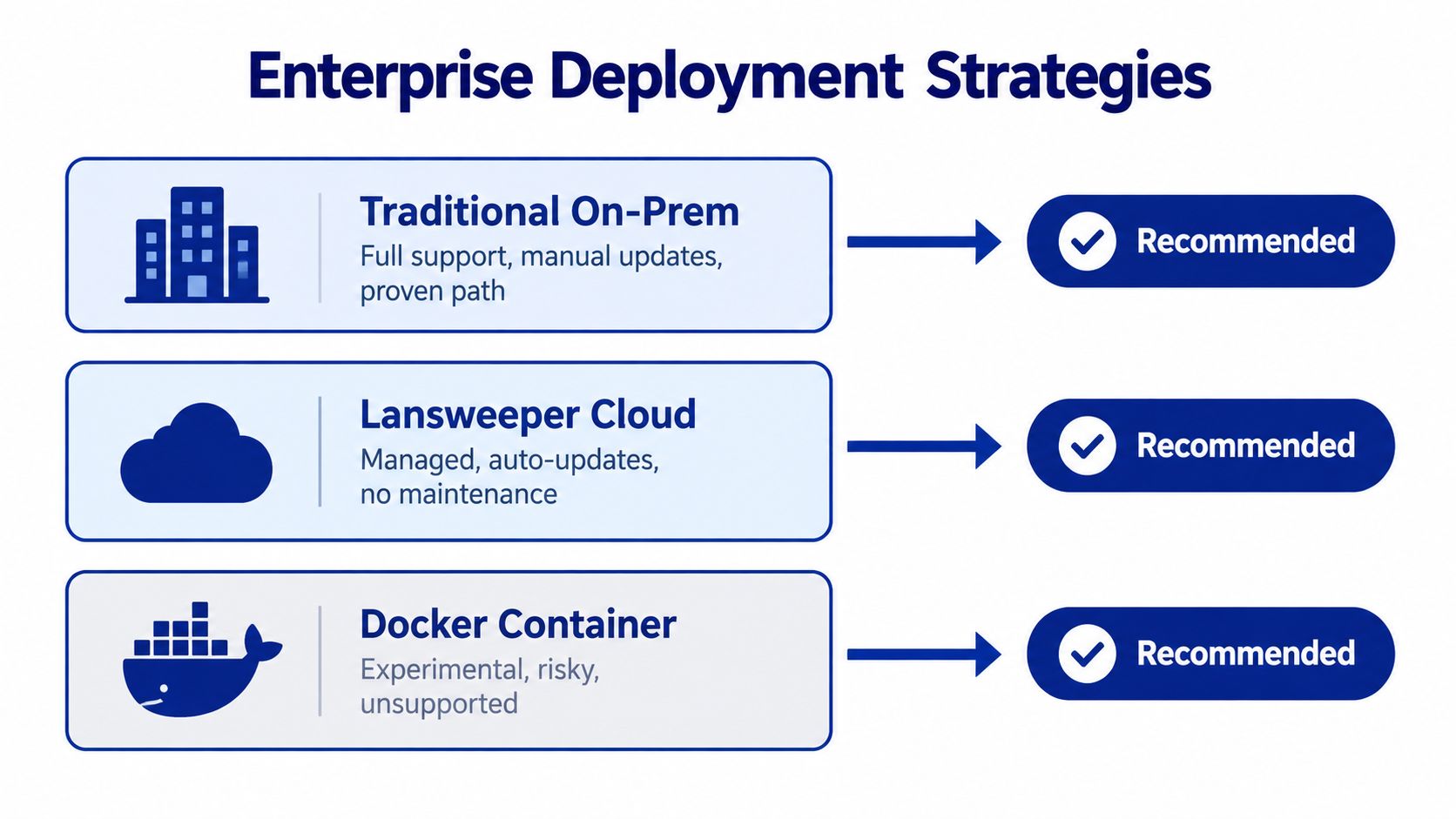
Enterprise buyers have three credible paths. Use traditional on-premises deployment when control and local operation matter. Use Lansweeper Cloud when reducing infrastructure ownership matters more. Use Docker only when a documented exception has a compelling technical reason and the organization accepts the support boundary.
Traditional on-premises Windows
This is the least surprising option for a regulated or audit-heavy environment. It follows the documented Windows Server, IIS, and Microsoft SQL Server pattern, gives infrastructure teams familiar controls, and avoids forcing a network-discovery engine into a container abstraction that doesn't match its assumptions.
It still requires patching, database administration, backup design, and capacity planning. Those are visible costs, which is preferable to hidden costs that emerge after an unsupported deployment fails.
Lansweeper Cloud
Cloud removes much of the application-hosting burden and provides a cleaner answer when your team doesn't want to maintain the underlying server stack. It doesn't automatically solve container visibility. A cloud control plane can still struggle to represent short-lived workloads if the discovery method and asset model expect durable endpoints.
Ask precise questions before signing:
Container identity: Does the platform inventory images, hosts, workloads, or only persistent operating systems?
Lifecycle handling: What happens when a container is destroyed and recreated?
Agent requirements: Which assets need an agent, and which can be discovered agentlessly?
Reporting: Can you distinguish a host from its workloads without duplicate records?
Audit export: Can you show when an asset appeared, changed, and disappeared?
Agent-based infrastructure
For long-lived Linux systems, agent-based collection may provide a practical path. Community guidance indicates that a persistent container with storage may be treated like a normal Linux asset when an agent is installed. That doesn't amount to native Docker or Kubernetes inventory. It also won't give you reliable historical identity for every ephemeral workload.
The correct architecture may be hybrid:
Environment | Sensible visibility method |
|---|---|
Windows servers | Supported scanning and endpoint collection |
Linux hosts | Agent-based or supported network discovery |
Network devices | Agentless protocols and central scanning |
Cloud resources | Native integrations or documented imports |
Ephemeral containers | Host-level inventory plus separate orchestration telemetry |
The public gap is clear. Lansweeper markets unified visibility across IT, OT, and cloud assets, while the community answer still describes native Docker and Kubernetes inventory as unsupported. Buyers should demand a roadmap and a precise capability matrix rather than assume that “cloud” means “container-aware.”
Procurement and Licensing Considerations for Enterprise Buyers
The purchasing question isn't whether a container can start. It's which deployment model produces defensible total cost of ownership and clean audit evidence. Unsupported Docker can look cheaper because the initial infrastructure footprint is smaller, but procurement must count platform engineering, persistent storage, certificate operations, recovery testing, compatibility validation, and the possibility that vendor support excludes the configuration.
The network design also affects the commercial assessment. Lansweeper's on-premises guidance requires chosen HTTP and HTTPS ports for the web console. Microsoft SQL Server uses 1433/TCP by default for communication between scan servers and the database, while discovery agents and queue access use 9524 by default. A quote that ignores these dependencies is incomplete, regardless of whether the application runs on a VM or in a container. See the Lansweeper CMDB and inventory context when mapping technical requirements to business ownership.
What to put in the buying file
Require these items before approval:
Support statement: Record whether the proposed architecture is vendor-supported, community-maintained, or an internal exception.
License scope: Define which assets, agents, integrations, environments, and discovery methods are covered.
Operational ownership: Name the team responsible for storage, certificates, upgrades, backups, and recovery.
Security controls: Document setup-port access, trusted TLS, container capabilities, and administrative separation.
Exit plan: Specify how the inventory will move to a supported deployment if the workaround becomes unviable.
Comparable quotes: Separate license charges from hosting, implementation, managed operations, and support costs.
Stackingo provides quote-based Lansweeper licensing and procurement through an authorized reseller channel, with managed onboarding and provisioning for subscriptions. Its marketplace-first model can consolidate requirements across multiple OEMs into a single RFQ-led process, producing comparable commercial options instead of forcing your team through disconnected vendor conversations. That helps procurement evaluate the licensing decision separately from the risky assumption that Docker itself is a saving.
Choose Docker only when the business case survives that scrutiny. For most enterprises, a supported Windows or cloud deployment is easier to defend, easier to recover, and less likely to turn a routine inventory platform into an infrastructure exception.
Stackingo can help you source Lansweeper licensing, compare quote-based procurement options, and coordinate onboarding without hiding the operational implications of your deployment choice. Visit Stackingo to define your asset scope, compare supported paths, and request a commercial route that your procurement and audit teams can defend.