
Log4j Lansweeper: How Do You Find Vulnerable Assets?
Does a clean Lansweeper report mean your Java applications are safe? No. A Log4j Lansweeper audit surfaces candidate exposure; filesystem inspection, runtime checks, and application-owner evidence help establish whether affected components are fixed.
Lansweeper provides an inventory starting point, not proof that an application is exploitable or that remediation is complete. Confirm findings against the library files and the versions required for each Java runtime. Measure closure by verified fixed versions, not by the number of rows marked closed.
How to Find Log4j Components in Lansweeper
Lansweeper finds candidate Log4j exposure in your inventory, and you confirm it through a short sequence of checks. Use it as the inventory layer, not an exploitability test. CISA's Log4j guidance recommends combining network and host scanning with affected-software comparisons and filesystem inspection.
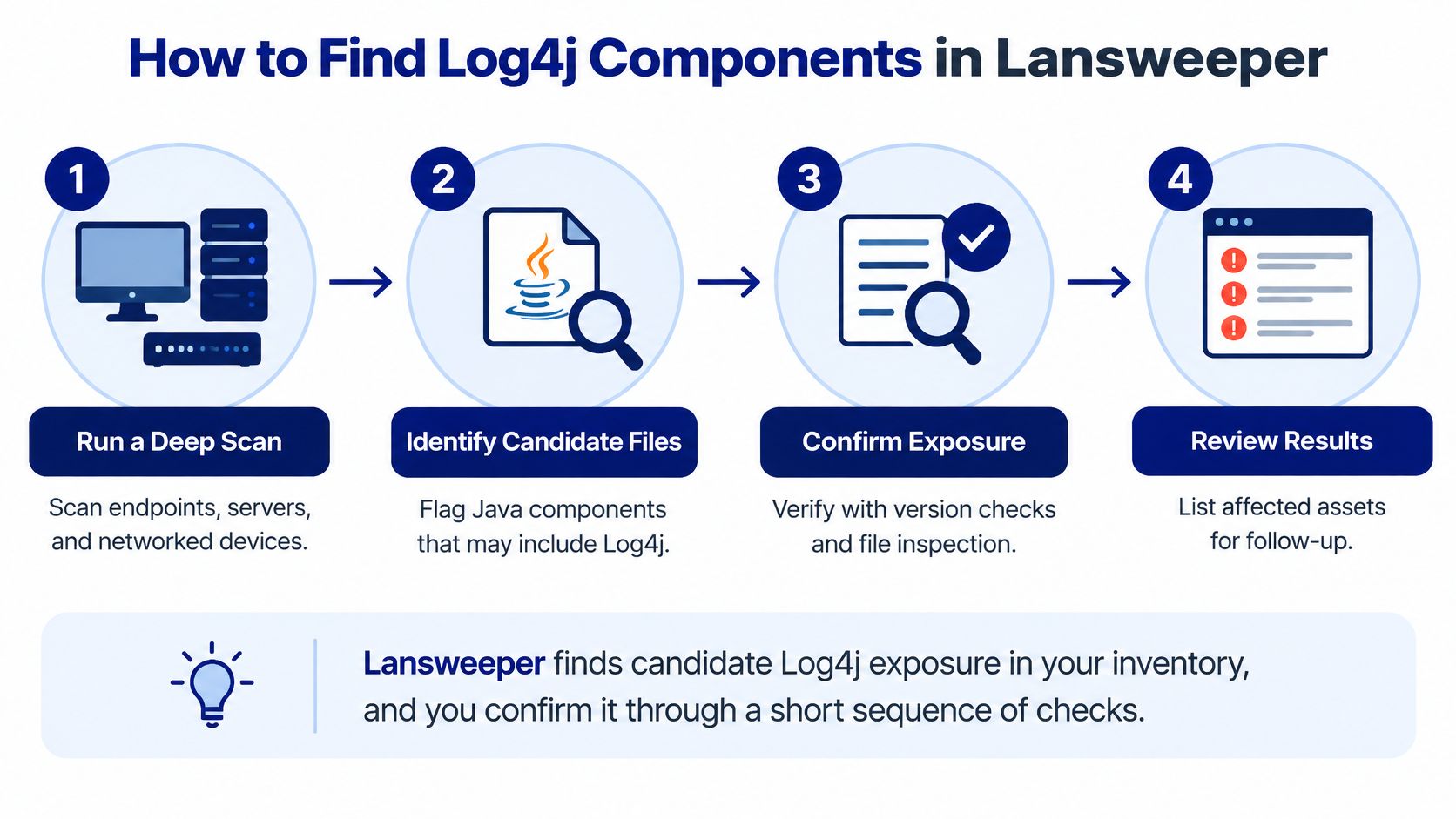
Discover the estate. Scan endpoints, servers, virtual machines, and internet-facing solution stacks with appropriate credentials. Check failed scans and unmanaged ranges instead of assuming your existing inventory defines the entire scope.
Filter publisher matches. Compare installed-software publishers against CISA's affected-software database. A publisher match is a lead, not evidence that every product from that publisher contains vulnerable Log4j.
Inspect product versions. Capture the installed application version and its vendor advisory. Don't mistake an application's version number for the version of its bundled logging library.
Inspect files and archives. Use host tooling capable of examining JARs inside WARs, EARs, and other archives. Filename-only searches miss renamed libraries and nested dependencies; inspect archive contents and metadata.
Preserve an evidence record. Store asset ID, hostname, owner, product, publisher, observed version, scan time, JAR path, exposure route, patch status, and validation result. Missing ownership turns a finding into an unattended report row.
What should a usable evidence record contain?
A hypothetical record could identify asset , hostname , owner , product , and publisher . Record the observed library version separately from the application version, the actual scan timestamp, and a path such as .
Complete it with exposure route , patch status , and validation . Use Lansweeper PowerShell workflows to plan repeatable collection rather than disconnected command output.
For hybrid inventory requirements, Device42 ITAM offers agentless hardware, software, and cloud discovery with a continuously updated CMDB. It's another inventory option, not a substitute for library inspection.
Practical rule: A successful scan proves that collection ran. It doesn't prove that every application dependency was inspected.
Log4j Versions to Target for Each Java Runtime
Typical upgrade targets by Java runtime
Java runtime or Log4j version | Target or status | What to record |
|---|---|---|
Java 8 and later | 2.17.0 or newer | Exact Log4j version, Java generation, status of CVE-2021-44228, CVE-2021-45046, and CVE-2021-45105 |
Java 7 | 2.12.3 | Separate upgrade path; do not apply the Java 8 target to Java 7 hosts |
2.15.0 | Incomplete; follow-on issues remained | Flag for upgrade to 2.17.0 or newer on compatible runtimes |
2.16.0 on Java 8 | JNDI and message-lookup patterns disabled by default | Confirm configuration, then upgrade to 2.17.0 or newer |
Apache's release history documents the releases behind these runtime-specific upgrade paths. Later vulnerabilities required updates beyond the initial fix.
Google Cloud's Mandiant analysis explains that 2.15.0 disabled message-lookup substitution while JNDI remained enabled in certain circumstances. Version 2.16.0 disabled JNDI functionality and message-lookup patterns by default for Java 8.
Why isn't a version string enough?
Inspect the application configuration and dependency path, including the artifact loaded by the running process. A library updated in a staging directory will not fix an application that still loads its bundled copy.
Use Lansweeper's Linux discovery guidance to plan host coverage. Record the exact library version, Java runtime generation, configuration state, and remediation status. Close a finding only after the deployed artifact is confirmed at the target version.
How to Rank Log4j Findings by Business Risk
Rank findings by observed version, exposure, and business criticality. Classify publisher-only matches as unknown until a version or JAR is observed. Lansweeper surfaces candidates; the deployed artifact and its location determine whether the application is affected.
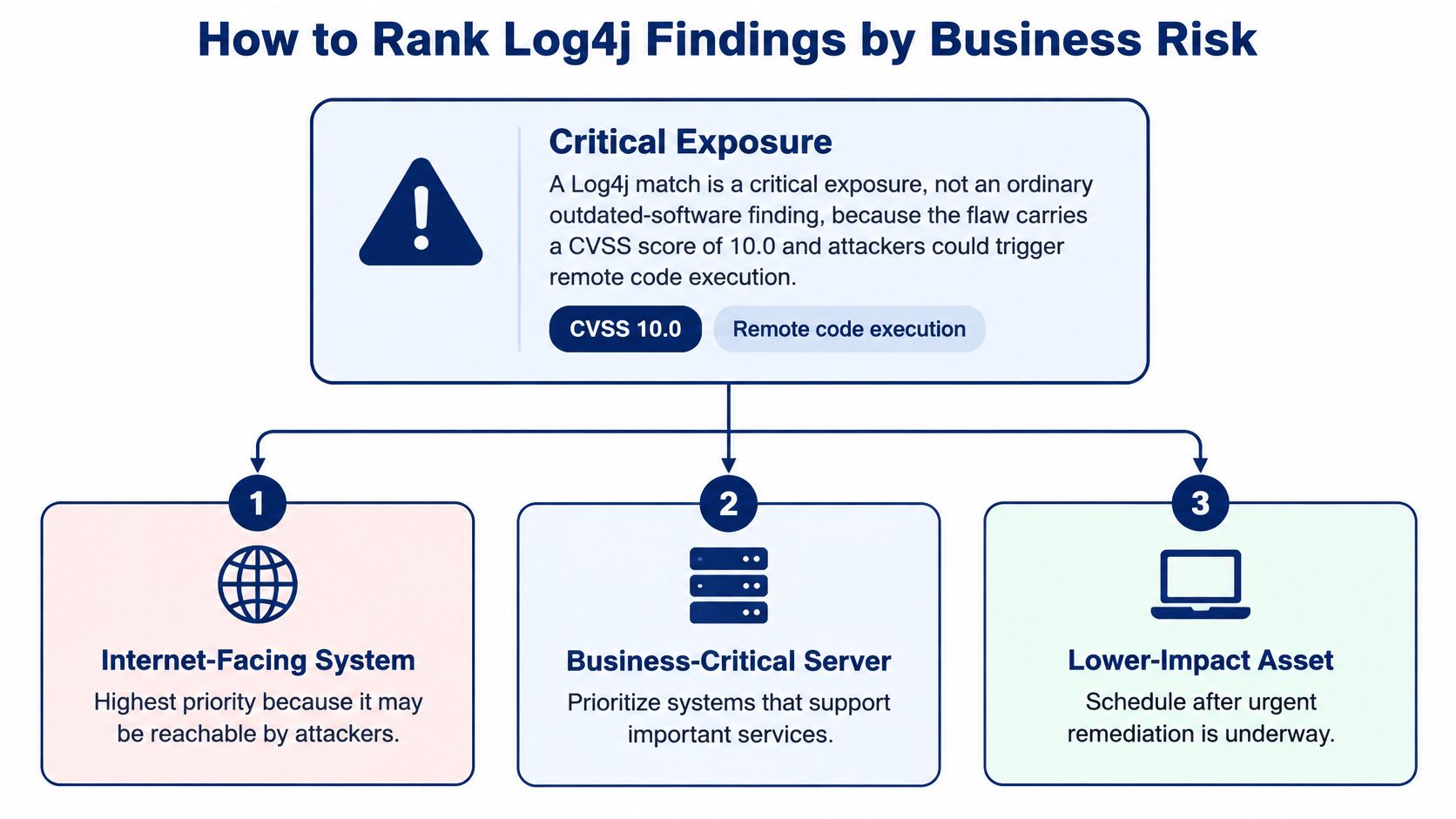
Log4j priority tiers and first actions
Priority | Asset criteria | First action and evidence |
|---|---|---|
Critical | Internet-facing or networked server running an affected version | Patch first or isolate; owner confirms the fix |
High | Internal mission-critical system with an affected version | Patch in the next change window; verify the deployed artifact |
Medium | Internal non-critical system with an affected version | Schedule the upgrade; track in the ITSM queue |
Low | Product matched by publisher, version confirmed fixed | Keep in recurring rescans |
Unknown | Publisher match with no version or JAR evidence | Run a filesystem scan before ranking |
Apply the highest applicable tier. If patching isn't possible, document the isolation or temporary mitigation, the reason, the owner, and a review date.
How should you build the priority report?
Save a Lansweeper query using the discovery publisher filters. Include hostname, owner, product, observed version, internet reachability, business criticality, patch status, and a calculated tier. Enrich fields outside Lansweeper where necessary.
Refresh automatically. Run the report after discovery. Weekly discovery is a practical starting point for internet-facing segments, with monthly scans for internal estates. Increase frequency where deployments change faster.
Export actionable rows. Sort by tier and reachability. Send critical and high findings to the change-window queue, and unknown findings to filesystem inspection.
Keep validation visible. Include the last validated rescan date and use one shared export for security and ITSM.
Use Lansweeper CMDB integration planning to keep ownership and business-service context consistent.
Send Findings to Your SIEM and ITSM Workflow
Send findings to the systems where people investigate and remediate them. A shared inventory only helps when IT, security, and procurement can associate the same asset with the same application owner.
Create deduplicated ITSM tickets. Key each critical or high finding on asset ID and product. Repeat scans should update the existing issue rather than create competing assignments.
Attach patching evidence. Include hostname, observed version, JAR path, and runtime-compatible target. The application owner needs the actual deployment location, not just a software display name.
Enrich SIEM context. Send the affected-asset list through your supported integration or ingestion process. Security analysts should be able to associate host alerts with ownership, business criticality, and exposure route.
Assign responsibility before handoff. Infrastructure teams may deploy the package, but the application owner must confirm which artifact the service uses. Don't let a ticket bounce between teams without an accountable owner.
Require validation before closure. Attach the rescan and deployed-artifact evidence. A successful installation job alone isn't sufficient.
Agree on asset identity before automating ticket creation. Otherwise, each integration can produce a different record for the same host.
Review Lansweeper syslog workflow considerations when designing event handoffs. Before the first sync, map asset ID, hostname, product identifier, owner, evidence timestamp, status, and ticket ID across the CMDB, SIEM, and ITSM tools.
Prove Log4j Fixes Hold and Know When to Close
How do you know a Log4j finding is really resolved? Lansweeper surfaces assets and library versions to investigate, but a report row alone cannot confirm which JAR the application loads or whether a fix remains in place.
Lansweeper's Log4j overview summarizes historical Tenable telemetry: 72% of organizations remained exposed as of October 2022, and 29% of previously remediated vulnerable assets had the vulnerability reintroduced.
Log4Shell full remediation rates by region, one year after disclosure
Region | Full remediation rate |
|---|---|
North America | 28% |
Europe, the Middle East and Africa | 27% |
Asia-Pacific | 25% |
Latin America | 21% |
CISA's emergency directive called for thorough enumeration and urgent remediation of vulnerable internet-facing assets. Apply the same discipline to routine remediation: verify the deployed artifact, then check that the fix persists.
What evidence should close a finding?
Deployed artifact verified. Confirm the fixed library in the deployed application and check the runtime state.
Owner approval attached. Record application-owner confirmation alongside the deployment evidence.
Scope reconciled. Investigate unmanaged assets and scan failures; keep them visible until their status is resolved.
Mitigations governed. Assign each temporary control an owner and review date.
Ticket evidence retained. Attach validation results before closing the ITSM issue.
Stability demonstrated. Require two consecutive clean rescans as an operational closure policy.
Measure confirmed affected assets with verified fixed versions divided by all confirmed affected assets. This tracks verified remediation rather than ticket status.
Review inactive Lansweeper assets before excluding systems from the count. An unreachable server may be temporarily offline rather than retired.
Ask suppliers for component inventories, affected-version attestations, patch evidence, and ownership mapping. Reconcile those records after upgrades, acquisitions, restores, and major releases.
Can a Log4j Lansweeper report prove exploitability?
No. It identifies candidates. Application configuration, dependency inspection, and runtime evidence are needed to determine exposure.
Should a Log4j Lansweeper audit include bundled JARs?
Yes. Inspect nested archives and application deployment directories, since software inventory entries may not list embedded libraries separately.
When should a Log4j Lansweeper ticket reopen?
Reopen the ticket if a rescan finds a vulnerable deployed version again. Keep the earlier evidence and route the issue to the existing owner so the team can investigate the reintroduction.
Stackingo offers a unified RFQ-led purchasing process for enterprise software, including asset-management options for hybrid estates. Share your discovery scope, evidence fields, and CMDB/ITSM requirements with Stackingo to request comparable licensing quotes aligned with your Log4j audit needs.


