
Cleverbridge Lansweeper Integration and Renewal Guide
Updated: Oct 10
A renewal notice for a Lansweeper subscription arrives from Cleverbridge, procurement asks which company owns the contract, and the asset team can't make the invoice quantity match the scanned inventory. The practical answer is straightforward: Cleverbridge generally handles the commerce and billing layer, while Lansweeper provides the product and product support. The difficulty lies in reconciling those responsibilities with your actual licensing data.
Why Your Lansweeper Invoice Comes From Cleverbridge
A renewal notice arrives from Cleverbridge, while administrators manage assets in Lansweeper. Procurement then has to explain why the invoice issuer differs from the software provider and why its quantity does not match the scanned inventory. Cleverbridge can act as Lansweeper's billing and commerce partner, processing orders, issuing billing communications, and handling payment matters while Lansweeper supplies the software and product support. Public contract language, including a Lansweeper software contract from Lucas County, reflects this type of arrangement.
The transaction has three working records. The IT director owns the operational outcome, procurement needs a clear contracting and invoicing answer, and the software team works inside Lansweeper. An invoice naming Cleverbridge can therefore look unfamiliar to accounts payable even when the related entitlement is valid.
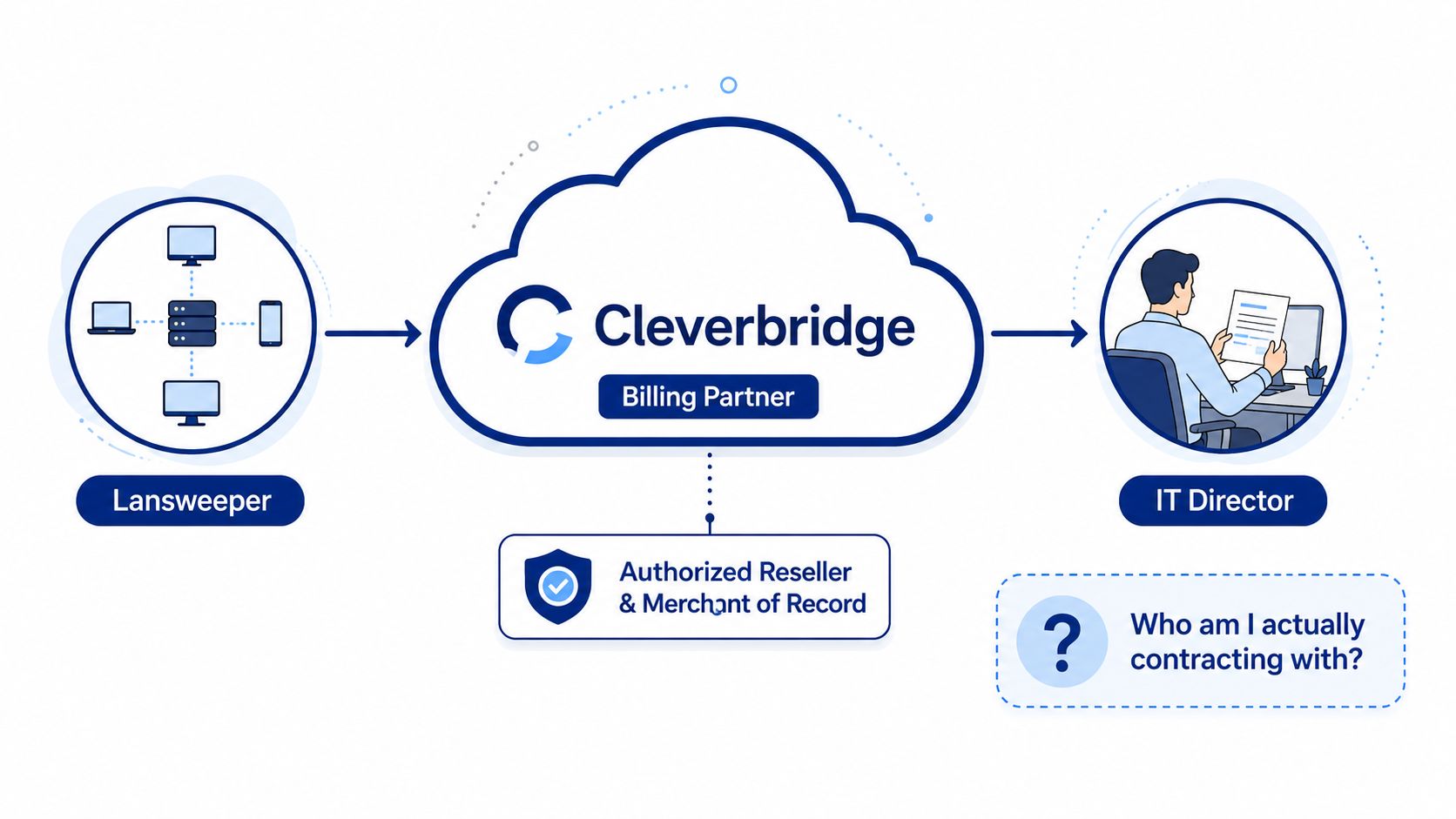
What the split means for asset management
Each system answers a different reconciliation question:
Cleverbridge data records what was ordered, invoiced, renewed, or cancelled.
Lansweeper data records what the organization discovered, classified, and associated with its environment.
Procurement and CMDB records identify the approver, contracting entity, and internal cost center.
Keep those records separate during review. An invoice quantity does not automatically equal active installations, and a device scan does not prove that every discovered asset is covered by the commercial entitlement. Match the records using contract identifiers, billing contacts, renewal status, and the relevant asset or license scope.
The commercial relationship is established rather than incidental. Cleverbridge has worked with Lansweeper since 2009, as stated in Cleverbridge's Lansweeper partnership announcement, which also describes the partnership's role in Lansweeper's B2B subscription strategy. Corporate changes did not remove the need to trace those records. Cleverbridge was acquired on April 19, 2021, while Lansweeper, founded in Belgium in 2004, attracted a €130 million investment from Insight Partners in June 2021, according to Cleverbridge company-profile data.
For a commercial reference point, compare the invoice layout with the Lansweeper pricing overview, then verify every quantity against your entitlement and inventory records.
Who Handles Billing, Renewal, and Support
Lansweeper owns the product relationship and product or installation support. Cleverbridge handles order and billing issues when it is the commerce provider. That division should determine where you send each question, but your contract and purchase path still matter because Lansweeper may invoice through more than one legal or commercial entity.
Lansweeper's documentation says subscriptions purchased directly or through Cleverbridge can't be renewed through the online store or reseller portal. The billing contact receives renewal communications, and changes or cancellation need to be handled more than 30 days before renewal, as described in the Lansweeper renewal guidance.
There are two timing signals to track. Lansweeper's renewal documentation says that, by default, licenses auto-renew on the purchase-date interval, usually every 1 or 3 years, and that an automated renewal email is sent 14 days before expiration when auto-renewal is active, according to the Lansweeper license renewal page. The partner-oriented renewal process also identifies an earlier notice window of 60 to 90 days before expiration for the billing contact, so procurement should not wait for the final automated reminder.
Responsibility table
Task | Owner | What to Know |
|---|---|---|
Product functionality | Lansweeper | Product questions belong with the software vendor. |
Installation support | Lansweeper | Cleverbridge's help center says it handles order and billing issues, not product installation support. |
Order and payment questions | Cleverbridge when it processes the transaction | Keep the invoice, order reference, and payment correspondence together. |
Renewal notice delivery | Billing contact and relevant commerce path | The notice may go to an old employee or to a reseller rather than the operational owner. |
Contracting entity | Lansweeper NV, Lansweeper, Inc., or Cleverbridge, depending on invoicing details | Public contract language permits different billing entities, and Cleverbridge payment conditions apply when Cleverbridge is used. |
The ownership question has a commercial answer and an operational answer. The Lansweeper full product reference can help identify the product scope, but it won't replace a review of the purchase order, invoice, renewal setting, and support route.
Practical rule: Put the billing contact, contract owner, technical owner, invoice entity, and support route in your CMDB. Never assume one person or company owns all five.
Prerequisites and Data Mappings for Reconciliation
Before joining Cleverbridge and Lansweeper records, collect the source data and define the matching key. A clean process needs order and subscription exports from Cleverbridge, current Lansweeper scan results, a deduplicated asset inventory, and a stable identifier such as an order number, product SKU, license quantity, or entitlement reference.
The quality of the result depends on how carefully the technical inventory has been prepared. Lansweeper's benchmark methodology compares vulnerability resolution across peers with a similar technology stack, industry, country, or market segment, but those comparisons only make sense when the underlying asset and severity classifications are reliable. The same issue applies to licensing reconciliation. Duplicate assets inflate the observed installation count, while missed or stale scans suppress it.
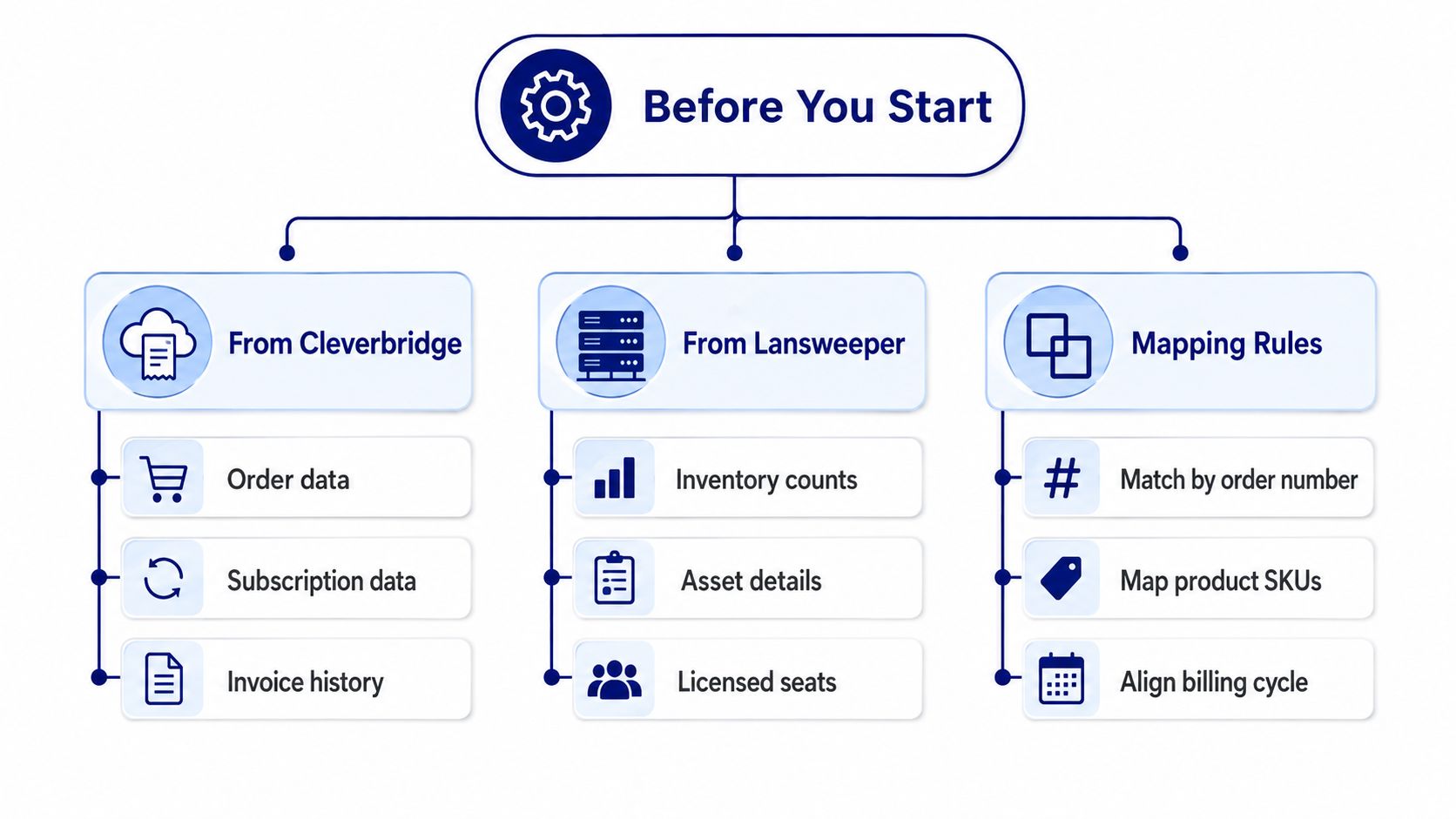
Build the source inventory first
Pull the commercial fields that explain the transaction:
Order identity: Preserve the order number, invoice reference, product name, SKU, and contracting entity.
Entitlement status: Record purchased quantity, subscription status, renewal date, and cancellation or auto-renewal state.
Ownership details: Capture the billing contact, procurement owner, cost center, and internal contract record.
Then prepare the Lansweeper side:
Inventory counts: Use the current count of relevant discovered installations.
Asset identity: Retain hostname, device identifier, installation detail, last scan time, and classification status.
Coverage context: Separate managed, unmanaged, duplicate, retired, and unscanned records before comparing quantities.
Apply explicit mapping rules
Map Cleverbridge subscription quantity to the Lansweeper installation or asset population that the entitlement covers. Match purchase and renewal dates to scan timestamps so a device discovered after the contract period isn't incorrectly treated as historical evidence.
Map the billing entity to the contract owner in your CMDB. If the invoice comes from Cleverbridge but the product and support relationship sits with Lansweeper, store both relationships rather than flattening them into a single vendor field. A CMDB and Lansweeper integration guide can support that broader configuration.
A reconciliation is only as trustworthy as its weakest classification rule. Fix duplicate and stale assets before debating whether the invoice is correct.
Building the Reconciliation and Automation Workflow
A useful workflow turns a one-time spreadsheet comparison into a controlled operating rhythm. Run it on a recurring basis and again before each renewal decision, with ownership assigned to procurement, software asset management, and the Lansweeper administrator.
Start with the commercial extract. Preserve the original Cleverbridge file or invoice data, then normalize product names, SKUs, order references, quantities, dates, and billing contacts. Don't overwrite source values during cleanup. Create a separate normalized layer so an auditor can trace every calculated result back to the original record.
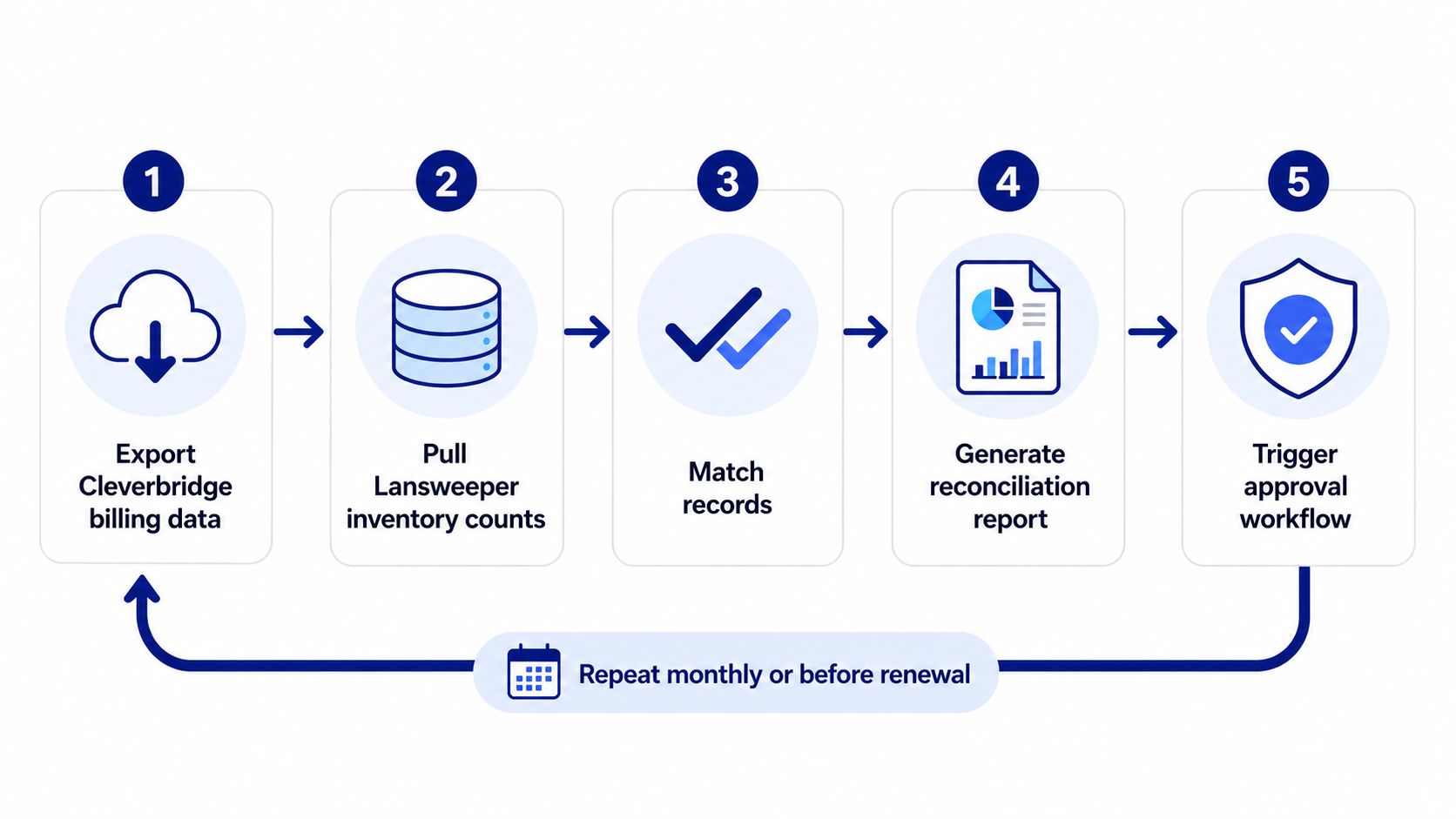
Make exceptions visible
Pull the current Lansweeper inventory and join it to the entitlement record. The report should separate at least these outcomes:
Matched records: The commercial entitlement and scanned population align.
Commercial surplus: The purchased quantity exceeds the currently observed installation population.
Operational surplus: Scanned installations exceed the purchased quantity or the expected coverage scope.
Unresolved records: A product, SKU, asset, or order reference can't be matched confidently.
A realistic example is an organization with 500 licensed Lansweeper assets that identifies 40 unmanaged scanned devices. The numbers alone don't prove an under-licensing problem. First determine whether those devices are duplicates, outside the licensed scope, newly introduced, or subject to the same entitlement. Then document the decision to remove, classify, true up, or investigate them before renewal.
Automate the reminders, not the judgment
Scheduled exports can feed a spreadsheet, CMDB pipeline, or software asset management process. Alert procurement when renewal dates enter the 60-to-90-day notice window, but route the final action through an approval record that explains whether the organization will auto-renew, renegotiate quantities, cancel, or request clarification.
A Lansweeper ticketing workflow can help assign ownership for unresolved assets and licensing questions. The important control is the decision log. Record who reviewed the exception, which evidence they used, and whether the result changed the renewal quantity.
Validation Checks That Keep Your Numbers Honest
A reconciliation report can be perfectly calculated and still be wrong. Validation tests whether the records describe the same population, period, and coverage rules. Without that check, teams may approve a renewal based on clean arithmetic applied to incomplete inventory.
Lansweeper's benchmark methodology provides a useful external check for security-related inventory quality. It lets organizations compare high and critical vulnerability resolution against all customers, a similar technology stack, the same industry, the same country, or a market segment. Results are normalized into four equal performance bands, worst, lower middle, upper middle, and best, as described on Lansweeper's product page.
Use peer context carefully
Internal trend lines can create false reassurance. Your resolution rate may improve while your organization still sits behind comparable peers, particularly if the asset population changes or scan coverage is delayed. The benchmark doesn't repair bad inventory data, so treat the result as a reason to investigate classification quality rather than as a substitute for it.
The methodology also distinguishes resolution rate from adoption rate. Resolution rate concerns high and critical vulnerability remediation, while adoption rate measures the share of assets running a non-vulnerable software version relative to total installations. Duplicate assets, incomplete software inventory, and delayed scan cycles can distort both numerator and denominator.
Pre-renewal validation
Use a short evidence-based review before approving the renewal:
Dedupe assets: Confirm that repeated records represent separate devices, not multiple discovery paths.
Confirm scan coverage: Review last scan times and investigate assets that haven't reported recently.
Match entitlements: Compare purchased quantities, product scope, and installation counts using the agreed key.
Check billing alignment: Confirm that each subscription maps to an invoice and a contract owner.
Verify contact ownership: Ensure the billing contact email reaches an active role rather than a departed employee.
Review peer context: Use the relevant Lansweeper benchmark segment to challenge internal assumptions.
The Lansweeper market and analyst context may inform broader vendor evaluation, but it doesn't validate your specific invoice or inventory count. Your own source records remain decisive.
Common Pitfalls in Partner-Led Billing
Partner-led billing can simplify a vendor's commerce operation while leaving the buyer responsible for coordination. Assign one internal owner for purchase-order timing, invoice approval, renewal decisions, and license continuity. External billing and technical support do not remove that responsibility.
Missing the change deadline
Symptom: The renewal arrives with an unwanted quantity or term.Cause: Procurement waited until the renewal date was near.Preventive habit: Assign an owner when the first notice arrives. Record cancellation and change deadlines in the contract calendar, then confirm them against the order terms.
Treating the invoice name as the product owner
Symptom: Accounts payable rejects a Cleverbridge invoice because the team expected Lansweeper.Cause: The buyer recorded only the product vendor and omitted the billing entity.Preventive habit: Store vendor, merchant, invoice entity, support provider, and internal owner as separate fields. This keeps payment routing distinct from product responsibility.
Assuming the billing path never changes
Symptom: A contract review identifies Cleverbridge as the billing entity even though Lansweeper is the product vendor.Cause: Earlier procurement records may not reflect the current invoicing arrangement.Preventive habit: Check the current order, invoice, renewal notice, and support instructions instead of relying on an old vendor master record. If those documents disagree, pause approval until procurement confirms which party owns each step.
Letting auto-renewal run on stale quantities
Symptom: The subscription renews against a seat count that no longer matches scanned assets.Cause: No one compared the entitlement with the latest cleaned inventory.Preventive habit: Require reconciliation approval before renewal. Check the agreed asset key, exclusions, and scan freshness so a billing quantity is not mistaken for an active deployment count.
Sending notices to the wrong person
Symptom: The technical team discovers an expired or soon-to-expire subscription after procurement misses the notice.Cause: The billing contact left the company, the mailbox is unmanaged, or the address belongs to a reseller.Preventive habit: Test the contact path during every contract review. Confirm who receives billing notices, who approves changes, and who handles support, then record a backup contact.
How a Centralized Licensing Marketplace Simplifies It All
The underlying problem isn't merely that two vendors appear on one transaction. It's that Lansweeper, Cleverbridge, procurement, finance, and IT operations can each hold a different version of the commercial truth. That fragmentation makes it harder to compare quotes, identify the responsible party, and connect renewal quantities to scanned assets.
A centralized licensing marketplace can give the buyer one commercial front across multiple OEM relationships. Instead of asking separate vendor portals to explain pricing, quantities, renewal dates, and contracting entities, the procurement team can standardize how requirements are captured and compare options through a consistent RFQ process.
For organizations managing several software platforms, that structure can simplify:
Requirement capture: Record product, quantity, scope, term, and support needs in a consistent format.
Commercial comparison: Review comparable quotes rather than interpreting unrelated vendor documents.
Renewal governance: Keep dates, owners, approvals, and entitlement evidence together.
Vendor coordination: Give procurement one accountable route for pricing and purchase-order discussions.
Stackingo operates as a marketplace-first platform for software and hardware licensing, aggregating options from multiple technology OEMs into one RFQ-led purchasing experience. It can also provide Lansweeper licensing through its procurement workflow, so buyers can consolidate the commercial process while continuing to validate technical coverage in Lansweeper.
The controls that matter most remain practical: keep invoice and product ownership separate, maintain a current billing contact, deduplicate assets, confirm scan coverage, and reconcile entitlement quantities before renewal.
Stackingo can help you source Lansweeper licensing, standardize requirements, and coordinate multi-vendor software purchasing through one commercial workflow. Visit Stackingo to request a quote and create a clearer renewal process around your actual asset inventory.