
Lansweeper BitLocker Reporting: A Practical How-to Guide
Updated: Oct 10
You've got laptops showing up in inventory, a help desk asking for recovery keys, and a security report that can't clearly separate protected devices from encrypted devices with no recoverable key. Lansweeper BitLocker reporting can close that visibility gap, but only when scanning permissions, Active Directory escrow, reporting, and remediation operate as one governance loop.
Why BitLocker Visibility Matters Before You Touch Lansweeper
BitLocker availability has never guaranteed BitLocker compliance. Microsoft's enterprise reporting documentation describes the need to verify encryption status rather than assume that an operating system feature is active. Historical evidence makes the point sharply: an Opswat survey summarized by Microsoft found that nearly 90% of computers used no hard-disk encryption, while a little over 8% had BitLocker installed, and only 1.47% of machines with BitLocker installed were actively encrypting at the time measured.
That gap is the operational reason to deploy reporting before you start remediation. An endpoint may be covered by policy, partially encrypted, suspended during maintenance, or encrypted without a recovery key safely escrowed. Those states create different actions for security, infrastructure, and the help desk.
Lansweeper's BitLocker Drive Encryption Audit scans Windows devices for encryptable volumes and records the encryption state of each volume. Its core values distinguish OFF, ON, and UNKNOWN, while fields such as drive letter, asset name, last changed, first seen, and last seen support lifecycle and compliance tracking.
What the platform can and cannot do
Lansweeper gives you an inventory and audit view. It doesn't function as a real-time MDM and won't enforce BitLocker by itself. Enforcement still belongs in tools such as Group Policy, Intune, Configuration Manager, or another endpoint-management control plane.
Set expectations around three boundaries:
Detection: Scanning tells you what the device reported at the time of the scan.
Recovery: A recovery key is useful only when escrow succeeded and the scanning account can read it.
Remediation: A report identifies the gap, but an administrator or endpoint-management workflow must correct it.
Use the Lansweeper overview for asset discovery to align this work with broader inventory ownership. The practical target isn't a one-time spreadsheet. It's a repeatable cycle that supports quarterly attestations, asset handoffs, exception review, and investigation of laptops outside your expected management boundary.
Prerequisites, Credentials, and Scanning Scope
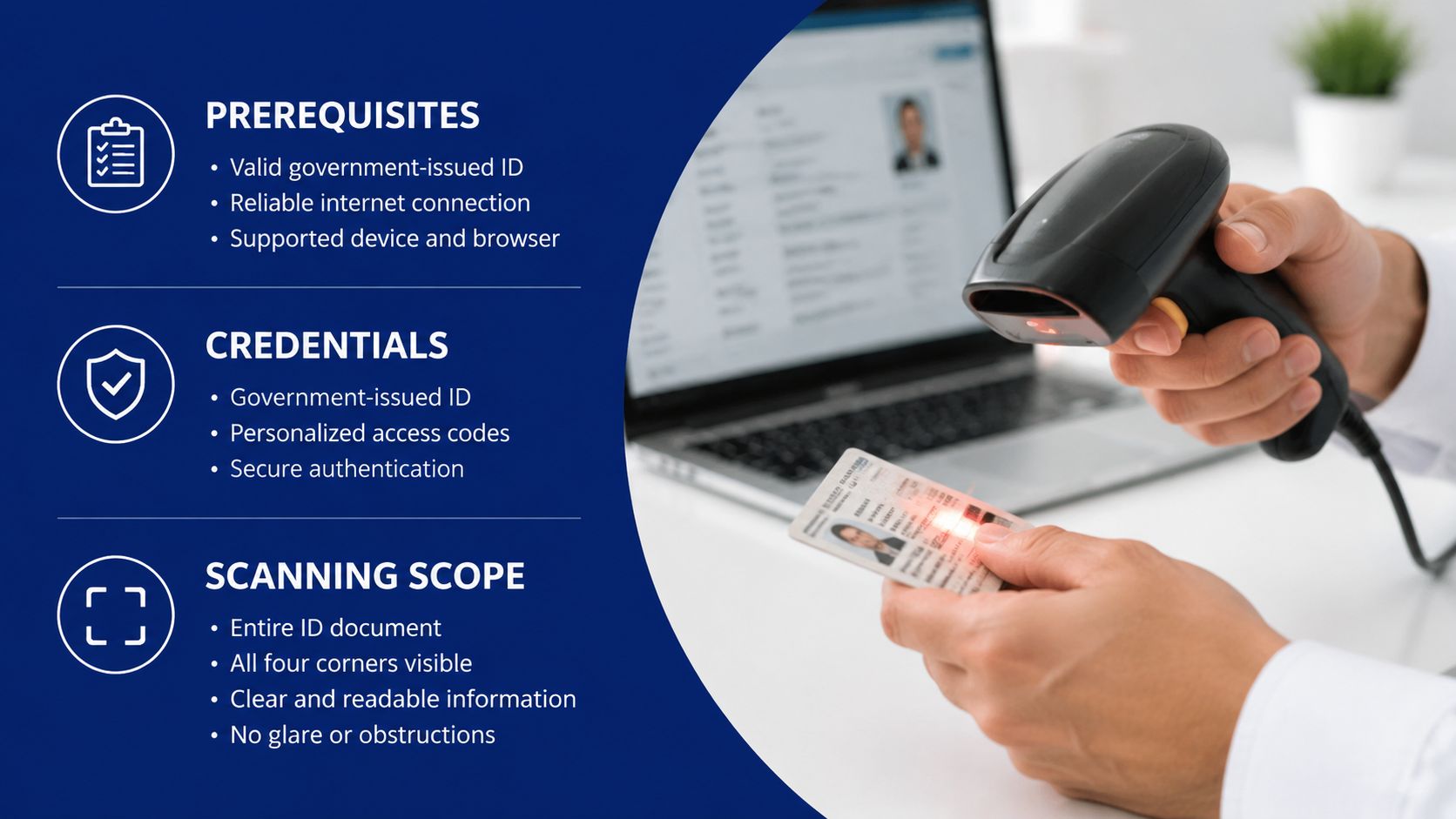
Reliable Lansweeper BitLocker data starts with access, not with the report itself. The scanning account needs local administrator or equivalent rights on the Windows endpoints in scope. The network path must also support the Windows management services Lansweeper uses, including WMI, Remote Registry, and SMB, with Windows Firewall rules allowing the required traffic.
In the console, configure the account under Scanning > Scanning Credentials, then map the credential set to the relevant scanning targets. Keep the first test narrow. A single representative laptop can reveal credential, firewall, domain, and escrow problems before a broad scan produces a noisy exception list.
Prepare recovery escrow before encryption
For domain-joined devices, configure Group Policy to save BitLocker recovery information to Active Directory Domain Services. Microsoft's documented recovery guidance also supports blocking encryption until recovery information is stored in AD DS. Apply the policy to the operating-system volume and fixed data drives where those volumes are part of your protection scope.
For Entra ID-joined endpoints, use cloud escrow and recovery-key lookup through the 48-digit recovery key ID. The password provides access to the volume during recovery. The optional key package is reserved for deeper repair scenarios and requires the BitLocker Repair Tool, so don't treat it as a substitute for a properly escrowed recovery password. These distinctions are covered in Microsoft's Active Directory BitLocker recovery discussion.
Define a defensible scan boundary
Use domains, organizational units, and IP ranges that match your ownership model. Exclude servers or specialist systems that legitimately don't use BitLocker, but document those exclusions so they don't look like unexplained gaps later.
Your initial validation should answer four questions:
Does the test laptop appear as the expected Windows asset?
Does the report show its encryptable volume?
Is the protection state consistent with the device's local BitLocker view?
Can an authorized operator locate the escrowed recovery material?
For network discovery boundaries and target design, the Lansweeper IP scanning guide provides useful supporting context. Don't scale until the test asset answers all four questions.
Running and Tuning the BitLocker Drive Encryption Audit
Open the built-in report under Reports > Windows, then review the fields that support both triage and governance. The useful columns include computer name, domain, drive letter, , encryption method, volume status, and last seen. Lansweeper's published audit model also includes asset timestamps that help you distinguish a newly discovered device from a stale inventory record.
The most important field is . The documented core interpretation is straightforward: 0 means OFF, 1 means ON, and other or unavailable values require investigation. Don't collapse every noncompliant result into one queue. A device with no protection needs a different response from a device whose scan can't determine the state.
Use filters that map to ownership
Start with domain and asset type. Add operating-system version, last user, OU, site, or a custom asset state where those fields exist in your environment. Those additions turn a security finding into an actionable assignment for desktop engineering, regional IT, or the endpoint-management team.
Export the filtered report to CSV when security needs an offline review or a ticket import. Save a customized personal report only after you've confirmed that every selected field serves triage. More columns can improve investigation, but unnecessary fields make daily review slower.
Practical rule: A dashboard should answer who owns the exception, why it exists, and what happens next.
Schedule email delivery to the security distribution list and the operational owner. The report should arrive as part of the working routine, not only after an auditor or help desk engineer asks for it. Adjust the scanning interval to match your operational need, while watching scan-server capacity. Faster visibility is valuable, but aggressive scheduling can create avoidable load.
ProtectionStatus | Meaning | Recommended action |
|---|---|---|
0 | The volume is reported as unprotected. | Confirm policy scope, then remediate through your endpoint-management control. |
1 | The volume is reported as protected. | Validate escrow and retain it in the compliant view. |
UNKNOWN or another state | Lansweeper can't treat the result as a clear protected state. | Check scan access, volume status, and whether encryption or protector changes are in progress. |
Keep operational event data separate from encryption posture. If you're correlating scan timing with infrastructure events, the Lansweeper Syslog integration topic can help you preserve that context without overloading the BitLocker report.
Surfacing BitLocker Recovery Keys from Active Directory
Encryption status and recovery capability are separate checks. A device can report protection while the help desk still can't retrieve the material needed for an incident. That's why the escrow-to-report path deserves its own validation.
For domain-joined systems, configure the BitLocker policy path under Computer Configuration > Policies > Windows Settings > Security Settings > Public Key Policies > BitLocker Drive Encryption. Recovery data appears in Active Directory as objects beneath the computer account. The object's recovery password attribute must be populated, and the Lansweeper scanning account needs read access to the descendant recovery objects.
Where retrieval commonly breaks
Permission inheritance from the computer object isn't always enough after an OU restructure or delegated-administration change. Grant the scanning account read access on descendant objects through ADUC or an appropriately controlled procedure. Test with the exact account used by the Lansweeper scan, not with a domain administrator account that hides the permission boundary.
Lansweeper documents that Windows assets scanned through Active Directory can retrieve BitLocker recovery keys alongside other identity and management data. That makes recovery and inventory part of one workflow, provided the directory objects and permissions are correct.
AD Attribute / Object | What It Stores | Lansweeper Field | Verification Step |
|---|---|---|---|
Recovery record beneath the computer account | BitLocker recovery entry | Confirm the object exists below the correct computer. | |
The recovery password used to unlock the volume | Recovery password field | Confirm it's populated and readable by the scan account. | |
Recovery key ID | Identifier shown during BitLocker recovery | Recovery key reference | Match the ID from the recovery console to the directory record. |
Computer account | Parent identity for the endpoint | Lansweeper asset and hostname | Confirm hostname and domain alignment. |
During an incident, search Lansweeper by hostname and open the asset's recovery-key field. Compare the first and last four characters of the displayed recovery material with the BitLocker recovery console and record the request in the ticketing system. That trace protects the operator and gives security a clear record of who accessed recovery information and why.
Building Dashboards and Saved Views That Actually Drive Action
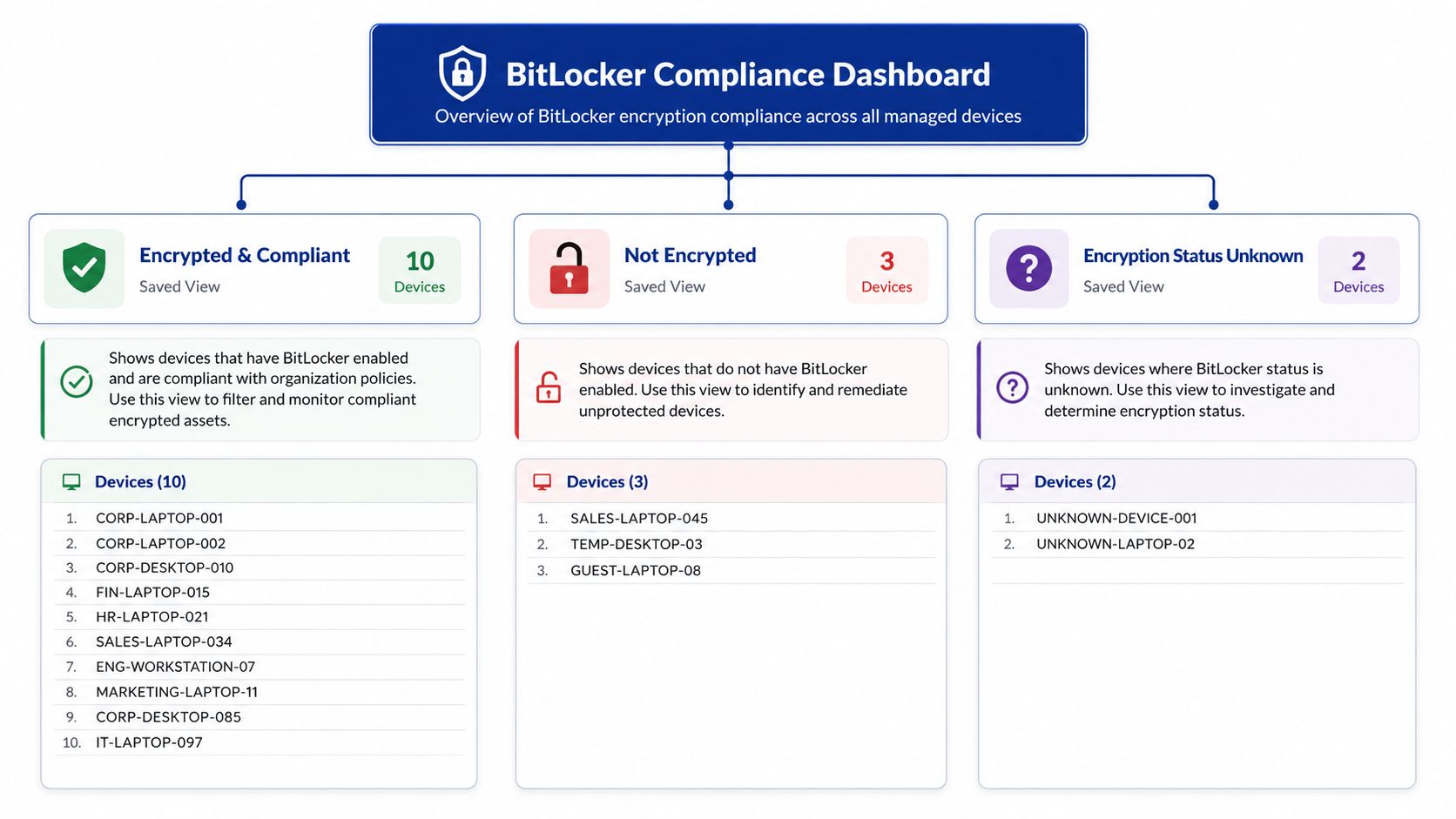
A useful dashboard doesn't celebrate inventory volume. It separates assets that need no action from assets that require an owner. Build the dashboard around saved views with names that explain the decision.
Start with these three views:
Encrypted and Protected: Devices whose volumes report the protected state and have passed the escrow validation process.
Encrypted but Suspended: Devices that need engineering review because encryption may be paused, changing, or otherwise not in a stable protected condition.
Not Encrypted or Unknown: Devices requiring policy, credential, network, or data investigation.
Group each view by OU, site, or asset state. That lets a regional team work its own queue while security retains the environment-wide picture. Link the detailed drill-down to the standard BitLocker Drive Encryption Audit so a dashboard user can move from a tile to the underlying asset records.
Make exceptions visible without making the homepage noisy
A pie chart driven by gives leadership a quick posture view. A bar chart grouped by operating-system family can reveal whether a problem is concentrated in a particular endpoint population. Keep both charts subordinate to the exception list, because teams remediate devices, not chart segments.
Pin a report for devices under a change window, with a next-review date and an accountable owner. A temporary exception should look temporary in the console. Scheduled delivery to the security distribution list creates a useful routine, while asset-state grouping prevents the dashboard from becoming a static snapshot.
Use Lansweeper CMDB practices to connect encryption posture with ownership, lifecycle, and service context. That relationship matters when an unencrypted laptop is also approaching disposal or when a device has no current user assignment.
Troubleshooting Common Lansweeper BitLocker Gaps
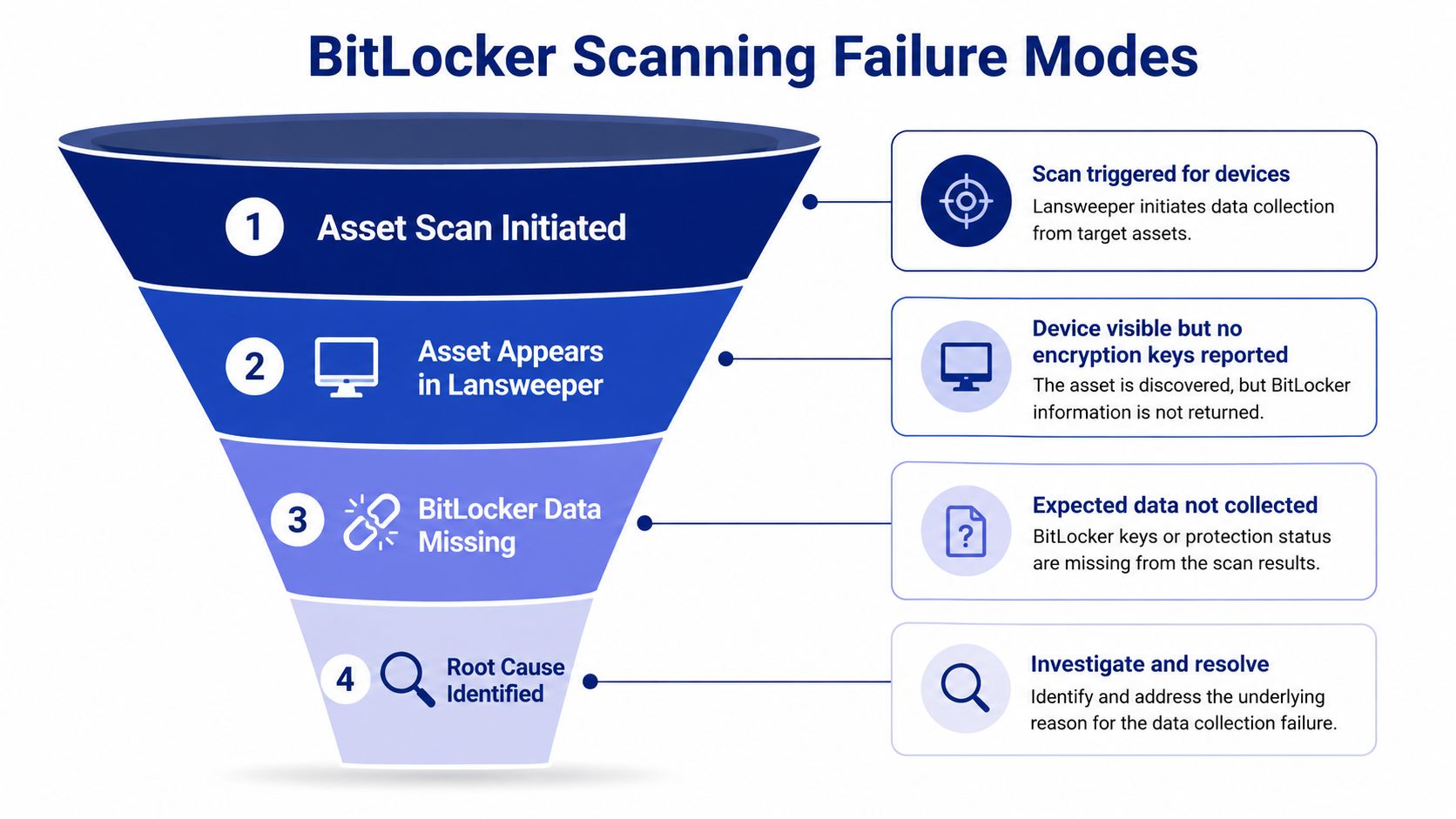
A green asset status doesn't prove that BitLocker data was collected. One of the recurring mistakes in Lansweeper BitLocker deployments is treating “asset discovered” as equivalent to “encryption audited.” The asset can exist in the database while the scan lacks the rights or path needed to query its encryption data.
Classify the failure before changing policy
Use the first failed layer as your diagnosis:
Agent or access gap: The asset appears, but BitLocker fields are empty. Check UAC behavior, WMI access, Remote Registry, firewall rules, and the scanning account's ability to read and .
Policy gap: Encryption is active, but no recovery entry exists. Review the GPO path, the requirement to back up recovery information, and whether encryption was allowed before escrow completed.
Data or permission gap: The directory contains recovery objects, but Lansweeper can't display them. Inspect read permissions on descendant objects, especially after OU or delegation changes.
Force a rescan from the Lansweeper console after correcting one variable at a time. Enable verbose logging during the test, then compare the result with a direct query from the target device. Avoid changing credentials, firewall policy, and GPO scope simultaneously, because you'll lose the evidence showing which control fixed the problem.
Troubleshooting discipline: Treat an empty field as an observation, not a verdict. Prove whether the failure is collection, escrow, or authorization.
If remote procedure calls fail alongside other Windows scan data, use the Lansweeper RPC troubleshooting guidance to isolate network and service conditions. Don't rotate recovery keys or alter encryption settings until you've established that the reporting path, rather than the device, is the problem.
Turning BitLocker Reporting into a Repeatable Program
A mature Lansweeper BitLocker deployment runs as a governance cycle. Security defines the required posture, endpoint engineering owns enforcement, directory teams own escrow permissions, and the help desk follows a controlled retrieval runbook. Lansweeper supplies the shared asset context that lets those teams work from the same records.
Schedule recurring attestations around scan results and AD escrow checks. Export compliant and exception views into the ticket queue so remediation has an owner and a due date. Pair the dashboard with procedures for TPM resets, recovery-key rotation, and lost-device retrieval, but keep those procedures separate from the report so the report remains readable.
Connect encryption to lifecycle decisions
Encryption gaps become more meaningful when you see them beside warranty, software-license, disposal, and asset-state information. A device approaching retirement may need secure handling rather than a new policy deployment. A laptop with no assigned owner may require inventory cleanup before security can decide whether it's a genuine exposure.
Review scanning credentials and directory permissions during every major change window. Silent reporting decay usually starts with a permission, OU, firewall, or delegation change that nobody tied back to the audit. Consolidating related encryption telemetry into one asset source of truth also reduces the temptation to maintain conflicting spreadsheets and parallel inventories.
Stackingo offers Lansweeper licensing and procurement through a multi-vendor enterprise purchasing model, with implementation and deployment support available for capabilities such as CMDB, lifecycle visibility, license management, and asset discovery. That can be relevant when your BitLocker program needs to align with a wider platform and procurement decision.
Frequently Asked Questions About Lansweeper BitLocker
What does Lansweeper BitLocker reporting show?
It scans Windows devices for encryptable volumes and reports their protection state. The audit can include drive, asset, timestamp, and encryption details, while Active Directory scanning can surface escrowed recovery keys when permissions and policy are configured correctly.
Does Lansweeper enforce BitLocker?
No. Lansweeper reports the observed state and helps identify devices that aren't protected. Enforcement still requires Group Policy, Intune, Configuration Manager, or another endpoint-management system.
Why does a device appear without BitLocker data?
The usual causes are insufficient scanning rights, blocked WMI or Remote Registry access, firewall restrictions, SMB or RPC reachability problems, or a partial scan. Test the scanning account against the relevant Windows management classes and force a verbose rescan.
Why is a recovery key missing when encryption is enabled?
Encryption may have started before recovery information was escrowed, the GPO may not apply to the device, or the scan account may lack read access to objects. Validate both the directory record and the permissions used by Lansweeper.
How should teams use the BitLocker audit report?
Use it as an operational queue, not just a compliance snapshot. Separate protected, unstable, unencrypted, and unknown states, assign each exception to an owner, and review the results on a recurring schedule.
Stackingo can help you evaluate and procure Lansweeper alongside the wider licensing and asset-management stack that supports your encryption governance program. Visit Stackingo to discuss Lansweeper licensing, deployment support, and a structured multi-vendor quote for your environment.