
Lansweeper Log4j: A Practical Enterprise Response Plan
Updated: Oct 10
Nearly 300 million Log4j downloads occurred in 2025, and about 13%, roughly 40 million downloads, were still vulnerable versions despite fixes being available for years. That makes continuous detection necessary, because a one-time Lansweeper scan can't prove that Log4j is absent, inactive, unreachable, or permanently remediated.
Lansweeper is valuable for identifying which machines, applications, publishers, and owners may be involved. It isn't an application-runtime proof system. A credible enterprise response combines inventory discovery with JAR inspection, dependency analysis, external testing, log review, remediation evidence, and recurring assurance.
Why Lansweeper Log4j Discovery Is Not the End of Your Response
The central lesson from Lansweeper Log4j work is simple: finding a vulnerable library is a lead, not a verdict. Sonatype reports that nearly 300 million Log4j downloads occurred in 2025, with about 13%, roughly 40 million downloads, still being vulnerable versions even though fixed releases have existed for years (Sonatype's analysis of open-source vulnerability persistence). Patching during the original emergency doesn't prove that later application builds, inherited appliances, development environments, or vendor updates stayed clean.
An asset-management platform answers important questions:
Which host has the software?
Which publisher supplied it?
Who owns the device or service?
What network context surrounds the asset?
What version or installed package did the scanner observe?
Those answers matter, but they don't independently establish whether a vulnerable Log4j class is loaded, whether the application accepts attacker-controlled input, or whether the relevant JNDI execution path remains reachable. A machine can contain a vulnerable JAR that isn't used. Conversely, an inventory scan can miss Log4j embedded in a container, appliance, cloud service, or application package.
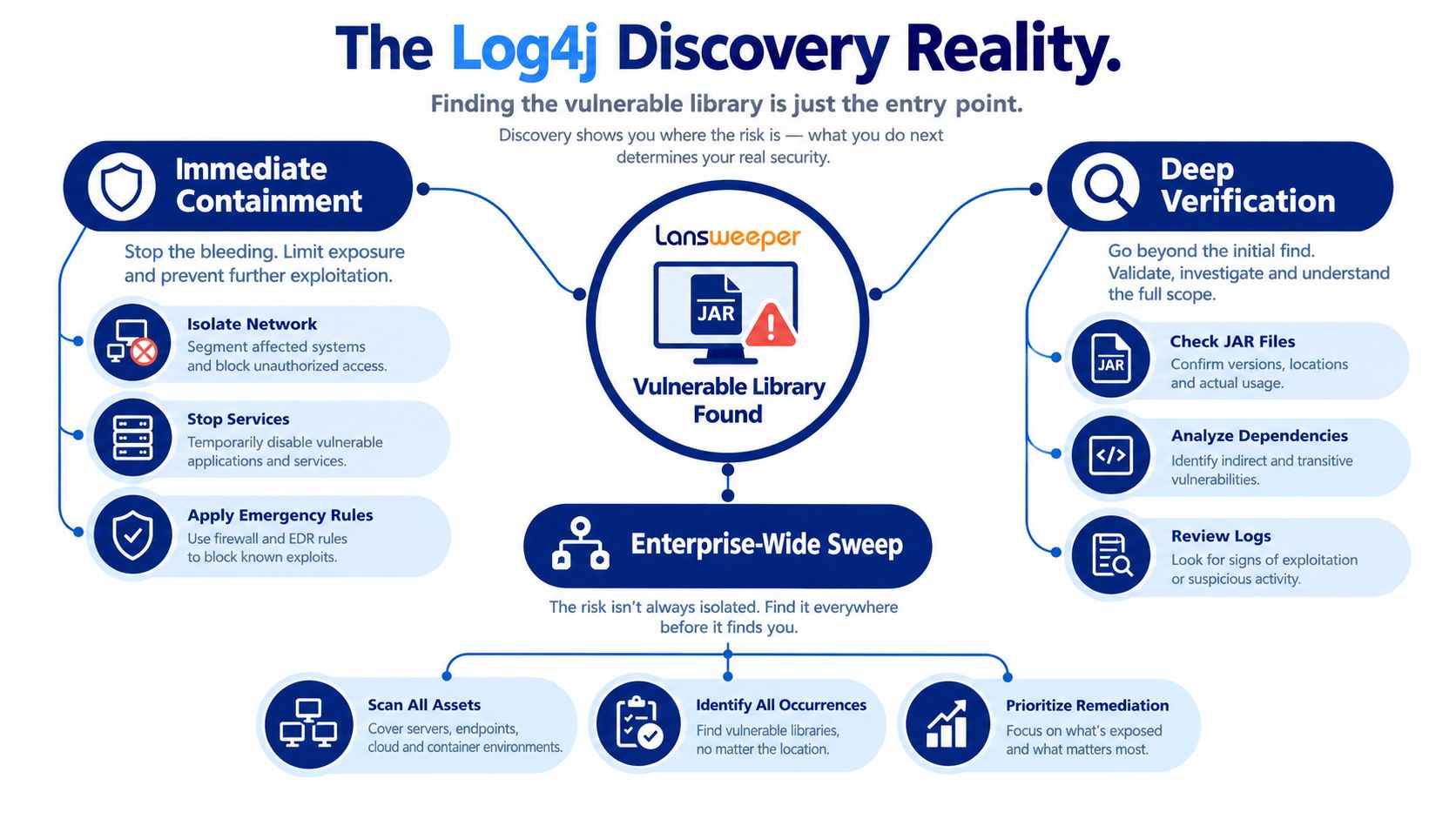
The proof standard enterprise teams should use
A mature response separates four decisions:
Discovery, identify assets, software, versions, owners, and exposure context.
Verification, determine whether the library exists, is loaded, reachable, and potentially exploitable.
Remediation, patch, upgrade, isolate, remove, or obtain a documented vendor exception.
Assurance, rescan and monitor so the dependency does not return unnoticed.
That distinction prevents two costly errors. Treating every inventory hit as confirmed exploitable risk creates unnecessary disruption and weakens prioritization. Treating an inventory miss as proof of safety leaves embedded dependencies and unmanaged runtimes outside the response.
Practical rule: Use Lansweeper to establish ownership and scope. Use application-security and runtime evidence to establish exposure.
The same principle applies when you evaluate Lansweeper's broader asset-management capabilities. A strong platform can improve accountability and accelerate triage, but it shouldn't be treated as a replacement for software composition analysis, SBOM reconciliation, container inspection, or runtime detection.
Using Lansweeper for Initial Log4j Software Discovery
Start with Lansweeper's software and asset data, not with assumptions about where Log4j was installed. After Apache disclosed CVE-2021-44228 on December 10, 2021, the affected scope included Log4j versions 2.0-beta9 through 2.14.1, and the vulnerability received a CVSS score of 10.0. A second issue, CVE-2021-45046, followed on December 14 with a CVSS score of 3.7, which forced organizations to reassess findings rather than treat the first remediation pass as final (NVD's CVE record).
Lansweeper documented a useful first pass: identify Windows software from publishers known to have products affected by Log4j, review installed versions, and compare results with the Dutch Cyber Security Centre's impacted-software list. Its own local, cloud, and third-party services were reported as unaffected, but that didn't mean software discovered through the platform was safe.
Queries that create a usable starting set
Query Focus | What to Look For | Limitation |
|---|---|---|
Publisher inventory | Products from publishers associated with Log4j-impacted software | Publisher presence doesn't prove that a vulnerable dependency is included |
Installed software versions | Log4j packages or products with versions associated with the affected range | Embedded JARs may not appear as separately installed software |
File and path evidence | archives, application directories, and package locations | A file can be present without being loaded |
Ownership and network context | Hostname, business owner, role, internet exposure, and service relationship | Context improves prioritization but doesn't prove exploitability |
Vendor remediation status | Product version, vendor advisory, patch state, and validation date | A vendor statement may cover the product generally, not every deployed build |
Use the results to create a candidate exposure register. Each row should include the asset identity, product and publisher, observed version, scan timestamp, business owner, exposure path, and current remediation state. Keep “unconfirmed,” “confirmed vulnerable,” “mitigated,” and “remediated” as separate statuses.
The sequence of disclosures is operationally important. A first patch can be incomplete, superseded, or unsuitable for a particular Java runtime. Lansweeper's role is to make reassessment repeatable, not to turn an emergency scan into a permanent assurance certificate.
Use directory, domain, and ownership context from related Lansweeper Active Directory discovery workflows to route findings to the right application or infrastructure owner. Then move every material finding into technical verification. Don't close a ticket because a host has a newer operating-system patch if the vulnerable library is embedded inside an application that follows its own release cycle.
Verifying Log4j Presence Beyond the Lansweeper Scan
An inventory result is a starting point, not proof of exploitability. CISA's Log4j scanner documentation warns that the tool is not a 100% true-positive solution and that false negatives can occur. Its design tests more than 60 HTTP request headers, which shows why a narrow check of a few obvious fields can miss relevant behavior (technical discussion of CISA scanner limitations).
Lansweeper identifies machines and software records. A defensible decision requires evidence that vulnerable Log4j is present, loaded by a process, reachable through an exposure path, and covered by a verified fix. Combine network, host, application, and ownership evidence.
Start with externally reachable services
Identify internet-facing or internally reachable services that accept user-controlled input and run Java applications. Test them through the paths clients use in practice, including proxies, load balancers, WAFs, and application gateways. One request to one endpoint cannot represent a service when routing rules send different paths to separate application instances.
Treat scanner output as a lead. Confirm positive findings, and investigate negative results against host contents and the application's dependency chain.
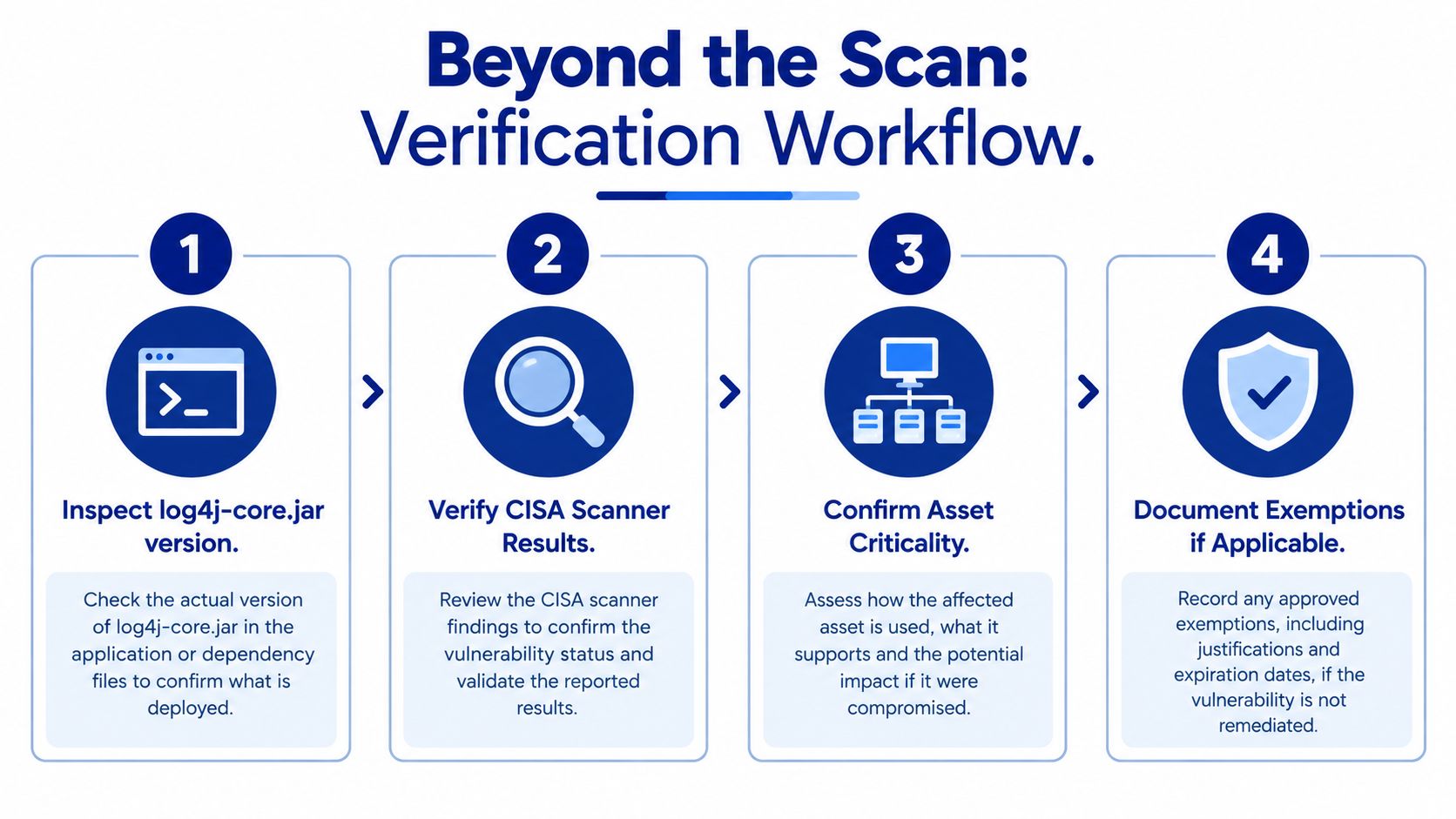
Correlate requests with telemetry
Review proxy, firewall, load-balancer, WAF, IDS/IPS, and application logs for JNDI-style payloads and suspicious outbound activity. Correlation links the request to the target service, host, process, and subsequent network behavior, giving responders evidence that an alert alone cannot provide.
On affected hosts, examine:
JAR contents, including the exact path and version.
Runtime processes, to establish whether the application loaded the library.
Child processes, especially unexpected processes created by the Java service.
Outbound connections, including suspicious command-and-control patterns.
Class and package signatures, associated with JNDI execution.
Application configuration, including logging settings and mitigations.
A static scanner can flag a vulnerable archive because the code is packaged, even when the application never loads it. Independent analysis cited by Azul found that roughly 58% of Java applications packaged a vulnerable Log4j2 version shortly after disclosure, while warning that static CVE tools can produce false positives because they may not distinguish used code from code merely present.
Package evidence for a defensible decision
For CIOs, IT directors, auditors, and procurement teams, record more than “clean” or “vulnerable.” Create a candidate exposure register with:
Asset identity and business owner.
Product, publisher, release, and deployment location.
Exact JAR path or dependency record.
Runtime or process evidence.
External or internal exposure path.
Scan timestamp and method.
Owner validation.
Patch, upgrade, isolation, or removal status.
Compensating controls and residual-risk rationale.
Keep “unconfirmed,” “confirmed vulnerable,” “mitigated,” and “remediated” as separate statuses. A supplier's statement that a product is patched should map to the deployed release, installed artifact, implementation date, and verification result.
Use Lansweeper Syslog integrations and related workflows to organize network and event evidence. Lansweeper supplies asset and ownership context. Telemetry and host inspection show what ran, what it reached, and whether the reported fix applies to the deployed application.
Remediation Paths by Asset Type and Stakeholder Need
Remediation depends on who controls the vulnerable component. For Java 8 and later environments, CISA recommended upgrading to Log4j 2.17.0 or newer. The practical constraint is that an embedded library often requires the software publisher or service maintainer to release and implement the fix, so an administrator can't always replace it independently (CISA's Log4j advisory).
Match the action to the ownership model
Asset Type | Primary Owner | Remediation Action | Evidence Needed |
|---|---|---|---|
Standalone Java application | Application engineering | Upgrade the dependency, rebuild, test, and deploy | Build record, dependency result, deployed version, runtime confirmation |
Vendor-managed appliance | Vendor and infrastructure owner | Apply the vendor update or replace the appliance when unsupported | Vendor advisory, appliance version, change record, validation scan |
Containerized deployment | Platform and application teams | Update the base image or dependency, rebuild, rescan, and redeploy | SBOM, image digest, pipeline result, deployment evidence |
Cloud-hosted service | Service provider, with customer oversight | Obtain provider remediation confirmation and validate exposed interfaces | Provider statement, service version or release evidence, external test |
Custom Java service | Application owner and security team | Inspect archives, update the dependency, test reachable paths, and monitor | JAR evidence, test results, owner sign-off, residual-risk decision |
CISA's response model gives security teams a practical hierarchy: update affected assets when fixes exist, remove them from the network when updates aren't available, and use temporary mitigation only until a permanent update becomes available. That turns remediation into a governed decision rather than an informal promise.
IT operations needs deployment evidence. Security operations needs exposure and detection evidence. Procurement needs contractual and lifecycle evidence, including who owns future fixes, how quickly the supplier communicates affected releases, and whether the product exposes a dependency inventory.
Vendor patching reality: You can patch an operating system yourself. You often can't safely patch a library embedded inside a supplier's application without the supplier's tested release.
Tool boundaries matter here. An asset-management license can identify machines and software context, but it doesn't automatically provide application composition analysis, runtime exploitability testing, or vendor attestation. Integrations can close parts of that gap, but buyers should validate the workflow rather than assume a single platform covers it.
For endpoint ownership and deployment context, teams may also connect discovery data with Lansweeper and Intune workflows. That helps coordinate action, but every remediation still needs evidence tied to the specific application and dependency.
Building Continuous Log4j Assurance Across the Enterprise
The original Log4j response demonstrated why discovery must be repeatable. Lansweeper's documented response connected the December 10, 2021 CVE-2021-44228 disclosure with the December 14 CVE-2021-45046 disclosure, whose CVSS score was 3.7 compared with 10.0 for Log4Shell. Organizations had to reassess assets because the first remediation pass couldn't be treated as final (Lansweeper's Log4j response guidance).
A durable program assigns each control a specific job:
Lansweeper supplies hostname, ownership, software, publisher, and network context.
SBOM and dependency scanners identify direct and transitive components in applications and builds.
Container inspection checks images before deployment and after inherited image changes.
Java archive analysis confirms the actual packaged library and path.
Runtime telemetry shows loading, process behavior, outbound communication, and reachable services.
CI/CD gates prevent known vulnerable dependencies from entering new builds.
Exception management records compensating controls, owners, expiry dates, and reassessment requirements.
The operating record matters as much as the scan
Create a single assurance record for each relevant application. It should show the latest inventory observation, dependency evidence, runtime status, exposure path, patch state, owner approval, and next review date. A finding should move through a defined lifecycle, not disappear when a ticket changes state.
An inventory hit doesn't automatically equal exploitable risk. An inventory miss doesn't equal safety. Mature teams preserve both conclusions until the evidence supports closure.
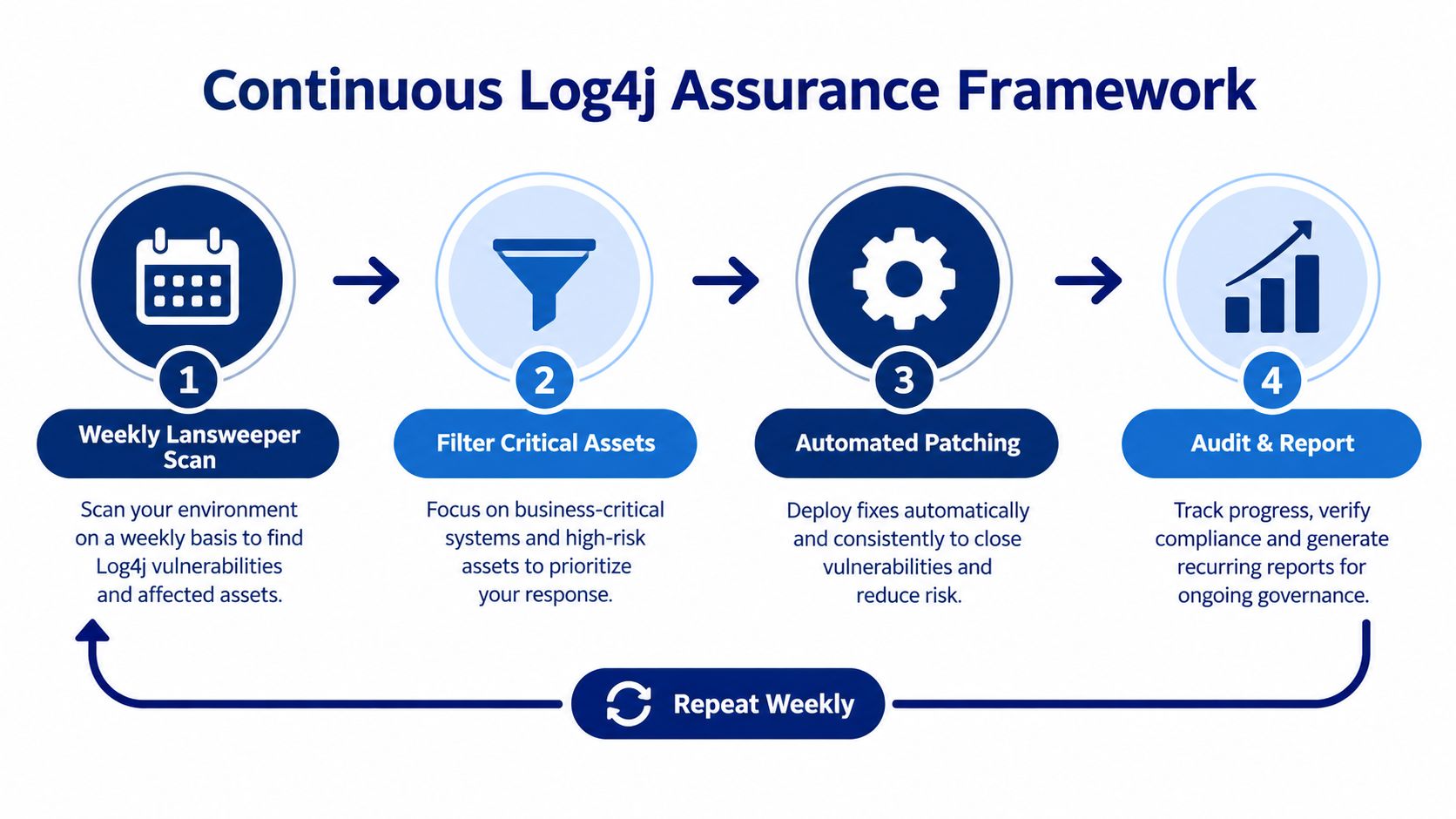
A practical rollout starts with internet-facing services and business-critical Java applications, then expands to containers, appliances, development environments, and vendor-managed platforms. Set recurring discovery, reconcile results with SBOMs, require owners to validate exceptions, and test whether remediation survives the next application release.
Use CMDB and Lansweeper ownership practices to keep asset relationships current. The technical workflow works only when someone owns each application, knows its deployment path, and can explain why a vulnerable component is fixed, isolated, unreachable, or temporarily accepted.
Stackingo helps enterprise teams compare and procure software across multiple vendors through one structured RFQ-led buying experience, which is useful when Log4j assurance requires asset discovery, vulnerability management, SBOM, and application-security capabilities rather than one isolated license. Visit Stackingo to organize your requirements, compare relevant platforms, and request a more efficient enterprise software quote.