
Lansweeper Azure AD: Setup, Scanning, and SSO Guide
Updated: Oct 10
If your Lansweeper inventory is accurate for servers and workstations but misses cloud identities, Azure resources, or Azure AD joined devices, the problem isn't usually the scanner. Your directory and cloud permissions aren't connected to the inventory workflow. Lansweeper Azure AD integration, now more accurately described as Microsoft Entra ID integration, gives you a way to discover users, groups, license assignments, and cloud assets in a shared operational view.
Why Connecting Lansweeper to Azure AD Matters
Microsoft renamed Azure Active Directory to Microsoft Entra ID in July 2023. The customer-facing name change began on August 15, 2023, and SKU and service-plan display names changed on October 1, 2023. Microsoft stated that prices, terms, and SLAs stayed unchanged, so older Lansweeper documentation and searches for Lansweeper Azure AD still refer to the same cloud identity platform under its previous name. Microsoft's Azure AD rebrand announcement explains the naming transition.
The operational issue is familiar. Your estate includes traditional Active Directory assets, cloud-managed endpoints, Microsoft 365 identities, service accounts, and guest users. A network scan can find what answers on the network, but it won't automatically provide a complete view of cloud-only identity objects. Lansweeper's dedicated cloud discovery workflow uses Microsoft Graph application permissions to retrieve identity and access information from Microsoft 365 and Entra ID tenants.
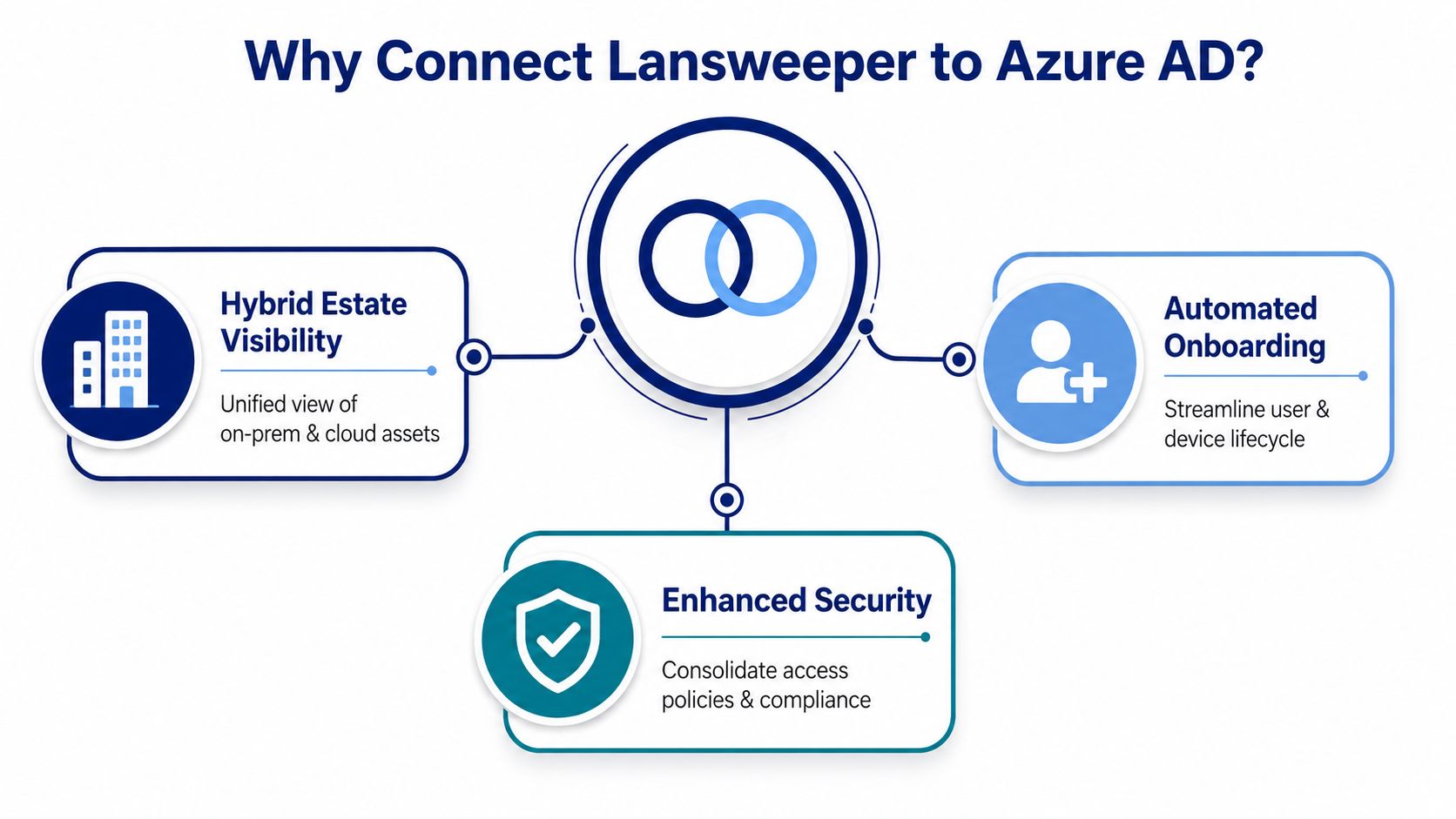
What the integration gives your operations team
The value isn't just another connector in the console. It gives administrators a way to reconcile identity and asset records that otherwise live in separate systems.
Cloud identity discovery: Find Entra ID users and groups through a dedicated scanning target.
License visibility: Retrieve license assignments associated with users in the Microsoft 365 tenant.
Hybrid reconciliation: Compare cloud identity data with traditional network discovery and local directory records.
Audit-oriented reporting: Use time-bounded logon information instead of relying only on static directory objects.
Cloud resource inventory: Surface Azure data by asset type when the scanning target and permissions are configured correctly.
Lansweeper's documentation and community guidance show that Entra ID discovery has been supported across multiple product workflows, including guidance for Microsoft Entra ID and Lansweeper SSO published in November 2021 and cloud scanning documentation available by June 2024. The broader point is practical: this isn't only a terminology update. Lansweeper has extended its inventory model toward cloud identity, access visibility, and audit reporting. Lansweeper's Entra ID user and group scanning guidance documents the cloud scanning target and Graph-based approach.
Before opening either portal, prepare the dependencies that commonly cause rework:
Directory authority: Use an account with the directory privileges required to create the app registration and grant tenant-wide consent.
Tenant and subscription details: Have the Directory ID and the Azure subscription or resource scope available.
Healthy Lansweeper access: Confirm that your Lansweeper site and scanning service are operational, with configuration rights for the administrator performing the setup.
Key Vault location: Decide which Azure subscription or resource group will host the vault that stores the required secret.
A related Lansweeper CMDB workflow becomes more useful when cloud identity data joins discovered hardware and software records. It also makes ownership conversations easier during audits because administrators can investigate the asset and identity relationship from a consistent inventory context.
Practical rule: Treat this as a directory integration with ongoing ownership, not as a one-time scan target. The initial setup can be correct while later role changes, secret updates, or subscription moves silently reduce coverage.
Registering the Azure AD App and Granting Graph Permissions
Create a dedicated Microsoft Entra app registration for Lansweeper rather than reusing an unrelated automation identity. Give it a descriptive name, record the Application ID and Directory ID, and keep those values in your configuration record before moving between the Azure and Lansweeper consoles.
Which permissions should you grant
Under API permissions, add Microsoft Graph application permissions. Lansweeper's Microsoft cloud discovery guidance identifies Organization.Read.All and Directory.Read.All for Microsoft 365 and Entra ID discovery. Grant administrator consent after adding them, then verify that the portal shows consent as granted. Lansweeper's Azure cloud discovery preparation documentation names these permissions and the required Key Vault secret pattern.
Create the client credential required by your selected Lansweeper workflow, but don't paste sensitive values into tickets, email, or exported configuration files. Store the relevant secret in Azure Key Vault. The required secret name is LansweeperSiteID, and the Lansweeper app registration needs Get permission on secrets so it can retrieve the value.
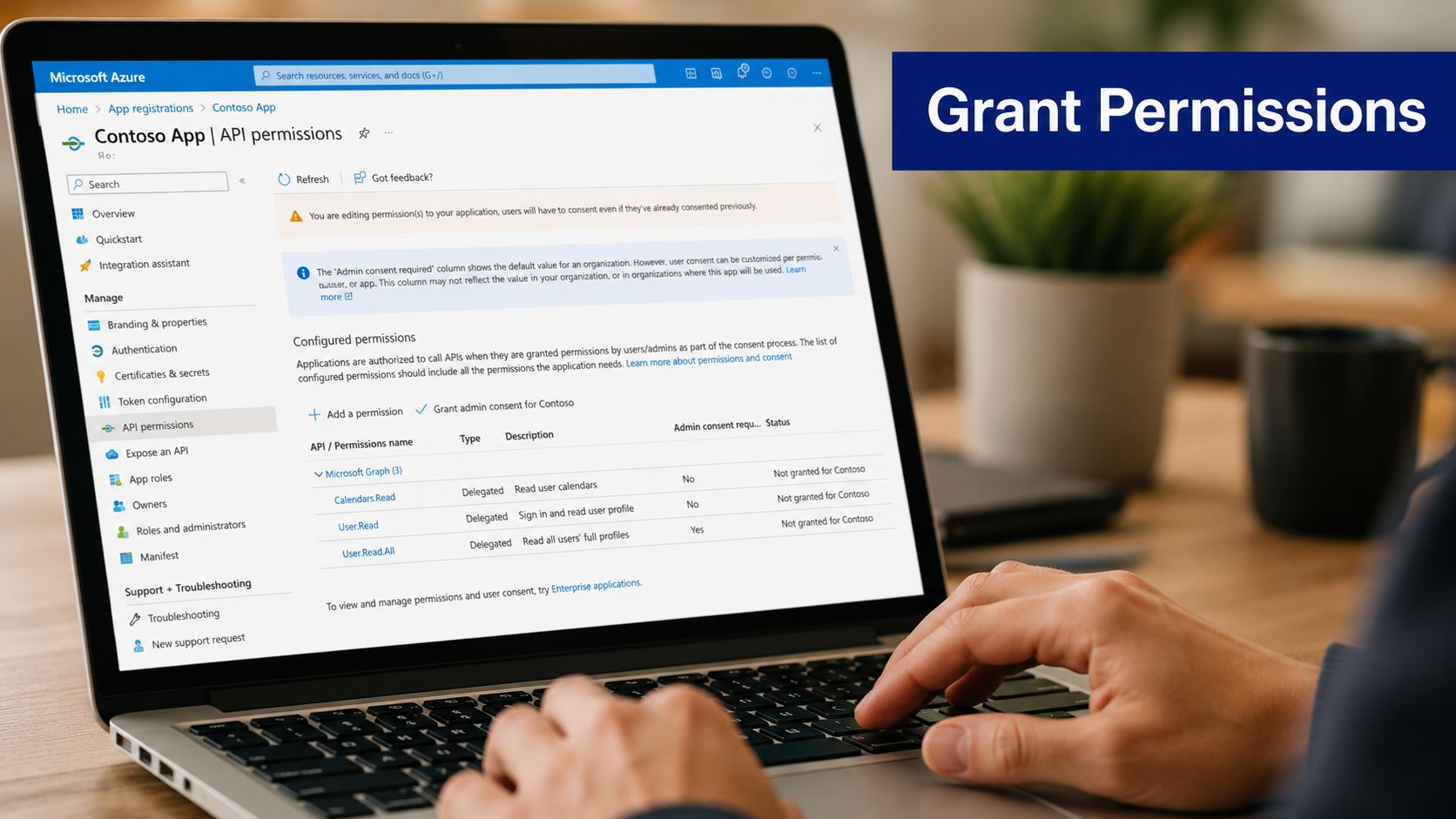
Microsoft Graph permissions should be deliberately scoped. Don't add write permissions merely because the app registration screen makes them available. Lansweeper's documented discovery model is based on reading identity and access information, while Key Vault protects the secret retrieval path.
Configuring the Azure Scanning Target Inside Lansweeper
In the Lansweeper web console, open the cloud scanning area and add an Azure scanning target. Select the scope that matches the access granted to the application, whether that scope is a management group, subscription, or resource group. Scope mismatch is one of the easiest ways to create a scan that authenticates successfully but returns incomplete inventory.
Enter the Directory ID, Application ID, and the Key Vault URI. The vault URI tells Lansweeper where to resolve the site secret, while the Azure-side permissions determine whether that resolution and subsequent discovery can succeed. Lansweeper's Azure scanning requirements describe the app registration, Microsoft Graph permissions, Key Vault access, and target configuration as connected prerequisites rather than independent settings. The Azure scanning requirements are useful when you need to validate the dependency chain.
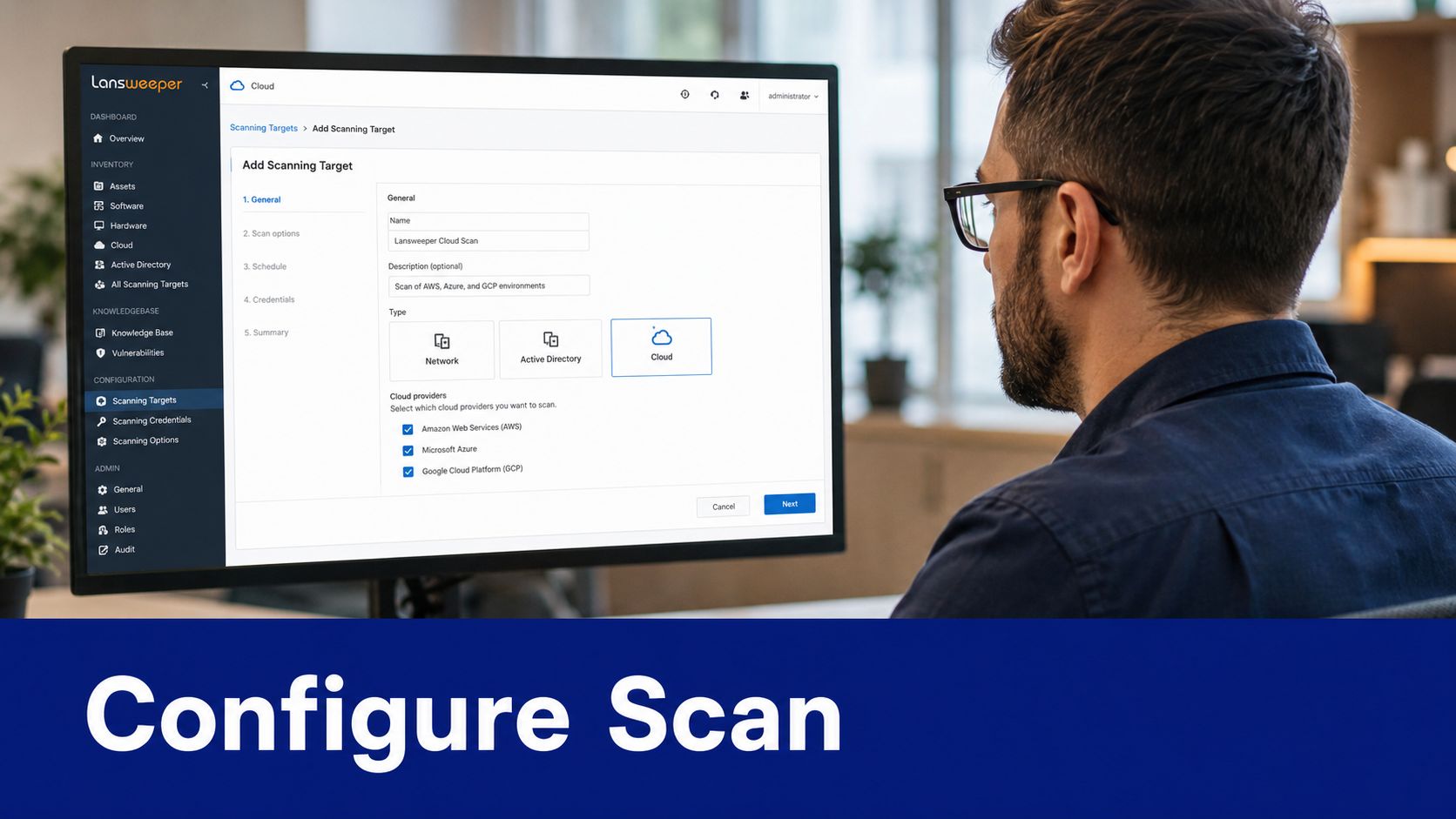
Run a test scan after saving the target. Don't stop at a successful connection message. Filter the inventory by asset type and check whether the expected Azure resources and identity records appear. If assets are absent, validate the chosen subscription scope, the application's Reader access at that scope, and the Key Vault permission before changing the Graph permission set.
For broader discovery planning, compare this workflow with a Lansweeper IP scanner approach. Network discovery and cloud discovery solve different visibility gaps, and running only one of them leaves part of a hybrid estate outside the inventory boundary.
Enabling Lansweeper SSO With Azure AD
SSO is a separate concern from cloud asset scanning. The same Entra tenant can support both, but authentication configuration and Graph discovery use different settings, so test them independently.
In Lansweeper, open the SSO configuration under the user and group settings, select the Entra ID authentication method supported by your deployment, and copy the Reply URL or equivalent service endpoint generated by Lansweeper. In the Entra portal, add that value to the app registration's authentication configuration. Depending on your Lansweeper version and connection type, you may configure web or single-page application entries and enable the token options required by the product.
Map users before removing local access
Claims matter because Lansweeper needs to associate the incoming identity with the correct user. Configure the claims your deployment requires, including the user principal name and email where applicable, then assign the appropriate Entra users or groups to the enterprise application. Lansweeper's SSO guidance also describes SAML configuration details such as the entity ID, Assertion Consumer Service URL, signing certificate, login URL, and the required attribute. The Lansweeper SSO configuration for Microsoft Entra ID provides the vendor's connection-specific fields.
Test with an administrator account in a private browser session. Confirm that the user lands in the expected Lansweeper site, then validate logout and group-based access. Keep a controlled local recovery account until the SSO path has been proven, because an incorrect claim or assignment can lock out administrators.
For operational context, review how a full Lansweeper deployment fits authentication, discovery, and inventory administration together. SSO reduces password duplication, but it doesn't remove the need to maintain the underlying identity application.
Scheduling Syncs and Using Identity Reports
A successful first scan gives you a baseline, not permanent accuracy. Cloud identity data changes as users join, leave, receive licenses, enter groups, or authenticate from new devices. Schedule recurring scans under Lansweeper's scanning settings, then adjust the cadence to your change rate and the practical load on the scanning service.
Lansweeper reports can provide time-bounded identity activity. One documented report example tracks recent user logins within the past 60 days, while another references the most recent logon within the past 2 days. These windows are useful for different questions: the longer window supports stale-account review, while the shorter window helps validate current activity. Lansweeper community guidance on stale account audit reporting provides those reporting examples.
Report | Time Window | Use Case |
|---|---|---|
Recent User Logons | Past 60 days | Review inactive identities and investigate stale access |
Last Logon | Past 2 days | Validate recent identity activity and dormant devices |
Don't treat a report as proof that an account should be deleted. Use it as an investigation signal, then confirm ownership, business need, licensing status, and any service dependencies with the relevant team. Re-run a scan after onboarding a subscription or changing credentials so your report reflects the new configuration rather than an earlier inventory state.
Common Errors and How to Fix Them
Most production failures fall into a small group of configuration and lifecycle problems. The error message may appear in Lansweeper, but the cause often sits in Azure RBAC, Key Vault, app credentials, or a recreated application object.
Error or Symptom | Root Cause | Fix |
|---|---|---|
No valid or working credentials | Lansweeper resolves an expired or inaccessible secret after credential rotation | Confirm the active credential in the app registration, inspect the Key Vault secret, verify Get permission on secrets, and run the Lansweeper credential test |
Authentication succeeds but assets are missing | Reader access or the selected subscription scope no longer matches the scanning target | Review Azure role assignments and target scope, then trigger a fresh scan |
SSO stops after a tenant or app change | Federated credentials, reply URLs, claims, or application assignments were not recreated | Compare the current Entra app with Lansweeper's SSO settings and reapply the missing values |
Scanning service becomes unstable | Overlapping inventory activity or service-side failures affect the scanning process | Review Lansweeper logs, separate schedules, and check current product guidance before retrying |
The recurring “No valid or working credentials” problem deserves a controlled diagnostic sequence. Start with the Azure audit trail and Key Vault access logs, then inspect the Lansweeper scanning log for the target and credential identifier. If the app registration has a new secret but the vault still contains the old value, updating only Azure won't repair the Lansweeper path.
Reader drift is equally common after subscription ownership changes. A service principal can remain valid while losing access to the resource scope it needs, which produces an apparently healthy identity with an empty or incomplete result. For network-side failures that affect asset collection, use the Lansweeper RPC unavailable troubleshooting guide separately from the Entra credential investigation.
Security Best Practices and Procurement Considerations
Start with least privilege. Organization.Read.All and Directory.Read.All should be treated as the documented read scope for the discovery requirement, not as an invitation to grant broader Graph access. Separate scanning, SSO, and unrelated automation identities when their responsibilities differ, because a smaller permission boundary makes audit review and incident response easier.
Key Vault should be part of the operating model, not an afterthought. Record who owns the app registration, who approves permission changes, who maintains Reader assignments, and how credential updates are tested before expiry. The integration depends on OAuth, Graph permissions, vault access, and Azure scope, so a change in any one of those layers can interrupt inventory.
What procurement should price beyond the license
The purchase decision should account for the people and controls needed after deployment:
Credential administration: Someone must maintain app credentials, vault secrets, and access reviews.
RBAC ownership: Subscription transfers and role reassignment can change scan coverage without changing Lansweeper.
Reporting operations: Audit teams need repeatable report ownership, review routines, and evidence retention.
Recovery planning: SSO and cloud scanning need tested fallback procedures.
Lansweeper's broader cloud coverage and interface changes show continued investment, but community and changelog references also include scanning service crashes, credential update failures, and Active Directory user path settings. Those signals support a realistic procurement position: reliability work and maintenance remain part of the total operating cost. Lansweeper market and platform context can sit alongside technical validation when you compare licensing and deployment requirements.
Stackingo operates as an enterprise licensing marketplace and offers Lansweeper licensing across its available plan options, giving procurement teams a way to compare requirements and obtain a structured quote alongside other software decisions. Treat the integration effort as part of the business case, not as an invisible implementation task.
If your team needs to validate Lansweeper licensing against Entra ID discovery, SSO, and ongoing credential administration, visit Stackingo to outline your requirements and request a structured procurement conversation. Bring your tenant scope, deployment model, and expected user and asset coverage so the quote reflects the operational reality, not only the initial license.