
Lansweeper Change Log Guide: Versions, Fixes, and Upgrades
Updated: Oct 10
You approve a Lansweeper update on Tuesday, then discover that an integration fails, a scanner behaves differently, or an audit question has no obvious answer. The Lansweeper change log gives you the evidence to prevent that surprise. Treat it as operational governance, not marketing copy: use it to approve installers, test API contracts, brief security stakeholders, and decide whether a release belongs in the next change window.
Why the Lansweeper Change Log Matters to Your Operations Team
A release note can look like a short list of fixes. For an operations team, it's closer to a control record. It tells you whether an update affects the on-prem scanning stack, the cloud platform, Network Discovery, or an integration that feeds another system. That distinction matters because the same vendor name covers several product surfaces with different operational consequences.
Use the changelog to answer three questions before approving a change:
What should we install? Lansweeper's support workflow directs users to official release notes and the latest installer available within the platform. The support page marks version 12.5.3.0 as Recommended, showing that version labels help guide upgrade decisions. See the official Lansweeper support guidance before selecting a build.
What could break? The Data API changelog records compatibility constraints that can turn a previously successful request into an error. Automation owners need a contract test, not an assumption that a minor-looking release is harmless.
What evidence must we retain? Classic and Sites handle logs differently. Classic uses database cleanup settings for login and configuration history, while Sites stores audit trails for up to 12 months, as documented in the Lansweeper Classic login and settings history guidance.
A weekly control is cheaper than a deferred incident
I've found that changelog review works best as a short recurring control. The reviewer records the release date, affected surface, compatibility notes, recommended action, owner, and CAB status. That record becomes useful when an API team asks why a query contract changed or when security asks who altered a configuration.
The operational relationship between inventory, scanning, and governance is also covered in Lansweeper CMDB practices. A changelog review should connect to that broader record, rather than sit in a bookmarked page that nobody checks.
Practical rule: If a release changes behavior your team depends on, it belongs in CI, the change ticket, and the rollback plan.
Skipping the review doesn't remove the work. It moves the work into the next scan failure, failed integration run, or audit investigation.
How Often Lansweeper Ships Updates in 2026
The public Lansweeper changelog shows a continuous release cadence in 2026, with documented entries dated 27/05/2026, 09/07/2026, 10/08/2026, 02/09/2026, and 09/09/2026. The page was last updated on 2026-09-22, so the record covers at least five documented product updates across roughly 3.5 months. These dates come from the Lansweeper public product changelog.
That pattern is frequent enough to change how you staff review. A quarterly deep dive leaves too much material to triage at once. A weekly check gives platform operations, cloud governance, network engineering, and automation owners a chance to identify impact while the release is still easy to isolate.
Lansweeper 2026 Release Cadence at a Glance
2026 Date | Product Surface | Update Type | Admin Action |
|---|---|---|---|
27/05/2026 | Lansweeper platform | Product update | Check affected deployment model and assign an owner |
09/07/2026 | Lansweeper platform | Product update | Compare release notes with current build and integrations |
10/08/2026 | Lansweeper platform | Product update | Review compatibility, scanning, and audit implications |
02/09/2026 | Lansweeper platform | Product update | Add relevant regression tests to the change record |
09/09/2026 | Lansweeper platform | Product update | Confirm whether the release is suitable for the next window |
The public dates show release activity, but they don't by themselves prove that every surface changes on the same schedule. That's why an operations lead should classify each entry before estimating testing effort. A release affecting the Data API deserves automation review. A scanning change needs a controlled target. A console or audit change needs security and governance review.
Bookmark the changelog, check it weekly, and add the result to your existing CAB workflow. If the platform ships updates across separate surfaces, one owner should still maintain the consolidated decision record.
Mapping the Lansweeper Change Log Surfaces Side by Side
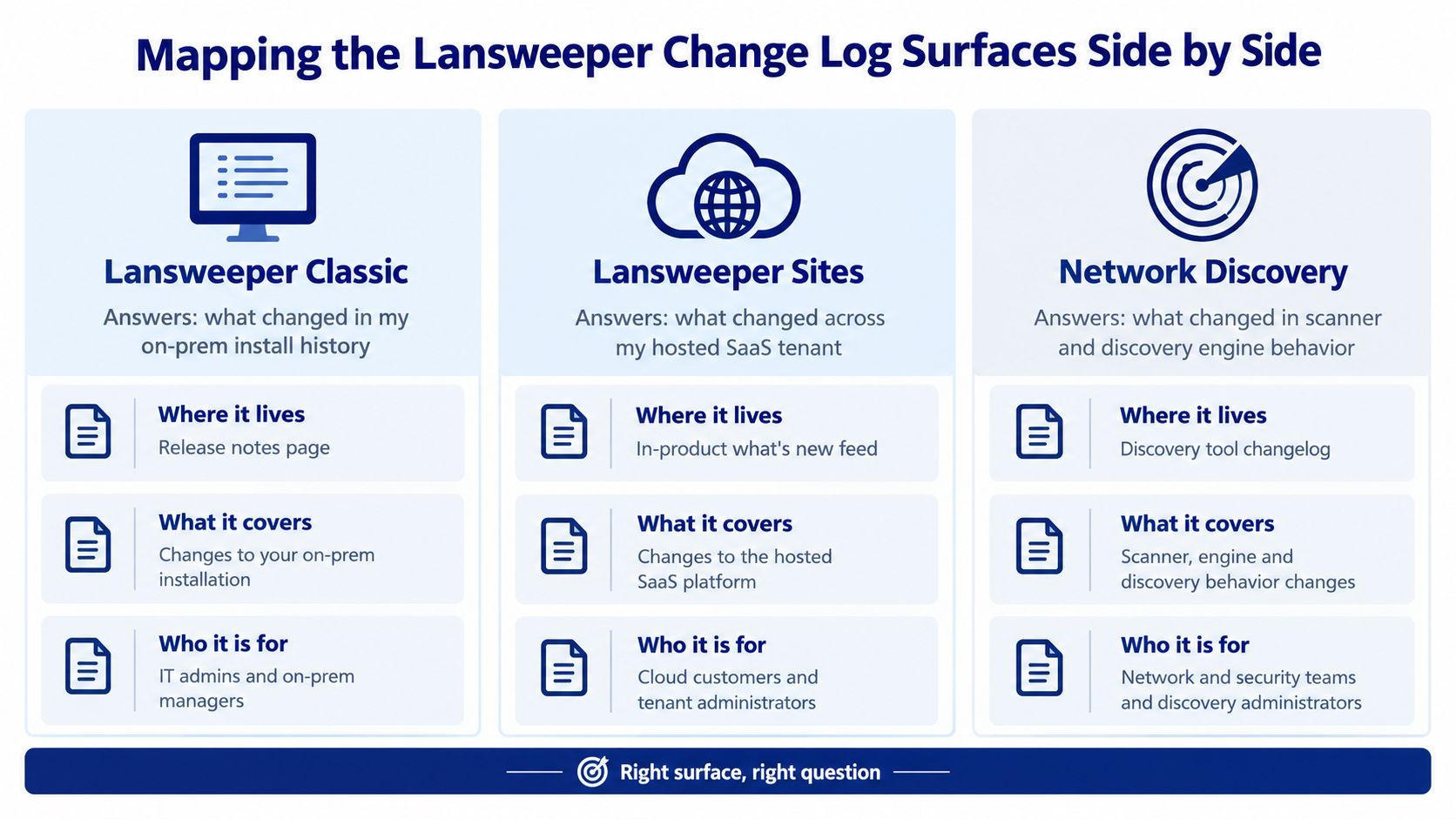
Lansweeper's documentation is split across Classic, Sites, Network Discovery, and the Data API. The practical mistake is treating one page as a complete product history. It isn't. Each surface answers a different question, and the Data API record is especially easy to miss because it's maintained separately.
Match the surface to the accountable team
Classic is the reference point for on-prem deployment behavior, scanning infrastructure, asset history, and configuration logging. Platform operations should review it for installer compatibility, local database impact, service behavior, and historical fixes.
Sites covers the hosted platform and its cloud-side governance model. Cloud governance should check changes affecting audit trails, synchronization, permissions, feature availability, and deployment decisions.
Network Discovery has its own release documentation. The network team should use it to identify scanner behavior, credential handling, discovery performance, and fixes that could affect queue processing.
Surface | Main operational question | Primary owner |
|---|---|---|
Classic | What changed in the local installation? | Platform operations |
Sites | What changed in the hosted tenant? | Cloud governance |
Network Discovery | What changed in discovery behavior? | Network engineering |
Data API | What changed in automation contracts? | Integration engineering |
A separate Lansweeper IP scanning overview can support the network team's runbook, but it shouldn't replace review of the Network Discovery changelog. Product documentation and release notes serve different purposes.
Subscribe or monitor each relevant surface through the team responsible for it. The platform team shouldn't be expected to interpret every API change, and the network team shouldn't own cloud audit implications. A lightweight ownership map prevents a release from becoming nobody's problem.
Reading the Lansweeper Data API Change Log Without Breaking Integrations
The Data API changelog should be treated as release governance for automation. Start by identifying whether the entry changes request syntax, required fields, pagination behavior, response structure, or endpoint availability. Then convert that entry into a test before allowing the associated release into production.
One documented breaking rule is exact request formatting. REST requests must not include a space between the key and its payload, or the request errors out. That is the kind of detail a human reviewer may overlook and a CI test will catch immediately.
Pagination has another explicit constraint. When using the parameter, the field is required, and once is specified, , , and pagination fields can't be used. The Lansweeper Data API changelog documents these rules directly.
Turn a release note into a contract test
Use a small staging test suite that checks:
Request serialization: Confirm the generated JSON matches the accepted query formatting exactly.
Pagination assertions: Test requests using with , then verify that prohibited pagination fields aren't emitted in the same request.
Response compatibility: Compare required fields and types with the integration's expected contract.
Don't infer that every response-field addition is safe for every consumer. A strict deserializer, schema validator, or transformation job may still fail when the response shape changes. Test the actual client and transformation path used by your service, not only a hand-built request in an API explorer.
Release gate: No API changelog entry should move directly from “read” to “deployed.” It should move from “read” to “tested,” then from “tested” to “approved.”
For teams connecting Lansweeper data to service management workflows, the Lansweeper ticketing integration context belongs in the same change record. Record the endpoint, query template, expected fields, pagination mode, test result, and rollback owner.
What a Network Discovery Release Note Actually Tells You
Network Discovery notes can reveal engineering changes that don't appear as headline features. The documented v4.12.13 release states that Network Discovery reuses its cloud connection across check-ins instead of reconnecting each time. The note says this reduces DNS lookups and connection overhead. It also records a fix for high CPU usage in the Discovery hub when browsing the discovery queue or results. See the Network Discovery changelog entry.
That language gives an operations lead concrete items to validate. Connection reuse may alter how the agent behaves across check-ins. Reduced DNS lookups and connection overhead can affect network traffic patterns. A CPU fix in the Discovery hub matters to the administrator reviewing queue or result data, especially if that interface previously caused resource pressure.
Translate release wording into a runbook
Don't rewrite the note as “performance improved.” Capture the mechanics:
Connection behavior: Record that the cloud connection is reused across check-ins.
Network behavior: Note the stated reduction in DNS lookups and connection overhead.
Console behavior: Test queue browsing and result browsing for the CPU issue described in the release.
Rollback evidence: Preserve the prior installer, current configuration, agent version, and a before-change observation.
The release note doesn't establish a universal scan duration or guarantee that every environment will experience the same result. Your baseline still matters. Run a representative discovery target before and after the change, record completion behavior qualitatively, and watch the discovery queue during normal administrative activity.
A good change ticket links the release note to the exact environment tested. That prevents a generic “Network Discovery upgraded” entry from hiding which credentials, targets, and connectivity paths were validated.
Upgrading Lansweeper the Way the Vendor Recommends
Use the official release notes and the installer path provided through Lansweeper. The support page identifies 12.5.3.0 as Recommended, and it directs users toward current installer guidance. That label should inform approval, but it shouldn't replace environment-specific testing.
Use a controlled sequence
Identify the deployed surface. Confirm whether you're changing Classic, Sites-related components, Network Discovery, or an integration. Don't run an installer just because its product name looks familiar.
Compare the current build with the recommended listing. Record the existing version, target version, release notes, and reason for the change.
Protect the data layer. Snapshot the relevant SQL Server database or supported local data store according to your deployment design. Confirm that the restore path is usable, not merely that a backup job completed.
Check the scanning server. Validate free disk space, service status, scheduled scans, credentials, and monitoring coverage.
Stop the Lansweeper service where the deployment requires it. Follow the product-specific installer procedure and use the signed installer from the official source.
Run the upgrade and record the result. Keep installer logs, timestamps, operator identity, and any warnings in the change ticket.
Perform smoke tests. Load the web console, run a credentialed scan against a controlled target, and check that the Data API health endpoint responds.
Classic and Sites require different checks
Classic upgrades focus on local services, database state, scanning behavior, and configuration history. Sites validation focuses more on cloud access, synchronization, tenant behavior, permissions, and audit visibility. Network Discovery requires a separate check of agent connectivity and discovery behavior.
Don't combine all of those into one generic acceptance statement. A change is only complete when the relevant surface has passed its own smoke tests and the responsible team has signed off.
Rollback, Audit Retention, and Log Survival After an Upgrade
Rollback planning starts before the installer runs. For Classic, login and configuration history is stored in the database, and retention is controlled through database cleanup settings. For Sites, audit trails are stored for up to 12 months, according to Lansweeper's documented product information. These are different retention models, so a single rollback policy won't cover both.
Preserve evidence before changing state
Before an upgrade, preserve:
A database snapshot: Export or snapshot the applicable SQLite or SQL Server instance and confirm where the restore artefact lives.
The prior installer: Cache the previous MSI or installer locally. Lansweeper doesn't publish an automated downgrade script, so reverting requires access to the earlier installer.
Current configuration: Save service settings, scan schedules, credentials references, integration configuration, and deployment notes.
Operational evidence: Capture the current console state, a representative scan result, API health, and relevant audit records.
Change controls: Freeze scheduled scanning jobs where appropriate and document the point at which the upgrade begins.
If a Classic patch regresses asset detail, review the local cleanup process before restoring. Database cleanup can remove older rows on its schedule, so pausing the relevant cleanup activity may be necessary while you preserve evidence and complete the rollback. Don't assume a restore alone will recover history that was pruned after the snapshot.
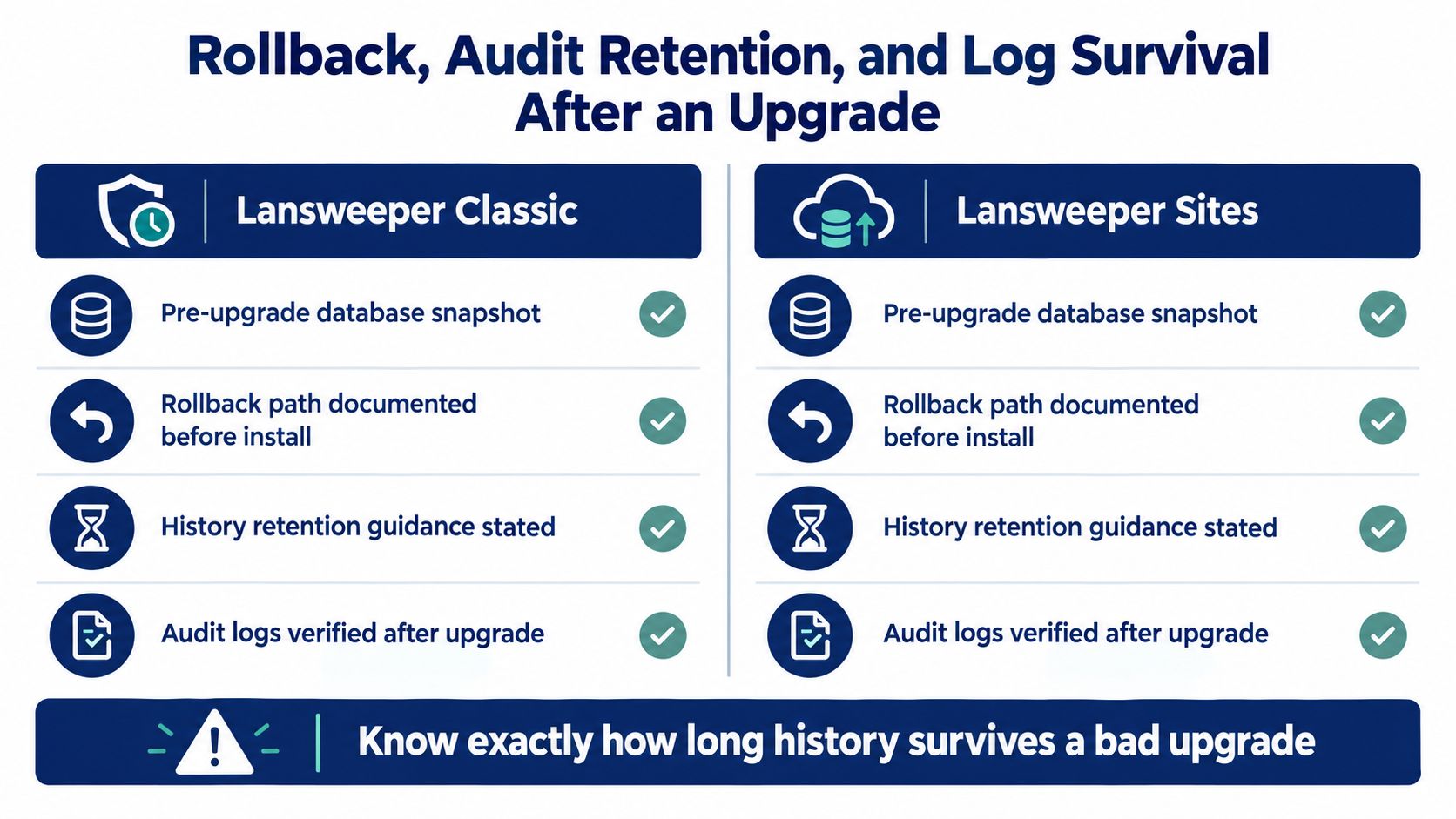
Sites audit data can't be manually purged from the UI, so a flawed upgrade shouldn't be treated as something you can erase by deleting rows. Verify audit visibility after the change and preserve the relevant records externally if your compliance process requires an independent copy. The Lansweeper Syslog perspective can help teams think about surrounding operational evidence, but it doesn't replace product-specific backup and retention controls.
Procurement Triggers to Watch in the Lansweeper Change Log
A changelog can affect commercial planning long before renewal paperwork arrives. Procurement teams should read release notes as evidence about scope, integration obligations, support expectations, and the practical cost of staying on a deployment model.
A Network Discovery update that changes scanning mechanics should trigger a request for updated sizing evidence. An API deprecation can create migration work that needs an owner and budget. A new Sites entitlement category may require a fresh mapping between purchased rights and actual users or workloads.
Signals that deserve a commercial question
Changelog Signal | Procurement Trigger | Action Before Renewal |
|---|---|---|
Network Discovery performance or scanning change | Existing sizing assumptions may no longer reflect the deployed behavior | Request updated sizing and validation evidence |
Data API deprecation or compatibility rule | Integrations may require engineering work | Inventory affected endpoints and price migration effort |
Sites entitlement or feature change | Commercial scope may differ from the current agreement | Map features and entitlements to actual usage |
Divergence between Classic and Sites releases | Support and lifecycle expectations may differ | Ask for deployment-specific support commitments |
New asset-management category | Coverage may expand or require revised governance | Confirm licensing, ownership, and reporting implications |
The commercial team should pair this review with the Lansweeper Gartner discussion, but the changelog remains the operational evidence. A sales presentation can describe direction. A release note shows what the vendor has documented as changed.
Run the review quarterly, while still checking the changelog weekly for urgent compatibility issues. Bring the release record, roadmap questions, integration inventory, and CAB history into renewal discussions. Stackingo can provide a multi-vendor licensing and RFQ route when your procurement team needs structured comparisons around Lansweeper and adjacent enterprise software, but the technical team should define the required deployment, integration, and support conditions first.
If your team needs a clearer way to connect Lansweeper release evidence with licensing decisions, Stackingo can help structure multi-vendor software requirements and compare procurement options through a single RFQ-led workflow. Visit Stackingo to turn the changelog, integration inventory, and renewal assumptions into a documented purchasing brief.