
Lansweeper Microsoft Graph Integration: Complete Setup Guide
Registering a secure Azure AD application and configuring the correct Microsoft Graph application permissions connects Lansweeper to Entra ID and Intune data. Identity scanning requires , , and , while Intune device discovery also requires .
The setup often looks simple until an unattended scan fails because the wrong permission type was selected, administrator consent was skipped, or a client secret value was lost. A reliable Lansweeper Microsoft Graph deployment treats the connector as an enterprise identity integration, not just another scanning credential. You need a clear data scope, controlled credentials, reachable endpoints, and an operating model for throttling and review.
Understanding the Lansweeper Microsoft Graph Architecture
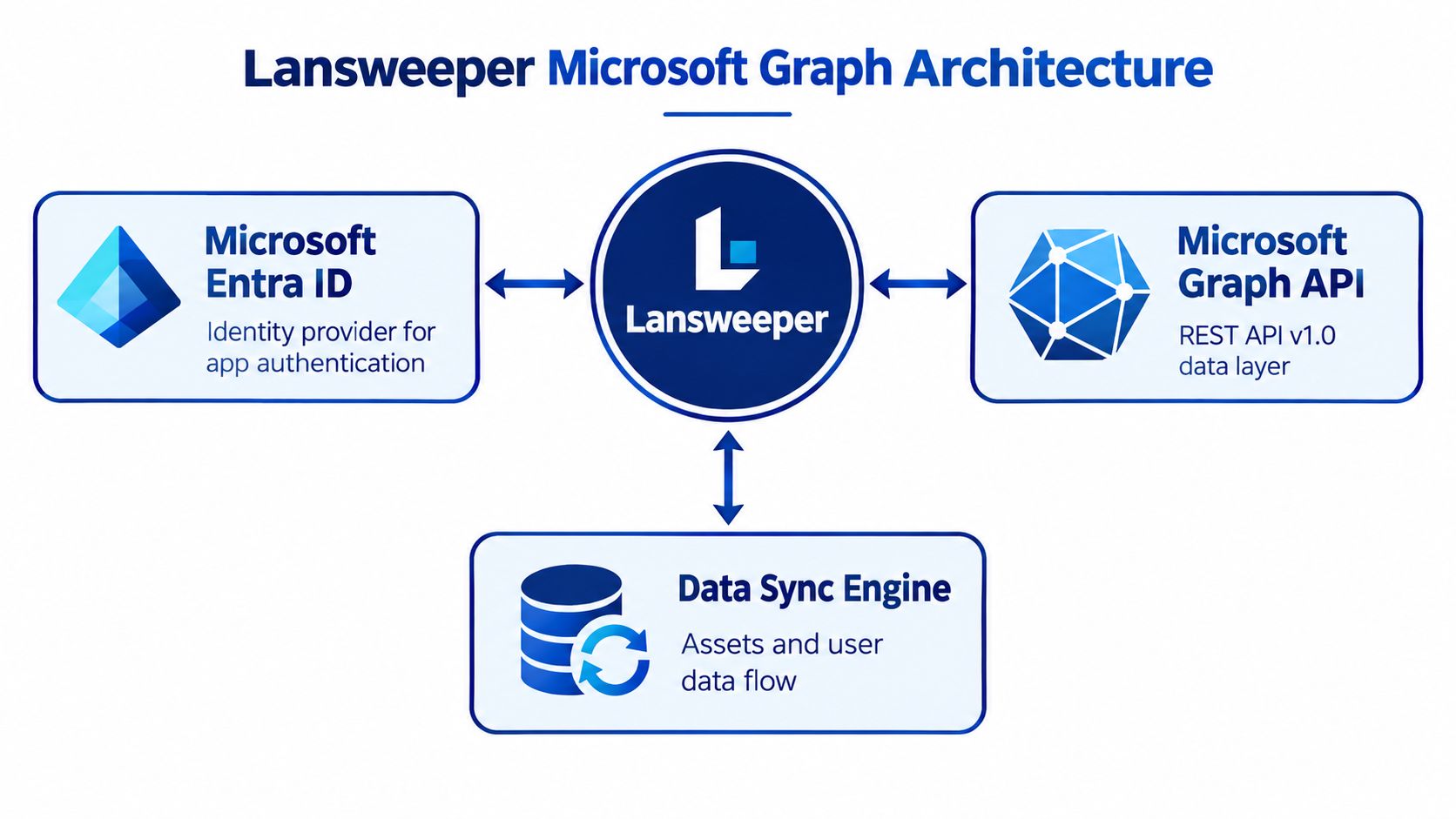
The Lansweeper Microsoft Graph integration uses Microsoft Graph REST API version 1.0, Microsoft's stable production API surface for accessing Microsoft 365 data. Lansweeper's Microsoft Cloud Services scanning capability was introduced in version 8.3, establishing Microsoft Graph as the mechanism behind cloud discovery in that product generation. The architecture gives Lansweeper a unified connection point instead of requiring separate legacy interfaces for each Microsoft workload.
Microsoft Entra ID authenticates the application through OAuth workflows. Microsoft Graph then provides the data layer for directory and device information, while Lansweeper's synchronization process turns that information into inventory records. This division matters during troubleshooting because authentication, authorization, network access, and Lansweeper processing can fail independently.
Which endpoints must the scanning service reach
The scanning service needs access to Lansweeper's Microsoft Graph connector endpoints. and provide data retrieval, while issues authentication tokens. A firewall rule that permits only the Graph data endpoint can still leave authentication broken.
The practical architecture is:
Microsoft Entra ID: Authenticates the registered application and governs tenant consent.
Microsoft Graph v1.0: Exposes directory, group, membership, and device resources.
Lansweeper: Stores and relates the resulting cloud inventory.
Network controls: Permit both token acquisition and Graph data retrieval.
For teams documenting identity dependencies, the Lansweeper Active Directory relationship is useful context. Entra ID and traditional Active Directory can coexist in an asset program, but they aren't interchangeable data sources. Decide whether your inventory needs cloud identities, on-premises directory objects, or both before you design reconciliation rules.
Practical rule: Treat the application registration, Graph permissions, tenant consent, and outbound network path as one dependency chain. Testing only the Lansweeper screen won't prove that the full chain works.
Registering the Azure AD App and Configuring Permissions
Create the application in Microsoft Entra ID, select application permissions, and grant administrator consent before you configure Lansweeper. Application permissions let scheduled scanning run without an interactively signed-in user, which is the right model for unattended inventory collection.
Start in the Microsoft Entra admin center and create an app registration. Record the Application (client) ID and Directory (tenant) ID immediately. Under API permissions, add Microsoft Graph and choose application permissions, not delegated permissions. Delegated permissions depend on a user context, while this integration needs a service identity that can operate during scheduled scans.
Map permissions to the data you actually need
For Entra ID users and groups, Lansweeper identifies three required permissions:
supports reading user records.
supports reading group objects.
resolves membership relationships.
These permissions are documented in the Lansweeper Entra ID user and group scanning guidance. Together, they provide more than a user list. They allow the inventory to represent directory structure and membership relationships, which can be important when asset ownership or access context depends on group data.
For Intune-managed device discovery, add . The Lansweeper Intune scanning documentation describes this as an application permission and requires administrator consent after it has been added.
After selecting the permissions, choose Grant admin consent for the tenant and verify that the permissions show as granted. Without this step, the registration may look complete while Graph calls fail during scanning. Keep the approval record with the application owner, business purpose, requested data, and review date.
The documented scanning configuration lists read permissions and doesn't list write permissions. That reduces operational capability, but it doesn't make the access narrow. , , and still provide broad visibility across the tenant, so security review should focus on the data exposed, not only on the absence of write access.
Obtaining Credentials and Configuring Lansweeper
Once consent is approved, create the credential that Lansweeper will use to authenticate. You can use a client secret or a certificate. For production scanning, a certificate is often easier to govern because it can be managed through established certificate ownership and renewal processes, while a secret can be simpler for an initial controlled deployment.
Choose and protect the authentication material
For a client secret, open the app registration's certificates and secrets area, create the secret, and copy the secret value immediately. Microsoft exposes that value only once. The secret ID isn't the credential Lansweeper needs, and confusing the two is a common setup error.
Store the value in a secrets manager. Don't place it in a script, ticket, spreadsheet, or plain-text configuration file. If you use a certificate, install the matching certificate on the Lansweeper scanning server, upload the certificate to the app registration, and retain the thumbprint for configuration.
The Microsoft Cloud Services application procedure identifies the identifiers and credential material required for the connector:
Application ID: Identifies the registered application.
Directory ID: Identifies the Microsoft Entra tenant.
Client secret value or certificate thumbprint: Proves the application's identity.
Permission grant: Authorizes access to the selected Graph resources.
Configure the Microsoft Cloud Service credential
In the Lansweeper web console, open the scanning credentials area and add a Microsoft Cloud Service credential. Enter the application ID and directory ID, then select either the client secret or certificate thumbprint. Assign the credential only to the scanning targets that need its permissions.
Validate the connection against a test tenant or restricted scope before production. Confirm that authentication succeeds, users and groups appear as expected, and Intune devices populate only when the Intune permission has been approved. The Lansweeper IIS guidance can help when your deployment also includes related Windows web infrastructure, but don't treat an IIS check as a substitute for testing Graph authentication.
A useful diagnostic sequence is:
Authentication: Confirm the tenant and application identifiers match.
Credential: Check the secret value or certificate thumbprint, not the secret ID.
Consent: Verify administrator consent is granted for the current tenant.
Authorization: Compare each scan target with its required Graph permission.
Network: Confirm access to both token and Graph endpoints.
Managing Throttling Limits and Synchronization
A scan that fails on page 40 of 400 and restarts from zero is one of the most expensive throttling mistakes. In Microsoft Graph, rate limits are shared at the application and tenant level, so poor recovery design turns a temporary HTTP 429 into a long inventory gap.
Microsoft documents an aggregate limit of 130,000 requests per 10 seconds per app across all tenants in its Graph throttling limits documentation. Endpoint-specific quotas can be tighter. For example, POST, PATCH, and DELETE operations are limited to 3,000 requests per 2 minutes 30 seconds per app per tenant, while the tenant write quota is 18,000 requests per 5 minutes.
Lansweeper discovery is mostly read-heavy, but throttling still matters because one app registration can be serving several tenants, recovery jobs, and parallel inventory tasks at once. Microsoft also evaluates sustained usage at approximately 83% of a published limit over a longer window, so a connector that sits near the ceiling can still trigger 429 responses even when it looks compliant on paper.
Build the synchronization process around recovery
Make the baseline paginated and resumable from the start. Persist continuation or delta state wherever the endpoint supports it, batch only compatible reads, and cap concurrency per tenant. The same pacing discipline applies to other Lansweeper connectors. See this parallel example in Lansweeper AWS discovery guidance.
A synchronization workflow that holds up in production usually includes:
Baseline: Page through the initial inventory and store progress after each successful page.
Incremental collection: Use delta or continuation state where the endpoint supports it.
Concurrency control: Set tenant-specific worker limits instead of one shared global pool.
Retry handling: Honor exactly when Microsoft returns it.
Fallback backoff: If the header is absent, use bounded exponential backoff with jitter.
Observability: Log request IDs, endpoint, tenant, latency, page size, and retry count.
Do not retry immediately. A 429 is a capacity signal.
Run full reconciliation outside peak periods, especially when several tenants or large directories share one application registration. Capacity-test with representative tenant counts and object volumes before you commit to a freshness target. Alert when throttling becomes a recurring pattern or when synchronization lag starts missing the inventory window your operations team depends on.
Treat repeated 429 responses as a design problem, not a temporary nuisance. In practice, the cause is usually too much concurrency, weak pagination discipline, or competing workloads using the same app quota. That matters for governance as well as performance, because a least-privilege design loses value if one broadly scoped app is also the bottleneck for every inventory stream.
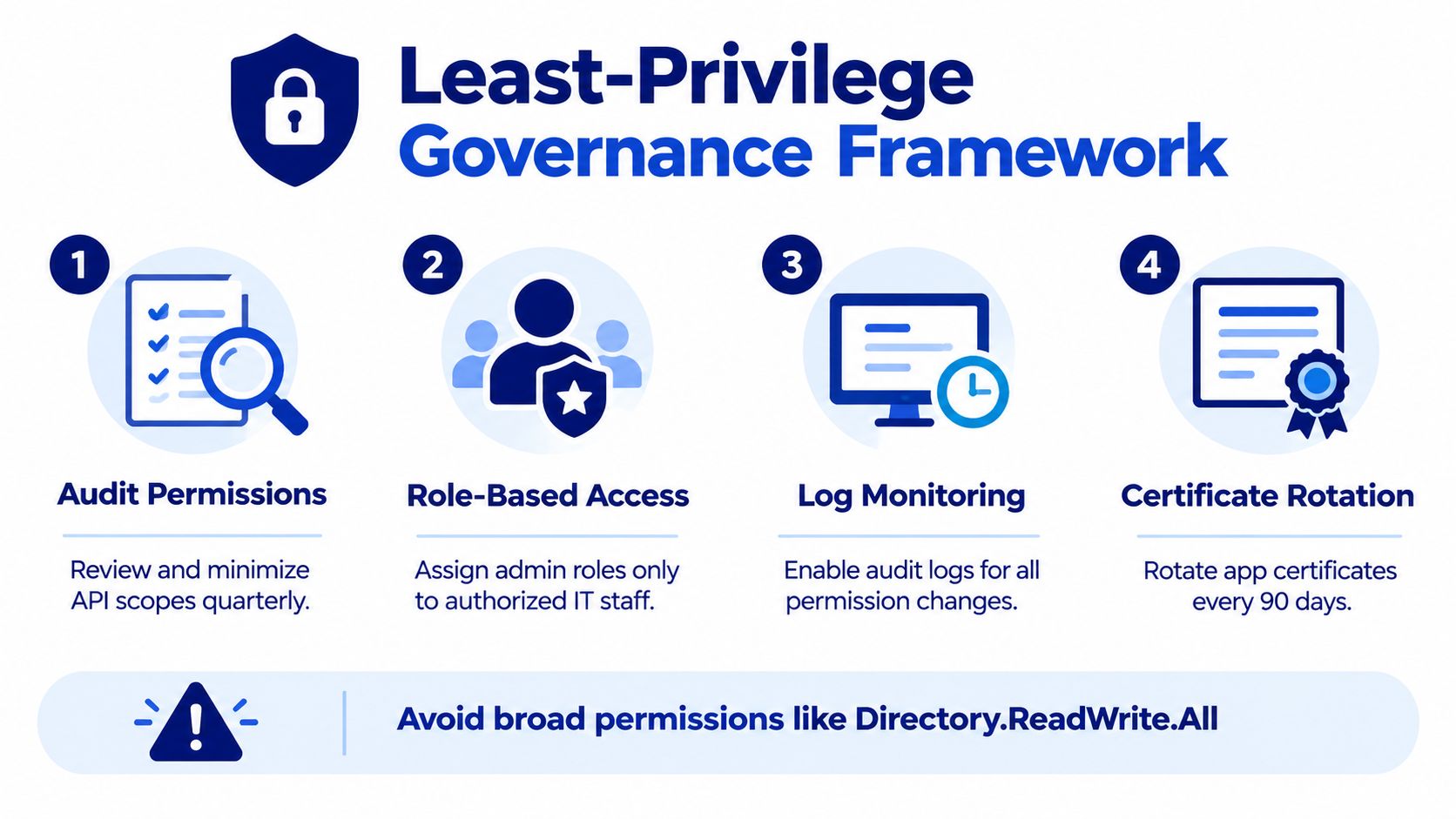
Building a Least-Privilege Governance Framework
The standard connector setup answers how to make the integration work. It doesn't fully answer how to govern tenant-wide application access. That gap matters to CIOs, procurement teams, auditors, and security architects because application permissions can expose directory information without a user signing in.
Start with a permission-to-data map rather than a generic approval request.
Inventory requirement | Graph permission | Governance question |
|---|---|---|
Entra ID users | Which user attributes does Lansweeper retain? | |
Entra ID groups | Does the inventory need every group object? | |
Group memberships | Is relationship data necessary for the use case? | |
Intune managed devices | Does device discovery require a separate application? |
This map makes the review concrete. It also exposes where a narrow scope may reduce functionality. A user-only inventory won't resolve group membership, and an Entra-only registration won't support Intune device discovery without the required device permission.
Separate access where the risk justifies it
A single application registration is convenient, but separate registrations can create clearer ownership and smaller blast radii. You might separate identity discovery from Intune device discovery when different teams own the data, different review boards approve access, or one workload has a different renewal schedule.
Microsoft's permission model distinguishes delegated and app-only access and emphasizes requesting only the permissions needed for the application's function. The Lansweeper mobile device scanning documentation also illustrates why resource-specific permissions need to be reviewed separately. Some license-detail operations don't support application permissions, while subscribed-SKU queries support application permissions with . Don't assume that every Microsoft Graph resource behaves like directory inventory.
Make consent and review auditable
Assign a named consent owner, application owner, technical custodian, and business data owner. Record the application purpose, tenant scope, permissions, data categories, credential type, renewal responsibility, and decommissioning process.
The Lansweeper CMDB integration context is relevant here because inventory data often feeds operational systems beyond the scanner itself. Document where the collected records go, who can access them, and how long they remain available.
A mature review cycle checks:
Permission necessity: Remove scopes that no active scan requires.
Application ownership: Replace team aliases with accountable owners.
Credential lifecycle: Track certificate or secret renewal before expiry.
Consent history: Log approvals and permission changes.
Data use: Confirm that downstream CMDB and reporting workflows still need the collected fields.
Incident response: Define how to disable the application and revoke credentials.
Don't add broad write permissions to solve a read-only inventory problem. The documented configuration doesn't list , and adding unrelated rights increases exposure without improving the stated discovery objective.
Best Practices for Long-Term Integration Success
Keep the integration under operational ownership after the first successful scan. Review permissions periodically, remove unused access, and rotate secrets or certificates through a documented change process. A working scan today doesn't prove that the credential will remain valid or that the permission set still matches the business need.
Monitor synchronization logs for HTTP 429 responses and rising retry counts. Schedule full reconciliation outside peak business periods, preserve incremental state where available, and test credential renewal before the active credential expires. When Microsoft changes permission behavior or service conditions, your recorded request IDs and endpoint logs will make diagnosis much faster.
Use a short runbook that names:
The application owner
The consent approver
The Lansweeper administrator
The credential storage location
The renewal procedure
The rollback or disablement action
Stackingo provides a multi-vendor enterprise software licensing marketplace with an RFQ-led process, which can help procurement teams structure requirements and compare licensing scenarios alongside their IT asset-management decisions.
Use Stackingo to capture your software requirements, compare multi-vendor licensing options, and standardize the commercial discussion around your Lansweeper and broader IT management stack. Bring your permission model, deployment scope, and renewal needs into the RFQ so procurement and technical stakeholders can evaluate the same requirements.